
123RF AI Suite
Image EditingUpdated November 18, 2026
Browser-based AI image toolkit from 123RF for upscaling, generative fill, image extension and background removal, tied to a 307M-asset stock library.
We may earn a commission when you sign up through our links. It does not affect our reviews.
What is 123RF AI Suite?
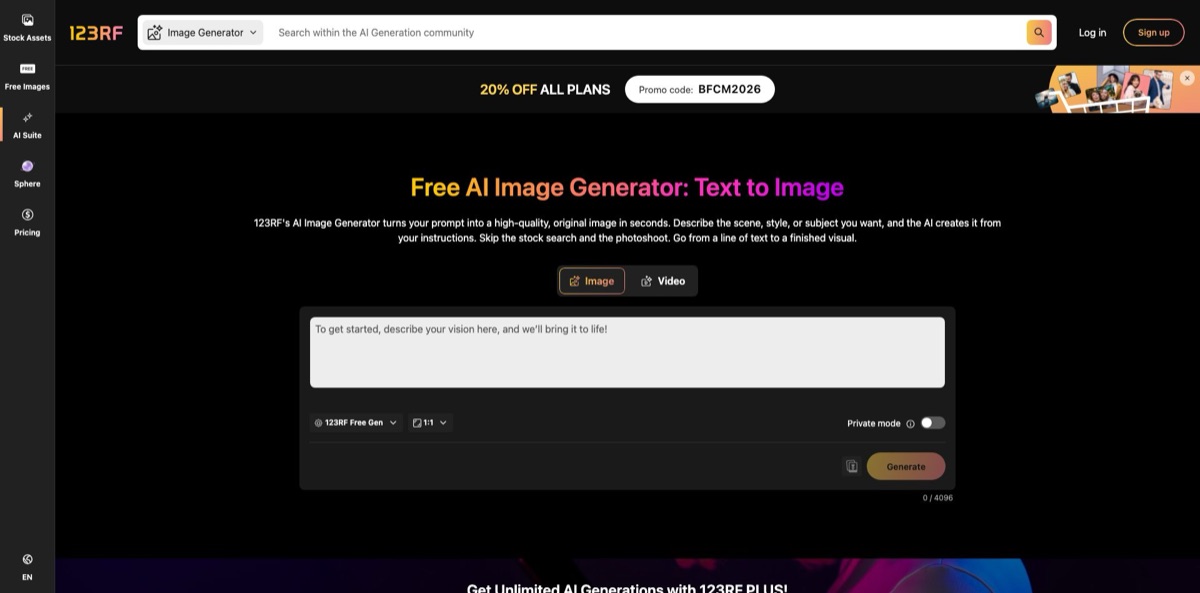
123RF AI Suite is the set of browser-based AI image tools that the stock agency 123RF, operated by Inmagine Lab, has built around its library of more than 307 million photos, vectors, videos, audio tracks and fonts. The editing side covers an Image Upscaler (up to 4x), Generative Fill for brushing out and replacing objects, an Image Extender for uncropping, and three background tools: Remover, Remix and Blur. The creative side adds image and video generators that run third-party models such as Nano Banana Pro, GPT Image 2, Flux 2 Pro, Kling O3 and Veo 3.1. The real draw is that the tools work on 123RF stock as well as on your own uploads, so finding, adapting and licensing an image happens in one account. The weak spots are 5 MB upload caps and pricing designed around stock subscriptions. It fits marketers and small teams who already buy stock.
How to start using 123RF AI Suite?
Open 123rf.com and hover over AI Suite in the top menu to see the full tool list, from AI Image Generator to Image Checker. Each tool has its own page with an upload box, so you can try the Background Remover on a JPG or PNG of up to 5 MB before you commit to anything. For generation and full-resolution downloads you need an account, and the home page offers a 7-day free trial of the PLUS plan. During the trial, downloads are capped at 10 a day.
A good first job is a product photo. In Background Remix, upload the shot, pick a preset scene or type your idea into the Describe a scene field, generate, then select the design you like and export it in the format you need. If something in the frame is in the way, switch to Generative Fill: paint over the object with the brush, describe the replacement in the prompt box and review the three variations it returns. Click Generate more if none of them fit, or leave the prompt empty when you want the AI to fill the area with a random idea.
The generator screen deserves a few minutes of attention. You write a prompt of up to 4,096 characters, choose a model, set the aspect ratio (1:1 by default) and decide whether to switch on Private mode. Models carry FREE, PLUS or PREMIUM labels: 123RF Free Gen is free, Nano Banana and Ideogram sit in PLUS, and the rest are premium. According to 123RF, some engines charge when you generate and others when you download, and the cost for the selected model is shown before you start. The video generator works the same way, with defaults of 5 seconds, 16:9 and 768p.
Before you publish, check what you are actually downloading. Without a plan you get a watermarked preview, while the full-resolution file comes with usage rights. Run generated images through the free AI Image Checker, which takes up to five JPEG, PNG or WebP files of 4 MB each without an account. Then skim the 123RF AI Generator Terms of Service, because you remain responsible for how the output is used.
Who is it for?
Social media managers
You need fresh visuals every week in several aspect ratios. Image Extender turns a vertical photo into a landscape banner, and AI Social drafts five on-brand creatives with captions from one brief for 5 credits per run.
E-commerce sellers
A studio shoot for every product is expensive. Background Remover gives you a clean PNG cutout, and Background Remix places the product in a generated scene from a preset or your own prompt, which 123RF says can be done in batches for lifestyle backgrounds.
Marketing teams that already license stock
If you buy 123RF images anyway, the AI tools live in the same account. You can localise a stock photo for a specific country, extend or upscale it and download it under the standard license without a separate editor.
Graphic designers on tight deadlines
Generative Fill removes a distracting object or swaps it for something you describe, and the Upscaler enlarges small assets up to 4x, which saves a round trip to Photoshop for routine requests.
Bloggers and small publishers
You want a header image that matches the article rather than the closest stock result. The generator offers a free model next to premium ones, and 123RF’s AI terms let you use the output for any purpose.
Real estate and travel marketers
Listings and destination pages often need wider frames than the photographer delivered. The Image Extender is pitched at exactly this uncropping job, and Background Blur adds a bokeh effect that keeps the subject sharp.
123RF AI Suite pricing
123RF does not sell the AI tools as a separate product on its pricing page; they come bundled with stock access. Usage is counted in credits. The image and video generators start from 1 credit per generation, applying AI Suite tools to your own images costs 1 credit per download, and transforming a 123RF stock image costs 10 credits per download. The prices below are the USD figures shown on the 123RF pricing page in November 2026; visitors in some regions, such as the EU, see local currency instead.
The Background Remover page describes the tool as free, and the generator includes the free 123RF Free Gen model. Free use comes with a daily generation limit and watermarked previews, so treat it as a test drive.
The plan data behind the pricing page lists this rate as a 12-month plan at $294, so expect an annual commitment at that price. It includes unlimited stock downloads, the Image Generator, Image Upscaler, Background Blur, Background Remover and Localise, standard licensing and a USD$5,000 liability cap. A 7-day free trial is available, and the membership continues automatically after it ends.
From $16.10/month per seat for up to 5 users, with the same AI tools, unlimited downloads, standard licensing and a USD$5,000 liability cap.
Custom. Unlimited users, customisable extended licensing and liability coverage of up to $100,000.
Credits are the only column in the comparison table that includes the Video Generator and Image to Video, and they come with standard and extended licensing plus a USD$25,000 liability cap. The 123RF blog says purchased credits stay valid for one year.
123RF advertises unlimited AI generations with PLUS, but models labelled PREMIUM sit outside that tier, so check the cost shown next to each model before you generate. If you unsubscribe, you lose PLUS features, while assets you have already used stay license-protected.
123RF AI Suite key features
Generative Fill lets you paint over one or more objects with a brush and describe what should replace them
It returns three variations per round, with a Generate more button for another set, and accepts JPG or PNG files up to 5 MB and 4,096 px. If you select several objects, the same prompt replaces all of them, so a cactus and a flower both become green apples.
Image Extender uncrops a photo to a new aspect ratio and fills the added area with AI-generated surroundings
123RF says the tool expands the background without distorting the main subject, and you preview the result before clicking Export. Uploads are limited to 5 MB and 2,048 px.
Three background tools cover the usual product-photo chores
Background Remover detects the main subject and saves the cutout as a PNG, Background Remix generates a new scene from presets, colors, textures or your own description, and Background Blur adds bokeh to images of up to 6,144 px. 123RF claims Remix handles hair, fur and transparent objects.
Image Upscaler enlarges a picture up to 4x and sharpens details along the way
The catch is the input limit of 5 MB and 1,024 px, which makes it a tool for small web images and thumbnails rather than for print-sized photos.
The image and video generators bundle many third-party models behind one account, from the free 123RF Free Gen to GPT Image 2.5, Seedream 5.0 Pro and Flux 2 Pro for stills and Kling O3 4K or Veo Fast 3.1 for video. Prompts can run to 4,096 characters, and each video is charged at the moment of generation.
Stock-aware editing ties the AI tools to the library
You can apply Localise, the upscaler, fills and background tools directly to 123RF stock images for 10 credits per download, and AI Social turns one brief with your brand name, website and preferred look into five sized creatives with captions.
AI Image Checker screens up to five images at a time for NSFW content and for landmarks, brands, logos, artwork and people that could affect commercial use. It is free, needs no account and gives an automated estimate rather than legal advice.
123RF AI Suite Pros & Cons
Pros
The strongest argument is having stock and AI editing in one place: you can find a licensed photo, extend it, swap its background and download it without switching apps or licenses. Each tool is a single page with an upload box, so there is almost nothing to learn. The generator gives access to models such as Nano Banana Pro, GPT Image 2 and Flux 2 Pro without separate subscriptions, and the free 123RF Free Gen model is enough for drafts. 123RF’s terms let you use AI output for any purpose, and the free Image Checker adds a basic rights screen. One annual member on Trustpilot rates the AI tool above others they have tried. Test it on the images you edit most often.
Cons
Upload limits are tight: 5 MB everywhere, 1,024 px for the upscaler and 2,048 px for the extender. Pricing is hard to read, because the PLUS headline rate assumes a year-long plan, video sits in the Credits column only, and a remover called free still meets a per-download credit price. The AI terms give 123RF a perpetual right to reuse and resell your inputs and outputs, and generated images may be shown to other users. Trustpilot reviewers complain about automatic renewal, unlabeled AI images in the stock library and a generator that cannot keep characters consistent. Turn on Private mode for client work and set a reminder before the trial renews.
Use 123RF AI Suite if you want…
- Remove backgrounds from product photos in one click.
- Replace unwanted objects in photos using text prompts.
- Extend portrait photos into landscape banners and ads.
- Upscale small web images up to four times.
- Generate images with Nano Banana, GPT Image or Flux.
- Edit licensed stock photos without leaving 123RF.
- Turn one campaign brief into five social creatives.
- Check AI images for logos, landmarks and faces.
123RF AI Suite alternatives
 Adobe FireflyRead review →
 Shutterstock Image GeneratorRead review →
 PixlrRead review →
 ClipdropRead review →
 Cutout.ProRead review →
 VanceAIRead review →
123RF AI Suite Reviews
An annual member on Trustpilot in February 2026 calls 123RF their go-to source for images, rates its AI tool above the others they have tried and says the yearly membership is worth the cost.
A three-star Trustpilot review from December 2025 says the AI image generator needs a lot of work, makes useful results hard to get and cannot keep one character consistent as a story changes.
Several long-time subscribers on Trustpilot in 2026 complain that AI-generated pictures in the stock library are not labeled and cannot be filtered out, and one says they look acceptable only until you download them.
A four-star Trustpilot reviewer is happy with the service overall but dislikes that the subscription renews and charges automatically, which kept billing them for months while they downloaded nothing.
G2 reviewers like finding images on almost any topic at a fraction of the price of pricier stock sites, though some call the plans somewhat expensive and point out that unused credits expire.
FAQ
Is 123RF AI Suite free?
Partly. The Background Remover page calls the tool free, and the image generator includes the free 123RF Free Gen model with a daily generation limit. Watermark-free, full-resolution downloads need a PLUS plan or credits, and PLUS comes with a 7-day free trial.
Can I use 123RF AI images commercially?
Yes. The 123RF AI Generator Terms of Service let you use the output for any purpose, and the generator FAQ says you may resell generated images. You are solely responsible for the output, and images showing recognizable people, trademarks or landmarks need clearance before commercial use.
Are my generations and uploads private?
Not by default. The image generator FAQ says your generated content may be made available to other users, and the terms grant 123RF a perpetual, royalty-free right to reproduce and resell your inputs and outputs. The generator has a Private mode toggle, and 123RF says generated videos are kept private.
What file types and sizes do the editing tools accept?
The editing tools take JPG or PNG files up to 5 MB. Pixel limits differ by tool: 1,024 px for the Image Upscaler, 2,048 px for the Image Extender, 4,096 px for Generative Fill and 6,144 px for Background Blur.
Which AI models does the generator use?
Image models include 123RF Free Gen, the Nano Banana family, Ideogram, GPT Image 2 and 2.5, Seedream 5.0 Pro and Flux 2 Pro. Video runs on MiniMax H3, Seedance, Kling O3 and Veo 3.1 models.
Does PLUS include the AI Video Generator?
The comparison table on the pricing page lists the Video Generator and Image to Video only under Credits, not under PLUS or PLUS Team. Each video generation is charged in credits up front, before you download the clip.
What happens if I cancel my subscription?
You lose PLUS features such as unlimited downloads and the bundled AI tools, but assets you have already used stay licensed. The 7-day trial turns into a paid membership unless you stop it.
Does 123RF offer an API or AI assistant integration?
123RF runs an MCP server, listed in Claude’s Connectors Directory, that lets Claude, Claude Code, Cursor and other clients search, license and insert 123RF stock images. The public pages do not describe a developer API for the AI editing tools themselves.
Similar tools
 Picture to DrawingBrowser tool that turns photos into pencil, charcoal, ink or watercolor drawings, cartoons and coloring pages, with free daily tries and one-time
 Retouch4meAI retouching plugins and cloud apps that automate skin cleanup, dodge and burn, culling and color grading for photographers and video editors.
 Pixelfox AIBrowser-based AI photo and video editor for object removal, background cutouts, upscaling, virtual try-on and AI video on one shared credit balance.