

1min.AI
AI AssistantsUpdated October 5, 2026
1min.AI is an all-in-one platform integrating leading models like GPT-4 and Claude for efficient, multi-model workflows.
We may earn a commission when you sign up through our links. It does not affect our reviews.
What is 1min.AI?
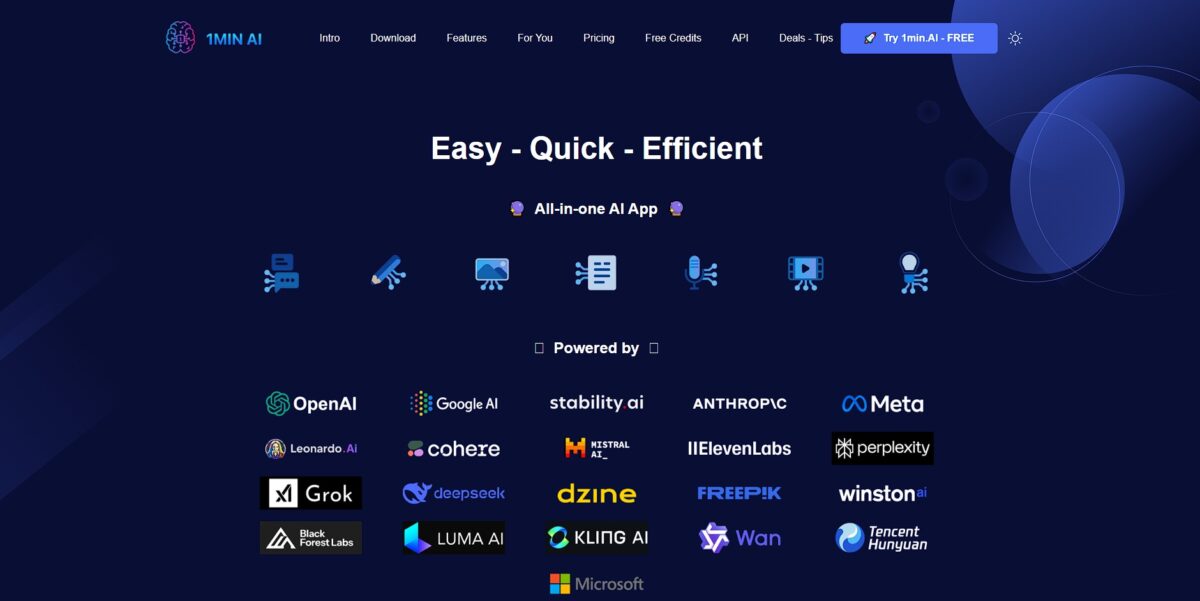
1min.AI acts as a central switchboard for over a dozen large language models, letting you query GPT-4o, Claude 3.5, and Gemini Pro 1.5 from a single dashboard. It eliminates the friction of jumping between tabs to compare how different engines handle a complex coding block or a specific marketing hook. I noticed it works well for side-by-side testing, though the credit-based system means you might burn through your monthly allowance quickly if you use premium models for every routine task. This matters because it consolidates your AI stack into one interface and one bill, saving you from maintaining five different $20 subscriptions. The trade-off is a layer of abstraction that might lag behind the absolute latest features released on a model’s native site. Use 1min.AI if you need to compare model outputs for accuracy, but stick to native apps for heavy, single-model workloads.
How to start using 1min.AI?
Start by visiting the 1min.AI website and creating an account using your Google login or a standard email address. You won’t need a credit card to access the free tier, which refreshes with 450,000 credits every month. This initial pool lets you experiment with different models without any financial commitment, so you can test whether the output from Claude 3.5 or GPT-4o actually fits your project’s tone before spending money.
The interface houses various categories like Chat, SEO, and Image tools on the left. The learning curve is slightly steeper than a single-model site because you have to choose your “engine” for every task. If you’re writing a blog post, you’ll select a text model; if you’re upscaling a blurry asset, you’ll head to the image section. This approach forces you to be intentional about which AI handles your data. It also stops you from wasting premium credits on a model that isn’t optimized for your specific goal.
Once you open a chat, use the model selector at the top to toggle between providers. You can run the same prompt through different models to see which one handles technical documentation better or which one feels more creative. The catch: switching models mid-flow can sometimes feel fragmented if you don’t keep your prompts consistent. 1min.AI charges different credit rates based on the model’s complexity, so keep an eye on your balance in the profile menu.
To get the most out of it, set up your “Brand Voice” in the settings. This saves you from re-pasting your style guides every time you start a new thread. It applies your specific vocabulary and tone across various tools, from SEO keyword research to email drafting. Your output stays consistent even when you’re jumping between three different AI brains.
Who is it for?
Multi-tasking Solopreneurs
Use it to jump between drafting SEO-rich blog posts and generating social media images without managing five different tabs. It bundles various models so you can compare outputs for a single prompt. That cuts the time spent logging into separate platforms to get one task done.
Content Marketers
Repurpose a long-form article into a LinkedIn thread or a short video script in one sitting. In testing, it handled the logic for different formats better than a basic chat box since it has dedicated modes for SEO and multilingual reach. You can scale distribution across regions without hiring a translation agency.
Non-Technical Founders
Build your initial landing page copy and meta tags without needing a deep understanding of HTML or marketing jargon. It bridges the technical gap by providing structured templates for product descriptions. The result: you launch a functional MVP faster while keeping your burn rate low.
Small Agency Owners
Manage content requests for multiple clients using a unified credits system rather than juggling individual pro subscriptions for every staff member. It works well for standard text and image generation, though it might feel restrictive if you need deep, custom training on a specific brand voice. Your software stack and monthly billing get simpler as a result.
Academic Researchers
Summarize long PDFs or extract key data points into a structured format for your literature review. It pulls from different models to verify facts, reducing the risk of a single model hallucinating a citation. That gives you a more reliable starting point for dense technical analysis.
1min.AI pricing
1min.AI uses a credit-based economy to let you hop between models like GPT-4, Claude, and Gemini without juggling multiple subscriptions. Instead of a flat monthly fee for a single bot, you buy a monthly budget of credits that you spend across text, image, and audio tools. This prevents the frustration of being locked into one provider when a competitor releases a better update.
Free: $0/month. You get 450,000 credits to test the dashboard, though storage only lasts 24 hours. Access to premium features is restricted, and the prompt library stays locked. In practice, the one-day data cap makes it impossible to build long-term projects or save recurring workflows.
Takeaway: Use this only for one-off tasks or to test the interface speed.
Pro: $6.50/month (billed annually). This plan provides 1,000,000 monthly credits plus the free base amount and opens up every AI feature. You get unlimited storage and brand voice settings. You can save your company’s specific style and apply it to a Claude-generated blog or a Gemini-drafted email instantly.
Takeaway: This is the right move for solo freelancers who need more than a few thousand words a month.
Business: $10/month (billed annually). Your credit pool grows to 2,000,000 per month and allows up to 10 team members. It enables a shared workspace where colleagues collaborate on content. This tier handles high-volume tasks, like generating a month’s worth of SEO keywords or social images in a single afternoon.
Takeaway: Opt for this if you need to coordinate AI prompts and assets with a partner or small squad.
Enterprise: $7/member/month (billed annually). Billing shifts to a per-seat model with 2 million credits per user and no member limit. You get priority support and the ability to submit feature requests directly to the developers. It removes the friction of managing credit distribution manually across a large organization.
Takeaway: Scale to this level only if your organization has passed the 10-user mark.
Lifetime: $79.97 - $99.99 (via third-party deals). Third-party bundles sometimes offer an Advanced Business Plan with 4 million monthly credits for a one-time fee. It provides a massive buffer for users who process audio or video, which drains credits much faster than text generation. These credits refresh monthly, giving you a permanent high-usage tier for the cost of a few months of a standard subscription.
Takeaway: Buy the lifetime license if you plan on using the video or transcription tools frequently.
1min.AI key features
Multi-Model Comparison
Toggle between GPT-4o, Claude 3.5, and Gemini in a single thread to see which engine handles your specific logic better. It removes the need for three separate browser tabs when a model starts hallucinating on a complex code block. You also avoid paying for multiple $20 subscriptions just to find the most accurate answer.
Unified Image Studio
Generate visuals with DALL-E or Midjourney, then immediately remove backgrounds or upscale for high-resolution social posts. I noticed it handles the grunt work of “sketch-to-image” well, though it can feel clunky if you need deep, layer-based Photoshop controls. Your creative assets stay in one workflow rather than bouncing between Discord and web editors.
Document and PDF Intelligence
Upload massive technical manuals to extract summaries or translate specific sections into a different language without losing the context of the original file. It bypasses the manual labor of “Ctrl+F” by letting you ask direct questions about buried data points. In effect, a static reference document becomes a searchable, interactive knowledge base.
Automated Content Refinement
Use the rewriter and brand voice tools to adjust the tone of a raw draft to match your company’s existing style. It strips away the robotic “AI feel” by applying specific constraints like “professional yet approachable” to your LinkedIn or X updates. That protects your brand identity while you scale your output.
Cross-Platform Multimedia Tools
Convert text prompts into short video clips or transcribe YouTube videos to generate instant meeting notes and captions. It functions as a Swiss Army knife for repurposing a single video into three different social media formats in minutes. Your existing content reaches further with minimal extra effort.
Unified Developer API
Access dozens of models through a single endpoint instead of managing individual API keys and billing cycles for OpenAI, Google, and Anthropic. It simplifies the backend for small projects by consolidating your usage into one credit pool, which cuts the administrative overhead of tracking different token costs and rate limits.
1min.AI Pros & Cons
Pros
1min.AI eliminates the fatigue of logging into five different dashboards just to compare how Claude 3.5 and GPT-4o handle a specific block of Python code. It acts as a unified workbench where you can swap between models from OpenAI, Google, and Anthropic without managing multiple $20 subscriptions. It handles the pivot from generating an SEO-optimized blog post to creating a corresponding social media image within the same interface. You skip the chore of moving assets between siloed apps. The credit-based system is particularly helpful for light users who need occasional access to top-tier models without a recurring monthly commitment.
Cons
The interface can feel cluttered because it attempts to house writing, image, audio, and video tools in a single sidebar. While it excels at variety, it lacks the deep, specialized settings found in standalone tools like Midjourney for granular image control or Descript for audio editing. You might find the output requires a manual pass to remove generic AI phrasing, as the default prompts aren’t always tuned for a specific brand voice. The trade-off for convenience is a learning curve in managing your monthly credit burn across different tasks. This matters because a few high-resolution video generations can quickly drain a balance intended for a month of writing.
Use 1min.AI if you want…
- …to access GPT-4, Claude, and Gemini in one tab.
- …limitless SEO keyword research and content generation.
- …to generate high-definition graphics and edit images instantly.
- …to transcribe audio and create videos from text.
- …multilingual support for over 60 different languages.
- …to analyze complex PDFs using multiple AI models.
- …a single subscription instead of juggling multiple fees.
- …to automate your coding and bug reporting workflows.
1min.AI alternatives





1min.AI Reviews
Love having access to every major model in one tab, but the credit burn is real if you use the premium engines too often.
The lifetime deal is a steal for casual research, though heavy users will hit the credit ceiling faster than expected.
Incredibly versatile for switching between image generation and document chat without multiple monthly subs, just watch your usage.
Perfect for comparing GPT-4 and Claude side-by-side, but the UI feels a bit dated compared to the official apps.
A massive time-saver for content workflows, though the credit costs for high-res video and audio can be quite steep.
FAQ
Which AI models does 1min.AI use?
1min.AI is an aggregator that integrates various models from leading providers, including OpenAI (GPT-4o, DALL-E 3), Google (Gemini), Anthropic (Claude), and others like DeepSeek, Mistral, and Flux.
How does the credit system work?
The platform uses a credit-based system where different tasks, such as generating text, creating images, or transcribing audio, consume a specific number of credits. Users receive a monthly allowance of credits based on their plan, and unused credits typically roll over.
Can I use 1min.AI on my mobile device?
Yes, 1min.AI is mobile-friendly and accessible via a responsive web design. There is no need to install a separate app from an app store; you can simply use your mobile browser to access all features.
Is my data secure with 1min.AI?
1min.AI prioritizes data security and uses secure payment processors like Stripe and LemonSqueezy. While they collect data necessary for account functionality and purchases, they provide a privacy policy outlining how user content and information are handled.
Does 1min.AI offer a money-back guarantee?
Yes, 1min.AI offers a 30-day money-back guarantee for its paid plans, allowing users to test the full suite of features with reduced financial risk.
Can I earn free credits?
Yes, 1min.AI provides several ways to earn free credits without a purchase, such as through daily logins or participating in their referral and affiliate programs.
Similar tools
 KreoCloud AI takeoff and estimating platform that measures, counts and prices construction drawings, with an AI agent that runs multi-step jobs.
 Cabina.AIToken-based AI workspace that puts 55+ text, image, video and audio models, a RAG knowledge base and scheduled AI agents in one
 PlerdyWebsite analytics and CRO suite with heatmaps, session replay, free A/B testing, SEO audits and an MCP connector for asking Claude or