

2short.ai
Content CreationUpdated November 17, 2026
Web app that picks the strongest moments from long YouTube videos and turns them into captioned, face-tracked vertical clips for Shorts, TikTok and Reels.
We may earn a commission when you sign up through our links. It does not affect our reviews.
What is 2short.ai?
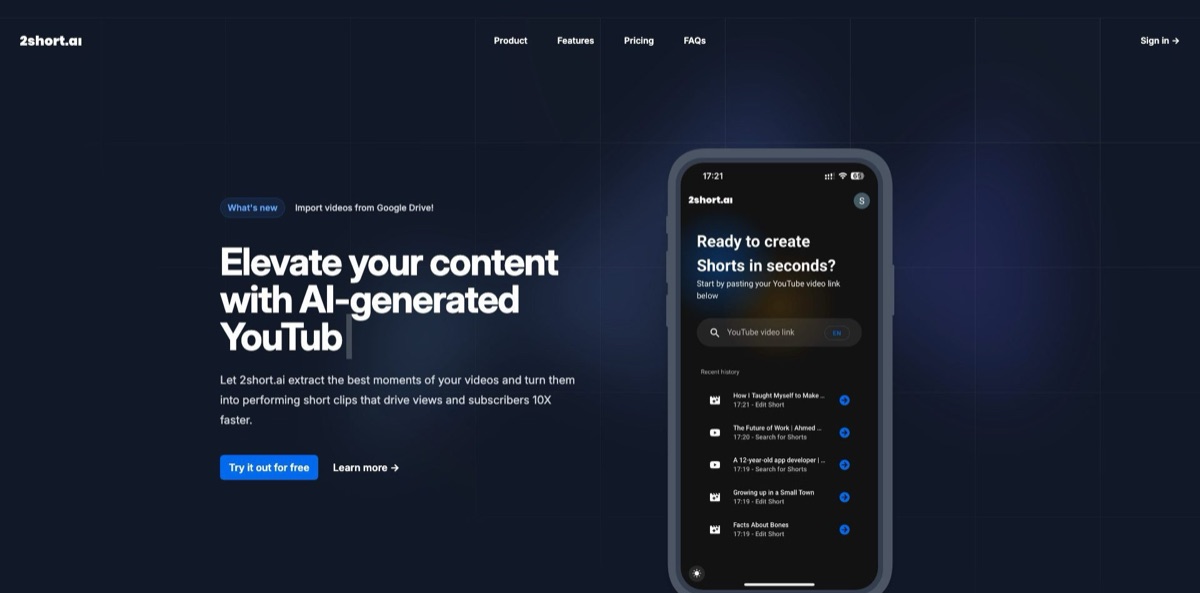
Paste a YouTube link into this browser-based clipper and it reads the video’s captions, has a language model pick the moments most likely to hold attention, and returns a ranked set of short clips with the speaker kept in frame and animated subtitles ready to go. It targets the slowest part of repurposing: scrubbing through an hour of footage to find forty usable seconds. Around the clipper sit smaller YouTube helpers for video ideas, keyword research, scripts, titles, descriptions, tags and chapters. The weak spot is judgment. Because selection works from the transcript, it does best with talking-head content, can cut a story before its payoff, and the editor is light next to a full timeline. It suits podcasters, educators and commentary channels who want a cheap, quick first pass at Shorts, TikToks and Reels from videos they have already published.
How to start using 2short.ai?
Open app.2short.ai and create an account with Google sign-in or with an email and password. Email accounts have to be verified before the app lets you work. The free Starter plan is the default, so you can try the core workflow before choosing a paid tier. The home screen asks what you want to create and groups the tools into Repurpose (the Short clip maker), Ideate (video ideas and YouTube keyword research), Scripting (script writer, script outline, rewrite the script of any video) and Upload and optimize (title, description, thumbnail, tags and chapters).
Start with the Short clip maker and paste a link to a public or unlisted YouTube video. If the same video was processed before, the app shows the Shorts already generated for it. Otherwise you pick the language of the video and processing starts: the app fetches the transcript, extracts the best moments and then ranks the resulting Shorts by virality potential. Videos without captions can be transcribed on paid plans, provided the file is publicly accessible and under 5GB. Private and age-restricted videos, live Premieres and music videos are rejected. On Lite and above you can also import from Google Drive or a public video URL.
The screen you will spend most time on is Edit Short. Auto Crop detects faces and keeps the active speaker centered, with a sensitivity slider that runs from fewer cuts to more cuts and a minimum face-confidence setting for busy shots. If it guesses wrong, re-run it or crop by hand. Subtitle style presets control font, colors, uppercase, background box, karaoke-style word highlighting, bounce and slide-up animations, emojis and how many characters appear per line. Brand assets add your logo as a layer, and you can switch between vertical, square and horizontal frames. If you already know the moment you want, Clip manually lets you set start and end times yourself.
Export is the last step. Fast export renders on 2short.ai’s servers and draws from a monthly quota on Lite, while Pro and Premium get unlimited fast exports. The alternative is exporting locally in your browser, which is slower but free and unlimited; the app recommends Chrome on a computer and warns that phones may fail. There is no built-in publishing, so you download each clip and upload it to YouTube Shorts, TikTok or Instagram Reels yourself. Watch every clip from start to finish before posting.
Check that each clip opens with its setup and ends on a complete thought, because that is where transcript-based picks most often go wrong.
Who is it for?
Podcasters
A weekly hour-long episode holds a dozen good soundbites, but finding them by ear takes an afternoon. 2short.ai scans the transcript, frames whoever is talking and burns in captions, so you start from a shortlist instead of a blank timeline. Your feed gets clips every week without a dedicated editor.
Educators and tutorial channels
Lessons and explainers are dense with spoken, self-contained points, which is exactly what transcript-based selection handles well. You can turn one long lesson into several short teasers that point viewers back to the full video. Discovery grows through Shorts while the main lessons stay intact.
Commentary and review YouTubers
Product reviews and opinion videos are built around punchy statements, the kind of moments the ranking tends to surface. Brand presets keep your logo and caption style consistent across every clip. Output looks uniform even when you publish in batches.
Coaches and speakers
Motivational talks and webinars are mostly one person on camera, so face tracking rarely loses the subject. Animated subtitles help the clips work with the sound off in social feeds. Recorded talks keep earning attention long after the event.
Creators publishing outside English
The site lists 26 supported languages, including German, Spanish, Polish, Japanese, Korean, Turkish and Ukrainian. Many clipping tools are strongest in English, so non-English channels get more mileage here. Some languages are still flagged as being tested, so expect weaker picks in those.
Small agencies handling a few channels
Premium adds 50 hours of analysis a month and priority support, enough for several client channels at once. Local exports cost nothing, so heavy rendering does not eat into the budget. You can review clips and hand them over without a full editing seat for every client.
2short.ai pricing
Plans differ mainly in how many hours of AI video analysis you get per month, and the homepage says every plan has access to all features. Quotas reset on the 1st of each month. The official pricing section lists monthly USD prices; the in-app upgrade screen also offers annual billing, advertised as two months free. Beyond analysis hours, paid tiers add fast server-side exports, imports from Google Drive and public URLs, transcription for videos without captions, more uses of the YouTube helper tools and an ad-free interface.
Free. The pricing card lists 30 minutes of AI video analysis per month, viewing and exporting of already generated clips, and access to all features. The helper tools can be used once a month, manual clips are limited to 10 to 60 seconds, and the free tier caps input video length. Another line on the same page still mentions 15 minutes, so check the usage screen in your account.
You get 5 hours of analysis, 60 minutes of fast server-side exports per month, 25 new tool chats per month, Google Drive and public URL imports, transcription for videos without captions, and no ads.
Everything in Lite plus 15 hours of analysis a month and unlimited fast exports. It is labeled the most popular plan and fits creators who publish several long videos every week.
Everything in Pro with 50 hours of analysis a month, priority support and access to the newest beta features. Aimed at agencies and creators with large back catalogs.
There is no enterprise or custom tier listed, and the pricing page does not mention a refund policy.
2short.ai key features
Transcript-based moment detection
The app pulls the video’s captions, has an AI model pick segments that stand on their own, and ranks the resulting Shorts by virality potential. Because it works from speech, it is suited to podcasts, lessons, commentary, product reviews and talks, and it rejects music videos. You get a ranked shortlist in minutes instead of scrubbing the whole timeline.
Auto Crop with face tracking
Faces are detected automatically and the active speaker is kept centered when a wide shot is reframed into a vertical one. Sensitivity and minimum face-confidence settings control how often the frame jumps, and you can re-run the crop or override it by hand. Interview footage stays watchable without keyframing every cut.
Animated subtitle presets
Styles cover outline or boxed text, uppercase, karaoke-style word highlighting with primary and secondary colors, word bounce and slide-up transitions, plus optional emojis with their own animation. Saved presets keep the look identical across clips.
Brand assets and aspect ratios
Logos and overlays sit on separate layers, and the same clip can be exported as vertical, square or horizontal. The homepage promises 1080p exports without watermarks. One source video feeds Shorts, Reels, TikTok and a square feed post.
Fast or local export
Server-side exports finish quickly and draw on the Lite quota or the unlimited Pro allowance, while local export renders in your browser at no cost. Chrome on a desktop is the recommended setup. Even the free plan can render as many clips as your computer can handle.
YouTube helper tools
Separate chats generate video ideas, keyword research, full scripts or outlines, a rewrite of another video’s script, and titles, descriptions, tags and chapters for upload. You can feed in channel handles to match tone, and title suggestions can draw on trending titles in a chosen country. Planning and packaging stay in the same app as clipping.
2short.ai Pros & Cons
Pros
The core loop is short: paste a link, pick a language, and a ranked list of captioned vertical clips appears without any manual scrubbing. Face tracking and animated subtitles come on every plan, including the free one, so you can judge output quality before paying. Local browser export removes the usual rendering cap, which makes even Lite at $9.90/month go a long way. Language coverage is broad at 26 languages, and the extra YouTube tools for titles, tags, chapters and scripts mean one subscription covers clipping and upload packaging. Start with a clear, single-speaker video to see the tool at its best before you feed it panel discussions.
Cons
Clip selection depends on the transcript, so the AI can latch onto a loud line and miss the setup or the quiet moment that actually lands. Every clip needs a human check. The editor handles crops, captions and trims but has no multi-track timeline, B-roll or music library, so complex edits still go to another app. Input is tied to YouTube links unless you pay for Google Drive or URL imports, private videos are refused, and there is no scheduling or direct posting. Pricing information is also slightly inconsistent between page sections. Keep a regular editor around for anything beyond talking-head clips.
Use 2short.ai if you want…
- Turn long YouTube videos into ranked vertical clips.
- Keep the active speaker centered without manual keyframing.
- Add animated karaoke-style subtitles in one click.
- Apply your logo and caption style to every clip.
- Export unlimited clips locally without paying for rendering.
- Clip podcasts and lessons in 26 supported languages.
- Generate titles, tags and chapters for your uploads.
- Test AI clipping on a free plan before upgrading.
2short.ai alternatives
2short.ai Reviews
Reviewers on G2 single out speed: the tool breaks a long video into Shorts quickly, and the text version of each clip makes choosing between them faster. The sample is small, with only a handful of reviews averaging around 4.5 stars.
One G2 reviewer says the AI sometimes fails to grasp the context of a video and produces weak reels, so you still need to go through the output manually before posting anything.
G2’s summary of user feedback lists the high cost of the product among its drawbacks, and some reviewers report difficulty using it effectively.
An independent blogger who ran their own videos through it rated it three out of five: pasting a link and getting vertical, captioned clips with the speaker centered felt almost effortless, but the editor only allows light trimming and caption changes, and the AI often missed quieter moments and setups that make a clip work.
FAQ
Is there a free plan?
Yes. The Starter plan is free and lists 30 minutes of AI video analysis per month with access to all features, though tool chats, manual clip length and input video length are limited.
Which languages does 2short.ai support?
The site lists 26 languages, including English, German, French, Spanish, Polish, Japanese, Korean, Turkish and Ukrainian. The app marks some languages as still being tested, which can lower clip quality.
Can it process videos without captions?
Yes, on paid plans. The app can transcribe a video that has no captions as long as it is publicly accessible and smaller than 5GB; the free plan needs existing captions, which YouTube generates automatically for most videos.
Can I use videos that are not on YouTube?
Lite and higher plans can import videos from Google Drive or a public URL. On the free plan you work from YouTube links, and private, age-restricted and music videos cannot be processed.
Do exported clips have a watermark?
The homepage advertises 1080p exports without watermarks. You can export on 2short.ai’s servers within your plan’s fast-export quota or render locally in the browser for free.
Can 2short.ai post clips to TikTok or YouTube automatically?
No. There is no scheduler or direct publishing, so you download finished clips and upload them to each platform yourself.
Where is my data stored?
The privacy policy says personal data is stored on servers in the European Union, lists GDPR rights such as access and deletion, and names OpenAI models as the AI used to generate clips.
Is there annual billing?
The in-app upgrade screen offers an annual option advertised as two months free. The public pricing section shows monthly prices only, so confirm annual totals in your account before you switch.
Similar tools
 Contents.comEnterprise AI content platform that writes, translates and illustrates on-brand content, with batch generation, approval workflows and audit trails.
 CopyterSpanish-first AI writing platform that researches keywords, drafts SEO articles and publishes them to WordPress, with image, voice and chat tools.
 DocswritePublishing hub that sends Google Docs, Drive folders and Sheets to WordPress, Webflow, Shopify and 8 more destinations, with an AI writer