

Adobe Firefly
Image GenerationUpdated October 26, 2026
AI image generator from Adobe that turns text prompts into commercially safe images, with partner models, editing tools, video and audio in one app.
We may earn a commission when you sign up through our links. It does not affect our reviews.
What is Adobe Firefly?
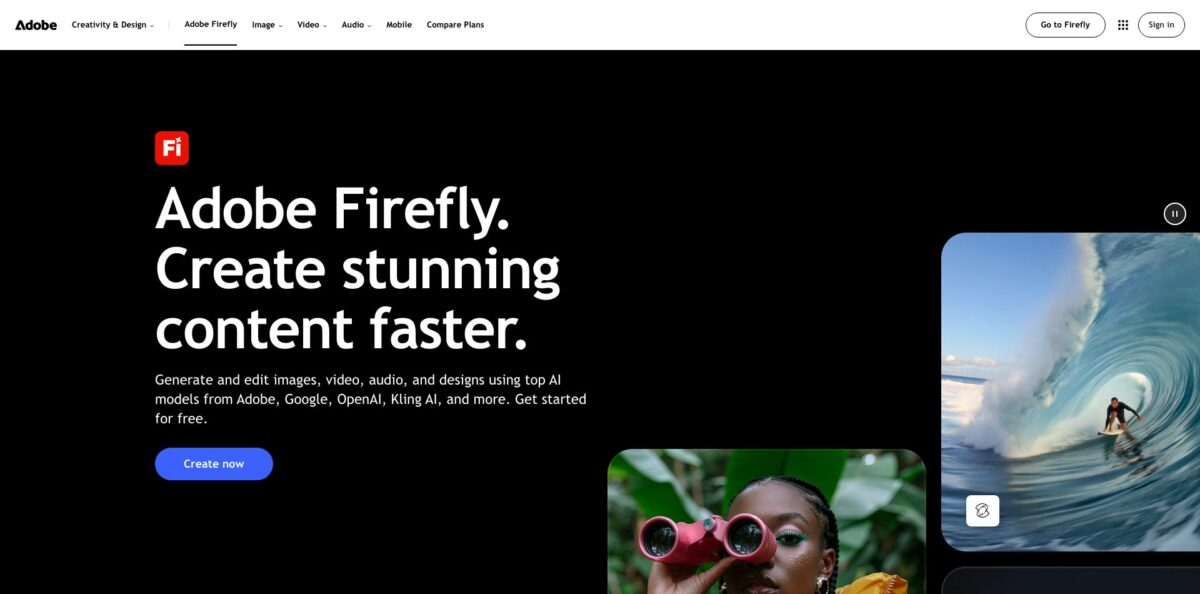
Firefly is Adobe’s web and mobile studio for generative AI, built around its own Firefly image models (Image 5, the newest, generates at native 4MP resolution) and a Model dropdown that also offers partner models from Google, OpenAI, Black Forest Labs and others. Text-to-image is the core job: you describe a scene, set aspect ratio, content type, style and composition references, then refine the result with Prompt to Edit, Generative Fill or a hand-off to Photoshop. The problem it addresses is legal risk, since Adobe trains its own models on Adobe Stock and public domain content, so brand teams can put the output into commercial work. The weak spot is the credit system: Image 5, partner models and video all draw from a monthly allowance, and recent app users report rate-limit errors. Pick it if you already work inside Creative Cloud.
How to start using Adobe Firefly?
Go to firefly.adobe.com and sign in with your Adobe ID, or create a free Adobe account. Without a plan you get a limited number of daily generations on a curated set of models (Adobe names Nano Banana and Luma Ray3.14), and the limits refresh every day. Firefly Standard, Pro and Pro Plus each offer a free trial. The same account works in the iOS and Android apps, and creations sync to Creative Cloud, so a phone idea can be finished on the web.
For a first real job, make a product shot for a social post. On the Firefly homepage, select Image in the left panel and then Generate image. Type a specific description in the Prompt field, such as a perfume bottle balanced on wet pebbles against a blue studio backdrop, and click Generate. Firefly Image 4 returns four variations per run, while Image 5 and Image 4 Ultra return one more detailed image. Adobe’s prompting guide suggests putting expression, lighting and mood into the first prompt, then adding lens type or framing.
The screen worth learning is General settings. The Model dropdown lists Firefly Image 3, 4, 4 Ultra and 5 next to partner models such as Gemini 3 (with Nano Banana Pro), GPT Image 2 and FLUX.2, and the settings change with the model. Below it you set Aspect ratio, Content type (Art, Photo or automatic), the Visual intensity slider, and Composition and Styles references with their own Strength sliders. Effects add preset looks, with optional Color and tone, Lighting and Camera angle. Partner models ask you to accept a confirmation pop-up on first use.
Before you publish, fix what is off. Prompt to Edit changes details, lighting or the background from a plain-language instruction, and the Edit Image workspace adds Generative Fill, Generative Remove, background removal and Crop and Expand. Generate more reruns the same prompt and settings. Then download the image, copy it, or continue in Photoshop or Adobe Express. Every generation lands in Generation history on the Your stuff page, with Content Credentials showing it was made with AI.
Who is it for?
Creative Cloud designers
You already work in Photoshop, Illustrator and Premiere, and a separate generator means exporting and rebuilding layers. Firefly credits work across those apps, and generations open directly in Photoshop or Express. You keep one ecosystem and one bill.
Brand and marketing teams
Legal review keeps rejecting images from models trained on scraped web data. Adobe’s own Firefly models are trained on licensed Adobe Stock and public domain content, outputs carry Content Credentials, and eligible enterprise customers can get IP indemnification for select outputs. You spend less time defending where an image came from.
Social media creators
You need thumbnails, post graphics and short clips every day, often from a phone. The mobile app and the web app share one account, and the same credits cover images, five-second videos, sound effects and music. One subscription replaces several single-purpose tools.
Art directors and agencies
Pitching three directions means running one brief through several models. Firefly lets you switch models from one dropdown and lay the results out on Firefly Boards, where each option is labeled by the model that made it. Clients choose a direction from one board instead of a folder of exports.
Ecommerce sellers
Product listings need fresh backgrounds, seasonal variations and lifestyle scenes. Text-to-image handles the scenes, while composition references and Generative Fill keep layouts consistent across a catalog. You get more listing images without booking a shoot.
Enterprise content operations
Large brands need thousands of on-brand variants for markets and channels. Firefly Custom Models train on your own assets, and the Firefly API in Firefly Services handles generation, product composites and upscaling at scale. Creative teams define the look once and automation covers the volume.
Adobe Firefly pricing
Firefly pairs unlimited standard features with a monthly pool of generative credits. Every paid plan includes unlimited standard features such as Generate Image, Generative Fill, Generative Expand and Text to Vector Graphics, while premium features (video, audio, partner models and Adobe’s top image models) deduct credits that reset on your billing date and never roll over. Adobe lists Firefly Image 5 at 10 credits per generation, Image 4 Ultra at 20, Gemini 3 (with Nano Banana Pro) at 40 for a limited time, and GPT Image 2 at 5 to 80 depending on resolution. Prices below are US list prices before tax; individual plans bill monthly.
A limited number of daily generations across image, video and audio on a curated set of models, including Nano Banana and Luma Ray3.14. Adobe publishes no fixed daily number.
2,000 credits, up to 20 five-second videos, 6 minutes of audio or video translation, 200 sound effects, 100 minutes of music and unlimited Firefly Boards. No Express Premium or Photoshop. Spent only on Image 5, 2,000 credits is about 200 images.
4,000 credits, up to 40 videos, 13 minutes of translation, 400 sound effects and 200 minutes of music, plus Adobe Express Premium and full Photoshop on web and mobile.
10,000 credits, up to 100 videos, 33 minutes of translation, 1,000 sound effects and 500 minutes of music, with the Pro app bundle.
50,000 credits, unlimited Firefly Video Model use in Generate Video, 166 minutes of translation, 5,000 sound effects and 2,500 minutes of music. After credits run out, video jobs queue in the background, up to 20 at a time.
$19.99, $49.99 or $199.99/month per license for Pro, Pro Plus or Premium, on an annual plan billed monthly, with admin tools and 24x7 support.
Custom. Firefly Custom Models, the Firefly API in Firefly Services and Firefly Foundry are sold through Adobe sales, with IP indemnification for eligible customers.
Creative Cloud Pro ($69.99/month, annual plan billed monthly) also includes 4,000 Firefly credits, and credit add-on plans top up any tier.
Adobe Firefly key features
Firefly Image 5 and Adobe’s own model family
Image 5 generates photorealistic images at native 4MP resolution, Image 4 Ultra handles complex scenes, portraits and medium groups, and Image 4 is the quick option for illustrations, icons and simple objects. All are trained on licensed Adobe Stock and public domain content, and Adobe says it does not train them on what you upload or generate. You can put the output into a client deliverable without a licensing debate.
Partner models in one dropdown
Gemini 3 (with Nano Banana Pro), Gemini 3.1 (with Nano Banana 2), GPT Image 2 and FLUX.2 sit beside Adobe’s models in Generate image, so one prompt can run through several. Each partner render costs credits, availability varies by country, and the commercial-use decision for partner output is yours.
Reference and style controls
Composition references lock layout and framing, Styles references carry over color, lighting and rendering, and each has a Strength slider. The Visual intensity slider moves between a natural snapshot look and a stylized finish, while Effects replace long strings of prompt adjectives. This is how a ten-image campaign ends up looking like one set.
Prompt to Edit and the Edit Image workspace
Instead of re-rolling a whole image, you describe the change, such as a new background or a removed object, and Firefly edits the existing picture. Generative Fill, Generative Remove and Crop and Expand handle manual fixes. Fewer full regenerations means fewer credits per finished asset.
Firefly Boards
An infinite canvas where teammates generate, arrange and compare images and video for mood boards and storyboards, with every option labeled by its model. It is unlimited on every paid plan, so stakeholders can approve a direction before final production.
Video, audio and translation from one credit pool
Generate Video covers text-to-video and image-to-video with the Firefly Video Model and partners such as Kling, Veo 3.1 and Runway Gen-4.5, next to Generate Sound Effects, Generate Speech, Generate Music and translation in more than 20 languages. Prompts work in more than 100 languages, and the same credits apply in Photoshop, Illustrator, Premiere and Lightroom.
Custom Models and the Firefly API
Firefly Custom Models (beta) train on your own subject or style images at 500 credits per training and 20 credits per generation. Enterprise teams call the Firefly API in Firefly Services for Image 5 generation, Custom Models, object composites and upscaling.
Adobe Firefly Pros & Cons
Pros
Firefly’s strongest card is provenance. Adobe’s own models are trained on licensed Adobe Stock and public domain content, outputs carry Content Credentials, and Adobe states that neither it nor its partner model providers train on your uploads or generations. Every paid plan includes unlimited standard features, so Generative Fill and standard Generate Image drafts do not touch your credit balance. The Model dropdown puts Gemini, GPT Image and FLUX next to Firefly Image 5, which can replace separate subscriptions, and results move straight into Photoshop, Illustrator or Express. On the US App Store the mobile app holds a 4.7 rating across roughly 11,000 ratings, with ease of use the most common praise. Use Firefly models for anything client-facing and partner models for exploration.
Cons
Credits drain quickly once you leave standard features. Image 5 costs 10 credits a render, high-resolution GPT Image 2 costs 80, and video is billed per second, so a few experiments can empty Standard’s 2,000 credits. App Store reviewers say failed or unusable generations still consume credits, and unused credits never roll over. Since August 2026, many iOS reviews describe a repeated “slow down” rate-limit message that blocks generation even for paying subscribers who have not generated in days. Reviewers also note that Firefly’s own models trail Midjourney on stylized, cinematic looks and that moderation sometimes rejects harmless edits. Check the credit cost before each partner-model run, and do heavy work in the browser.
Use Adobe Firefly if you want…
- Generate commercially safe images for client and brand work.
- Compare Firefly, Gemini and GPT Image outputs side by side.
- Turn text prompts into native 4MP product and lifestyle shots.
- Edit generated images with plain-language Prompt to Edit instructions.
- Keep campaign visuals consistent with style and composition references.
- Move AI images straight into Photoshop or Adobe Express.
- Build mood boards and storyboards on Firefly Boards.
- Create images, videos and sound effects from one credit pool.
- Train custom models on your own brand assets.
Adobe Firefly alternatives









Adobe Firefly Reviews
App Store users rate the mobile app 4.7 out of 5 and like how easy it is to switch between models and pick up a phone idea later on the web, but a large share of October 2026 reviews complain about a “slow down” limit that blocks generations even after days of no use.
Paying subscribers say a couple of short videos or failed image-to-video attempts can wipe out the monthly credits, and that unusable results still cost credits with no way to get them back.
One reviewer found the mobile app much thinner than the web version, with little more than a prompt box and reference uploads, and recommends doing serious work in the browser to avoid wasting credits on retries.
Designers on Product Hunt like using Firefly and Generative Fill inside Photoshop and Illustrator for quick jobs such as swapping backgrounds or clothing, though several say full-image quality still trails Midjourney and Stable Diffusion.
Hacker News commenters most often name the licensed training data as the reason to pick Firefly over other generators, while one developer found it struggled with clean UI icons and looping animations.
FAQ
Is Adobe Firefly free to use?
Yes. A free Adobe account gets a limited number of daily generations on a curated set of models, refreshed every day. Paid plans start at $9.99/month for Firefly Standard.
Can I use Firefly images for commercial projects?
Adobe says outputs from its own Firefly models are commercially safe because they are trained on licensed and public domain content. For partner models such as GPT Image or Gemini, that call is yours; eligible enterprise customers can get IP indemnification for select Firefly outputs.
Does Adobe train Firefly on my images?
No. Adobe states that neither Firefly nor partner models are trained on your content, and partner providers must agree to this by contract. For Chinese-developed models such as Kling and Seedance, your prompts and reference files are sent to those developers to produce the output.
What happens when I run out of generative credits?
Paid plans keep unlimited standard features, and you can wait for the monthly reset, upgrade, or add a credit add-on plan. Adobe does not charge for extra credits unless you buy them.
Which AI models can I use inside Firefly?
You get Adobe’s Firefly Image 3, 4, 4 Ultra and 5, plus partner image models including Gemini 3 (with Nano Banana Pro), Gemini 3.1 (with Nano Banana 2), GPT Image 2 and FLUX.2. Partner model availability can vary by country or region, and Adobe retires models periodically.
Does Adobe Firefly have an API?
Yes, through Firefly Services, part of Adobe’s enterprise offering sold via Adobe sales. The Firefly API covers Image 5 generation, Custom Models, object composites and upscaling.
Which languages and file formats does Firefly support?
Prompts work in more than 100 languages, and audio and video translation covers more than 20. You can upload JPG, PNG and WEBP images, and Firefly exports images as PNG or JPG and videos as MP4.
Can I cancel a Firefly subscription at any time?
The individual Firefly plans on Adobe’s plans page are month-to-month, so you can cancel before your next billing date. Firefly for teams plans are annual commitments billed monthly, so review Adobe’s terms before you buy licenses.
Similar tools
 BannerbearTemplate-based API for generating on-brand images, PDFs, animations and videos at scale from your data via REST, Zapier, Airtable or AI agents.
 Generated PhotosLibrary of 2.6M+ AI-generated faces plus face and full-body human generators for model-release-free people images in design, ads and research.
 VheerBrowser-based AI studio for text-to-image, photo editing and image-to-video, with a free no-signup model plus credit access to Nano Banana, Sora 2