

AdsLibrary
Marketing ToolsUpdated October 26, 2026
Chrome extension and web library for saving, organizing and sharing ads from Facebook, TikTok, Instagram and YouTube, with competitor ad tracking.
We may earn a commission when you sign up through our links. It does not affect our reviews.
What is AdsLibrary?
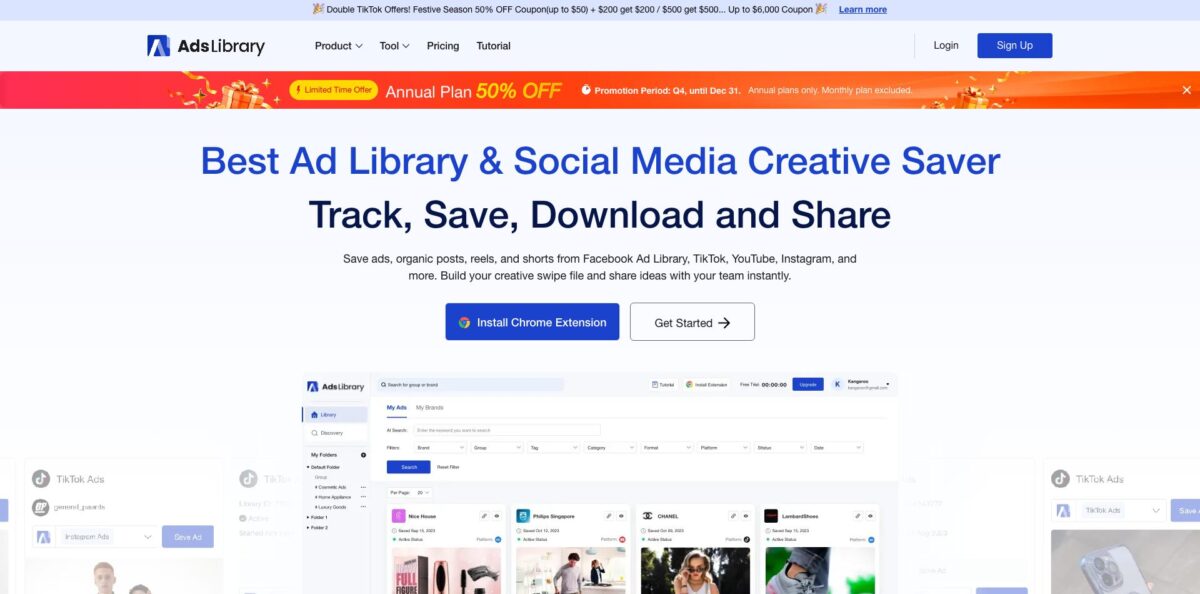
AdsLibrary is a Chrome extension paired with a web app that turns ads you spot on Facebook Ad Library, TikTok Creative Center, Instagram, YouTube, X and LinkedIn into a permanent, searchable swipe file. The extension adds a save button to each ad, and one click stores the video or image together with metadata such as copy, CTA type, format, platform and landing page. That fixes the usual mess of screenshots in random folders and ads that vanish once a campaign stops. Two extras sit on top: Discovery, a daily updated library of ads saved by users and picked by the vendor’s crawler, and Ad Tracker, which watches competitors’ Facebook ads and emails you reports. The weak spot is reliability, because the extension depends on each platform’s page layout. Pick it for an affordable swipe file, not for deep spend analytics.
How to start using AdsLibrary?
Create an account on the AdsLibrary registration page with your email or a Google account; the setup guide says no credit card is needed at this step. Then install the extension from the Chrome Web Store, where it is listed as “Ad Library - Save Facebook, TikTok, Youtube, Ins and Twitter Ads”, pin it to the toolbar and log in. The interface is available in seven languages, including English, German, Spanish, French, Portuguese, Chinese and Japanese.
Your first real scenario is usually Meta’s library. Open Facebook Ad Library, search for a competitor, and click “Save to AdsLibrary” under any ad you want to keep. The same button appears on TikTok Ad Library, TikTok Creative Center, TikTok and Instagram organic posts, YouTube, X and LinkedIn’s ad library. On TikTok Creative Center and the TikTok search results (Top and Video tabs) you can tick several videos at once and save them in bulk, or switch to the “Download Ads” section of the extension and choose “Download Ad Data” or “Download Video/Photo”.
The screen you will live in is My Library. Here you create folders and groups, add custom tags, and filter by duration, group, tag, category, format, platform, status, ad date, impression and spend. Clicking an ad card opens a details window with the media, copy and a download button, and because saved ads stay in your account, you can pull the files again months later. The Screenshot tab in the extension captures a full landing page and files it next to your ads; stay still and do not scroll while it runs.
To finish the loop, share your findings. The Share button on a card copies a public link to one ad, and a group can be shared the same way, so clients see your selection without creating an account, while teammates can leave comments. If you watch rivals closely, open Ad Tracker and add advertisers by Facebook ad account name, account link, page ID or website URL, then pick real-time, daily or weekly email reports. Keep in mind that the free tier only lets you browse; saving and downloading start on the Basic plan.
Who is it for?
Creative strategists
You collect references all day and lose them in screenshots and bookmarks. AdsLibrary keeps every saved ad with its copy, CTA and landing page in one searchable place. Briefs get faster because the evidence is already tagged and grouped.
Agency account managers
Clients want to see what competitors are running, not read a summary of it. A shared group link shows a curated set of ads to anyone, no login required. That makes weekly creative reviews easier to run and easier to approve.
TikTok-focused e-commerce sellers
You browse TikTok Creative Center for product angles and want the videos offline. Bulk saving and downloading on Creative Center and TikTok search pages removes the one-by-one routine. You build a reference bank for your own UGC shoots in minutes.
Small in-house marketing teams
You need to know when a direct competitor launches new Facebook ads but have no analyst to check daily. Ad Tracker emails reports in real time, daily or weekly and charts how many ads each advertiser runs and in which formats. Your team reacts within days instead of noticing a campaign weeks later.
Freelance media buyers on a budget
Enterprise ad intelligence suites cost far more than a single client can justify. AdsLibrary’s Basic plan covers unlimited saving, bulk downloads and one tracked advertiser for a modest monthly fee. You get a working research setup without a long contract.
AdsLibrary pricing
Plans are flat subscriptions charged in US dollars, with payments handled by processors such as Stripe or PayPal and no credits or per-search fees. What changes between tiers is the number of team members and how many advertisers Ad Tracker can monitor, while every paid plan includes unlimited ad saving. At regular rates an annual plan costs exactly twelve monthly payments, but a Q4 promotion running until December 31 halves annual plans; monthly billing is excluded from the offer.
One user can browse the Discovery library and see partial extra ad data inside Meta’s Ad Library through the extension. Saving ads, folders and groups, tags and downloads are locked.
One member, one tracked advertiser, unlimited ad saving, bulk download of ads and data, sharing with team comments and the Chrome extension.
Everything in Basic plus 20 tracked advertisers. Seat packs of 5, 10, 15 or 20 members are available at higher prices.
Raises Ad Tracker to 100 advertisers, with the same seat-pack options as Advanced.
The pricing FAQ states there is no trial, although the Ad Tracker page still promises a free trial tracking slot for new accounts, so check your dashboard before you pay. Refunds are not offered; you can cancel at any time under Account > Subscription, and invoices sit under Account > Invoice. When you upgrade, the remaining time on the old plan is converted and added to the new one.
AdsLibrary key features
One-click ad saving works through the Chrome extension on Facebook Ad Library, TikTok Ad Library, TikTok Creative Center, Instagram, YouTube, X and LinkedIn. Each save captures the creative plus metadata such as copy, likes, CTA type, format, category, platform and landing page. Saved ads stay in your account until you delete them, even after the advertiser switches the campaign off.
Bulk save and download covers TikTok Creative Center and the TikTok search results pages
You tick the videos you want, then save them to your library or export the media and ad data straight to your computer. The vendor notes that bulk download is limited to those TikTok pages, so other platforms are one ad at a time.
The personal library organizes everything with folders, groups and custom tags
Filters cover duration, group, tag, category, format, platform, status, ad date, impression and spend, and active-status tracking shows whether an ad is still running and for how long. Longevity is a useful hint at which creatives are paying off for the advertiser.
Discovery is a shared library of ads saved by users and picked by the vendor’s tracing program, updated daily
The vendor quotes different sizes on different pages, from 600,000 to over 1 million ads across 80,000+ brands. AI search by keyword plus filters for platform, format and category, and a Brands tab, help you find a competitor’s saved creatives.
Ad Tracker monitors competitors’ Facebook ads around the clock once you add them by name, link, page ID, website or from the extension. It charts each advertiser’s current ad count, new-ad trend and format distribution, supports single and bulk data export, and sends real-time, daily or weekly email reports. TikTok advertisers cannot be tracked yet, according to the feature’s own FAQ.
Sharing and capture tools round out the workflow
Public links show a single ad or a whole group to people without an account, team members can comment, and the extension takes full-page screenshots of landing pages. A separate YouTube Ad Downloader on the website fetches ads, regular videos and Shorts at the highest available quality for free after login.
AdsLibrary Pros & Cons
Pros
AdsLibrary is cheap and focused. Basic costs less than most ad research tools, yet it includes unlimited saving, bulk downloads, sharing and one tracked advertiser, and the current annual promotion cuts the price in half. Coverage of saving sources is broad, from Meta’s Ad Library and TikTok Creative Center to YouTube, X and LinkedIn, and ads never expire once saved. Public share links make client presentations painless, because recipients do not need an account. The free YouTube Ad Downloader is a handy bonus. Use it as your team’s central swipe file and organize with tags from day one, so searches stay fast as the library grows.
Cons
Reliability is the recurring complaint. Chrome Web Store reviews from February 2026 describe the save button spinning on Meta’s Ad Library for weeks before a fix reached Google’s review queue, and the listing sits at 3.0 stars from 32 ratings. Subscriptions are non-refundable, and the developer is listed as a non-trader on the Chrome Web Store, so EU consumer protections do not apply. Messaging about trials is inconsistent across the site. Ad Tracker covers Facebook only, and its analytics are simple charts rather than the deep creative scoring that full ad spy suites sell. Keep a backup method for urgent saves and pay monthly until you trust it.
Use AdsLibrary if you want…
- Save competitor ads from Facebook and TikTok in one click.
- Build a permanent swipe file that survives paused campaigns.
- Download TikTok Creative Center videos and data in bulk.
- Share curated ad groups with clients through public links.
- Track up to 100 Facebook advertisers with email reports.
- Capture full-page screenshots of competitor landing pages.
- Browse a daily updated library of ads saved by marketers.
- Keep ad research spending low for a small team.
AdsLibrary alternatives

AdsLibrary Reviews
One Chrome Web Store reviewer was satisfied enough on the monthly plan to upgrade to annual, then found the save button on Meta’s Ad Library stuck loading; the developer replied that a fix had been submitted to Google for approval.
Several users reported in February 2026 that the extension had stopped working for weeks; the developer answered each of them with a fix notice, but paying customers still lost weeks of the feature they bought it for.
A reviewer in April 2026 complained that there is no free trial despite what the marketing suggests and called the extension redundant for anyone comfortable pulling media with the browser’s Inspect Element.
On TopAI.tools, three of four voters recommend AdsLibrary, mostly for value for money, while the one critic pointed to missing features and weak integrations.
FAQ
Is AdsLibrary free?
There is a free tier, but it only lets one user browse the Discovery library and see partial extra data in Meta’s Ad Library. Saving, organizing and downloading ads start with the Basic plan at $19/month, while the YouTube Ad Downloader is free after login.
Does AdsLibrary offer a free trial or refunds?
The pricing FAQ says there is no trial and no refunds, though you can cancel at any time under Account > Subscription. The Ad Tracker page mentions a free trial tracking slot for new accounts, so check what your dashboard shows before paying.
Which platforms can I save ads from?
The extension saves from Facebook Ad Library and Facebook, TikTok Ad Library, TikTok Creative Center, TikTok and Instagram organic posts, YouTube, X and LinkedIn’s ad library. Bulk saving and downloading work only on TikTok Creative Center and TikTok search results.
Can Ad Tracker monitor TikTok advertisers?
Not yet. Ad Tracker currently follows Facebook advertisers only, and the feature’s FAQ says TikTok tracking is in development.
Do saved ads disappear when the advertiser stops the campaign?
No. Ads stay in your AdsLibrary account until you delete them, and the tool keeps tracking whether each ad is still running and for how long.
Can clients view shared ads without an account?
Yes. Share links for a single ad or a whole group are public, so anyone with the link can view them, and team members can add comments.
Is my data safe with the AdsLibrary extension?
On its Chrome Web Store listing, the developer declares that user data is not sold to third parties or used for purposes unrelated to the extension. AdsLibrary is an independent company with no affiliation to Meta, and it is listed as a non-trader, so EU consumer rights do not apply to purchases.
Is AdsLibrary the same as adlibrary.com?
No. AdLibrary at adlibrary.com is a separate ad intelligence platform run by a different company with its own pricing, while AdsLibrary lives at adslibrary.ai and centers on its Chrome extension and swipe file.
Similar tools
 AirOpsAI search platform that tracks how ChatGPT, Gemini and Perplexity cite your brand and runs agent workflows to create and refresh content.
 JumaShared AI workspace for marketing teams and agencies that runs 700+ ready Flows to turn briefs and live ad data into finished
 InstapageLanding page builder for paid ad campaigns with AI copy, Prompt-to-Page generation, ad-to-page personalization and server-side A/B testing.