

AI Detector Writer
Content CreationUpdated October 27, 2026
No-signup AI text detector that scans up to 300,000 characters, bundled with an AI image detector, PDF chat and simple AI writing tools.
We may earn a commission when you sign up through our links. It does not affect our reviews.
What is AI Detector Writer?
AI Detector Writer is a free, ad-supported website built around a browser-based AI text detector. You paste up to 300,000 characters or upload a .txt, .md or .csv file, pass a Cloudflare check, and get a split between human-written and AI-generated content. Around that detector sits a grab bag of no-signup extras: an AI image detector, a chat-with-PDF tool, a paraphraser, a grammar checker, a translator and generators for blog posts, emails, hooks and prompts. The appeal is zero friction, with no account, no credits and no paywall. The weak spot is transparency. The site does not name the model behind its verdicts, publishes no accuracy data of its own, and its privacy policy says nothing about the text you submit. Use it for a quick second opinion on drafts, not for decisions that affect someone’s grade, contract or job.
How to start using AI Detector Writer?
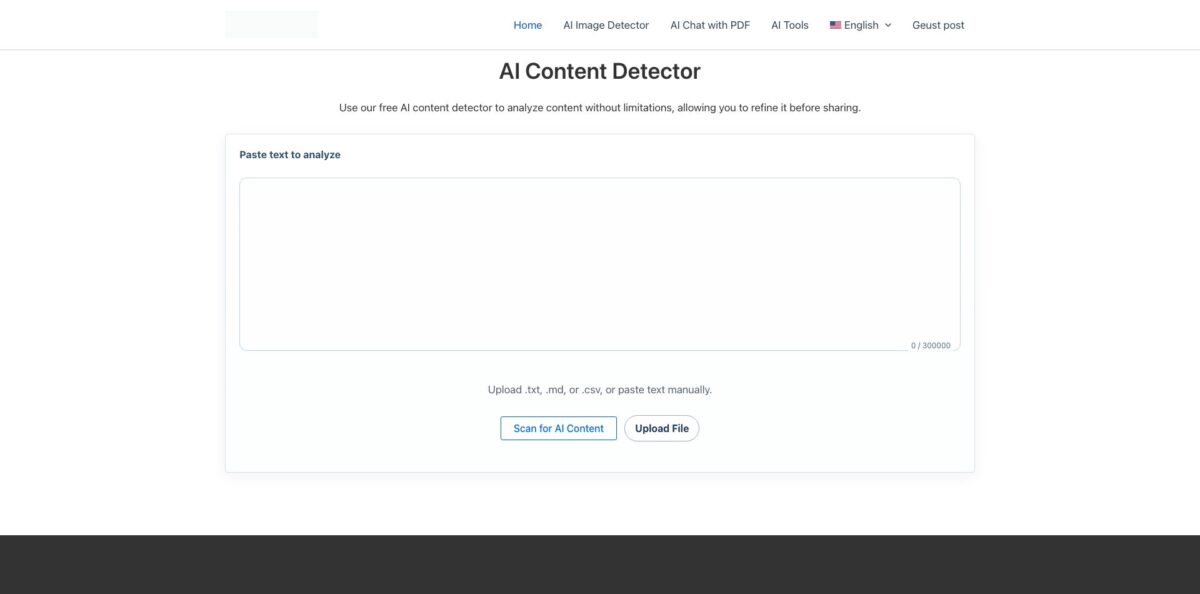
Open aidetectorwriter.com and the detector is the first thing on the homepage. There is nothing to install and no sign-up step; the site has no public login or account area at all. Paste your text into the “Paste text to analyze” box, where a counter tracks characters against the 300,000 limit, or press Upload File to load a .txt, .md or .csv document. Word files and PDFs are not accepted by this form, so copy their text across first. If you prefer another interface language, the menu switches between 12 of them, from French and Spanish to Korean and Ukrainian.
Next, complete the Cloudflare verification widget under the text box and press Scan for AI Content. The homepage says the result shows the percentage of human-written versus AI-generated text, with AI-written sentences highlighted next to a gauge of the AI share, plus a PDF report you can keep. The best first run is a calibration test. Scan a paragraph you wrote yourself, then a paragraph you asked ChatGPT to write on the same topic, and compare the two scores before you trust the tool on anything that matters.
Once the detector makes sense, open the AI Tools hub from the top menu. It groups the extras into Text Tools (sentence shortener, sentence expander, word counter, paraphraser, grammar checker), Conversion Tools (image to text, translation), Writing Tools (introduction, hook and email generators), Content Tools (content improver, blog post and FAQ generators) and Productivity Tools (an online notepad). Images go through a separate AI Image Detector page, and long documents go through AI Chat with PDF, which offers Explain, Summarize and Rewrite shortcuts next to a free-form question box.
Before you act on any result, cross-check it. The site’s own image detector page states that no AI detector is 100% accurate and that results are an indication rather than proof, and its blog advises reviewing detector output by hand. Run anything you plan to act on through a second detector, look at drafts, version history or sources, and keep confidential material out of the text box, since the privacy policy does not say how submissions are handled or stored.
Who is it for?
Teachers and tutors
You have a stack of essays and one that reads oddly polished, but no school license for a paid checker. AI Detector Writer gives you a free, instant second opinion without creating an account. Treat the score as a reason to talk to the student, never as evidence on its own.
Students
You used AI for brainstorming or grammar fixes and want to know how a draft might look to an instructor’s detector. Pasting the full paper costs nothing and long texts fit in one scan. Remember that a different detector may score the same essay very differently.
Freelance writers and bloggers
Clients increasingly ask for “human-written” copy and some run their own checks. A quick scan before delivery shows which passages read as machine-like, and the paraphraser and grammar checker sit on the same site. It will not replace a contract-grade tool if a client disputes your work.
Small-site editors
You receive guest posts and outsourced articles and want a fast filter before reading closely. The 300,000-character limit covers long-form drafts, and file upload handles plain-text exports. There are no team seats, shared history or API, so it stays a manual, one-document-at-a-time check.
Social media users and fact-checkers
A viral photo looks too perfect and you want a rough signal before sharing it. The AI Image Detector returns an AI likelihood, a human likelihood and a confidence level in seconds. Compressed screenshots and edited images can skew results, so check the original source too.
Multilingual writers
The interface comes in 12 languages and the homepage claims detection works across all languages. That is useful if you write outside English, but independent research has found that AI detectors misclassify non-native English writing as AI more often, so read flags on such text with extra caution.
AI Detector Writer pricing
There is no pricing page, plan table or checkout for the tools on the official site as of October 26, 2026. Every tool page is free to use without an account, and the site pays for itself with display advertising (Google AdSense and Yandex ad scripts load on its pages) and with paid guest posts on its blog. Some third-party directories mention a premium tier with higher limits, but nothing on aidetectorwriter.com describes or sells one, so do not plan around it.
AI text detector with up to 300,000 characters per scan and .txt, .md or .csv upload, the AI Image Detector, AI Chat with PDF and every page in the AI Tools hub. No sign-up, but each text scan requires a Cloudflare verification and pages carry ads.
Custom. The image detector page advertises enterprise models with faster speeds and custom detection options, but lists no price, plan or contact form. Pricing is quote-based; the only published business contact is support@aidetectorwriter.com.
This is a publishing service on the site’s blog, not a tool plan. The fee covers an 800 to 2,000-word article with up to 2 links; adding more than 2 links doubles the price to $40. Payment runs through Stripe or PayPal, and the article is saved as a draft for admin review.
AI Detector Writer key features
AI Content Detector
The homepage tool accepts pasted text up to 300,000 characters or a single .txt, .md or .csv upload, then returns a human versus AI percentage. The site says AI-written sentences are highlighted with a contribution gauge and that a PDF report accompanies each detection, and it lists GPT-4, GPT-5, OpenAI and Gemini output among its targets.
AI Image Detector
You drag and drop any image file and get a verdict (“likely created by AI” or “likely real”) with AI Likelihood, Human Likelihood, a High, Medium or Low confidence rating and a classification. The page itself warns that resizing, compression, screenshots and edits can change the result.
AI Chat with PDF
Upload a PDF, read it in the built-in viewer and ask questions in a side chat, or press Explain, Summarize or Rewrite for one-click actions. The page promises no registration and no limits. That makes it handy for skimming a contract or research paper, though the site does not say which model answers or whether the file is kept.
Text Paraphraser and Grammar Checker
The paraphraser offers three tone settings (Standard, Formal and Academic, Simple and Casual) and three purposes (Clarify and Add Detail, Shorten and Summarize, Creative Rephrase), and the page claims support for 20+ languages. The grammar checker scans for grammar, spelling and punctuation errors in a single pass. Together they cover light editing without a second subscription.
Content generators
The Blog Post Generator takes a topic, comma-separated keywords and a target length of roughly 500, 1,000 or 1,500 words. The AI Email Writer lets you set length, style, tone, mood and emoji use, and there are separate hook, introduction, FAQ and content-improver tools. The Prompt Generator writes prompts for ChatGPT, Claude or Gemini and lets you pick a Fast or Advanced model.
Conversion utilities
Image to Text extracts text from JPG, PNG, GIF and WEBP files or an image URL, and the page claims handwriting recognition. The AI Translation Tool converts text between a chosen input and output language. A word counter, online notepad, sentence shortener and expander and a Pomodoro timer round out the set.
Multilingual interface
The whole site, including the detector widgets, is available in English, French, German, Italian, Portuguese, Spanish, Russian, Arabic, Korean, Czech, Indonesian and Ukrainian. Students and teachers outside English-speaking countries can use it without translating the interface.
AI Detector Writer Pros & Cons
Pros
The biggest strength is how little stands between you and a result. There is no account, no credit counter and no upgrade wall, and a single scan takes up to 300,000 characters, which is far more than most free detectors allow. The same site handles image checks, PDF questions, paraphrasing, grammar fixes, translation and short-form generation, so a student or blogger can do a rough check-and-polish pass in one browser tab. Twelve interface languages make it approachable outside the English-speaking world. Because everything is free, testing it costs you only a few minutes. Start by scanning texts whose origin you already know, so you learn how far to trust its percentages.
Cons
You get very little information about what is happening under the hood. The site does not name its detection model, publishes no benchmark, and its homepage FAQ blurs AI detection with plagiarism-style database matching. The privacy policy is a standard WordPress template that covers comments and cookies but not the text, images or PDFs you submit. Features advertised on the homepage, such as batch uploads checked “in the dashboard”, do not match the public form, which takes one file at a time, and there is no account area. Pages carry ads and each scan needs a captcha. Keep sensitive documents out, and confirm any flag with a second detector.
Use AI Detector Writer if you want…
- Check long drafts for AI patterns without an account.
- Get a free second opinion on a suspicious essay.
- Estimate whether a viral image was AI-generated.
- Ask questions about a PDF without signing up.
- Paraphrase paragraphs in formal or casual tone for free.
- Fix grammar, spelling and punctuation in one click.
- Draft quick emails, hooks and blog outlines at no cost.
- Pull editable text out of screenshots and photos.
AI Detector Writer alternatives



AI Detector Writer Reviews
Independent user feedback is close to nonexistent: as of October 2026 the product’s G2, Capterra and GetApp profiles all show zero user reviews, so there is no crowd rating to weigh against the homepage claims.
Directory summaries such as Metaschool mostly restate the vendor’s feature list, crediting it with free unlimited checks, batch uploads and PDF reports while noting limited advanced features and full dependence on the algorithm’s accuracy for nuanced texts.
The one roundup that ranks it first, a 2025 DEV Community post, offers no test data and describes a premium plan the official site does not show, so it reads as promotion rather than a user verdict.
FAQ
Is AI Detector Writer free?
Yes. As of October 2026 the detector and all other tools on the site are free with no visible paid plan; the site is funded by ads and paid guest posts.
Do I need to create an account?
No. There is no sign-up or login on the public site, and each text scan only asks you to pass a Cloudflare verification check.
How much text can I scan at once?
The detector’s text box accepts up to 300,000 characters per scan, and you can upload a single .txt, .md or .csv file instead of pasting.
How accurate is AI Detector Writer?
The vendor describes its model as high-precision but publishes no accuracy figures or independent benchmarks. Even its own pages say no detector is 100% accurate, so treat results as an indication and confirm them elsewhere.
What happens to the text I submit?
The vendor’s G2 profile says no original content is retained or shared, but the privacy policy on the site does not address tool submissions at all. Avoid pasting confidential or personal material.
Can it detect AI-generated images?
Yes. The separate AI Image Detector accepts an uploaded image and returns AI and human likelihood scores, a confidence level and a Real or Fake classification.
Does AI Detector Writer have an API or integrations?
No public API, browser extension or LMS integration is listed on the site. The image detector page mentions enterprise models, but the only contact route is the support email address.
Which languages does it support?
The interface is available in 12 languages, and the homepage claims detection works in all languages. Test it on your own language first, because research has shown detectors misjudge non-native English writing more often.
Similar tools
 RunableGeneral AI agent that turns one prompt into websites, slide decks, social carousels, videos and apps, with plugins and scheduled tasks.
 AISEOAI writing suite with a text humanizer, article and Outrank generators, AI detector and plagiarism checker, plus AI search visibility tools.
 Octopus.doVisual sitemap builder that drafts page structure, block copy and SEO tags with AI, crawls existing sites and connects to ChatGPT, Claude