

AI Fiesta
AI ChatUpdated November 18, 2026
All-in-one AI app that bundles 100+ models from OpenAI, Anthropic, Google and others with image, video, slide and website studios in one subscription.
We may earn a commission when you sign up through our links. It does not affect our reviews.
What is AI Fiesta?
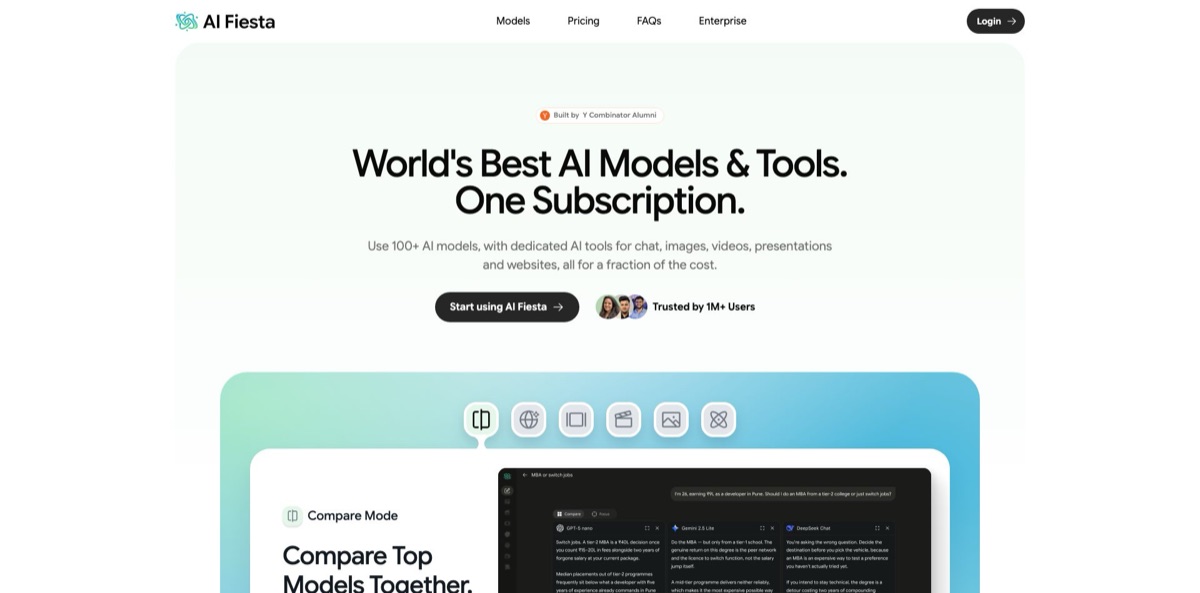
AI Fiesta is a subscription app that puts more than 100 AI models from OpenAI, Anthropic, Google, xAI, DeepSeek, Mistral, Qwen, Moonshot and Perplexity behind one login, with studios for images, video, slides and websites built around the chat. You ask once, read several answers side by side, and can merge them into a single Consensus reply. It replaces the habit of paying for ChatGPT, Claude and Gemini separately and copying prompts between tabs. The weak spot is the shared token pool: every model and studio draws from the same monthly allowance, premium models burn it faster, and heavy users on Trustpilot report running dry within days. Launched in August 2025 and run by Fiesta Labs, the Delaware company owned by YouTuber Dhruv Rathee, it suits students, marketers and moderate users who want many models cheaply, not developers who chat with AI all day.
How to start using AI Fiesta?
Open the homepage and press Start using AI Fiesta, or go straight to the chat app, where you sign in with Continue with Google or an email verification code. The login screen also has a Have a coupon? Redeem here link if you received a promo code. Paid plans are bought through the Buy Now button in the pricing section; outside India, payments are processed by Stripe or TagMango. The iOS and Android apps use the same account, and your chats follow you across devices.
Your first real task should be a comparison. Pick two to four models from the model list, type a question you would normally ask ChatGPT, and let Compare Mode return every answer in the same chat. Then generate a Consensus reply, which merges the answers and flags the points where the models disagree. If you don’t know which model fits a task, switch on Auto Mode and let it route the prompt for you. Prompt Enhancer turns a rough one-liner into a detailed brief before you send it.
Next, set up a Project for recurring work. A Project holds related chats, uploaded files and standing instructions, so every new conversation inside it starts already briefed, and you decide whether it draws on your account memory. Experts work in a similar way for single-purpose assistants with their own instructions, knowledge and model. Before you settle on a favourite model, look at the multiplier shown next to it in the picker: the most capable models drain your token allowance faster than standard ones.
Then try the studios. Image Studio generates from a prompt or a template and lets you change backgrounds or remove objects. Video Studio takes a prompt, duration, resolution, aspect ratio and optional start and end frames. Slides drafts an outline you can reorder before it builds the deck and exports it to PDF or PPT, while the website builder publishes to its own address or a custom domain. Everything you create lands in the Library, where you can search and reuse it.
Who is it for?
Students and self-learners
You want Claude, GPT and Gemini for assignments and revision but can’t justify three $20 subscriptions. AI Fiesta gives you all of them in one plan and lets you cross-check an answer before you rely on it. Consensus is handy when two models disagree on a fact.
Marketers on small teams
You need campaign visuals, a short promo clip and a landing page this week, without booking a designer or a developer. The image, video and website studios cover first drafts inside one subscription. Expect to polish anything client-facing in a dedicated tool.
Freelance writers and consultants
Your day is proposals, emails and reports, and different models suit different tones. Reading three drafts side by side is faster than juggling tabs, and Projects keep each client’s files and instructions apart.
Founders preparing a pitch
You need a deck, a research summary and a simple landing page before a meeting. Deep Research returns a cited report, Slides turns a brief into an editable deck with PDF or PPT export, and the website builder publishes without code.
Model-curious professionals
You want to see how new releases such as Claude Opus 5 or GPT-5.6 Sol behave without opening a new account every month. New models are added at no extra cost on your existing plan, so the app doubles as a testing bench.
Telecoms and enterprises in Asia
You want to bundle AI for subscribers or staff under your own brand. AI Fiesta runs co-branded, white-label and enterprise-seat deployments with SSO, model access controls and per-team token limits, already live in markets such as the Philippines, Singapore, Nepal and Bhutan.
AI Fiesta pricing
AI Fiesta sells a flat subscription with a shared token pool. Chat, images, video, slides, websites and deep research all draw from the same monthly allowance, premium models consume it at a higher multiplier shown in the model picker, and unused tokens don’t roll over to the next cycle. Prompts count as well as answers, since the Terms say tokens are used both when you send a message and when the model replies. Web prices are listed in US dollars, while the App Store shows its own set of in-app prices, several of them higher than on the web. Under the refund policy all payments are final.
Includes 3 million tokens a month, which the Terms translate into up to 300 images, or 30 short 480p videos, or 300 slides, or 5 websites, or 20 deep research runs, not all of them at once. The current homepage offer adds 3 million bonus tokens, doubles the allowance for the first month and includes a free custom domain for one year.
The yearly card quotes up to 36 million words of chat a year, up to 3,600 images or 360 videos at 480p, 60 websites and 240 deep research reports, with 9 million bonus tokens and four times the allowance for the first month.
It raises the allowance to 10 million tokens a month. Pro isn’t displayed in the homepage pricing section, but the FAQ confirms you can move between Basic and Pro whenever you like from account settings.
Custom. Team seats come with SSO, central billing, model access controls, per-team token limits and usage analytics. Telecom and platform partners choose between revenue share and wholesale credit packs, both scoped in a discovery call.
AI Fiesta key features
Compare Mode and Consensus let you pick the models you want, send one prompt, and see every answer side by side in the same chat. Consensus then merges the replies into a single answer and flags the points where the models disagree. You get a quick sanity check on facts and an easy way to choose the best draft without repeating yourself across tabs.
The catalogue of 100+ models spans chat, image, video, coding and research, from Claude Opus 5, GPT-5.6 and Gemini 3.1 Pro to DeepSeek V4 Pro, Grok 4.5, Veo 3.1, Kling and Seedance. Auto Mode reads each prompt and routes it to the model it judges best suited, or you pick one manually for the current chat. New models arrive at no extra cost on your existing plan.
Image Studio generates from a prompt or a template library, then lets you change backgrounds, switch ratios or remove objects in place. Video Studio sets duration, resolution and aspect ratio and accepts start frames, end frames and reference images. Both draw on the same token pool as chat, so a batch of HD clips eats your allowance fast.
Slides turns a description into a deck: choose the slide count, a template and the tone, edit the outline, then export to PDF or PPT. The website builder plans pages from a description or template, lets you edit any element, and publishes to an AI Fiesta address or a custom domain with free hosting and analytics.
Web Search pulls live results with linked sources and switches on by itself when you ask about something current
Deep Research asks a few clarifying questions, runs many searches and returns a structured report with citations after a few minutes. Save it for questions that deserve the wait.
Projects bundle chats, files and instructions, with a toggle for account memory so sensitive work can stay sealed off
Experts are custom assistants with their own instructions, knowledge and model, and Legends let you question AI simulations of historical figures for study. The Library saves every chat, image, video and file automatically and keeps them searchable.
AI Fiesta Pros & Cons
Pros
The price-to-coverage ratio is the main draw. For $12 a month you get flagship models from OpenAI, Anthropic, Google and xAI plus image, video, slide and website tools that would otherwise mean several separate subscriptions. Compare Mode and Consensus earn their place: Google Play reviewers single them out for research and study, because you see where models disagree instead of trusting one answer. The FAQ states that prompts and outputs aren’t used for training, and new models arrive without a price change. The iOS and Android apps share history with the web version. Use it as an everyday multi-model workspace if your usage is moderate and varied.
Cons
The shared token pool is the catch. Premium models and video generation drain it quickly, prompts count toward the limit, and several Trustpilot reviewers say they used up their monthly tokens within a day or after a handful of documents. Ratings are weak across platforms: 2.8 on Trustpilot, 2.5 on Google Play and 2.6 on the US App Store when this review was checked. Common complaints are slow responses, failed generations, annual renewals without reminders and a strict no-refund policy. Support on individual plans is by email only. Before paying for a year, run your real workload for a month and check how fast the counter moves.
Use AI Fiesta if you want…
- Compare answers from several leading AI models at once.
- Replace separate ChatGPT, Claude and Gemini subscriptions with one.
- Generate campaign images and short videos without extra apps.
- Turn a written brief into an editable slide deck.
- Publish a simple landing page without writing code.
- Run cited deep research reports on current topics.
- Keep client files and instructions organised in Projects.
- Try newly released models without opening new accounts.
AI Fiesta alternatives
 ChatHubRead review →
 MagaiRead review →
 MonicaRead review →
 NinjaChatRead review →
 Overchat AIRead review →
 ChatGPTRead review →
AI Fiesta Reviews
Google Play reviewers who use it for learning and research like comparing several models and the built-in consensus answer, though even satisfied users ask for a bigger allowance than 3 million tokens.
On Trustpilot, heavier users doing coding, document work or image batches say the monthly tokens run out within a day or a few sessions, and several report annual renewals charged without a reminder and refunds refused.
App Store reviewers call it a convenient way to use several chatbots in one app, but mention slow loading, failed responses and occasional crashes, with the developer replying and asking for examples by email.
An independent review by Kripesh Adwani, updated in October 2026, praises the clean interface, prompt improvement and image generation, while criticising unclear per-query token use and email-only support.
The testimonials AI Fiesta shows on its own homepage, selected by the company from app store reviews, stress the savings over paying for each model separately and the side-by-side comparison feature.
FAQ
Is there a free plan?
The official pricing lists only the paid Basic and Pro plans. A third-party review from October 2026 describes a small free chat allowance limited to a set of free models, so sign in and check what your account offers before you pay.
How many tokens does each plan include?
According to the Terms, Basic includes 3 million tokens a month and Pro 10 million. Premium models use tokens at a higher multiplier, and when you run out you can wait for the reset, upgrade, or buy top-up tokens from the subscriptions section of your profile.
Are my chats used to train AI models?
No. The FAQ says your prompts and outputs aren’t used for training, and prompts sent to model providers are excluded from their training programs. Chats stay private to your account unless you publish something yourself.
Can I get a refund?
The refund policy says all payments are final, including renewals, token packs and add-ons. The site FAQ makes an exception only for billing errors or duplicate charges, so cancel before the renewal date if you don’t plan to continue.
Can I cancel or switch plans?
Yes. You can move between Basic and Pro or cancel at any time from account settings. Cancelling stops future billing but doesn’t refund the current cycle.
Does AI Fiesta work on mobile?
Yes. It runs in any mobile browser and has dedicated iOS and Android apps, with chats synced across every device you sign in on.
Can I upload files and documents?
Yes. You can attach documents, PDFs and images to any chat, or add files to a Project so every conversation inside it can draw on them.
Does AI Fiesta have an API?
The chat app doesn’t advertise a public API. Its footer links to Mesh API, a separate gateway product that gives developers access to 1,000+ models through one endpoint.
Similar tools
 Clerk ChatTexting and AI calling add-on for Microsoft Teams that brings SMS, RCS and WhatsApp to your existing numbers, plus AI agents for
 6figr Career RoastFree 6figr tool where AI personas like Elon Musk roast your LinkedIn profile or resume, backed by salary data, offer analysis and
 Human or NotFree browser game where you chat with a stranger for two minutes and guess whether they are human or AI, plus group