

AI or Not
Data AnalysisUpdated October 26, 2026
Detector that checks images, video, voice, music and text for AI generation and deepfakes, with a free web checker and a pay-as-you-go API.
We may earn a commission when you sign up through our links. It does not affect our reviews.
What is AI or Not?
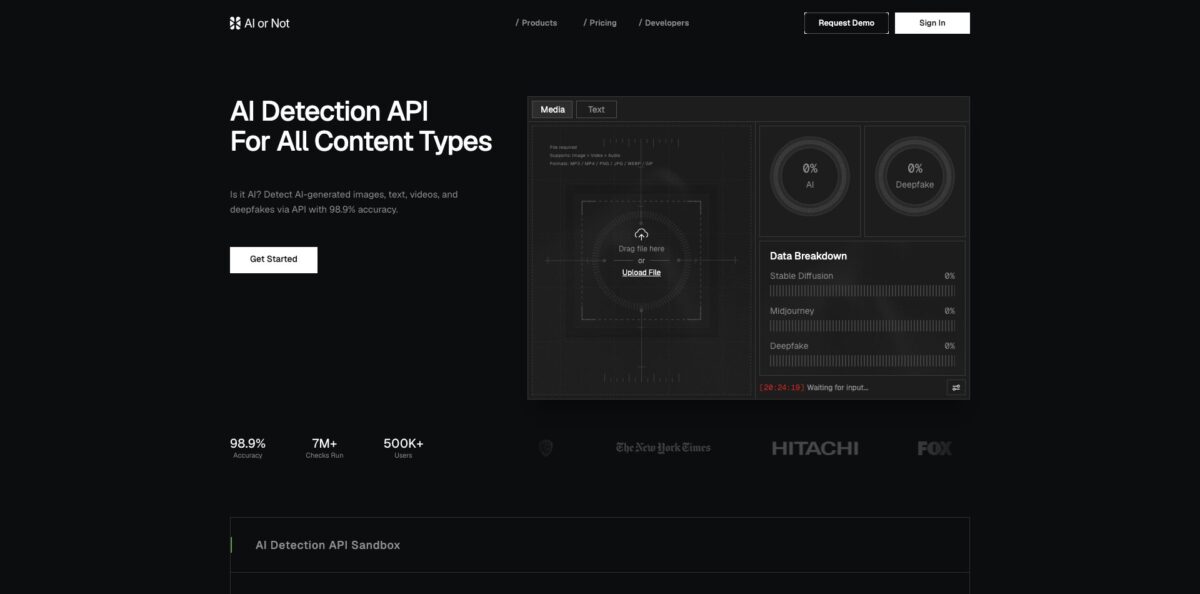
AI or Not is a detection service that tells you how likely an image, video, voice clip, music track or piece of text is to be machine-made, and whether a face in it looks like a deepfake. You get a free web checker for quick lookups and a REST API (plus an MCP server) for running the same models inside your own product. Image analysis works on pixel content rather than metadata, EXIF or C2PA credentials, so a screenshot or a re-saved file is still scored. The vendor advertises 98.9% accuracy; that is a company figure, not an audit. Independent tests are more mixed: NewsGuard’s May 2026 audit found it perfect on heavily altered photos but also flagging most lightly edited real photos as AI. Take it if you screen user uploads, claim photos or ID documents at volume, and treat every score as a signal for human review rather than a final verdict.
How to start using AI or Not?
Open aiornot.com and drop a file into the checker on the homepage, or pick the dedicated text page if you want to paste writing. The media uploader accepts images, video and audio in formats such as PNG, JPG, WEBP, GIF, MP3 and MP4, while the text checker takes pasted text or DOC, DOCX and TXT files. Creating a free account gives you $5 in starter credits, a monthly text allowance and an API key, so sign up even if you only plan to test a handful of files.
Run your first real case next. Upload a photo you already know the origin of and read the result panel: it shows an overall AI score, a separate deepfake score and a data breakdown that estimates which generator family (for example Midjourney or Stable Diffusion) the image resembles. For text, the detector returns a confidence score for human versus AI authorship. Starting with files of known origin tells you quickly how the tool behaves on your kind of content.
If you are a developer, move to the API tab in the dashboard and copy the key. Every request goes to api.aiornot.com with the key as a Bearer token. The image endpoint runs AI-generated, deepfake, NSFW and quality reports by default, and you can narrow it with the only and excluding parameters, which matters because AI and deepfake reports are billed separately. Video calls can take up to two minutes, so set a 120-second client timeout, and remember deepfake video detection is off unless you request it explicitly.
Before you wire results into an automated decision, build a small validation set from your own traffic: real customer photos, edited photos, and AI images from the generators your users actually touch. Check where the scores land and decide your thresholds from that, not from the marketing number. For long videos, split clips into 30-second segments as the docs recommend, because the synchronous endpoint only analyses part of a longer file.
Who is it for?
Insurance claims teams
Fabricated vehicle, roof or cracked-screen photos are cheap to produce with image generators. AI or Not markets its image model directly at claim intake, so you can score every photo on arrival and route suspicious ones to an adjuster instead of reviewing all of them by eye.
KYC and fraud analysts
Synthetic passports, AI selfies and face swaps are built to pass onboarding checks. The image and deepfake reports give you a second signal next to your liveness vendor, and the API lets you run it on every submission rather than on spot checks.
Newsrooms and fact-checkers
A viral photo needs a fast first opinion before you publish or debunk it. The free checker and the AI Image Tracker database of known fakes give you a quick read, while the separate generator breakdown hints at where to dig next.
Trust and safety teams
Platforms moderating profile pictures, marketplace listings or dispute evidence need detection at scale. Pay-per-check credits and a one-call image endpoint with NSFW and quality reports make it practical to scan uploads in bulk without a sales contract.
Developers building AI checks into apps
If you want an AI detector inside your own product, the API, Python SDK and MCP server cover images, video, voice, music and text from one account. The Business plan adds reseller rights, so you can bill your own customers for checks.
Students and writers checking text
The free text detector and the iOS app let you test an essay or cover letter before submitting it. Remember that text detectors are probabilistic, so use the result as a prompt to review your draft, not as proof either way.
AI or Not pricing
Everything runs on credits that are shared across content types. Pro rates are $0.02 per image, $0.01 per second of video, $0.005 per second of audio and $5 per million words of text; Business pays 25% less on image, deepfake, audio and video checks, while text and reverse image search ($0.02 per image) cost the same on every plan. Monthly credits roll over while your plan is active, and annual plans give you the full grant up front.
$5 in starter credits, 1M words of AI text detection every month, 20 AI image checks and an API key.
Yearly billing is $50/year with $100 in credits up front. Pay-as-you-go top-ups available.
Yearly billing is $1,000/year with $1,000 in credits up front. Adds the 25% media discount and reseller rights up to $5,000 per month of resold usage, with no contract.
Custom. On-prem deployment, private instances, custom models with a forward-deployed researcher, model calibration, full reseller rights and dedicated support.
Monthly plans can be cancelled at any time and stay active until the end of the billing period, and you can move from Pro to Business without losing existing credits.
AI or Not key features
Image detection with generator breakdown: the model scores the pixels of an image and returns an AI verdict, a per-generator estimate and a separate deepfake signal. Listed coverage includes Nano Banana, Midjourney, DALL·E and GPT Image, Stable Diffusion, Flux, Grok, Ideogram, Adobe Firefly, Recraft, Seedream, Qwen and GAN models. Because it ignores metadata and watermarks, stripped EXIF or a screenshot does not hide an AI image from it.
Video, voice and music checks: one video call returns separate scores for AI video, AI voice and AI music, with deepfake video as an opt-in report. Dedicated audio endpoints handle voice clones and AI-generated songs separately, and the docs warn that the voice model is not meant for singing. This lets you screen podcasts, voice notes and music uploads alongside images.
AI text detector: paste text or upload DOC, DOCX or TXT and get a confidence score for human versus AI authorship
The API accepts 250 to 500,000 characters (roughly 64 words minimum) and can return block-level annotations so you see which passages drive the score. Text is the cheapest modality at $5 per million words.
Developer API and rate limits: REST endpoints at api.aiornot.com with Bearer-token auth, JSON responses and an external_id field for tracking. The vendor states a 95th-percentile image response of one second or less, and rate limits sit between 1 and 5 requests per second depending on plan, with higher limits on request.
MCP server for AI assistants: install it with uvx and an API key, and Claude Code, Claude Desktop, Cursor, Codex, VS Code or Windsurf can call detection tools directly. Tools cover images, text, video, voice, music and a batch scan that writes a whole folder’s results to JSONL. It suits analysts who already work inside an AI coding or chat client.
AI Image Tracker: a free, searchable database of known AI-generated and deepfake images, counting just over 7,000 entries on the check date. You can reverse-search an image against it or browse by category, tag and subject, which is useful for celebrity and political fakes that circulate repeatedly.
Privacy handling: the company says content checked through the service is deleted right after inference, and the API docs repeat that uploaded media are processed and then removed. The iOS text app goes further and runs the detection model on the phone. Enterprise customers can also request on-prem or private deployments.
AI or Not Pros & Cons
Pros
Few detectors cover this many content types from one account: images, deepfakes, video, voice, music and text all draw on the same credit balance. Entry pricing is low, with a usable free tier, a $5 Pro plan and per-check rates published openly instead of hidden behind a sales call. Independent results support the image model on manipulated content: NewsGuard’s audit had it catch all 15 significantly edited photos, the only one of five tools to do so, and SlashGear’s hands-on test found it correct on every voice and music sample. The API, MCP server and batch scanning make it easy to automate. Start with the free tier and the API key, and test on your real upload mix before buying credits.
Cons
False positives are the main risk. In the same NewsGuard audit it labelled one of 15 authentic photos as AI and flagged 87% of lightly retouched real photos (brightened, background blurred) as AI-generated, which could hurt honest users whose phones apply filters. Older hands-on tests found illustrations and paintings far less reliable than photos, including a classic painting marked as AI. The headline 98.9% accuracy and the SynthID study are vendor numbers. Long videos are only partly analysed per call, and audio and video jobs can take up to two minutes. Never auto-reject on a single score; send borderline cases to a person.
Use AI or Not if you want…
- Screen insurance claim photos for AI fabrication.
- Flag synthetic IDs and AI selfies during onboarding.
- Check viral news images before publishing them.
- Detect cloned voices in calls and voice notes.
- Spot AI-generated music in upload pipelines.
- Add AI detection to your own app via API.
- Resell detection checks to your own customers.
- Run AI checks from Claude or Cursor through MCP.
AI or Not alternatives
AI or Not Reviews
An early Product Hunt reviewer liked getting a clear 1 to 100 percentage for how likely an image is to be AI-generated rather than a bare yes or no.
A SlashGear tester found it flawless on real and cloned voices and AI music, but unreliable on illustrations and paintings and unable to tell when a real photo had been edited with AI.
A Creative Bloq writer saw it correctly flag edited and painted-over AI images, yet it could not decide on a copy-pasted version of a Stable Diffusion woodland scene.
NewsGuard’s May 2026 audit praised it as the only tool to catch every heavily altered photo, while noting it misread one authentic photo and most lightly retouched ones as AI.
Hacker News commenters on the 2023 launch were split, with one calling it a useful tool and another dismissing the post as little more than an ad.
FAQ
Is AI or Not free?
Yes. A free account includes $5 in starter credits, 1M words of text detection per month, 20 AI image checks and an API key. Paid plans start at $5 per month.
How accurate is AI or Not?
The company claims 98.9% accuracy, but that is its own figure. NewsGuard’s independent May 2026 test found it perfect on heavily altered photos, with one false positive on 15 authentic photos and 87% of lightly edited real photos flagged as AI, so treat scores as evidence for review.
Does AI or Not store my uploads?
The company says checked content is deleted right after inference, and its API documentation states the same for uploaded media. The iOS text app runs detection on the device, so your text is not uploaded.
Which content types can it check?
Images, deepfakes, video, AI voice, AI music and text. Image uploads support formats including JPG, PNG, WEBP, HEIC and TIFF, and text can be pasted or uploaded as DOC, DOCX or TXT.
Does AI or Not have an API?
Yes. Every plan, including Free, comes with an API key for REST endpoints at api.aiornot.com, and there is an MCP server for Claude, Cursor, Codex, VS Code and Windsurf. Rate limits range from 1 to 5 requests per second depending on plan.
Can it detect AI images without metadata or watermarks?
Yes. Detection reads the pixel content, not EXIF data, watermarks or C2PA credentials, so screenshots and re-saved files are still analysed.
What happens to unused credits?
On monthly plans unused credits roll over for as long as the plan stays active. On annual plans the whole grant is available up front for the full term.
Can I cancel at any time?
Yes. Monthly plans can be cancelled whenever you like and remain active until the end of the billing period, and you can upgrade from Pro to Business while keeping your credits.
Similar tools
 HexCollaborative analytics workspace that mixes SQL, Python and AI agents in notebooks, then publishes results as data apps and plain-language answers.
 WindwardMaritime AI platform that fuses AIS, satellite and ownership data into vessel risk scores, sanctions screening, alerts and container ETAs.
 Delve AIAI market research platform that builds personas from analytics, CRM and social data, then lets you chat with them or run synthetic