

AIAI
Video GenerationUpdated November 13, 2026
All-in-one AI studio that puts Veo, Sora, Kling, Seedance and other models behind one credit balance for video, images, music and voice.
We may earn a commission when you sign up through our links. It does not affect our reviews.
What is AIAI?
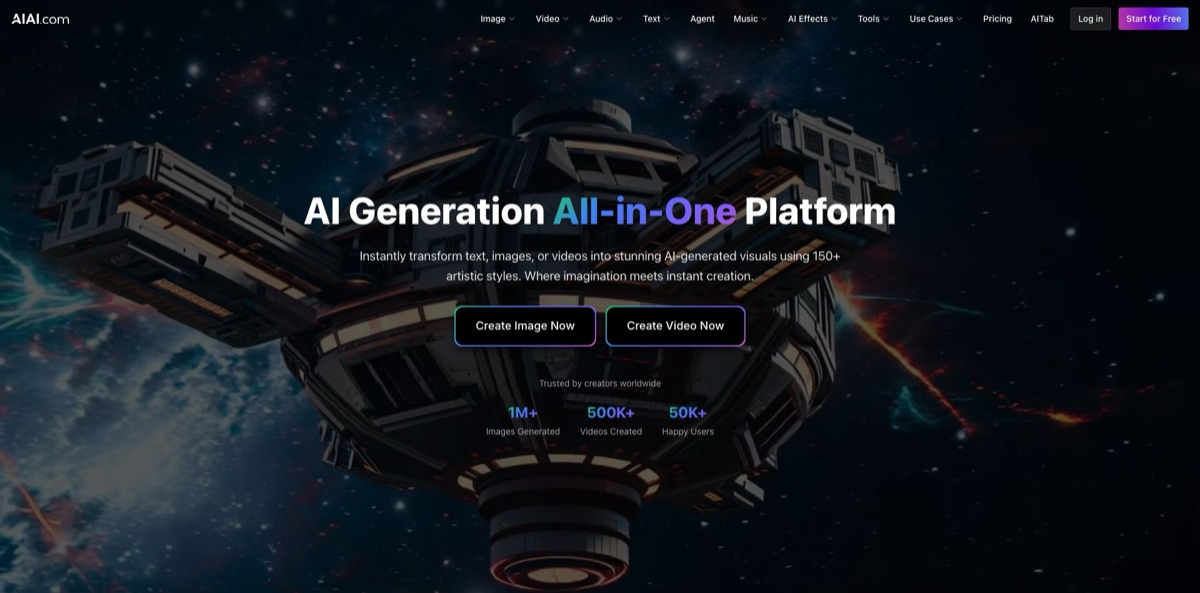
AIAI is a browser-based generation hub at aiai.com that puts dozens of third-party models behind one credit balance: Veo 3.1, Sora 2, Kling 3.0, Seedance 2.0, Runway Gen-4.5 and Wan 2.6 for video, plus Nano Banana Pro, GPT Image, Seedream and Flux for still images. Around those engines sit talking avatars, lip sync, more than 150 effect templates, music, voice cloning and a set of writing and study tools. The problem it removes is subscription sprawl: instead of paying Google, OpenAI and Kuaishou separately, you pick a model from a dropdown and spend the same credits on all of them. The weak spots are a free tier that watermarks output and may publish it to a public feed, and a very thin record of independent user reviews. It suits creators who want to compare models side by side for short clips without juggling five accounts.
How to start using AIAI?
Open aiai.com and click Create Video Now or Create Image Now on the homepage, or go straight to the top menu, which splits the product into Image, Video, Audio, Text, Agent, Music, AI Effects and Tools. Generating requires an account, and the privacy policy confirms that Google sign-in is supported for authentication only. The Free plan on the pricing page credits 20 points at sign-up, which the page itself estimates at up to 6 images or 2 videos, so treat the first session as a test drive rather than a production run.
For a first real scenario, open Video and choose Text to Video. The model picker lists the engines with a one-line description each: Seedance 2.5 sits at the top, followed by options such as MiniMax H3, Veo 3.1, Kling 3.0 Pro, Runway Gen-4.5, Grok Imagine, Wan 2.6 and Sora 2. Type your prompt, and switch on Translate to English if you write in another language or Polish your Prompt if you want the platform to expand a short idea into a fuller description before it reaches the model.
Next, set the output parameters. The default form offers 480P, 720P or 1080P resolution, seven aspect ratios (Auto, 16:9, 4:3, 1:1, 3:4, 9:16 and 21:9) and durations of 5, 10, 15, 20 or 30 seconds, although each model has its own limits. Before you press Generate, the form shows the credits required, calculated as the per-video cost of the chosen model multiplied by the number of outputs. If you already have a still you like, Image to Video animates it instead, and Reference to Video accepts up to 9 images, 3 videos and 3 audio clips that you can tag with @ to steer characters, motion, style or sound.
When a clip is ready, check the Public Visibility setting before you share it. On the Free plan, results cannot be deleted and may be published to the Inspiration feed after review, while paid plans add private creations and watermark-free downloads. For finishing passes, separate tools on AIAI subdomains handle video quality enhancement, background removal and watermark removal, and the Agent section opens a workflow canvas where you can organize multi-step projects.
Run the same prompt on two or three models at 480P first, then spend credits on a 1080P take only with the model that handled the motion best.
Who is it for?
Short-form social creators
You need a steady stream of vertical clips and trend formats, and filming each one is not realistic. AIAI pairs prompt-based generation with ready-made effects such as AI Motion Capture From Video, Dog Dancing, AI Walking and AI Gender Swap, while the full models offer a 9:16 aspect ratio. One credit balance covers both the templates and the full models.
AI video tinkerers comparing models
Every week a new model claims to beat Veo or Kling, and testing each one means another subscription. Here Veo 3.1, Sora 2, Kling 3.0, Seedance 2.0, Runway Gen-4.5, Vidu Q3 Pro and Wan 2.6 sit in the same model menus. You can judge motion and prompt adherence on identical inputs before committing to any single vendor.
Small e-commerce and marketing teams
Product visuals usually mean a photographer, a designer and a video editor. Image tools like the AI 9-Panel Product Mockup Generator and AI Product Exploded View Generator cover stills, while Image to Video turns a packshot into a short ad. Commercial use is listed on the Pro and Ultimate plans, not on Free.
Independent musicians
A finished track often stalls because there is no budget for a music video. Text to Music runs Suno V5.5, Lyria 3 Pro, ElevenLabs Music and MiniMax models, and the AI Music MV generator turns a song idea into a clip. You get a draft visual identity for a release without hiring a crew.
Podcasters and voice creators
Recording pickups or translated versions eats studio time. The AI Voice Clone page offers Chatterbox multilingual, IndexTTS-2 for duration and emotion control, and Qwen3-TTS, which clones a voice in 10 languages from a reference clip of at least 3 seconds. An AI Podcast Generator and Audio to Text transcription sit in the same menu.
Teachers and students
Building quizzes and flashcards by hand takes hours each week. The Text section includes an AI Flashcard Maker, Quiz Generator, Worksheet Generator, AI Grader, Homework Helper and summarizers, so study materials and visuals come from one login.
AIAI pricing
AIAI runs on credits. Subscriptions refill a monthly credit allowance, while one-time packs add credits that never expire and can be stacked on top of a plan. The pricing page converts credits into rough output using about 3 credits per image and 10 per video, but the real cost depends on the model and settings you pick, and the generator shows the exact figure before you start. The page has Yearly, Monthly and One-time Purchase tabs; the figures below are the US dollar prices from the official pricing data as of November 2026.
You get 20 credits at sign-up, enough for up to 6 images or 2 videos by the page’s estimate. Access is limited to selected models, jobs wait in a queue, outputs are watermarked and may be publicly visible, and use is non-commercial.
You get 300 credits a month, up to 100 images or 30 videos by the page’s estimate, plus all AI models, faster generation, watermark-free outputs, private creations, commercial use and priority support.
The allowance rises to 800 credits a month, up to 266 images or 80 videos, with early access to new models and credits the page labels the cheapest per credit.
Packs run from 160 credits for $8 through 300 for $13.50, 500 for $22.50, 1,000 for $40, 2,000 for $80, 3,000 for $105 and 5,000 for $175, up to 10,000 credits for $250. Generations made with paid credits are private, and the credits never expire.
No team or enterprise plan is listed. The refund policy is strict: subscription refunds must be requested within 3 days of purchase, are refused once more than 50 subscription credits have been used, and may carry a processing fee of up to 6%, while one-time credit packs are not refundable at all.
AIAI key features
Multi-model video generation. The Text to Video and Image to Video pages list more than 20 engines, including Veo 3.1, Veo 3, Sora 2, Sora 2 Pro, Kling 3.0 Pro, Seedance 2.0, Runway Gen-4.5, Vidu Q3 Pro, MiniMax H3, Grok Imagine and several Wan versions. Each entry carries a short note on what it does best, such as native audio or multi-shot support. You get to pick the right engine per shot instead of forcing every idea through one model.
Reference to Video
This mode, built on Seedance 2.5, takes up to 9 images, 3 videos and 3 audio clips in a single job. You mention each uploaded file with @ in the prompt to assign it a role, for example a character, a camera move, a visual style or a soundtrack. It gives you far more control over consistency than a text prompt alone.
Image studio with current models
Text to Image offers Nano Banana Pro, Nano Banana 2, GPT Image models, Seedream 5.0, Flux Kontext Pro and Max, Flux 1.1 Pro Ultra and Recraft V3, while Image to Image restyles uploads into anime, cartoon or photoreal looks. The homepage advertises more than 150 artistic styles. Stills and video live in the same workspace, so a generated image can go straight into Image to Video.
Effects library
More than 150 video and photo effects cover viral formats like Kissing AI, Cat Dance, AI Skinny Filter, AI Cosplay Portrait and AI Pet to Human, plus practical tools such as a 9-panel product mockup and a 360 camera photo that renders one scene from several angles. Templates need little or no prompting.
Avatars and lip sync
The Avatar tool uses Kling Avatar V2 to create talking avatars of realistic humans, animals or cartoons, and Lip Sync runs Sync Lipsync V2 to match mouth movement to new audio. Together they cover talking-head explainers and dubbed clips without filming. Review the mouth area frame by frame before you publish, since small sync errors are what viewers notice first.
Music, voice and audio
Text to Music offers Suno V5.5, Lyria 3 Pro, ElevenLabs Music, MiniMax 2.6 and Ace Step 1.5, and the AI Music MV generator turns music ideas and visual concepts into music videos. Voice cloning, text to audio, an AI podcast generator and transcription round out the audio side. A single project can get its visuals, soundtrack and voiceover from the same credit balance.
Finishing utilities and chat
Separate AIAI tools remove watermarks, enhance video quality and strip video backgrounds, and the AITab extension for Chrome and Edge adds a chat sidebar with GPT, Gemini and DeepSeek models. These sit outside the main generator on their own subdomains and listings.
AIAI Pros & Cons
Pros
The model lineup is the main draw. Veo 3.1, Sora 2, Kling 3.0, Seedance, Runway Gen-4.5 and Vidu sit next to each other, so you can test the same prompt across vendors without opening separate accounts or learning new interfaces. Entry pricing is low, with a $7.99 first month of Pro and credit packs starting at $8 that never expire. The platform also goes well beyond video, covering images, effects, avatars, lip sync, music and voice cloning under one login, and the interface is available in 14 languages with a prompt translator built in. Use the credit packs if your output is irregular, because they avoid paying for a monthly allowance you might not spend.
Cons
The Free plan is restrictive on privacy: output is watermarked, cannot be deleted and may appear in the public Inspiration feed, and the license is non-commercial. Credits disappear quickly on premium video models, and the 300-credit Pro allowance equals only about 30 videos by the platform’s own estimate. Refunds are limited to 3 days and 50 used credits, and packs are non-refundable. Independent feedback is scarce, with no Trustpilot reviews and mixed ratings elsewhere, and the homepage FAQ still promises free access during a launch celebration that the pricing page no longer reflects. Keep anything sensitive off the Free plan and read the credit estimate before every generation.
Use AIAI if you want…
- Compare Veo, Sora and Kling outputs in one place.
- Turn product photos into short video ads quickly.
- Generate vertical clips for TikTok, Reels and Shorts.
- Animate characters with references, motion clips and audio.
- Create talking avatars and lip-synced dubs from photos.
- Score a video with Suno or ElevenLabs music.
- Clone a voice for narration in several languages.
- Pay with credits that never expire instead of subscribing.
AIAI alternatives
 KreaRead review →
 OpenArtRead review →
 Leonardo.aiRead review →
 Kling AIRead review →
 PixVerseRead review →
 RunwayRead review →
 Vidu AIRead review →
 Deevid AIRead review →
AIAI Reviews
On the topai.tools directory, three of the five users who rated AIAI recommend it, all three for output quality and value for money, and two of them also found it easy to use.
The two users on the same directory who would not recommend it found the platform hard to use and short on integrations, and one of them also complained about inconsistent results and missing features.
The companion iOS app, AIAI.com - All-in-One, holds a 2.6 average from just five App Store ratings, and its only written reviews are one-word complaints that call it greedy and worthless.
Chrome Web Store users rate the AITab extension 4.8 out of 20 ratings and praise its clean new-tab layout and widgets, though that feedback covers the chat add-on rather than the video studio.
FAQ
Is AIAI free to use?
Yes, the Free plan gives you 20 credits at sign-up, which the pricing page estimates at up to 6 images or 2 videos. Free output is watermarked, limited to selected models and licensed for non-commercial use only.
Which video models does AIAI include?
The video pages list Veo 3.1, Veo 3, Sora 2, Sora 2 Pro, Kling 3.0 and earlier Kling versions, Seedance 2.0 and 2.5, Runway Gen-4.5, Vidu Q3 Pro, MiniMax H3, Grok Imagine, Wan 2.6 and others. Free users get selected models, while Pro and Ultimate open up the full list.
Can I use AIAI videos commercially?
Commercial use is listed as a feature of the Pro and Ultimate plans. The Free plan is marked non-commercial, so upgrade before using any output in client work or paid ads.
Are my AIAI creations private?
On the Free plan, results cannot be deleted and may be published to the Inspiration feed after review. Paid plans add private creations, and generations made with purchased credits are private.
Do AIAI credits expire?
Subscription credits refresh monthly as part of the plan. Credits from one-time packs never expire and can be stacked on top of an active subscription.
Can I get a refund from AIAI?
Subscription refunds must be requested by email within 3 days of purchase and are refused once more than 50 subscription credits have been used; a processing fee of up to 6% may apply. One-time credit packs are not refundable.
How long can AIAI videos be?
The default Text to Video form offers 5, 10, 15, 20 and 30 second durations at up to 1080P, but each model has its own limits. MiniMax H3, for example, is listed at 5 to 15 seconds.
Does AIAI have a mobile app or browser extension?
There is an iOS app called AIAI.com - All-in-One, which focuses on AI chat, and the AITab extension for Chrome and Edge adds a chat sidebar. Video and image generation run in the browser at aiai.com.
Similar tools
 ToMoviee AIWondershare's AI creative studio that turns text prompts and images into short videos, pictures, music, sound effects and voiceovers.
 Morph StudioBrowser AI video studio that runs Seedance, Kling, Veo and its own style transfer model, with a storyboard canvas for multi-shot clips.
 JXPMulti-model AI video and image studio that puts Seedance, Veo, Kling, Wan and other third-party engines behind one credit balance.