
AI Chatting
AI ChatUpdated October 26, 2026
Web and Android AI chatbot with 70+ role-play characters, a general assistant, ChatPDF and writing tools, sold on weekly or annual plans.
We may earn a commission when you sign up through our links. It does not affect our reviews.
What is AI Chatting?
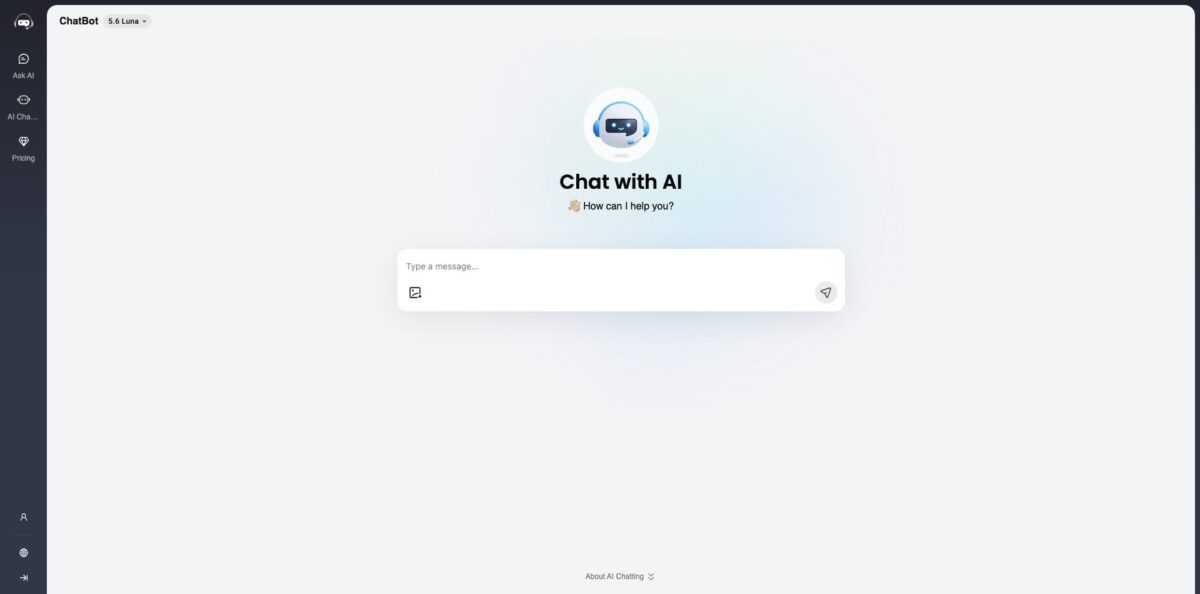
AI Chatting is a browser-based chatbot run by Wegital HK Limited that pairs a general GPT-style assistant with a library of more than 70 pre-built characters, from anime heroes and celebrities to a psychologist persona, a language tutor and text adventure games. You can type a question on the homepage without registering, and the privacy policy names OpenAI as the provider behind the generated text. Around the chat sit a ChatPDF reader and roughly 40 single-purpose writing generators. The weak spots are thin documentation, a small free allowance and a run of app-store complaints about billing and slow support. It suits casual users and fans who want quick answers or light role-play for a few dollars a week, not teams: the terms restrict use to personal, non-commercial purposes.
How to start using AI Chatting?
Open aichatting.net and start typing in the chat box on the homepage; the site says you do not need to register or set anything up. Anonymous use is capped, and the Ask AI page puts the free allowance at 5 questions a day. The Sign in button in the header offers Continue with Google, Continue with Facebook and Continue with Apple, and the site’s own prompt says logging in gives you more free usage. The interface comes in 12 languages, including Spanish, Japanese, Korean, German, French, Arabic and Swedish, and you can write to the bot in any language you like.
For a first real task, keep it practical: ask for a short reply to an email, a plain explanation of a concept you are studying, or a packing list for a trip. The model label above the chat shows 5.6 Luna, the standard tier that every plan runs on. The chat offers Copy, Edit and Regenerate controls, and the Clear button wipes the thread and starts a new chat when the context drifts. On the Free and Basic tiers a single message can carry up to 3,000 words of input and return up to 1,500 words of output.
The AI Characters tab is the screen that sets this product apart. Characters are grouped into Recommend, Companion, Famous People, Game, Education, Film & TV, Anime, Work & Life and Text Adventure. Each card shows a one-line persona description and a Chat button, and Recent Chats keeps the characters you used last within reach. Pick LinguaBot for language practice, Interview Coach for mock questions, Dr. Lawson for a reflective conversation, or a Harry Potter or Baldur’s Gate text adventure if you want a game. The public pages show no option to build your own character, so you work with the curated cast.
Before paying, check whether you actually need Pro features. Image chat and the GPT-5.6 Terra model consume advanced credits, and only Pro plans include them. Open Pricing, switch between the Basic and Pro tabs, and compare the Weekly Plan with the Annual Plan. Every plan auto-renews; you stop renewal with Cancel Auto-Renew in the account menu at the top right of the site, and the plan stays active until the paid period ends.
Who is it for?
Casual Askers
You want a quick answer, a rewritten sentence or a recipe idea without creating yet another account. AI Chatting lets you type straight from the homepage and keeps the interface bare. The free cap is small, so expect to sign in or pay once it becomes a daily habit.
Anime and Game Fans
You would rather talk to Satoru Gojo, Levi Ackerman, Hu Tao or Mario than to a neutral assistant. The character library spans anime, games, film and TV, and each persona answers in its own voice. It is lighter and more filtered than dedicated role-play apps, which suits shorter, casual sessions.
Language Learners
Practising a language is easier with a partner who never gets tired of repeating things. LinguaBot is set up for conversation practice, and the chat accepts any language you type. You get low-stakes repetition, but there is no structured curriculum, progress tracking or pronunciation feedback.
Students
Quick explanations, essay drafts, paraphrasing and summaries sit in one place, with the Essay Writer, Paraphrasing Tool and Text Summarizer a click away from the chat. ChatPDF can summarise a paper of up to 120 pages on the free tier. Check facts and citations yourself, because the tools do not show sources.
Interactive Fiction Players
Text adventures such as Time Traveler, Harry Potter Adventure and Baldur’s Gate Adventure turn the chat into a choose-your-path game. Each reply moves the story based on what you type. Long sessions eat through free usage quickly, which is where the cheap Basic plan earns its keep.
Budget-Conscious Users
If a mainstream assistant subscription feels like overkill, the Basic annual plan works out to under $1 a week for unlimited standard chats. You give up top-tier models, deep tooling and responsive support in exchange for the low price. Remember that the terms forbid commercial use, so this is not a work tool.
AI Chatting pricing
Plans are billed per week or per year, and usage is counted in credits: every request costs 1 credit. Standard credits run the GPT-5.6 Luna model and are unlimited on both paid plans. Advanced credits cover GPT-5.6 Terra, chat with images and other premium features, and they come only with Pro. The figures below come from the official pricing page and the USD price feed it loads, checked on October 25, 2026.
Limited standard credits, access to the 70+ characters, and 3,000 words of input and 1,500 words of output per message. The Ask AI page puts the free allowance at 5 questions a day, and signing in adds more free usage. ChatPDF includes free daily chats.
Unlimited GPT-5.6 Luna chats, access to all bots, an ad-free experience and early access to new features. Message limits stay at 3,000 words in and 1,500 words out, and no advanced credits are included.
Everything in Basic plus GPT-5.6 Terra and chat with images, with message limits raised to 7,500 words of input and 3,000 words of output. Advanced credits are capped at 100 per week on the weekly plan and 1,000 per year on the annual plan, which is roughly 19 a week. In ChatPDF, Pro allows up to 30 PDFs a day, 300 pages per file and 100 PDF chats a week.
Refunds are available only if you have not used any credits from the plan; you request one by email and the site says it typically processes them within a week. If you upgrade from a weekly to an annual plan, the weekly subscription is cancelled automatically and simply does not renew.
AI Chatting key features
Character library: More than 70 curated personas are sorted into categories such as Companion, Famous People, Game, Education, Film & TV, Anime and Work & Life. You pick a card and the bot answers in that character’s voice, so you skip writing a role-play prompt yourself. Companion personas like Luna, Sofia and Ethan play romantic roles, but a content filter blocks prompts flagged for sexual content, violence, hatred or self-harm.
General chat with two model tiers: The standard GPT-5.6 Luna tier is described as suitable for everyday tasks, while GPT-5.6 Terra is pitched for complex language work and is reserved for Pro. The privacy policy names OpenAI as the source of AI-generated content, though the site publishes no technical detail beyond the tier names. Copy, Edit and Regenerate controls in the chat make it easy to iterate on a reply.
Chat with images: Pro users can upload PNG, JPEG, JPG or WEBP files of up to 20MB each and ask about them
The Ask AI page gives examples such as explaining a formula, describing a product, reading the trend in a sales chart or figuring out how to use a device. Each image request draws from your limited advanced credits, so save it for questions text alone cannot answer.
ChatPDF: Upload a PDF of up to 120 pages and 32MB, and the tool produces an instant summary plus suggested questions
You can then explain, summarise or translate any passage with one click and chat with the document in any language. The page says you can keep or delete your PDF history, and Pro raises the ceiling to 300 pages and 30 files a day.
Writing tools hub: The Writing section lists about 40 single-purpose generators, including Essay Writer, Paraphrasing Tool, AI Grammar Checker, AI Translator, Cover Letter Generator and Instagram Hashtag Generator. Tools such as the Essay Writer and Paraphrasing Tool use short forms instead of open prompts; the Essay Writer, for example, asks for a topic and optionally an essay type, education level and length. That speeds up routine drafts, although the output still needs your own edit.
Text adventure games: Harry Potter Adventure, Baldur’s Gate Adventure, Time Traveler and a generic Text Adventure Game turn the chat into interactive fiction. You type actions and the bot narrates what happens next, keeping the story going for as long as your credits last. It is a simple way to pass time or warm up creative writing.
AI Chatting Pros & Cons
Pros
AI Chatting removes almost every barrier to a first conversation: there is no forced sign-up, the chat box is clean, and a cast of ready-made characters saves you from writing role-play prompts. The character range is broad for a general chatbot, covering anime, games, film, historical figures and practical coaches in one list. Paid plans are cheap, with Basic annual at $39.99 for unlimited standard chats, and the pricing page spells out credit rules, word limits and refund terms in plain language. ChatPDF and the writing generators come at no extra charge. Start with the free quota and two or three characters before deciding whether a plan is worth it.
Cons
Feedback on the Android app is weak: Google Play shows 2.7 stars from about 1,260 reviews, and the most visible reviews describe unexpected annual charges, further upgrade prompts after paying, and support emails that go unanswered. Refunds apply only if you have used no credits, which excludes anyone who tried the service before asking. Privacy messaging is inconsistent, because the homepage says chat history is not stored while the June 2023 privacy policy describes keeping user data as long as your profile exists and sharing cookie data with ad partners. Annual Pro’s advanced credits are thin. Pay with a card you monitor closely and turn off auto-renew right after subscribing if you want only one period.
Use AI Chatting if you want…
- Chat with AI anime, game and movie characters.
- Ask quick questions without creating an account.
- Practice a foreign language with a patient bot.
- Play text adventures set in familiar fictional worlds.
- Summarize and question PDFs of up to 120 pages.
- Draft essays, captions and cover letters from templates.
- Get unlimited standard AI chats for under $1 weekly.
- Ask questions about photos, charts and formulas.
AI Chatting alternatives
 Character AIRead review →
 ChatGPTRead review →
 MonicaRead review →
 Overchat AIRead review →
 DeepAIRead review →ToolbazRead review →
AI Chatting Reviews
A paying Google Play reviewer says the subscription delivered inconsistent service, the app demanded yet another upgrade before letting them use the AI, and repeated emails to support went unanswered, even though the app used to work well.
Other Android users assumed the app was free and only discovered the paywall after installing; one cancelled after a single day and later found a full year had been charged, and another suggested a proper trial before any payment plan.
On the App Store, one fan says they chat in the app every day and that it helps them mentally and in daily life, while another simply rates the answers as good.
A critical App Store review says the bot itself claimed questions were unlimited and free, then demanded a monthly or annual subscription after five to ten questions; another reviewer paid for annual Pro through Apple Pay and could not access it.
On Trustpilot, where the site has only two reviews, an annual subscriber complained that the PDF feature they had paid for was moved to a different product and that customer service did not respond, though they conceded the tools themselves may be useful.
FAQ
Is AI Chatting free to use?
Yes, with limits. The Ask AI page allows 5 free questions a day, signing in adds more free usage, and paid plans start at $3.99 per week or $39.99 per year.
Do I need to create an account?
Not for basic chat, since the homepage works without registration. Signing in with Google, Facebook or Apple raises the free allowance and keeps your chats tied to an account.
Which AI models does AI Chatting use?
The site labels its tiers GPT-5.6 Luna (standard, all plans) and GPT-5.6 Terra (advanced, Pro only), and the privacy policy names OpenAI as the provider of AI-generated content. No further technical detail about the models is published.
Can AI Chatting read images and PDFs?
Image chat is a Pro feature that accepts PNG, JPEG, JPG and WEBP files of up to 20MB each. ChatPDF handles PDFs of up to 120 pages and 32MB on the free tier, and up to 300 pages and 30 files a day on Pro.
Is my chat history private?
The homepage says chat history is not stored, but the privacy policy (last updated June 2023) says user data is kept while your profile exists and that prompts are processed by OpenAI. Avoid sharing sensitive personal or work information.
How do I cancel and get a refund?
Click Cancel Auto-Renew in the account menu at the top right, and the plan runs until the end of the paid period. Refunds are granted only if you have used no credits; you request them by email, and processing typically takes about a week.
Is there a mobile app?
An Android app called AI Chatting - AI Chatbot is on Google Play with 100K+ downloads, ads and in-app purchases. The pricing page also lists iOS, but the US App Store listing returned a 404 error when checked on October 25, 2026.
Can I use AI Chatting for business?
No. The terms of service grant a license for personal, non-commercial use only, and users must be at least 12 years old.
Similar tools
 Chat 4O AIAll-in-one AI workspace with GPT, Claude, Gemini and Grok chat plus image and video models like Veo, Kling and Nano Banana, paid
 LiveChatAIAI customer support agent trained on your website, docs and Q&As, with human live chat handoff, AI Actions, and WhatsApp, Slack and
 Kore.aiEnterprise agentic AI platform for building, governing and improving voice and chat AI agents for customer service, HR, IT and business processes.