

Akool
Content CreationUpdated October 5, 2026
Akool is an all-in-one AI platform for high-quality video generation, realistic face swaps, and multilingual content localization.
We may earn a commission when you sign up through our links. It does not affect our reviews.
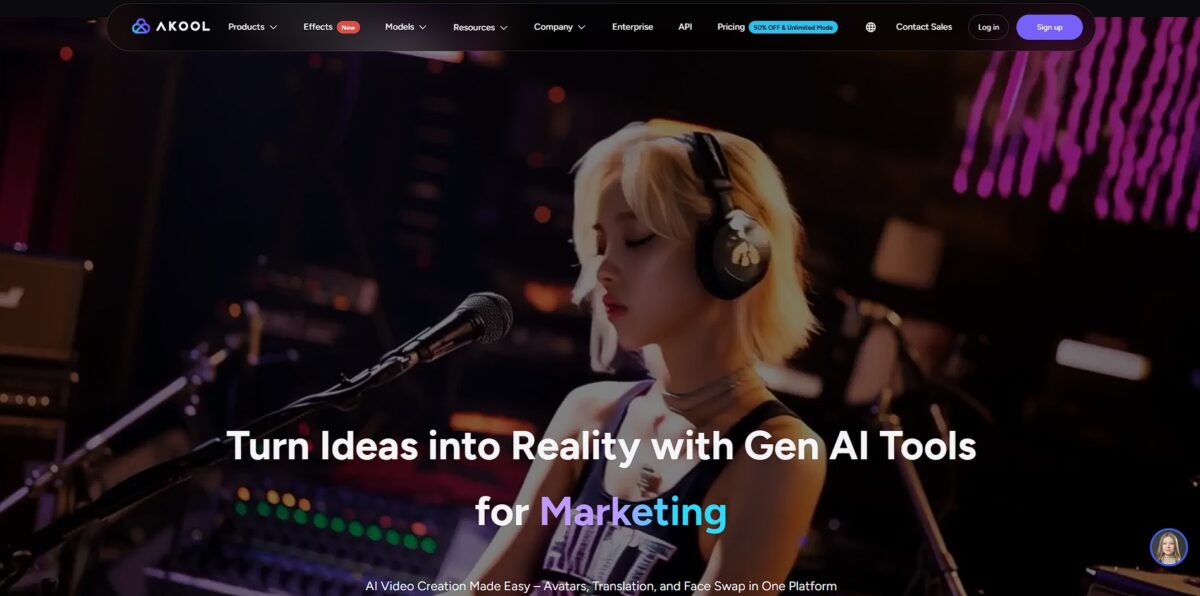
What is Akool?
Akool acts as a centralized generative suite that replaces the need to jump between separate tools for face swapping, voice cloning, and avatar animation. It turns static product images into 4K video ads and dubs existing footage into over 150 languages with synchronized lip movements. This matters because a single marketing team can localize a campaign for dozens of regions without renting studios or hiring multilingual actors. I noticed the face swap tool maintains skin texture and lighting consistency during head rotations, which usually breaks on cheaper web-based wrappers. It excels at high-volume e-commerce assets but lacks the granular frame-by-frame control required for complex cinematic editing. This consolidation eliminates the subscription fatigue of paying for three different AI services just to produce one video. Use Akool to automate your video localization and stop managing your creative workflow across five different browser tabs.
How to start using Akool?
Head to akool.com and sign up with your email or social account. The dashboard dumps you straight into a grid of visual generators. You will likely start with the “Image to Video” or “Face Swap” modules, as these are the platform’s heavy hitters. The UI prioritizes speed over deep settings, so don’t expect a complex timeline editor. This layout works well for churning out social assets but feels limiting if you need frame-by-frame control.
Rule of thumb: start with a clear, front-facing photo to avoid distorted facial geometry in the final render.Upload your source image to the workspace. If you are using the face swap tool, you will need a target video—either your own or one from their stock library. The AI maps the new face onto the existing head movements and lighting conditions automatically. It removes the need for manual tracking points or complex masking in After Effects. A four-hour editing job becomes a sixty-second wait. Check the “Face Quality” toggle; leaving it on standard often results in visible blurring around the jawline.
For product descriptions, paste your URL or upload a product photo. The engine scans the image to identify key features and writes copy based on the visual data. It skips the phase where you have to type out technical specs for every single SKU. While it captures the main object accurately, it sometimes misses smaller details in busy backgrounds. This helps small e-commerce owners populate a store front in minutes instead of days.
Tip: crop your product photos tightly so the AI doesn’t get distracted by props or shadows.Once your generation finishes, preview the result in the built-in player. Free users will see a watermark, and the resolution is capped at 720p, which looks soft on desktop monitors. Upgrading to a paid tier gets you 4K exports and removes the branding. High-movement videos can sometimes introduce “jitter” where the face meets the hair, and that jitter breaks the illusion of reality for your viewers.
Rule of thumb: use footage with steady lighting and minimal head-turning for the most believable results.
Who is it for?
Performance Marketing Teams
Swap lead actors’ faces across existing video ads to test which demographics convert best without reshooting. This allows for rapid A/B testing of visual talent in 4K resolution. For regional campaigns, that slashes production budgets.
Corporate Training Leads
Turn a static photo of a CEO into a speaking avatar that delivers monthly updates or compliance training. The lip-sync tech aligns the mouth to a text script, so you never need a teleprompter or a studio. Internal comms stay consistent and easy to update.
Global YouTube Creators
Dub and sync your speech into over 150 languages to reach international audiences without using robotic subtitles. The tool matches your avatar’s mouth movements to the new audio for a natural look. Traditionally, localized content means hiring expensive voice actors and editors.
E-commerce Brand Managers
Generate photorealistic product videos from a simple text prompt or a few static product shots. You can create a smartwatch or shoe promo in minutes by describing the camera movement and lighting. The result is a constant stream of social-ready assets for storefronts.
Lean Creative Agencies
Build 8K visual assets and video backgrounds for client pitches without a full design department. You can generate original images and immediately drop them into a video timeline within the same dashboard. No more jumping between separate AI generators and editing software.
Social Media Managers on Deadlines
Turn yesterday’s high-performing photos into dynamic videos with music and effects using the image-to-video tool. It works well for turning static portfolio pieces into eye-catching reels or TikToks. Your feed stays active even when you lack fresh video footage.
Akool pricing
Akool operates on a credit-based system where every generation—from a simple face swap to a full 4K avatar video—depletes a monthly balance. This structure forces you to calculate the cost of every draft before hitting render. While the tiers seem clear, the math behind “credits per second” can make predicting monthly spend difficult for heavy users.
Basic: $0/month. You get a few credits to test tools, but exports carry a heavy watermark and resolution maxes out at 720p. This tier is mostly for kicking the tires rather than shipping professional assets, since those limits rule out actual client work or public marketing.
Pro: $30/month (600 credits). This tier removes watermarks and jumps resolution to 4K, which is necessary for YouTube or social ads. It buys you roughly 20 minutes of 1080p avatar footage. That is enough fidelity for a professional brand presence without a studio.
Pro Max: $59/month (2,400 credits). Scaling up to 8K resolution and adding API access, this plan is for developers building Akool into their own apps. The credit volume handles about 80 minutes of standard video. That makes room for bulk content creation or automated workflows.
Business: $249/month (12,000 credits). This is the high-volume engine for agencies. It supports 16K resolution and allows 10 concurrent renders so your team isn’t waiting in a queue. The production bottleneck disappears when you manage multiple client campaigns at once.
Treat the Pro plan as your baseline for real work, but track your credit burn closely to avoid mid-month blackouts.
Akool key features
Automated Personalization at Scale
Swap faces across thousands of frames to tailor ads for different regional demographics without re-shooting entire commercials. I noticed the engine preserves original lighting transitions, making the replacement look like it belongs in the scene. In global campaigns, that slashes the budget needed for diverse talent casting.
Script-to-Screen Avatars
Convert text into a speaking digital human who handles HR onboarding or weekly news updates. It removes the friction of getting “camera ready” and renting studio space for routine internal communications. This matters because you can update a training video by changing the text script instead of re-recording the entire session.
Lip-Synced Video Translation
Translate spoken dialogue into 155+ languages while the AI matches the avatar’s mouth movements to the new audio. Unlike standard dubbing, this eliminates the jarring mismatch between sound and visual cues. In educational content, that builds viewer trust and retention across borders.
Product Photo Transformation
Generate lifestyle images from simple text prompts to place your e-commerce items in premium settings. It replaces the need for expensive physical sets and professional lighting rigs for every new SKU. Lean marketing teams can produce fresh social media assets daily without waiting for a creative agency.
Workflow Automation via API
Connect the content generation engine directly to your internal apps or website to automate video production. The platform moves beyond a manual web dashboard, allowing developers to trigger face swaps or translations as part of a background process. That opens the door to hyper-personalized customer experiences, like sending a personalized thank-you video immediately after a purchase.
Real-Time Streaming Avatars
Deploy a digital spokesperson that interacts live during webinars or on your website storefront. This works well for 24/7 customer support but feels less personal than a real human for complex sales negotiations. You get consistent brand messaging at any hour without hiring a global support team.
Akool Pros & Cons
Pros
Akool puts face swapping, 4K image generation, and video translation into one browser tab. This saves you from managing four different subscriptions just to make a localized product ad. The video translator keeps the speaker’s original voice while aligning lip movements to the new language, so your marketing videos don’t look like poorly dubbed 70s cinema. You can skip the studio hire and turn a static headshot into a speaking avatar for corporate training in minutes.
Cons
The platform lacks deep post-production tools, so what the AI generates is mostly what you get. Render times can stretch during peak hours, which might stall your workflow if you are on a tight deadline. The pricing structure relies on credits that can be difficult to track if you are running multiple experiments. While the avatars look realistic, you have limited control over their specific gestures or clothing compared to specialized competitors. As a result, you might need several attempts to get the exact professional look your brand requires.
Use Akool if you want…
- Produce high-quality, personalized videos and images for your brand or business.
- Customize stock photos and videos with high-precision face swapping to save on production costs.
- Generate realistic, talking avatars from text for automated product demonstrations and onboarding.
- Translate and dub videos into over 150 languages with synchronized lip-syncing to expand global reach.
- Create studio-quality product photos and lifestyle images from simple text descriptions.
- Build interactive demos and virtual shopping assistants to boost e-commerce engagement.
- Integrate AI content generation directly into your internal apps and workflows via an open API.
Akool alternatives




Akool Reviews
I swapped to Akool for my marketing visuals and never looked back; having the image generator and video editor in one tab saves me hours of manual exports.
The video translation tool is surprisingly tight, matching lip-sync phonemes perfectly so my localized ads don’t look like a poorly dubbed movie.
Using AI avatars for our internal training notes has been a total lifesaver; we can update our onboarding videos in minutes without ever having to re-record.
FAQ
Does Akool offer a free plan?
Yes, Akool provides a free plan that allows users to test most features, although it includes watermarks on video exports and limits resolution to 720p.
How does the credit system work?
Akool uses a credit-based model where different actions consume varying amounts of credits. For example, an image face swap costs 4 credits, while video face swaps cost 10 credits per 10 seconds.
Can I perform multi-face swaps in a single file?
Yes, the platform supports replacing multiple faces within the same image or video file simultaneously.
What file formats are supported?
Akool supports common formats including MP4, MOV, and AVI for videos, and JPG and PNG for images.
Is my data secure on the platform?
Yes, Akool uses industry-standard encryption to ensure that user data and uploaded assets remain secure.
Can I create a custom AI avatar?
Yes, you can upload your own video to create a custom avatar that mimics your specific appearance, voice, and movements.
Does Akool support 4K video exports?
Yes, 4K resolution is available for users on the Pro, Pro Max, and Business subscription tiers.
Similar tools
 RunableGeneral AI agent that turns one prompt into websites, slide decks, social carousels, videos and apps, with plugins and scheduled tasks.
 AISEOAI writing suite with a text humanizer, article and Outrank generators, AI detector and plagiarism checker, plus AI search visibility tools.
 Octopus.doVisual sitemap builder that drafts page structure, block copy and SEO tags with AI, crawls existing sites and connects to ChatGPT, Claude