

Anima
Developer ToolsUpdated October 21, 2026
Design-to-code platform that turns Figma files, screenshots, prompts and live websites into responsive React or HTML apps your team can edit and publish.
We may earn a commission when you sign up through our links. It does not affect our reviews.
What is Anima?
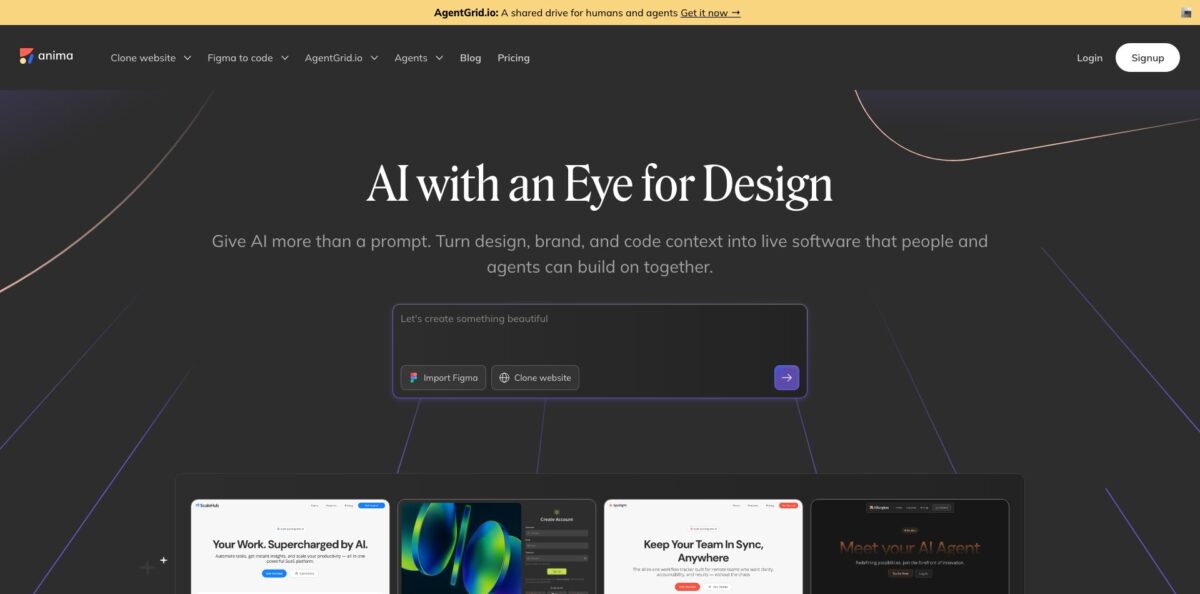
Anima is a design-to-code platform built around a Figma plugin and a browser workspace called the Playground. You feed it a Figma frame, a screenshot, a public URL or a plain prompt, and it generates responsive HTML or React code that you can keep editing by chat, by hand or visually. The output can use TypeScript or JavaScript, Tailwind or plain CSS, and UI libraries such as shadcn, MUI or Ant Design. The point is to cut out the slow phase where a developer rebuilds a finished mockup pixel by pixel. The catch is that quality depends heavily on how the Figma file is built: designs without Auto Layout and with messy layer names produce weaker code, and reviewers still report cleanup work on mobile breakpoints. Pick it if your team already lives in Figma and wants a working front end, not just a static spec.
How to start using Anima?
Sign up for free and open the Playground at dev.animaapp.com. The start screen offers three entry points: starting from Figma, starting from a prompt or starting from a URL. If you design in Figma, install the Anima plugin from the Figma Community as well. The docs recommend the plugin over the link method because it captures Figma variables and design tokens, recognises components more reliably and avoids Figma API rate limits.
For a first real run, take one finished screen. In Figma, right-click the frame and choose Copy link to selection, then in the Playground click Tools, Import Figma, paste the link and send it. Before you send, use the dropdowns under the input to pick the framework (React or HTML), the UI library (shadcn, MUI, AntD or none), the language for React and the styling. The import creates a live preview with the generated code next to it, and multi-screen flows come in as linked pages with working navigation.
The key screen after that is the editor itself. You can describe changes in plain language, edit the code directly, add or rearrange screens and watch the preview update. Code preferences sit behind the settings icon, so you can fix the stack once per project instead of every prompt. If the app needs real data, the built-in database lets you create tables and fields, and you can add user sign-in with email and password or Google.
When the result looks right, check it at desktop and mobile widths before you ship anything, because that is where reviewers find most of the rough edges. From there you can publish with one click to the default Anima URL or a custom domain, download the code, or sync it into an existing codebase through the GitHub integration. Developers who prefer Dev Mode can open the same plugin in Figma’s right panel and copy component code straight from the inspected design.
Who is it for?
Product designers
You hand off a polished Figma file and then wait weeks to see it live, often with details lost along the way. Anima turns the frames into a clickable, responsive build you can share as a link the same day. You stop arguing over screenshots and start reviewing a working page.
Front-end developers
Rebuilding layouts, spacing and typography from a mockup is repetitive work that eats sprint time. The plugin and Dev Mode panel give you React or HTML with Tailwind or your chosen library as a starting point. You spend your time on state, data and edge cases instead of margins.
Startup founders
You have a Figma prototype and need something investors or early users can click through before hiring a full team. Anima produces a live app with routing, a basic database and authentication, published on your own domain. It is a fast bridge between a deck and a real product.
Agencies and freelancers
Clients send Figma files and expect landing pages fast, often with tight budgets. Generating responsive HTML and publishing from the same workspace shortens delivery, and the playground link gives clients a place to review. Expect to budget time for mobile polish before handover.
Teams using AI coding agents
Agents like Claude Code or Cursor are good at logic but weak at matching a designer’s exact layout. The Anima MCP server gives those agents access to Figma-to-code, design system docs and live playgrounds. Your agent builds on the real design instead of guessing from a description.
Marketing teams
Campaign pages and email templates often stall in a developer queue. Anima can clone an existing site into an editable app or output email-compatible HTML with inline CSS from a Figma design. You can launch and iterate without filing a ticket for every change.
Anima pricing
Anima prices by seat plus two usage meters: chat messages in the AI Playground and code generations. A code generation counts every time Anima produces code for you, whether that is a plugin export, a Figma import into the Playground, a website clone, a prompt build or a call through the Anima MCP server. The prices below are the annual-billing rates shown on the official pricing page; monthly billing is available and costs more, since the annual toggle advertises 20% off. Chat message add-ons are sold on the paid tiers.
5 chat messages and 5 code generations per month, 1 workspace. Enough to import one design and judge the code quality, not enough for a real project.
100 monthly chat messages, 50 monthly code generations, two-way Figma and code workflow, custom domains and 3 workspaces. Fits a solo designer or developer with a steady trickle of screens.
1,000 monthly chat messages (marked as a limited-time offer), 200 monthly code generations, custom domains, priority support and 10 workspaces. This is the plan Anima flags as popular for small teams.
2,000 monthly chat messages (also a limited-time offer), 600 monthly code generations, team roles and permissions, premium support, SSO on annual billing, 50 workspaces and $49/month per additional seat. A medium websites pack is offered as an add-on.
Adds SSO, MFA, enterprise-grade SLAs and the security controls compliance teams ask for, with wire transfer or invoice payment available.
The Anima API and SDK are sold separately through sales, with no public price.
Anima key features
Figma to HTML and React: The plugin converts individual components, full screens or entire flows into code, with output for HTML, CSS, React, Vue, Tailwind, TypeScript, JavaScript and Next.js. Auto Layout is translated into Flexbox, and layer names become class and component names. You get a structured starting point instead of an absolutely positioned image of your design.
AI Playground: A browser workspace where imported designs, prompts or screenshots turn into a live app with code and preview side by side. You refine the result through chat, direct code edits or visual changes, and you can restore any earlier version. It keeps design iteration and code in one place rather than in two tools.
Website cloning: Point Anima at a live website and it imports multiple pages into one editable app with routes and navigation already wired. A separate flow handles private sites. This is useful for redesigns and migrations where you need a working baseline before you change anything.
Design system support: You can import Figma design system components, match a brand from any URL or use a Design.md file to keep builds visually consistent. The UI library setting maps output to shadcn, MUI or Ant Design. Teams get code that looks like their product, not a generic template.
Anima MCP and API: A remote MCP server lets agents such as Claude Code and Cursor create and edit playgrounds, implement Figma designs and read design system documentation. The API and SDK automate the same generation from Figma, URLs or prompts, and Anima says its engine already runs inside Bolt.new and Replit. Your agent workflow gains a design-aware layer without custom tooling.
Backend basics and publishing: The Playground includes a database for tables and fields, app users with email or Google sign-in, one-click publishing and custom domains. Code can also be downloaded or synced to GitHub. A prototype can become a small production site without leaving the workspace.
Dev Mode integration: Developers can run Anima from the right panel in Figma Dev Mode to inspect, copy or download code for a selection, with breakpoints linking frames for different screen sizes.
Anima Pros & Cons
Pros
Anima removes most of the manual rebuild between a finished Figma file and a working front end. The plugin is easy to pick up, and reviewers on G2 and Product Hunt say it saves real engineering time, especially on desktop layouts that come out close to the design with only small alignment fixes. The stack choices are broad for this category, covering React or HTML, TypeScript or JavaScript, Tailwind and three popular UI libraries. The Playground, database, auth and publishing turn a mockup into a live, shareable site in one place, and the MCP server connects the same engine to coding agents. SOC 2 Type II and an opt-out for AI training help with security reviews. Use it as an accelerator for the first 70% of a front end, then hand the code to a developer.
Cons
Mobile responsiveness is the most frequent complaint in user reviews, and generated markup usually needs cleanup before it is production-ready. Code quality also depends on how disciplined the Figma file is, so teams with loose layer structure and little Auto Layout get weaker results. The free tier is very small at five generations a month, and some users feel the jump to paid plans is steep for occasional exports. Code generations on lower tiers run out quickly on large multi-screen files, and reviewers mention occasional plugin bugs and a learning curve in the interface. Test your most complex screen on the free plan and check it on a phone before you commit to annual billing.
Use Anima if you want…
- Turn Figma designs into responsive React or HTML code.
- Give developers clean starting code directly from Dev Mode.
- Clone an existing website into an editable multi-page app.
- Publish a clickable prototype on your own custom domain.
- Keep AI-generated screens consistent with your design system.
- Connect Claude Code or Cursor to your Figma files.
- Build email-ready HTML templates from Figma layouts.
- Add a simple database and user login to prototypes.
Anima alternatives

Anima Reviews
The Figma plugin is simple to use, and inspecting the generated code helps non-technical teammates follow the structure, though the markup still needs some adjusting before it is ready for production.
Desktop output from a React, TypeScript and Tailwind export came out close to the design with minor alignment fixes, but getting the mobile layout right was a real challenge.
Conversion is fast, yet the choice of code languages felt limited for one team, which also wanted unit tests and quicker handling of multi-page projects.
It saves the engineering team time and gives designers, developers and clients one place to view a project, but the step from the free tier to paid plans feels steep for occasional use.
The idea works, but the Figma plugin was unreliable at times and the platform took a while to learn how to navigate.
FAQ
Is Anima free to use?
Yes, there is a free plan with 5 chat messages and 5 code generations per month and one workspace. It is enough to test one design, but any real project needs a paid plan from $20 per seat per month billed annually.
Which frameworks and libraries does Anima support?
Anima generates HTML or React, with TypeScript or JavaScript, Tailwind or plain CSS, and UI libraries including shadcn, MUI and Ant Design. The Figma plugin page also lists Vue and Next.js output.
Does Anima work in Figma Dev Mode?
Yes. Developers can run the Anima plugin in the right panel of Dev Mode, or use Anima from Dev Mode panels, to inspect, copy or download code for a selected design.
Is my design data used to train Anima’s AI?
Anima can use anonymized data for training, but the setting is optional, set per team and can be switched off at any time. The company states it is SOC 2 Type II and GDPR compliant, with data stored in the US.
Does Anima have an API or MCP server?
Yes. The Anima MCP server connects agents like Claude Code and Cursor, and the API and SDK automate code generation from Figma, websites or prompts. API access and pricing are arranged through sales.
What counts as a code generation?
Every time Anima produces code counts as one generation, including plugin exports, Figma imports into the Playground, website clones, prompt builds and MCP calls.
Can I publish my project on my own domain?
Yes. Paid plans include custom domains, and you can publish from the Playground in one click or download the code and host it yourself.
Can I cancel or change my plan?
You can change or cancel your plan anytime from the settings. Upgrades are prorated for the rest of the billing cycle, and after cancelling you keep access until the current cycle ends.
Similar tools
 Novita AIDeveloper cloud with one API for 200+ open-weight AI models, plus GPU instances, dedicated endpoints and isolated sandboxes for AI agents.
 You.comDeveloper platform of web search, content extraction, cited research and model inference APIs that feed AI agents and RAG apps real-time web
 QodoAI code review platform that runs specialized agents on every pull request, enforces team rules and checks changes against tickets and linked