

Applitools Eyes
Developer ToolsUpdated November 10, 2026
Visual AI testing tool that adds screenshot checkpoints to Playwright, Cypress or Selenium tests and flags real UI regressions across browsers.
We may earn a commission when you sign up through our links. It does not affect our reviews.
What is Applitools Eyes?
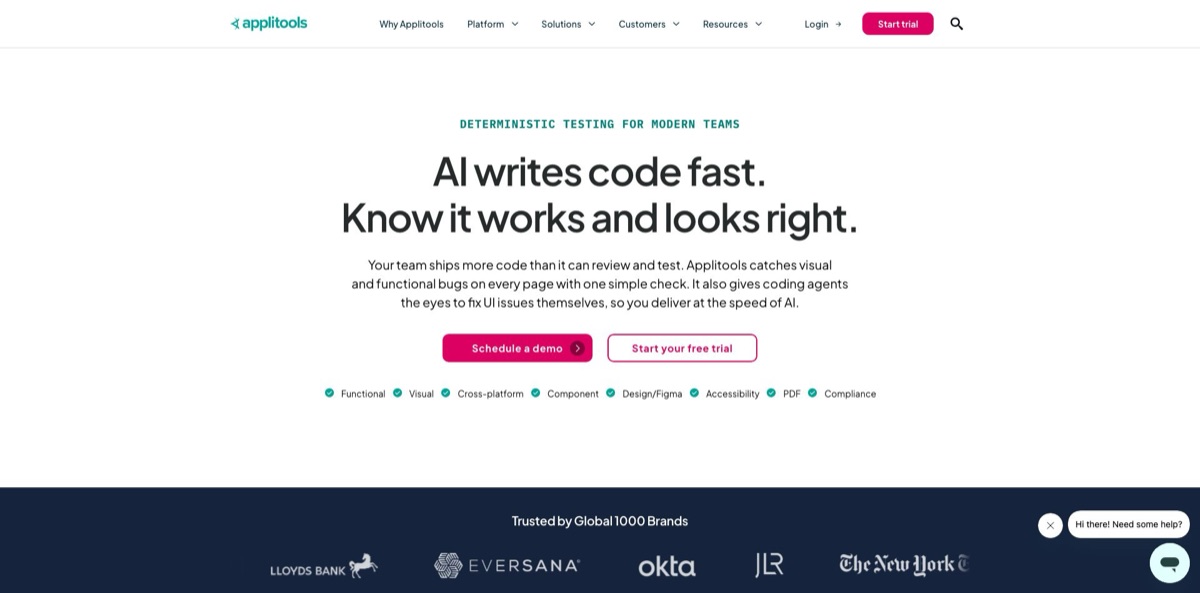
Eyes replaces long lists of hand-written UI assertions with one screenshot checkpoint that a computer-vision model compares against an approved baseline. You add a line or two to existing Playwright, Cypress, Selenium, Appium or Storybook tests, and Eyes reports missing elements, overlaps, broken layouts, wrong text and contrast problems while ignoring the font-smoothing and sub-pixel noise that makes plain pixel diffing so flaky. Its Ultrafast Grid re-renders a single DOM snapshot across 100+ browser, viewport and device combinations, and an MCP server lets coding agents such as Cursor or Claude Code read failures and act on them. The weak spots are cost and upkeep: the cheapest public plan is $667 a month billed annually, and baselines need disciplined review once suites grow. Pick it if UI regressions keep reaching production and your team already runs automated end-to-end tests.
How to start using Applitools Eyes?
Open the Applitools sign-up page and start the 14-day free trial with a work email. No credit card is required, and your API key is sent to that address. You can find it again later in the Eyes dashboard: open the main menu icon at the top right and choose My API Key. Export it as an environment variable named APPLITOOLS_API_KEY. If your company uses a dedicated cloud instead of the public eyes.applitools.com server, also set APPLITOOLS_SERVER_URL so the SDK reports to the right place.
The fastest first run is the official Cypress quickstart. Clone the example-cypress-javascript repository, run npm install and npx eyes-setup, then npm test. Every cy.eyesCheckWindow() call in the test becomes a step. On the first run each test gets the status New, and its screenshots are saved as the baseline. Run the suite again, and any step that differs turns Unresolved, which is your first look at a real comparison. The same pattern applies to the SDKs for Playwright, Selenium, WebdriverIO, Appium and the rest of the 50+ supported frameworks.
The settings that shape your results are match levels and the browser list. Dynamic, the default, recognizes dates, numbers, emails and links and flags them only when the format breaks. Strict flags anything a human eye would catch, Ignore Colors skips color shifts, and Layout checks only structure and the relative position of elements. You can apply Layout to specific selectors, such as a dashboard table full of live data, instead of excluding the region entirely. Browsers and devices for the Ultrafast Grid sit in an applitools.config.js file, so you scale coverage by editing one array.
Results land in the Eyes Test Manager. The left panel lists batches (one execution of a suite), the main panel shows tests and their steps, and pressing the s key on a step puts baseline and checkpoint side by side. Accept intended changes, reject bugs, group steps by similar differences, and use the Auto Maintenance menu to apply one decision to every matching step. Nothing becomes permanent until you save the changes to the baseline. Once the flow feels routine, wire the run into GitHub Actions, GitLab CI or CircleCI so checks fire on every pull request.
Mark live-data regions with the Layout match level on day one, so your first week of reviews is spent on real bugs rather than changing numbers.
Who is it for?
Front-end developers
AI coding assistants and fast refactors break responsive layouts, z-indexes and component states in ways unit tests never see. Eyes adds a visual check to the Playwright or Cypress tests you already have, and its root cause view points to the DOM element and CSS rule that changed. You find the broken breakpoint in the pull request, not in a customer screenshot.
QA engineers and SDETs
Asserting every label, price and button by locator bloats suites and breaks with each redesign. One Eyes checkpoint validates the whole screen, and grouped differences let you approve one header change across hundreds of viewports in a single click. Maintenance time goes to real failures instead of rewriting selectors.
Design system teams
Components in Storybook drift away from the Figma source as they pass through many hands. Eyes tests isolated components, compares builds with Figma designs through its integration, and the Starter plan counts component checkpoints separately from full pages. Drift gets caught before it spreads into every product that consumes the library.
Teams in regulated industries
Banks, pharma and healthcare companies need to show that statements, labels and PDFs render exactly as approved. Eyes validates PDF documents, can run in a private cloud or on-premises, and holds ISO 27001 and SOC 2 Type II certifications. Audit evidence comes from saved baselines rather than manual screenshots.
Teams shipping with coding agents
When Cursor, Copilot or Claude Code writes much of your UI, nobody checks how it actually renders. The Applitools MCP server lets the agent add checkpoints, read failed batches and propose accept or reject decisions, with your approval required before anything reaches the baseline. Visual review becomes part of the agent’s loop instead of a separate manual chore.
Applitools Eyes pricing
Applitools sells Eyes inside platform-wide plans priced by checkpoints and active pages rather than seats, and every plan includes unlimited users. Only the entry tier has a public price. The two higher tiers, which also bundle Applitools Autonomous for AI-driven functional testing, are negotiated with sales. No permanent free plan appears on the pricing page, but a free trial lets you run your own suites before you commit.
Sign up with a work email, get an API key, and test Eyes on real projects. No credit card is required.
Unlimited users and either 100,000 component checkpoints or 1,000 page checkpoints. Includes Visual AI validation, the Visual AI MCP server, Figma design integration, Storybook component testing, cross-browser and device testing, CI/CD integrations, automated maintenance and root cause analysis, accessibility testing, and standard support through the portal or email.
Custom pricing. Starts at 150 active pages or 1,500 components with unlimited executions. Adds unlimited browsers and devices per Visual AI check, AI-driven functional testing, NLP-based test authoring, codeless API testing, test data generation, priority support with a shared Slack channel, and two hands-on training sessions. Private cloud, SSO and extra concurrent executions are optional add-ons.
Custom pricing. Starts at 350 active pages or 1,500 components with unlimited executions. Adds a dedicated or private cloud, SSO/SAML, custom SLAs with a 99.99% uptime guarantee, premier support with a weekly dedicated technical account manager, up to 5 custom executive dashboards and unlimited onboarding sessions. Access to real iOS and Android devices and on-premises deployment are add-ons.
Applitools Eyes key features
Visual AI match levels
Instead of comparing raw pixels, Eyes analyzes each checkpoint with models trained on more than 4 billion application screens, using Strict, Layout, Dynamic and Ignore Colors levels that you can mix on a single screen. Dates and order numbers are checked for a valid format rather than an exact value, and Layout regions still catch a missing table without flagging changed figures. You keep full-page coverage without maintaining long ignore lists.
Ultrafast Grid
The SDK captures a DOM snapshot once during your test, and the cloud renders it across Chrome, Safari, Firefox, Edge, iOS and Android viewports in parallel, 100+ combinations in all. You skip running a local browser farm and avoid repeating the whole functional script per browser.
Automated maintenance and root cause analysis
Eyes groups identical differences across tests and viewports, so one accept or reject decision applies to all of them, and clicking a difference reveals the DOM element and CSS property behind it. A design-system color change becomes one decision instead of hundreds. Developers get a starting point for the fix, not just a highlighted rectangle.
Applitools MCP server
Installed with npx @applitools/mcp@latest or through the VS Code and Cursor extensions, it lets Cursor, GitHub Copilot, Cline or Claude Code set up Eyes, add checkpoints and investigate failed batches from the IDE. The setup tools currently support only the Playwright Fixtures SDK, while the inspection and review tools work on results from any SDK and need separate read and write API keys.
Accessibility and design checks
Contrast Advisor and WCAG-oriented checks test color contrast, font sizes and overlapping elements alongside every visual run, and the Figma plugin compares built screens with the original designs. Accessibility regressions appear in the same report as layout bugs. It covers routine contrast checks well, though it does not replace a full accessibility audit.
Framework and deployment coverage
SDKs cover 50+ frameworks, including Selenium, Cypress, Playwright, Appium, Storybook and WebdriverIO, plus 60+ integrations with CI servers, Git hosts, Jira and Slack. Eyes runs as SaaS, in a dedicated cloud on AWS, Azure or GCP, or on-premises behind your firewall. Regulated teams can adopt it without sending screenshots to a shared multi-tenant cloud.
Applitools Eyes Pros & Cons
Pros
Eyes tackles the problem that sinks most visual regression projects: false alarms. Match levels separate harmless rendering noise and dynamic data from real breakage, so one checkpoint can replace dozens of brittle locator assertions. Reviewers on G2 and Capterra repeatedly praise its accuracy, the Ultrafast Grid for covering browsers such as Safari that local runners miss, and root cause analysis that points at the responsible CSS. The SDK list is long enough that you rarely need to change frameworks, and the MCP server brings visual results into Cursor, Copilot and Claude Code. Unlimited users on every plan means designers and product managers can review diffs without extra seat costs. Start the trial with your most-visited flows so you can show value within 14 days.
Cons
Price is the main barrier. Starter costs $667 a month on an annual contract, and anything beyond its checkpoint allowance goes to a sales negotiation, which puts Eyes out of reach for many small teams and side projects. Users also describe a learning curve around baselines: merges can fail pull requests even after a new baseline was approved, dynamic content needs extra configuration, and upkeep grows with suite size. Some reviewers want clearer usage metrics and alerts before they hit limits, and the MCP setup tools only support Playwright Fixtures for now. Track checkpoint usage weekly during the trial and agree on baseline branch rules before inviting the whole team.
Use Applitools Eyes if you want…
- Replace hundreds of UI assertions with single visual checkpoints.
- Catch layout bugs across browsers before pull requests merge.
- Test Storybook components against approved baselines on every build.
- Compare live screens with original Figma designs automatically.
- Let coding agents read and triage visual test failures.
- Validate PDFs, statements and regulated documents at scale.
- Run cross-browser checks without maintaining your own grid.
- Flag color contrast and WCAG layout issues on every run.
Applitools Eyes alternatives


Applitools Eyes Reviews
Visual AI catches differences that Selenium functional checks miss and fits into a Selenium and TestNG stack without much effort, but baseline management and dynamic content take real configuration, and the price is hard to justify for a small team.
The Ultrafast Grid scales one suite across many browsers and devices, and the Layout and Dynamic modes cut flaky failures; what is missing is usage alerts and a per-page view of what consumes the quota.
For a team without dedicated QA running Cypress, the smart comparisons and in-code layout regions work well, yet pull requests sometimes fail after a merge even though the updated baseline had already been approved.
Reviewers call its comparison accuracy the best on the market, although the dashboard confuses newcomers at first and tiny pixel deviations still cause the occasional false failure.
Useful features like layout regions and the grid make it worth keeping, but baseline maintenance becomes time-consuming at scale and communication about new releases could be better.
FAQ
Does Applitools Eyes have a free plan?
No permanent free plan is listed on the pricing page. You get a 14-day free trial without a credit card, after which the Starter plan costs $667 a month paid annually.
Which test frameworks does Applitools Eyes support?
SDKs cover 50+ frameworks, including Selenium, Cypress, Playwright, WebdriverIO, Appium and Storybook. In most of them you add a visual checkpoint with one or two lines of code.
How is Visual AI different from pixel-by-pixel comparison?
Pixel tools flag every anti-aliasing or sub-pixel shift. Eyes uses match levels such as Strict, Layout and Dynamic to flag only differences a person would notice, and checks dynamic values by format rather than exact content.
Can AI coding agents work with Applitools Eyes?
Yes. The Applitools MCP server connects to Cursor, GitHub Copilot, Cline, Claude Code and other MCP clients so an agent can add checkpoints and investigate failures, while baseline changes still need your explicit approval.
Is my test data secure?
Applitools is ISO 27001 certified and SOC 2 Type II compliant, supports SSO and SAML, and states GDPR and CCPA compliance. Larger customers can run Eyes in a dedicated private cloud or on-premises.
What counts as a checkpoint?
A checkpoint is one visual check call in your test, such as cy.eyesCheckWindow(), and each one appears as a step in the Test Manager. Starter includes 100,000 component checkpoints or 1,000 page checkpoints.
Can Eyes test mobile apps and PDF files?
Yes. Eyes covers native mobile apps through Appium and its native mobile library, renders mobile viewports on the Ultrafast Grid, and validates PDF documents. Real iOS and Android devices are an Enterprise add-on.
Who owns Applitools?
Private equity firm Thoma Bravo took a controlling stake in 2021, and its partners sit on the board. Co-founder Adam Carmi remains the company’s CTO.
Similar tools
 Novita AIDeveloper cloud with one API for 200+ open-weight AI models, plus GPU instances, dedicated endpoints and isolated sandboxes for AI agents.
 You.comDeveloper platform of web search, content extraction, cited research and model inference APIs that feed AI agents and RAG apps real-time web
 QodoAI code review platform that runs specialized agents on every pull request, enforces team rules and checks changes against tickets and linked