
ApX Machine Learning
Developer ToolsUpdated November 10, 2026
LLM VRAM and GPU sizing calculator with model and hardware directories, a REST API and MCP server, plus free ML courses for engineers.
We may earn a commission when you sign up through our links. It does not affect our reviews.
What is ApX Machine Learning?
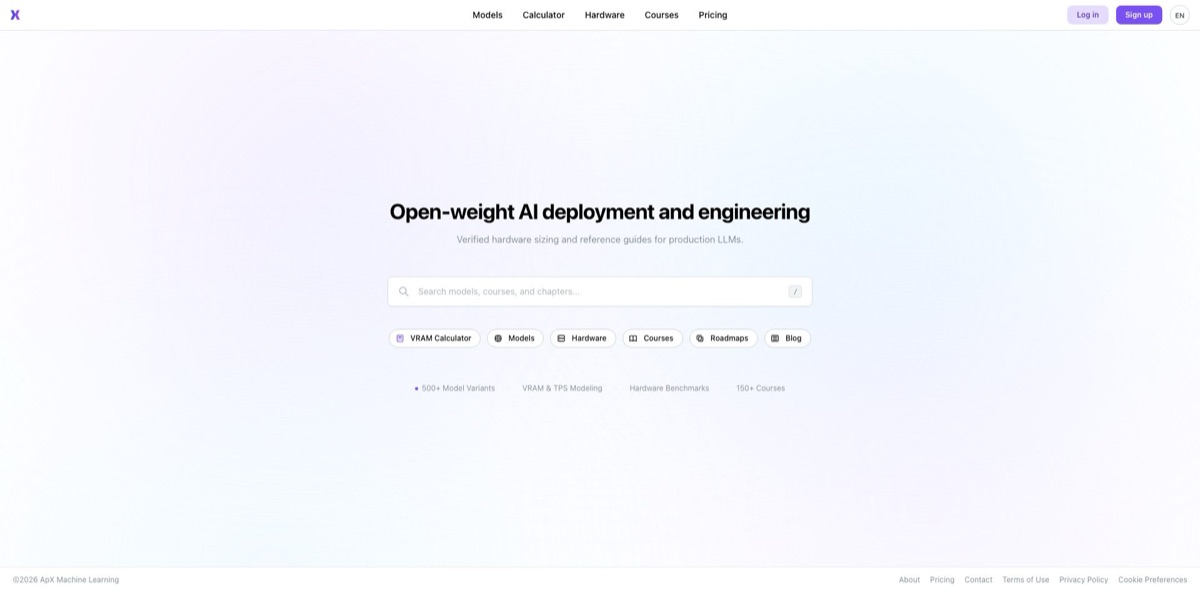
ApX Machine Learning (apxml.com) is a sizing platform for engineers who run open-weight language and diffusion models on their own GPUs. Its centerpiece is a VRAM and serving calculator: choose a model, a quantization level and a GPU, and it estimates weight memory, KV cache, activations, time to first token, tokens per second and hourly rental cost, from one consumer card up to a multi-node cluster. Around it sit a model and GPU spec directory, a REST API, an MCP server, a signed-in AI assistant and a free library of machine learning courses. The problem it removes is the out-of-memory crash that appears only after the weights are downloaded and real traffic arrives. The weak spot is that every figure is a modeled estimate, and brand-new architectures can be misread. Use it if you buy, rent or configure GPUs for inference or fine-tuning.
How to start using ApX Machine Learning?
Open the VRAM Calculator from the top menu of apxml.com. It runs in the browser on the free Basic tier, which is aimed at local hardware and shows ads. Create an account with email or Google sign-in when you want the AI Assistant, course progress tracking or an API token. The sign-up form asks for a work or student email, and you can protect the account with two-factor authentication through an authenticator app.
Your first real scenario is a simple fit check. On the Inference tab, pick a model in Select Model, set Inference Quantization (for example Q4_K_M for a GGUF build) and KV Cache Quantization, then choose your card under Device / GPU or type in custom VRAM. Leave Batch Size and Concurrent Users at 1 and set Sequence Length to the context you actually plan to use. The results panel shows VRAM use as a share of your card, generation speed, time to first token and an estimated GPU rental price, plus a memory breakdown for base weights, KV cache, activations and framework overhead.
The settings that move the answer most sit further down. Runtime settings decide which serving framework the estimate models: vLLM, TensorRT-LLM, llama.cpp, Ollama, Hugging Face Transformers or Diffusers, with Auto picking one for you. Hardware Configuration switches between Single Rig and Cluster and sets the number of GPUs and the interconnect. The Recommend button searches for a setup that can run the selected model, Auto-Tune adjusts runtime parameters for the hardware you already own, and Advanced Configuration enables offloading to CPU RAM or NVMe. The Fine-tuning tab swaps in full, LoRA and QLoRA methods, optimizer flags and dataset size so you also get a training time estimate.
Before you order hardware, check the result twice. Read the runtime advisories, which flag risks such as long-prompt prefill stalling continuous batching or KV cache swapping over PCIe, then open the Accuracy Scorecard to see how the engine scored on similar models and GPUs. Share the configuration with a link or copy the config and results as JSON; PDF export needs Pro. If you want the same check in a CI pipeline, create a token under API & Account Tokens and send the same parameters to
POST /api/v1/vram-calculation/inference.
Who is it for?
Local LLM hobbyists
You have a single gaming card and want to know whether a 32B model at 4-bit will load before you download tens of gigabytes. The free calculator answers that in a minute and shows how much context you can afford on top. Expect the memory figure to be more reliable than the speed figure.
ML platform engineers
You are moving a model from a demo to an internal service and need to know how many concurrent users one node can hold at your latency target. Concurrency, batch scaling and SLA target optimization turn that into a number you can defend in a design review. Those production features sit behind the Pro plan.
Infrastructure buyers and technical founders
You have to choose between renting datacenter GPUs, buying workstation cards or running on Apple Silicon, and a wrong guess is expensive. Cluster topologies, interconnect options and hourly rental estimates give you a side-by-side comparison, and every invoice can carry your company name and Tax ID. A one-time pass fits a single purchasing decision.
Fine-tuning practitioners
LoRA and QLoRA runs usually crash on optimizer states and activations rather than on the weights themselves. The fine-tuning mode breaks those parts out and estimates training time from dataset size, with presets for Hugging Face Trainer, Unsloth and torchtune. One independent tester found training memory to be the weaker area, so leave headroom.
Developers building AI agents: You want an assistant or a build job to check hardware fit without anyone opening a browser. The REST API and the MCP server expose sizing, GPU catalog and compatibility checks as callable tools, and both come with the free tier, with higher rate limits on Pro+.
Students and career switchers
You want to understand transformers, quantization and distributed inference instead of only running a calculator. The course library is free, including quizzes, completion certificates and a public verification link you can add to LinkedIn.
ApX Machine Learning pricing
Pricing is per person and scales with the size of the deployment you want to model, not with the number of calculations. The calculator for local hardware, the model directory, the API, the MCP server and every course are free. Paid tiers open datacenter GPUs, multi-GPU and multi-node topologies, production concurrency and higher API limits. You can pay monthly, annually (the site advertises a 17% saving) or with a one-time pass that does not auto-renew. The terms license each account, subscription, pass and API key to one named person, so there is no shared team seat. Accepted cards are Visa, Mastercard and UnionPay; American Express is not supported, and payments are generally non-refundable.
Free forever and ad-supported. Covers VRAM allocation and token throughput estimates, local inference and parameter-efficient fine-tuning, memory offloading, quantization and runtime diagnostics, plus API and MCP server access.
A one-time pass costs $29 for 30 days or $189 for 365 days. Adds the full datacenter and workstation GPU catalog, production concurrency and batch scaling, multi-GPU server and distributed topology modeling, workload SLA target optimization, PDF export and an ad-free interface.
A one-time pass costs $149 for 30 days or $989 for 365 days. Includes everything in Pro plus fleet-scale concurrency and large-batch planning, hyperscale multi-node and rack-scale topologies, cluster node configurations and high-capacity API and MCP rate limits. Applying cluster setups beyond 64 GPUs requires this tier.
ApX Machine Learning key features
Architecture-aware memory modeling separates base weights, KV cache, activations and framework overhead instead of multiplying parameters by bytes. It handles MHA, GQA and DeepSeek-style Multi-Head Latent Attention, and lets you quantize weights (FP16, FP8, INT8, INT4, GGUF levels, AWQ, GPTQ) and the KV cache independently. That is how it catches long-context setups where the model loads but the cache does not fit.
Performance and cost simulation turns a memory check into a serving plan
You get time to first token, decode tokens per second, per-user throughput, estimated power draw and an hourly GPU rental figure. Runtime advisories warn about issues such as prefill starvation, unaligned prefix caching or speculative decoding eating into KV capacity.
Multi-GPU and cluster planning models tensor, pipeline, expert, data and context parallelism over PCIe, NVLink, InfiniBand or Ethernet. For multi-node layouts it reports pipeline stage imbalance and the network bandwidth needed to move KV cache between nodes.
The fine-tuning estimator covers full fine-tuning, LoRA and QLoRA with optimizer choices such as AdamW and 8-bit optimizers, gradient checkpointing, flash attention and ZeRO stages. Enter dataset size, tokens per sample and epochs and it returns training throughput and total hours. It answers whether a run fits and roughly how long it will occupy the GPU.
The REST API and MCP server bring the same engine into scripts and AI assistants
The API has inference and fine-tuning endpoints plus GPU and model listing routes, authenticated with a bearer token. The MCP server at apxml.com/mcp exposes 8 tools, including calculate_vram_requirements and recommend_hardware_setup, over OAuth or an account token.
A public accuracy scorecard compares predictions with measured runs across 272 cases
The vendor’s own figures show a 92.3% in-band pass rate and 1.7% median error for VRAM, against 88.1% and 8.4% for decode speed. Few calculators publish their misses, which makes it easier to judge where to trust the output.
The model directory, hardware profiles and course library round out the platform
Model pages list architecture details, context length and API price per million tokens, and a signed-in AI Assistant can summarize a page or estimate minimum hardware for a model. The site lists 150+ free courses, from Python basics to quantization and LLM serving.
ApX Machine Learning Pros & Cons
Pros
The free tier is unusually complete: you get the full local-hardware calculator, fine-tuning estimates, the API and the MCP server without paying. The engine understands attention schemes and KV cache quantization, which is exactly where generic calculators go wrong, and local-LLM users on Hacker News and Reddit often point newcomers to it for that reason. It also covers diffusion image and video models, Apple Silicon and custom hardware profiles. The team publishes an accuracy scorecard and a dated version history, with v4.4 released on November 3, 2026. Start with the free calculator and the scorecard for your model family before paying for anything.
Cons
Every output is an estimate, and community feedback shows it can still miss badly, especially on newly released architectures. Speed predictions are looser than memory predictions, even by the vendor’s own numbers. The features production teams need most, such as datacenter GPUs, multi-GPU topologies and PDF reports, are paywalled, and licenses are strictly single-user with no visible team plan. Payments are generally non-refundable, American Express is not accepted, and the free tier carries ads. The interface is available only in English and Simplified Chinese. Treat the result as a shortlist and confirm it with a short load test on rented hardware before you buy.
Use ApX Machine Learning if you want…
- Check whether a model fits your GPU before downloading.
- Size KV cache for long contexts and many users.
- Compare quantization levels by memory and speed trade-offs.
- Plan multi-GPU or multi-node clusters before buying hardware.
- Estimate LoRA or QLoRA memory and total training time.
- Add VRAM checks to deployment scripts through a REST API.
- Give your AI assistant GPU sizing data over MCP.
- Learn transformer internals and quantization through free courses.
ApX Machine Learning alternatives

ApX Machine Learning Reviews
A Hacker News commenter called it the most thorough VRAM calculator they knew, because it accounts for each model’s attention scheme when sizing the KV cache and supports quantized weights, quantized KV cache and fine-tuning; the catch is that it only covers models in its own catalog.
In a 2026 Hacker News thread, a local-LLM user who had praised it before argued that even model-specific calculators like this one still get estimates very wrong a lot of the time, so the numbers should be treated as a starting point.
On Reddit, people answering “will it fit” questions link straight to the calculator and say it gives a good estimate for any model at any quantization, while others suggest a quick sanity check against the model file size and your available memory.
Another Hacker News user shared the model directory as a useful resource that combines a ranking of local models, VRAM needs by quantization and context size, and architecture details such as attention structure and knowledge cutoff.
Independent blog roundups of VRAM calculators rank it near the top for its visual interface, easy inputs, speed simulation and visible update log, although one tester reported that it is stronger on inference than on training memory, which it tended to underestimate.
FAQ
Is ApX Machine Learning free?
Yes. The Basic plan costs $0 with no time limit and includes VRAM and throughput estimates for local hardware, fine-tuning estimates, API and MCP access, with ads. Courses, quizzes and completion certificates are free as well.
How accurate is the VRAM calculator?
The vendor’s public scorecard reports a 92.3% in-band pass rate and 1.7% median error for VRAM across 272 test cases, with looser results for speed. Community users still report misses on new architectures, so confirm critical sizing with a real test run.
Does it support Apple Silicon and consumer GPUs?
Yes. The hardware list covers consumer NVIDIA cards, datacenter GPUs and Apple Silicon unified memory, and you can enter custom VRAM, bandwidth and compute figures. Datacenter GPUs and larger custom memory sizes require Pro.
Is there an API or MCP server?
Yes. The REST API offers inference and fine-tuning endpoints authenticated with a bearer token from your account settings, and the remote MCP server at apxml.com/mcp works with OAuth or an account token. Both are available on the free plan, with higher rate limits on Pro+.
What happens to messages I send to the AI Assistant?
The privacy policy says chat messages are sent to third-party LLM API providers under data processing agreements and are used only to generate a response. The assistant requires you to sign in.
Can my team share one subscription?
No. The terms license each account, subscription, pass and API key to a single person and allow suspension without refund if credentials are shared.
How do I cancel, and can I get a refund?
You can cancel a subscription from your settings page and keep Pro features until the billing cycle ends. Payments are generally non-refundable, and one-time passes simply expire after 30 or 365 days.
Which payment methods are accepted?
Visa, Mastercard and UnionPay are accepted, while American Express is not. An itemized invoice with your company name, address and Tax ID is generated for every transaction.
Similar tools
 Novita AIDeveloper cloud with one API for 200+ open-weight AI models, plus GPU instances, dedicated endpoints and isolated sandboxes for AI agents.
 You.comDeveloper platform of web search, content extraction, cited research and model inference APIs that feed AI agents and RAG apps real-time web
 QodoAI code review platform that runs specialized agents on every pull request, enforces team rules and checks changes against tickets and linked