

Artbreeder
Art GenerationUpdated November 18, 2026
Browser-based AI art studio for mixing, breeding and editing images with gene sliders, prompts, collages and a remix-friendly community.
We may earn a commission when you sign up through our links. It does not affect our reviews.
What is Artbreeder?
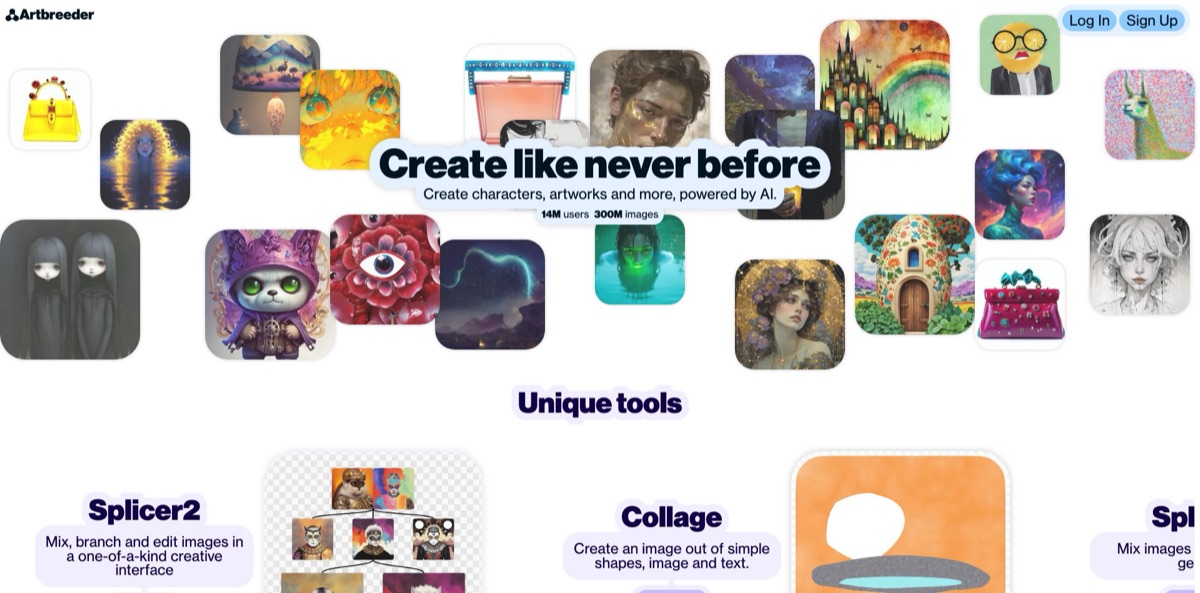
Artbreeder is a browser-based image studio from Morphogen, Inc. that began as Ganbreeder, an experiment in “breeding” pictures by mixing the genes of GAN models. That idea still sits at the center: Splicer and Splicer 2 blend images and expose sliders for traits such as age or color, while Composer and Collager add spatial control. Newer tools wrap third-party models, with Prompter running Flux, GPT Image and Nano Banana for generation and editing, and Animator turning stills into video for subscribers. The homepage claims 14 million users and 300 million images, and public creations feed a remixable community library. The weak spots are a real learning curve on blending, credits that reset every billing period, and Terms that place your images under a CC0 license. Pick it for character concepts, moodboards and playful exploration rather than assets you need to own exclusively.
How to start using Artbreeder?
Open artbreeder.com and click Sign Up in the top right corner; you must be at least 13 under the Terms of Use. You can look around first, since the tool pages load without an account, but saving and generating happen inside your profile. The View all link on the homepage leads to the Tools page, which lists Splicer2, Mixer2, Prompter, Composer, Collager, Animator (marked Pro Only), the original Splicer, Outpainter and Worlds, with Director and Patterns hidden under More tools. A free account covers the free features, such as creating Splicer images and generating slow Collager images, so you can learn the interface before paying.
For a first real project, build a character portrait. In the original Splicer, choose Portraits and then New Image, and you get gene sliders like Age, Gender and color that push the face in small steps. Splicer 2 works more like a family tree: the Select images to mix screen lets you pull parents from Browse, Shuffle or Upload, or describe an image in text, then press Branch to grow variations. A Mutation Rate control sets how far each child drifts, and the toolbar shows the current rate of 33 images per credit.
Prompter is the screen you will open most once you move past blending. The Settings panel has a Model Type switch (Normal for plain text-to-image, Instruct for editing), a Model menu that offers SDXL Lightning and Flux Schnell in Normal mode, and a Shape option that shows the output size, 1024x1024 for Square. Below that sit the Description box, a Starting Image uploader, an advanced section and the generate button. Instruct models other than Kontext accept up to four starting images, so you can drop a character into a scene from another picture. In-Paint lets you select one region and prompt only that area.
Before you share anything, check where it is going. Images land in the public community by default, and only subscribers get Private Mode or Google Drive Sync. Regular downloads are 512px, while Pro accounts can export 2048px files. If the NSFW checker flags a harmless image, open the flag icon and choose Unflag; free users get 3 unflags a day. Prompter keeps your generations for 30 days, but the Terms say Artbreeder can remove images at any time, so save the keepers locally.
Who is it for?
Tabletop game masters
You need a face for every innkeeper, villain and party member, and stock art never matches the table’s description. Reddit GMs have called Artbreeder a gold mine for PC and NPC portraits, because sliders let you nudge age, hair and expression until the character fits. You get a consistent cast in minutes instead of hunting through image searches.
Novelists and worldbuilders
Holding a protagonist’s face in your head across a 300-page draft is hard. Writers on Reddit describe Splicer as Photoshop for genetics, with sliders for face shape, eye color and hair. The experimental Worlds tool goes a step further and builds story settings from any image you upload.
Concept artists and illustrators
Early exploration eats hours of sketching before a direction even exists. Splicer 2 branches ideas into a visual tree, and Composer lets you assign separate images to style, content and composition, so you can test many combinations quickly. Treat the output as reference, not finished art.
Indie developers with no art budget
Prototypes need placeholder portraits and backgrounds long before an artist is hired. Tabletop designers on r/RPGdesign recommend Artbreeder for filler art, and the CC0 license means the images carry no attribution requirement. The flip side is that anyone else may reuse them too.
Community-minded hobbyists
Some people come for the social loop as much as the images. Daily contests, Remix Parties and lineage pages that trace each image’s ancestors turn generation into a shared game. If you enjoy remixing other people’s work, few tools make that easier.
Short-form video creators
Animated characters stand out in feeds, but separate video tools add another bill. Subscribers can push their Artbreeder stills into Animator, which now produces video with sound and supports starting and ending frames on newer models.
Artbreeder pricing
Artbreeder pairs a free account with three Artbreeder Pro tiers that differ only in how many credits you get. Credits pay for generations, and the pricing page estimates about 10 SDXL images per credit. Every paid tier includes the same benefits: no ads, privacy controls, Google Drive sync, unlimited image generation in Composer, Splicer fast mode and high-resolution downloads. Credits reset at the start of each billing period (monthly or yearly) and do not roll over yet. All prices below come from the official pricing page and are in USD.
Free features such as Splicer images and slow Collager generation, ads on, public images and 3 NSFW unflags a day. The pricing page does not publish a monthly credit allowance for free accounts.
Billed yearly, it costs $7.49/month ($89.88/year) and grants 1,200 credits for the year at $0.07 per credit.
Billed yearly, it costs $15.99/month ($191.88/year) with 3,300 credits at $0.06 per credit.
Billed yearly, it costs $30.99/month ($371.88/year) with 8,400 credits at $0.04 per credit.
There is no team or enterprise plan on the page. If you run out mid-cycle, you can renew early, upgrade, or buy more credits from your account page, and the free features keep working at zero balance. Animator is reserved for subscribers.
Artbreeder key features
Splicer and gene editing
The original Splicer mixes images and exposes their “genes” as sliders, from age and gender to colors and custom traits other users create. You move a slider and watch the portrait shift gradually instead of rewriting a prompt. This is still the fastest way on the site to keep one face consistent while you change details.
Splicer 2 branching tree
Launched in April 2025, it replaces a flat canvas with a tree of parents and children. You pick images to mix, press Branch, and follow whichever variation looks most promising, with a Mutation Rate control for how wild each generation gets. An achievements system rewards you for finding unusual results.
Composer with Paint Mode
Composer lets you decide which reference image supplies style, which supplies content and which sets composition, and images take around one second to generate. Paint Mode, added in September 2024, lets you paint an image into a region of the canvas, which helps put two different faces in one picture.
Prompter with modern models
Normal mode offers text-to-image models such as SDXL Lightning and Flux Schnell, the November 2026 update added Z-Image Turbo for fast, low-cost images, and Instruct mode handles edits with models like GPT Image 2.5, Nano Banana Pro and Flux 2. The November 2026 update added Qwen Camera Angles to rotate, raise or zoom the camera around a starting image. Generations stay saved for 30 days even if the tab closes.
Mixer 2 concept generator
Upload up to four images, add some text guidance, and Mixer 2 proposes creative concepts, each with its own AI-written prompt and images. You can vary a concept, edit its prompt, and choose the generation model, including GPT Image, Nano Banana and Krea options. The Create Concepts button is priced at 0.20 credits.
Animator for video
Subscribers can combine an image with a text prompt to make short clips. Since November 2025 the Wan 2.5 model adds native audio, and the latest update brought H3 Max Turbo and FLUX 3 Max with starting and ending frames.
Community, contests and lineage
Every public image has a lineage page showing its ancestors, so you can trace and remix how a picture evolved. Daily contests and Remix Parties give you prompts and an audience, and a user directory highlights the most active creators.
Artbreeder Pros & Cons
Pros
Artbreeder offers a way of working you rarely find elsewhere: breeding and slider-based editing let you steer a character gradually instead of gambling on prompts. That makes it strong for consistent portraits and slow, exploratory concept work. The toolset is broad, covering blending, collage layouts, text-to-image, instruction-based editing, outpainting and video, and it now includes current models like GPT Image 2.5 and Flux 2. Paid plans are inexpensive, starting at $7.49 a month on yearly billing, and Composer generation is unlimited on every tier. The remix community and lineage pages add inspiration you would not get from a solo tool. Start with Splicer for faces and Composer for scenes to see the strengths quickly.
Cons
Blending has a learning curve, and reviewers often mention trial and error before results match what they had in mind. Credits reset each billing period with no rollover, and premium models in Prompter and Animator burn through them faster than SDXL. The Terms of Use, last updated in November 2019, license every image you create under CC0, so anyone may reuse your work, which is a poor fit for exclusive brand or client assets. Free accounts see ads, public-only images and 512px downloads. The NSFW checker can misfire, and some reviewers report occasional inappropriate output. Keep a local backup and read the Terms before using anything commercially.
Use Artbreeder if you want…
- Design consistent character portraits with gene sliders.
- Breed new images by mixing several parent pictures.
- Branch creative variations in a visual family tree.
- Control style, content and composition from separate references.
- Edit images with plain-language instructions and inpainting.
- Turn finished stills into short videos with sound.
- Remix community artwork in daily contests and parties.
- Generate placeholder art for games and tabletop campaigns.
Artbreeder alternatives
 Leonardo.aiRead review →
 MidjourneyRead review →
 KreaRead review →
 OpenArtRead review →
 IdeogramRead review →
 starryaiRead review →
 CivitaiRead review →
 PlaygroundRead review →
Artbreeder Reviews
Merging two images and then tweaking the generated result is the standout feature, and the pictures feel original and realistic, though the tool now and then produces inappropriate or offensive images.
Real-time previews and flexible color controls make quick adjustments easy, but the blending feature takes a while to understand and results often need a lot of trial and error.
Tabletop players and writers praise it for character work, calling it a gold mine for player and NPC portraits, while some art communities have pushed back, with one worldbuilding forum banning Artbreeder images over copyright concerns.
Mixing is impressive and the site shows every image’s ancestors, which makes remixing easy, yet another reviewer notes that the full feature set sits behind a paid plan.
FAQ
Is Artbreeder free?
Yes, you can sign up for free and use features such as Splicer images and slow Collager generation. Paid Artbreeder Pro plans start at $8.99 a month, or $7.49 a month billed yearly, and add credits, private images, no ads and high-resolution downloads.
Who owns the images I create on Artbreeder?
The Terms of Use say each image belongs to the user who created it, but you also agree to license it under Creative Commons CC0. In practice that releases your images into the public domain, so anyone can use them for any purpose, with or without attribution.
Can I keep my Artbreeder images private?
Only on a paid plan. Subscribers can make individual images private or switch on Private Mode so that every new image stays private, and they can sync images to Google Drive.
Do Artbreeder credits roll over?
No. Credits reset at the beginning of each billing period, which is monthly or yearly depending on your plan. Artbreeder says rollover is being worked on, and you can renew early, upgrade or buy extra credits from the account page.
Which AI models does Artbreeder use?
The original tools were built on BigGAN and StyleGAN. Current tools add SDXL Lightning, Flux Schnell, Z-Image Turbo, Flux 2, GPT Image 2.5, Nano Banana, Qwen Image and Krea models for images, plus Wan 2.5, H3 Max Turbo and FLUX 3 Max for video in Animator.
Is there an Artbreeder app or API?
Artbreeder runs in the web browser, and the site does not link to an official mobile app or a public API. Updates and help come through the site, its Discord server and social accounts.
What happens if my image is wrongly flagged as NSFW?
You can click the flag icon on the image and choose Unflag, which runs a stronger checker. Free users get 3 unflags a day, while subscribers get unlimited unflags.
How do I delete my Artbreeder account?
The Terms say you can deactivate your account by emailing support. Images you created stay under the CC0 license after deactivation, so copies others have saved can still be used.
Similar tools
 Pixel DojoSubscription AI studio with 80+ image and 60+ video models, consistent characters, LoRA training and an agent that builds ads and short
 mnml.aiAI rendering studio for architects and designers that turns sketches, photos and SketchUp, Revit or Rhino views into photoreal renders and short
 Hyper3D RodinAI 3D model generator from Deemos that turns text prompts or up to five reference images into textured, editable 3D assets with