

Chat & Ask AI
AI AssistantsUpdated October 27, 2026
Multi-model AI chat app from Codeway that puts GPT, Claude, Gemini, Grok and DeepSeek in one place, with PDF chat, web search and image tools.
We may earn a commission when you sign up through our links. It does not affect our reviews.
What is Chat & Ask AI?
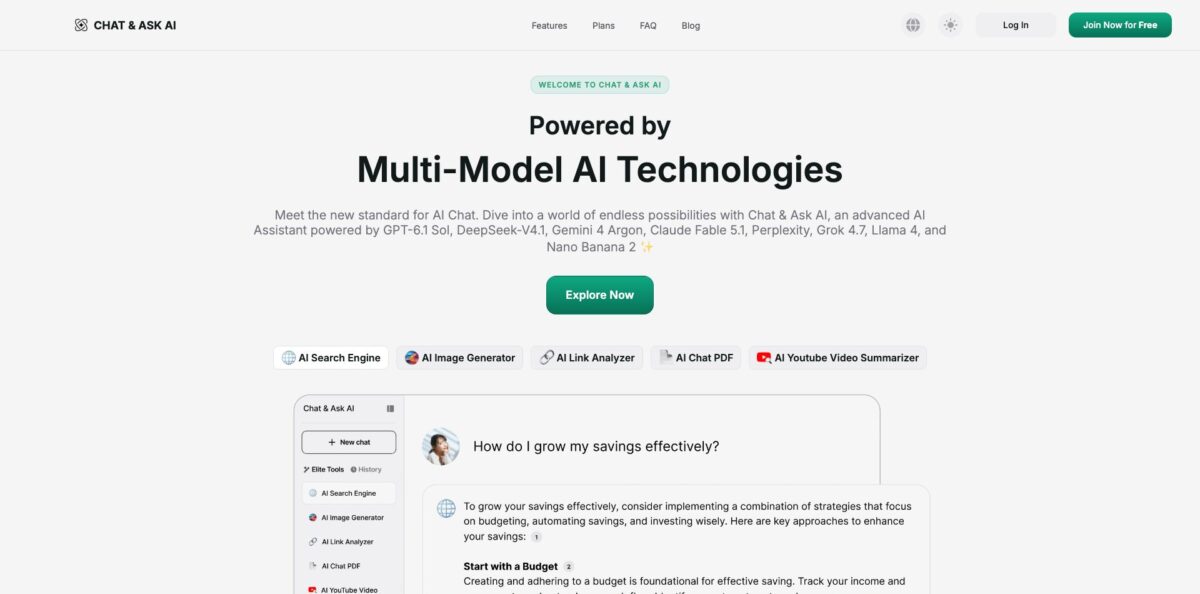
Chat & Ask AI is a consumer chatbot from the app studio Codeway that wraps several commercial language models behind one subscription. You pick a model from a menu (GPT, Claude, Gemini, Grok, DeepSeek, Perplexity or Llama) and add tools for chatting with PDFs, summarizing links and YouTube videos, searching the web with sources and generating images. It runs in the browser at askaichat.app and on iOS and Android, where the store listings now read “Chat AI: Ask Agent Anything”. The appeal is one app instead of four separate AI subscriptions. The weak spots are pricing that is hard to read before checkout, weekly in-app plans that add up, and a database misconfiguration in early 2026 that exposed user chats. Pick it if you mostly ask quick questions on your phone and want model choice without managing several accounts.
How to start using Chat & Ask AI?
Create an account on askaichat.app with the Join Now for Free button. Sign-up works with Google, Apple ID, Facebook or a plain email address, and the same account carries over between the browser and the mobile apps. On a phone, install the iOS app (it needs iOS 15.5 or later and also runs on Macs with an M1 chip or newer) or the Android version from Google Play. Both store listings now use the name Chat AI: Ask Agent Anything and show DEEP FLOW SOFTWARE SERVICES as the publisher, with Codeway in the copyright line, so the different label is still the same product.
Your first real task should be a plain chat. Open a new conversation, choose a model from the model list and ask something you already know the answer to, so you can judge tone and accuracy. The free plan gives you a free model and limited tool access, while the top models named on the plans page sit behind Pro. Then run the same prompt on a second model. Comparing two answers is the main reason to use a multi-model app instead of going straight to ChatGPT or Claude.
Next, open the tools. AI Chat PDF accepts PDF, Word and Excel files and lets you question several files in one session. AI Link Analyzer takes any public URL, and AI Youtube Analyzer takes a video link and can return a transcript or jump to a timestamp you name. AI Search Engine answers with source links, and the AI Image Generator turns a prompt into a picture. The AI Assistants area holds role-based helpers such as AI Writer, AI Logo Designer and AI Marketing Assistant. Pro adds Projects for grouping chats, Temporary Chats, an Image Library and a customizable voice chat.
Check before you trust or pay. For web answers, open the sources the search tool lists under each reply. For documents, ask for the section that supports a claim and read it yourself, especially with contracts or court papers. Before upgrading, look for the renewal amount on the checkout screen, not only the trial price, and note the refund window: website purchases qualify only within 3 days and with fewer than 20 messages sent, with longer windows in the EEA, UK, Turkey, Switzerland and a few other countries. The policy covers website purchases; subscriptions bought inside the iOS or Android app are billed through the store.
Who is it for?
Students
You need homework help, essay feedback and quick explanations, often from a phone. The homework helper and language practice through interactive stories cover the basics, and the AI Detector and plagiarism checker let you scan a draft before you hand it in. Treat the explanations as a starting point and confirm facts in your course material.
Casual mobile users
You want ChatGPT-style answers, a voice mode and image generation without juggling several apps. One subscription gives you a model menu instead of separate accounts with OpenAI, Anthropic and Google. That convenience is the core of the product.
Writers and bloggers
Writer’s block, rewrites and first drafts are the jobs App Store reviewers mention most. The AI Writer assistant drafts emails, essays, stories and blog posts, and you can rerun a weak paragraph on a different model to get a different voice.
Researchers and office workers
Long PDFs, Word reports and Excel sheets are slow to read. AI Chat PDF summarizes them and answers questions across several files in one session, while the link and YouTube analyzers handle articles and recorded talks. Keep the originals at hand, since some users report trouble getting stored files back later.
Small business owners
You need a logo idea, a social post image or a marketing paragraph today, not next week from an agency. The AI Logo Designer and AI Marketing Assistant give you quick drafts to react to. Expect to iterate, because reviewers say the logo tool sometimes ignores text instructions.
Model-curious users
You want to see how Claude, Gemini, Grok and DeepSeek differ without paying for each one. Asking the same question across models takes a few taps here, though this is not a developer tool and there is no API documented on the site.
Chat & Ask AI pricing
The app runs on a freemium subscription, and the price you see depends on where you buy. The website offers a Free plan and a Pro plan, while the iOS app sells weekly and lifetime Premium in-app purchases. There are no credits or seats to track: Pro lifts the limits on models, tools and assistants. Prices below are in USD from the US plans page and the US App Store listing as of October 2026; shoppers in other countries see different amounts and currencies.
You get a free model, limited AI tools, your first AI Assistants and previews of Pro features. It is enough to judge answer quality, not enough for daily document work.
The visible page does not say what the plan renews at after that week; the page’s structured product data lists Premium at $9.99 per month, so confirm the figure on the checkout screen. Pro opens the top models, all AI tools, unlimited assistants, Projects, Temporary Chats, the Image Library and personalized voice chat.
Weekly billing adds up fast over a month, so this is the most expensive way to pay if you keep the app.
A single payment avoids renewals, but it ties you to whatever models Codeway keeps offering for as long as the app exists.
Chat & Ask AI key features
Multi-model chat lets you switch between OpenAI’s GPT models, Claude Sonnet 5.5, Opus 5.5 and Haiku 5.5, Gemini 4 Argon and 3.8 Flash, Grok 4.7, DeepSeek, Perplexity and Llama 4 from one model menu. New models are announced as in-app events soon after their release. You match the model to the job, a fast one for quick replies and a heavier one for careful reasoning, under a single bill.
AI Chat PDF reads PDF, Word and Excel files, and the feature page claims support for more than 30 document types
You can upload several files in one session and ask questions that compare them, or request summaries of chapters and contracts. Targeted questions replace scrolling through long reports.
AI Search Engine answers questions with current web results and lists the sources it used under each reply
Follow-up questions keep the context of the earlier answer. A search becomes a short conversation instead of ten open tabs.
AI Link Analyzer and AI Youtube Analyzer take a URL and return summaries, answers and, for videos, a transcript
You can point the video tool at a timestamp and ask what happens there. Long articles and lectures turn into a two-minute read.
Image generation and editing cover text-to-image, Nano Banana edits for backgrounds and objects, and photo restyles such as crayon, caricature, Van Gogh or plushie looks. The mobile app can also identify a landmark or object from a photo. You get social graphics and playful edits without a separate image app.
AI Assistants and writing tools bundle role-based helpers (AI Writer, AI Logo Designer, AI Marketing Assistant, plus fitness and business helpers in the mobile app) with an AI Detector, a plagiarism checker and a Prompt Library for saving prompts you reuse. Instead of writing a long setup prompt, you open the assistant that fits the task. Free users get a few assistants, and Pro makes them unlimited.
Pro workspace tools add Projects for grouping related chats, Temporary Chats for one-off questions, an Image Library for generated visuals and a personalized voice chat for hands-free use. According to the privacy policy, voice recordings sent for transcription are deleted from the servers within 24 hours. These additions make the app workable for ongoing tasks, not only single questions.
Chat & Ask AI Pros & Cons
Pros
You get the big model names in one place. GPT, Claude, Gemini, Grok, DeepSeek and Perplexity sit in one menu, and new releases such as Claude Opus 5.5 and Gemini 4 Argon show up in the app soon after launch. The extra tools are practical: chat with PDF, Word and Excel files, link and YouTube summaries, web answers with sources, image creation and editing. One account covers the web, iPhone, Android and Apple silicon Macs, and the iOS app supports 15 languages. Store ratings are strong at scale, 4.8 from about 329,000 App Store ratings and 4.6 on Google Play with more than 10 million downloads. Use it as a phone-first assistant and stay on the free plan until one tool becomes a daily habit.
Cons
Pricing is the main problem. The web plans page shows a $1 trial but not the renewal price, iOS shows several weekly prices between $7.39 and $11.99, and one-star Trustpilot reviews center on unexpected charges, email-only support and hard cancellations. Some buyers say search ads made them think they were paying for ChatGPT or Claude. In early 2026 a misconfigured Firebase database exposed about 300 million messages from more than 25 million users; Codeway reportedly fixed it within hours, but it is a reason to keep sensitive material out. Users also report refusals on harmless requests and a one-photo-per-message limit. Read the renewal amount at checkout and never upload confidential documents.
Use Chat & Ask AI if you want…
- Compare GPT, Claude and Gemini answers in one app.
- Summarize long PDFs, Word files and spreadsheets quickly.
- Turn YouTube videos into transcripts and short summaries.
- Get web answers with sources you can check.
- Generate social images and restyle your own photos.
- Draft emails, essays and blog posts on your phone.
- Check drafts with an AI detector and plagiarism checker.
- Ask questions hands-free with voice chat while multitasking.
Chat & Ask AI alternatives
 ChatGPTRead review →
 Claude AIRead review →
 Google GeminiRead review →
 MonicaRead review →
 NovaRead review →
 1min.AIRead review →
 Overchat AIRead review →
Chat & Ask AI Reviews
App Store reviewers like having Claude, Perplexity and other models inside one app for everyday writing and quick explanations, though a few complain that it answers ordinary requests with filter refusals.
The image generator gets praise for fast, fun results, but users mention misspelled words in images and a logo tool that ignored language instructions until the usage limit ran out.
Many short Trustpilot reviews call the service fast and easy to use, while the one-star reviews focus on charges right after sign-up, email-only support and ads that made people think they were buying ChatGPT or Claude.
A Google Play user found it frustrating that only one photo or screenshot can be attached per message, and an earlier lifetime buyer felt the answers were too vague for the price paid.
One Trustpilot reviewer spent weeks uploading court documents, then found the app could no longer access the stored files and kept asking for re-uploads close to a deadline.
FAQ
Is Chat & Ask AI free?
Yes. The Free plan costs $0 and includes a free model, limited AI tools and a few AI Assistants. Advanced models, unlimited assistants, Projects and the full tool set need Pro on the web or a Premium in-app purchase.
Is Chat & Ask AI the same as ChatGPT?
No. It is an independent app from Codeway that gives you access to models from OpenAI, Anthropic, Google, xAI and others through its own subscription. The company says in its Trustpilot replies that it is not affiliated with those providers, so an existing ChatGPT or Claude subscription does not carry over.
Which AI models can I use?
The plans page lists OpenAI GPT models, Gemini 4 Argon and 3.8 Flash, Claude Sonnet 5.5, Opus 5.5 and Haiku 5.5, Grok 4.7, Perplexity Sonar, DeepSeek, Llama 4 and Kimi K3. Free users get limited model access, and Pro opens the full list.
Is my data safe with Chat & Ask AI?
The privacy policy says voice recordings are deleted within 24 hours of transcription and that you can request deletion of your content. In early 2026, however, a Firebase misconfiguration exposed about 300 million messages from more than 25 million users before Codeway fixed it, so keep sensitive or confidential material out of your chats.
How do I cancel and get a refund?
You can cancel at any time and keep access until the end of the billing period. Website purchases are refundable only if you ask within 3 days and have sent fewer than 20 messages, with 14 days in the EEA, UK, Turkey and Switzerland and 7 days in South Korea, Mexico, Taiwan, Brazil and China. In-app subscriptions are cancelled through your Apple or Google account.
Does Chat & Ask AI work on desktop?
Yes. Use the web app at askaichat.app in any browser, or install the iOS app on a Mac with an M1 chip or later running macOS 13 or newer. The web and mobile apps share the same account.
What languages does it support?
The website is available in 10 languages, including Spanish, Portuguese, Korean, Japanese, French, Arabic, German, Italian and Russian, and the iOS app lists English plus 14 more. The chat itself supports multilingual conversations.
Does Chat & Ask AI have an API?
No public API is documented on askaichat.app. It is a consumer chat app, so if you need programmatic access, use the model providers’ own APIs instead.
Similar tools
 FreedomGPTMulti-model AI app that puts hundreds of chat, image and video models, including its own censor-free Liberty models, behind one credit balance.
 ElephasPrivate desktop AI for Mac and Windows that answers questions from your own documents with page-level citations and hides personal details first.
 MagaiPaid AI workspace that puts ChatGPT, Claude, Gemini, Grok and dozens of image and video models in one chat, with memory and