

Autify
AI AutomationUpdated November 13, 2026
AI software testing platform whose Aximo agent runs plain-English end-to-end tests on web, mobile and desktop apps without scripts or selectors.
We may earn a commission when you sign up through our links. It does not affect our reviews.
What is Autify?
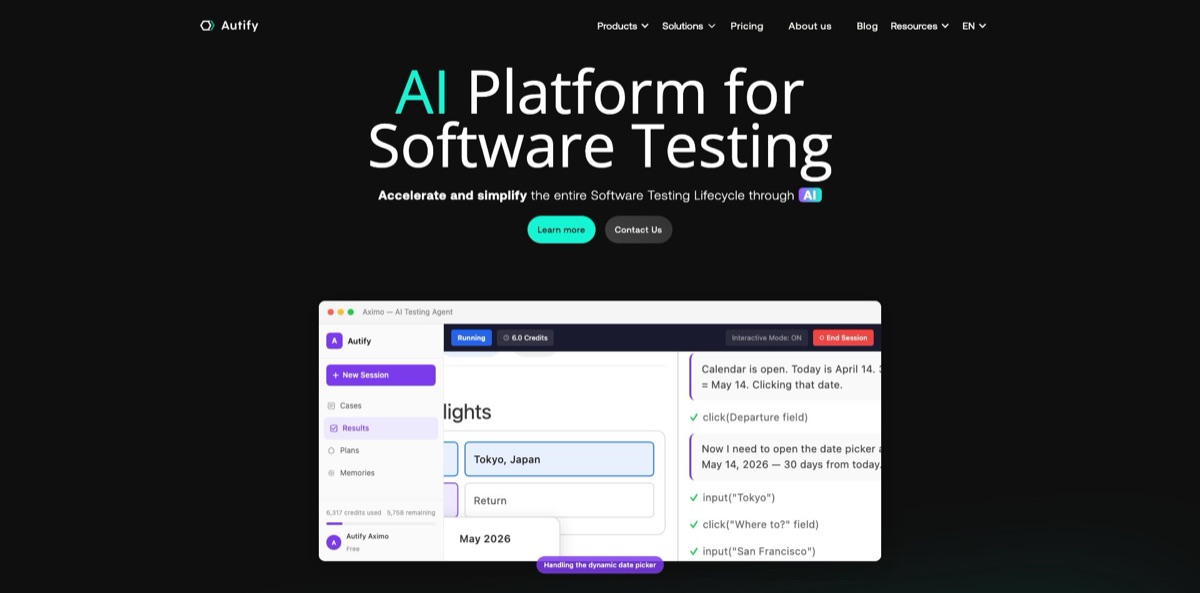
Autify sells AI software testing tools, and its current flagship, Aximo, is an agent that reads a test scenario written in plain English and then drives a cloud browser, an iOS or Android device, or a registered desktop machine to check whether your app reaches the expected state. You skip selectors and Selenium code: the agent picks every click and keystroke from screenshots, logs and what it learned in earlier runs, then reports pass or fail with step-by-step evidence. Around Aximo sit Genesis, which turns requirements and source code into test cases, Nexus, a Playwright-based authoring tool, and the older Autify NoCode recorder. The weak spot is cost predictability, because every AI step consumes credits and heavier models consume more. Pick it if your QA team spends more time repairing brittle scripts than finding bugs.
How to start using Autify?
Begin on the Aximo product page and click Try Aximo For Free, which takes you to the sign-up form at aximo.autify.com. Since May 2026, new organizations start on a one-time Trial Plan rather than a renewing free tier, with 2,000 credits that have no expiry date. A default workspace is created automatically, and you land on a prompt-first home screen instead of an empty results list. If you sign up with a corporate email domain that already has an organization, you can request to join it after verifying your address.
Your first real run is a session. Open the Sessions tab, click New Session, choose Web, and type the flow into Test instructions, one action per line: where to start, what to do, what to verify. The official quick start uses the Autify contact form as the example: click Contact Us, submit the form empty, and confirm that required-field errors appear. Add a Start URL if the scenario does not name one, pick a model (Claude Sonnet is the default), and click Run Test or press Command+Enter. Instructions shorter than 10 characters are rejected, and unsent drafts survive a page reload.
The screen worth learning early is Memories. Shared memories hold variables, secrets, OTP generators, hostname overrides, app files such as .apk and .ipa, upload files and fixed email addresses, all referenced from scenarios with placeholders like {{PASSWORD}}. The Rules tab takes up to 20,000 characters of standing instructions that apply to every run in the workspace, such as which login flow to prefer or how to treat errors. The Learned tab shows the workflows and failure patterns the agent picked up on its own, and you can edit or delete them.
When the session finishes, review the result, the per-step screenshots, the Logs tab and the Conversation tab, which shows the agent’s messages and tool calls. If the run did what you expected, click Save as a case and keep it as Gherkin, Markdown or the original prompt. Add cases to a plan, open Configure Schedule, and click Save Schedule to activate nightly or pre-release runs. Plans can run cases in Parallel or Sequential mode and post results to Slack, Microsoft Teams, Google Chat or a custom webhook.
Who is it for?
QA leads with brittle regression suites
Every release breaks a handful of locator-based tests, and someone loses a day repairing them. Aximo executes against what is on screen rather than stored selectors, so layout changes are less likely to turn into maintenance tickets. Your team’s time shifts from fixing scripts to deciding what deserves coverage.
Manual testers moving into automation
You know the product flows better than anyone but do not write Playwright or Cypress. Writing scenarios in plain English and saving successful sessions as cases lets you build a regression suite without learning a framework first.
Mobile app teams
Testing iOS and Android builds usually means juggling device farms and separate tooling. Aximo runs the same style of scenario on cloud devices or on phones you register locally, installs the apps you upload, and can switch between several apps in one session.
Developers working with coding agents
If Claude Code, Cursor or Copilot already writes your features, the Aximo MCP server lets the same agent list sessions, create cases and trigger plans. On the Team plan and above, the agent can also turn Aximo’s test context into Playwright, Selenium or Cypress code you own.
Enterprise QA in regulated industries
Finance or healthcare teams often cannot send test data to a shared cloud. The Enterprise plan adds self-hosted or dedicated infrastructure, custom concurrency and desktop app testing, and Nexus supports local or on-prem execution.
Teams testing Japanese or other CJK interfaces
Support runs in English and Japanese, and recent releases fixed IME input for Japanese, Chinese and Korean in remote browsers and on macOS desktops. That removes a common source of false failures for apps built for Asian markets.
Autify pricing
Aximo, the main product, is the only part of the lineup with prices on the public pricing page, and it bills by credits rather than seats. A credit is spent per step of an AI test run, and the rate depends on the model and the platform: Claude Sonnet costs 1 credit per web step and 1.5 per mobile step, while Claude Haiku and Kimi K2.6 cost 0.5 per web step and 1 per mobile step. GPT-5.5, available only when enabled for your organization, costs 2 and 2.5. Concurrency, meaning how many runs can execute at once, also grows with each tier.
One-time 2,000 credits with no expiration, 1 concurrent web run and 1 concurrent mobile run, hosted on Autify’s cloud. It does not renew, so treat it as an evaluation budget rather than a free plan.
6,000 credits per month (72,000 a year), 5 concurrent web runs and 2 concurrent mobile runs on Autify’s cloud. Add-on credits are available on paid plans, priced through sales.
30,000 credits per month (360,000 a year), 20 concurrent web runs and 5 mobile runs, plus Script Generation, which hands Aximo’s test context to your coding agent over MCP so it can write Playwright, Selenium or Cypress scripts.
Custom. Custom credits and concurrency, self-hosted or dedicated infrastructure, Script Generation, and desktop app testing, which the pricing FAQ lists as Enterprise-only.
quote-based. Standard, Advanced and Enterprise plans are priced by test run steps, user seats and add-ons, with a 14-day free trial; Standard includes 5 parallel runs and Advanced 10.
The Pro tier costs $599/month or $499/month billed annually with unlimited tests and users, and NoCode fees are charged in US dollars.
Genesis and Nexus have no public prices; both go through a demo or trial request and a sales quote. Purchased add-on credits roll over month to month, and admins can cap on-demand usage in units of 1,000 credits.
Autify key features
Plain-English AI tester
Aximo reads each scenario, takes a screenshot, picks the next click, tap or keystroke, and checks the result before moving on. On the web it can also open DevTools to check JavaScript console errors, run shell commands in a terminal and send HTTP requests to verify API responses. Autify’s own figures claim under 1% of failures come from UI changes and a 90% cut in maintenance time, so measure those claims on your own app.
One agent across platforms
Web sessions run in a cloud browser, mobile sessions run on cloud iOS and Android devices or on phones you register locally, and desktop sessions run on your own Windows, macOS or Linux machine when BYOD is enabled for your organization. Multi-Device sessions, also enabled per organization, can drive up to 3 devices in one scenario, for example a browser and a phone in the same flow.
Memories, rules and learning
Shared memories store variables, masked secrets, OTP generators, hostname overrides, apps, files and fixed email addresses at workspace level. Rules apply standing instructions to every run, and learned memories record workflows and failure patterns from finished sessions so similar tests start with more context. You can view, edit and delete what the AI learned, which keeps bad habits from spreading.
Email, 2FA and human-in-the-loop steps
Each test gets an inbox, so the agent can wait for a verification email, open the link or type the code, and fixed emails keep the same address across runs. OTP memories handle two-factor logins, and a line starting with [manual] pauses the run for a CAPTCHA or an approval in another system. You can also click Pause Session, take over the browser or device, and hand control back with a note.
Cases, plans and CI hooks
Successful sessions become reusable cases, and cases group into plans with schedules, parallel or sequential execution, tags and notifications. The Public API creates and triggers cases and plans, exports results as PDFs or ZIP archives with screenshots, and allows 100 requests per 10 seconds per key.
MCP server and script generation
The Aximo CLI, installed from npm, runs an MCP server with 16 tools, 10 read-only and 6 that create or change cases and plans, for Claude Code, Claude Desktop, Cursor, Windsurf, Kiro and VS Code. On Team and Enterprise plans your coding agent can turn that context into framework code you commit to your own repo, which limits lock-in.
Genesis and Nexus for structured QA
Genesis indexes requirements, specs and source code to produce feature lists, testing viewpoints, detailed test cases and documents such as PRDs and API specifications. Nexus, built on Playwright, records tests from plain English, offers Fix with AI when locators break, and exports every scenario as an editable Playwright script. Both connect to Aximo, so designed cases can flow into autonomous execution.
Autify Pros & Cons
Pros
Autify removes the selector layer that makes most UI automation fragile: you write what should happen, and the agent works it out from the screen. One tool covers web, iOS, Android and desktop, including OS-level actions, email checks and API calls inside the same scenario. Runs are easy to audit, with step screenshots, logs, the agent’s conversation and the credits each run consumed. Aximo’s prices are public, which is rare among enterprise testing vendors, and model choice lets you trade accuracy for cost per run. The release notes show weekly updates through 2026, so reported gaps tend to close quickly. Start with the flows that break most often and measure maintenance time before and after.
Cons
Costs are hard to predict because credits are spent per step, and a long or confused run costs more than a clean one; mobile steps and premium models multiply the bill. Desktop app testing sits on the Enterprise plan, and Multi-Device and BYOD features must be enabled for your organization. The lineup is fragmented across Aximo, Genesis, Nexus and NoCode, each with its own pricing, docs and trial rules. Independent reviews are scarce and mostly describe the older NoCode product, not the agent. Support works Japan business hours with first replies within 2 business days, and cancelling Aximo means contacting sales. Set an on-demand credit cap and keep critical checks deterministic until you trust the agent’s verdicts.
Use Autify if you want…
- Write end-to-end tests in plain English instead of code.
- Stop repairing broken selectors after every UI release.
- Run one scenario across web, mobile and desktop apps.
- Test sign-up flows with real verification emails and codes.
- Turn successful exploratory sessions into scheduled regression plans.
- Trigger AI test runs from CI pipelines and coding agents.
- Generate test cases from requirements and source code.
- Export Playwright scripts your team owns and maintains.
Autify alternatives



Autify Reviews
G2 reviewers, who give Autify a 4.8 average across a dozen reviews, praise how quickly non-engineers can build scenarios with the recorder, though several would like integrations with more third-party tools.
A Capterra reviewer says the no-code editor saves non-developers a lot of time because tests can be written without any coding, but the sample there is only three reviews.
On Gartner Peer Insights, users call it user-friendly and credit the AI with reducing maintenance effort, while the most visible recent review warns that costs run high for small teams.
Some reviewers find it limiting for highly customized or complex test cases and ask for more flexible logic and user-role options, which can frustrate experienced automation engineers.
FAQ
Does Autify have a free plan?
Not a renewing one. New Aximo organizations get a one-time Trial Plan with 2,000 credits that do not expire, and when they run out you upgrade to Core, Team or Enterprise.
How are Aximo credits counted?
Credits are deducted per step of an AI test run. Claude Sonnet uses 1 credit per web step and 1.5 per mobile step, Haiku and Kimi K2.6 use half as much on web, and the Results page shows the model and credits for every run.
Can Autify test native mobile and desktop apps?
Yes. Aximo runs iOS and Android apps you upload as .ipa or .apk files on cloud devices or registered phones, and desktop sessions run on your own Windows, macOS or Linux machines, with desktop app testing listed as an Enterprise feature.
Does Autify work with CI/CD tools and coding agents?
Aximo has a Public API, a CLI and an MCP server, so you can trigger cases and plans from any pipeline or from Claude Code, Cursor and similar agents. Autify NoCode also integrates with CircleCI, Jenkins, TestRail, Slack and webhooks.
Where is my test data hosted?
Free, Core and Team plans run on Autify’s cloud, while Enterprise customers can choose self-hosted or dedicated infrastructure. Passwords and other secrets live in shared memories, are masked when reopened, and are referenced in scenarios through placeholders.
Which AI models does Aximo use?
Claude Sonnet is the default, alongside Claude Haiku, Kimi K2.6 and an Auto option that mixes models per session. GPT-5.4, GPT-5.4 Mini and GPT-5.5 are available only when your sales representative enables them for the organization.
What support does Autify offer?
Basic support handles questions in English and Japanese, accepts inquiries around the clock, and answers on business days between 10:00 and 18:00 JST, with a first response within 2 business days.
How do I cancel an Autify subscription?
For Aximo, you contact your sales representative to cancel. Autify NoCode plans need at least two weeks’ notice before the renewal date.
Similar tools
 GPT WorkspaceAI agent for Google Docs, Sheets, Slides, Gmail and Drive that edits your files, runs GPT formulas in bulk and automates routine
 FPT.AIVietnamese enterprise AI platform from FPT Smart Cloud for chatbots, call-center voicebots, document reading and eKYC that automate customer operations.
 Frigate NVROpen-source NVR that runs real-time AI object detection on your own hardware and sends camera events to Home Assistant and other MQTT