

BgEraser
Image EditingUpdated November 12, 2026
Browser-based AI background remover that turns up to 20 photos per batch into transparent PNGs without an account, plus offline apps for Mac and Windows.
We may earn a commission when you sign up through our links. It does not affect our reviews.
What is BgEraser?
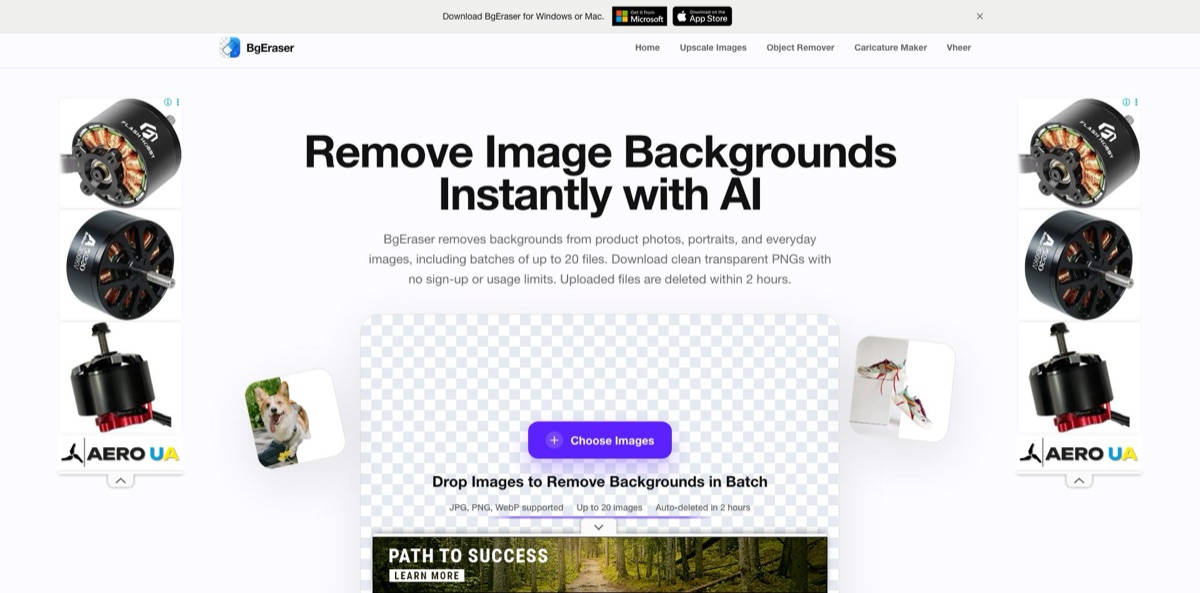
You drop a product shot, portrait or logo into a browser tab, and an AI model separates the subject from everything behind it, returning a transparent PNG. The web version handles up to 20 JPG, PNG or WebP files per batch, asks for no account, and deletes both uploads and results from its servers within two hours. That makes it a fast answer to routine cutouts for listings, slides and social posts, where opening a full photo editor would be overkill. The trade-offs are equally plain: the web tool lists no manual brush for repairing edges, there is no public API, the site is funded by Google AdSense ads, and its terms reserve the right to add accounts, billing or quotas later. Separate desktop apps for Mac and Windows process images offline. Pick it when you need free batch cutouts quickly and can live without fine control.
How to start using BgEraser?
Open bgeraser.com and you are already in the tool. There is no sign-up form, login or installation step, because the upload workspace sits right on the home page. Click Choose Images or drag files onto the drop area. The uploader accepts JPG, PNG and WebP, rejects anything larger than 10 MB with a warning, and stops you at 20 images per batch. If you would rather judge the output before using your own photos, the Try a sample option loads one of four demo pictures.
A sensible first job is a set of product photos for a store or marketplace listing, which is the scenario the site leads with. Add the whole set in one go and the workspace shows progress across the batch, first while files upload and then while they are processed. When a few images fail, a notice tells you how many were processed and how many failed. You can then clear those items and re-add only the problem files instead of rerunning everything.
The one control that changes what you download is the background color option. Leave it untouched and each result keeps its transparency, previewed on a checkerboard. Pick a preset swatch or a custom color from the picker, and the color is applied before download, so every file is exported with that solid backdrop instead. Save images one at a time, or press Download Results as ZIP to grab the full batch as a single archive. Clear All empties the workspace for the next round.
Before anything goes live, open each cutout at full size and inspect the hard parts: hair, fur, glass, thin straps and soft shadows. The site’s own FAQ says higher-resolution images with a clear subject usually give the best results, so a sharper source photo beats repeated attempts on a blurry one. Download promptly, since files disappear from the servers within two hours. For confidential images, the Mac and Windows apps run the removal on your own computer, so nothing is uploaded at all.
Run five representative photos, including your trickiest edge case, before you commit a whole catalogue to it.
Who is it for?
Online sellers
Listing photos shot on a kitchen table look amateur next to clean studio images. BgEraser strips the clutter from up to 20 product photos at once and can drop them onto a solid color for marketplaces that prefer a plain backdrop. You spend minutes on a new collection instead of an afternoon.
Social media managers and creators
Posts, thumbnails and story graphics often need the same person or product cut out in several layouts. A transparent PNG drops straight into Canva-style templates or any design app. The free web tool keeps quick weekly jobs off your software budget.
Students and office workers
Slides look cluttered when a logo or headshot arrives with a white box around it. Uploading the file and downloading a transparent PNG fixes that without learning layer masks. The site states processed images can be used commercially if you have the rights to the originals, which covers most work decks.
Designers building mockups
Early concepts need rough cutouts fast, not pixel-perfect masks. BgEraser gives you a usable subject to place in a layout while the client is still choosing a direction. Expect to redo hero images in a dedicated editor once the design is approved.
Privacy-conscious users
Some photos should never leave your machine, such as unreleased products or client portraits. The Mac and Windows apps process images locally and work without an internet connection. That removes the upload question entirely.
Mac users with large recurring batches
The free Mac app handles up to 10 images per batch, and Pro removes that ceiling. If you clear backgrounds from dozens of photos every week, a one-time Lifetime purchase spares you yet another recurring subscription. Test the new Quality model on your own images first.
BgEraser pricing
The website itself has no pricing page and no paid plans. Its terms and privacy policy, both dated May 29, 2026, describe the web service as free, ad-supported, with no account and no plan-based usage limits, while warning that accounts, billing or quotas may be introduced later. Paid tiers exist only inside the desktop apps. The prices below come from the US Mac App Store listing, and the listing notes that current prices are shown in the app before purchase, so other storefronts may differ.
No sign-up, up to 20 images per batch, each file under 10 MB, transparent or solid-color PNG output and ZIP download. The service carries Google AdSense ads and Google Analytics.
Local, offline processing on macOS 14 or later, with up to 10 images in a batch.
Lifts the 10-image cap so you can add more images to a batch.
The same Pro features, billed once a year.
The same Pro features with no recurring charge.
free download from the Microsoft Store. The store listing flags add-ons and a free trial, but it does not publish add-on prices, so check them inside the app before buying.
BgEraser key features
Batch web workspace
You can load up to 20 JPG, PNG or WebP images, each under 10 MB, and process them together in one session. Progress is tracked across the batch, and partial failures are reported with a count rather than silently dropped. That turns a repetitive one-at-a-time chore into a single upload and a single download.
Transparent PNG or solid-color output
Results always come out as PNG files so transparency survives. A color picker with presets lets you apply a solid background before download, and Download Results as ZIP packages the batch. You can prepare marketplace-ready images without opening a second editor.
No account and two-hour deletion
The web tool works without registration, login or software install. Uploaded images and generated results are removed from the servers within two hours, with exceptions only for security, abuse or legal reasons, according to the privacy policy. Short retention lowers the risk of your files sitting on someone else’s server indefinitely.
Mac app with Quality and Fast models
Version 2.2.0, released in September 2026, added a new Quality AI model alongside a Fast option based on Apple’s built-in technology, and both run locally. You can switch models and reprocess the same images without importing them again, then use Compare to check each result against the original. Save Results exports all finished cutouts to a folder.
Windows app with GPU or CPU processing
The Windows build, listed in the Microsoft Store since July 2026, removes backgrounds fully offline and lets you choose GPU inference on supported graphics hardware or CPU on everything else. A dedicated GPU is not required. Output can keep the original dimensions, be resized to a custom width and height, or be scaled by percentage, which saves a separate resizing step for web uploads.
Multilingual interface
The website is available in 11 languages, including Chinese, Japanese, Korean, Spanish, German and Russian, and the Mac app offers 14 interface languages. Non-English speakers can use the tool without a translation plugin.
Commercial use of results
The site’s FAQ states that processed images can go into product listings, marketing assets and presentations, provided you have the right to edit the originals. No watermark is mentioned on the free web output, and Trustpilot reviewers confirm downloads come without logos. You can publish results directly without paying for a clean export.
BgEraser Pros & Cons
Pros
The biggest strength is how little stands between you and a finished cutout. There is no account, no paywall on the web version and no watermark, and you can push 20 images through in one batch and download them as a ZIP. The solid-color option covers the common marketplace requirement without a second tool. Privacy handling is better than average for a free service, with files deleted within two hours, and the Mac and Windows apps give you a fully offline route for sensitive photos. The Mac Lifetime option at $29.99 is inexpensive for anyone with recurring batch work. Start with the web version, and only install a desktop app once you need offline processing or bigger Mac batches.
Cons
Control is minimal. The web tool lists no manual erase or restore brush, no edge feathering and no shadow options, so a bad mask means retaking or re-uploading the photo. There is no public API for automating catalog workflows, and no team accounts. The service depends on advertising, and the terms openly allow future accounts, billing or quotas. Transparency about ownership is thin: the website names no company, the Mac app is published under an individual developer account, and the Windows app under Vertexshare Ltd. Quality can also differ between versions, as one 2026 App Store reviewer found the Mac app far weaker than the website before a newer model shipped. Keep a fallback editor for difficult images.
Use BgEraser if you want…
- Remove backgrounds from 20 photos in one batch.
- Create transparent PNGs without registering an account.
- Place product cutouts on a solid color backdrop.
- Download a whole batch of cutouts as one ZIP.
- Process confidential images offline on Mac or Windows.
- Clean up logos and headshots for presentation slides.
- Avoid watermarks on free background removal results.
- Resize exported cutouts by dimensions or percentage on Windows.
BgEraser alternatives
 Removal.AIRead review →
 Cutout.ProRead review →
 PixelcutRead review →
 ClipdropRead review →
 PixlrRead review →
 SnapEditRead review →
BgEraser Reviews
Trustpilot reviewers keep returning to the same points: it is free, needs no login and hands back clean cutouts with no logo or watermark, and one admitted they expected a paywall or sign-up that never came. The rare negative ratings visible on the page give no details about what went wrong.
Users on Trustpilot describe it as quick for bulk photo jobs and say edges stay intact when trimming backgrounds, which makes it a regular tool for small batches rather than a one-off experiment.
A 2026 App Store reviewer liked the website so much they installed the Mac app, then found its cutouts pixelated, with background remnants and parts of the subject removed, and no settings to adjust; the developer replied that a new Quality model had since been added.
Older App Store reviews of the Mac app are split between praise for a quick fix on product shots and complaints about crashes and upload errors after purchase; the developer has since replied that the app was substantially upgraded.
On G2, the small number of reviewers call it easy to use and good at detecting unwanted backgrounds, though one notes that uploads can be slow and occasionally fail.
FAQ
Is BgEraser free?
Yes. The web version is free and ad-supported, with no plan-based usage limits under the terms dated May 29, 2026. Only the Mac app sells a Pro upgrade, at $3.99 per month, $19.99 per year or $29.99 once on the US App Store.
Do I need to create an account?
No. You can upload images and download results without signing up, logging in or installing anything. The terms note that accounts may be introduced in future versions.
How many images can I process at once?
The web tool accepts up to 20 images per batch, each smaller than 10 MB. The free Mac app handles up to 10 per batch, and Pro removes that limit.
What happens to the images I upload?
Uploaded files and generated results are automatically deleted from the servers within two hours of processing. Longer retention is only mentioned for security investigations, abuse prevention or legal obligations.
Which file formats does BgEraser support?
You can upload JPG, PNG and WebP files. Results are downloaded as PNG so the transparent background is preserved, either individually or as a ZIP archive.
Can I use the results for commercial projects?
Yes. The FAQ allows use in product listings, marketing assets and presentations, as long as you have the right to edit and use the original images.
Does BgEraser work offline?
The website needs an internet connection, but the Mac app (macOS 14 or later) and the Windows app process images locally and work without a connection once installed.
Does BgEraser have an API?
No public API is listed on the website. If you need to automate background removal inside your own software, a developer-focused service such as remove.bg or Removal.AI is the better fit.
Similar tools
 HamaFree browser-based AI eraser that removes people, objects, text and blemishes from photos with a brush, plus an inpainting API for developers.
 ImgkitsBrowser-based set of AI photo tools for background removal, object cleanup, upscaling, old photo restoration, image generation and image-to-video.
 FacetuneLightricks' face-aware photo and video editor for iOS, Android and the web: retouching, reshaping, makeup, hair and outfit try-on, and AI headshots.