

BIGVU
Content CreationUpdated October 26, 2026
Teleprompter video app that writes scripts with AI, records on phone or webcam, adds captions and AI edits, and posts to social channels.
We may earn a commission when you sign up through our links. It does not affect our reviews.
What is BIGVU?
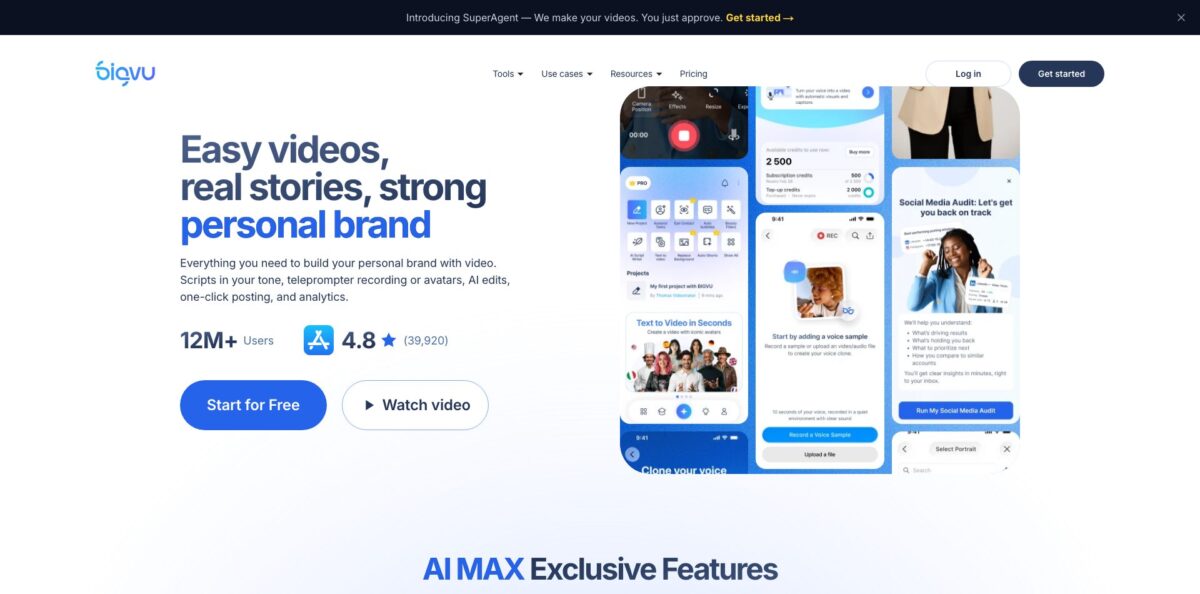
BIGVU is a mobile and web video studio built around a teleprompter. You write a script yourself or generate one with the AI Script Generator, read it on screen while you record on your phone or webcam, then clean the take with auto-captions, filler-word removal, AI eye-contact correction and branded templates before posting it to your social accounts from the same app. It targets people who have to appear on camera often but have no editor: realtors, coaches, sales reps, trainers and solo marketers. Newer paid tiers add an AI Twin clone of your face and voice, talking photos and a voice agent, so the product is drifting from “teleprompter app” toward a full video marketing suite. The weak spots are the editor, which reviewers call clunky, and a subscription process that draws complaints. Pick it if scripted talking-head video is your main format.
How to start using BIGVU?
Sign up on the website or install the BIGVU Teleprompter app on iOS or Android. The Free plan needs no credit card and gives you 500 AI credits a month, recordings up to 9 minutes, 720p export with a watermark, the AI Script Generator and social scheduling. Scripts you write on the web sync to the mobile app, so you can draft on a laptop and record on your phone later.
For your first video, open the AI Script Generator, describe the topic or goal, and let it draft a script structured for spoken delivery. Edit the lines into your own voice, then send the script straight to the teleprompter. If you prefer your own notes, paste them in and add Cues: a Pause that waits for your tap, a timed pause that continues by itself, or a private Note that never shows up in captions or exports.
The recording screen is where most of the value sits. Set the scroll speed in words per minute, choose the font size and colors, and move the text window right under the lens so your eyes stay close to the camera. On iPhone and iPad you can turn on Voice Control, which scrolls while you speak and waits when you stop, with a mic threshold so background noise does not push the text. DualShot records a 16:9 and a 9:16 version in one take, and Light Ring turns the screen edges into a soft fill light. In the browser, the online teleprompter’s Read Only mode is free, while webcam recording and live streaming sit on paid plans.
After recording, add auto-captions, apply your Brand Kit (logo, colors, style), cut “um” and “uh” with AI WordTrim, and on AI Pro or higher run AI Eye Contact Fix. When the cut looks right, connect your channels and publish or schedule it to YouTube, Instagram, TikTok, Facebook, X and LinkedIn, with post text and hashtags generated for each platform.
Record one short test script on the Free plan first and check how Voice Control and the eye-line look on your own face before paying for anything.
Who is it for?
Real estate agents
You need a steady flow of listing tours, market updates and personal intros, but filming each one takes an afternoon. BIGVU gives you scripts, a prompter and branded captions in one app, and Fototale for listings turns property photos into narrated walkthroughs. Your social presence stays active without hiring a videographer.
Coaches and course creators
You talk to camera constantly and lose takes to forgotten lines. Multi-Page Mode splits long lessons into sections, and cues let you pause between points. Expect fewer retakes and more consistent delivery across a course.
Sales reps and account managers
Personal video beats plain email, yet most reps freeze on camera. A short scripted message, eye-contact correction and video emails with a CTA button make outreach feel personal without a script showing in your eyes. Follow-ups stop being a production job.
Solo marketers and small business owners
You run social channels alone and need short vertical clips every week. Auto-Shorts cuts long recordings into highlight clips, and the scheduler posts them across up to 20 connected accounts. One recording session can fill several days of posts.
Agencies and internal comms teams
Several people need to record on-brand updates. AI Pro and above add team workspaces with roles, and Max adds an AI Twin plus a Video API with Zapier, Make and an MCP server for automation. Branding stays consistent even when ten different people are on camera.
BIGVU pricing
BIGVU charges a flat subscription per person, and each plan includes a monthly pool of AI credits that you spend when generating video (avatars, talking photos and similar AI output). Credits reset each billing cycle and do not roll over, though you can buy extra credits on top of your plan. Yearly billing saves up to 33%. Website purchases come with a 30-day money-back guarantee; App Store and Google Play subscriptions follow those stores’ refund rules. The pricing page rotates between showing a Starter tier and a Super Agent tier, so you may not see all five plans at once.
500 AI credits a month (about a 10-second portrait video), recordings up to 9 minutes, 720p export with a watermark, AI scripts, teleprompter recording, social scheduling and a Social Media Audit. Single user only.
1,500 credits, 9-minute recordings, no watermark, 1080p HD, one Brand Kit and unlimited captions.
3,000 credits (about a 1-minute portrait video), recordings up to 59 minutes, HD and 4K export, the full AI edit suite (Eye Contact Fix, Background Replace, auto B-rolls, split screens), Auto-Shorts, AI dubbing in 30+ languages and a team workspace with roles.
A done-for-you service on top of Max: a dedicated coach, a monthly content calendar planned and published for you, AI Twin setup handled by the team, monthly performance reviews and direct Slack or email access.
BIGVU key features
The mobile teleprompter follows your voice on iPhone and iPad, scrolling while you talk and waiting when you pause
You can still set a fixed words-per-minute speed, adjust it mid-take, and add pauses or private notes anywhere in the script. You read naturally instead of chasing text that runs away from you.
DualShot records a horizontal 16:9 and a vertical 9:16 video in a single take
You drag the horizontal frame to set the crop before recording, and the script stays on screen the whole time. One session covers YouTube and Reels, TikTok and Shorts without filming twice.
AI Eye-Contact Correction adjusts your gaze after recording so you appear to look straight into the lens while reading
It is aimed at teleprompter, webcam and presentation footage where eyes drift to the text. You keep takes you liked instead of redoing them for eye line alone.
AI WordTrim and auto-captions handle the cleanup most self-recorded videos need
Filler words and pauses are cut in one tap, you can delete parts of a take by selecting words in the transcript, and captions can be styled with your Brand Kit. Silent-first viewers on social feeds can follow the message.
Auto-Shorts scans long recordings such as webinars, podcasts and tutorials, finds highlight moments and trims them into vertical clips. You can adjust captions, layouts and branding before exporting. A single long video turns into a batch of short posts.
AI Twin, available on Max, learns your face, voice and speaking style from a short training recording
After that you paste a script and it produces a talking-head video without you stepping in front of the camera again.
Built-in publishing connects YouTube, Instagram, TikTok, Facebook, X and LinkedIn, with up to 20 social accounts
You can post right away or schedule ahead, and BIGVU drafts platform-specific captions and hashtags. Max adds a Video API with Zapier, Make, Airtable, a REST API and an MCP server for automated video creation.
BIGVU Pros & Cons
Pros
BIGVU covers the whole loop of a talking-head video in one place: script, teleprompter, recording, captions, branding and posting. The teleprompter itself is the strongest part, with voice-following scroll, cues, multi-page scripts, DualShot and on-screen lighting aids that dedicated prompter apps often lack. Eye-contact correction and filler-word removal fix the two most common flaws of self-recorded clips. Script sync between desktop and phone means you can prepare at your desk and record anywhere. The Free plan is genuinely usable for testing, and the 30-day refund on web purchases lowers the risk of trying a paid tier. Buy on the website rather than in the app store so the refund guarantee applies.
Cons
The editor is the weak link: reviewers describe it as clunky, and some features are hard to find. A few users report mobile limitations, such as templates that work only on desktop and videos that do not always appear across devices. Trustpilot reviews are harsh, citing unexpected renewals after trials, slow support, audio drifting out of sync with lip movement and trouble setting up the AI Twin. Monthly prices are high next to the yearly rates, and the most useful AI edits start at AI Pro. If you start a trial, set a calendar reminder and cancel from the same place you subscribed.
Use BIGVU if you want…
- Read scripts on camera without memorizing lines.
- Generate spoken-style video scripts from a short topic.
- Record horizontal and vertical versions in one take.
- Fix off-screen eye contact after recording.
- Remove filler words and pauses with one tap.
- Add branded captions to every social video.
- Turn long webinars into short vertical clips.
- Schedule posts across six social networks from one app.
- Clone your face and voice for scripted updates.
BIGVU alternatives

BIGVU Reviews
Reviewers on G2 like how natural it feels to read lines on a phone thanks to adjustable scroll speed and font size, though several find the editing tools clunky.
Capterra users praise writing scripts on desktop and having them sync to the phone, but some say custom templates only work on the desktop version.
App Store users rate the app highly for fast, simple recording, while one long-time user calls the paid plans expensive for what they offer and says AI-written text needs heavy rewriting.
Several Trustpilot reviewers report being charged after a free trial and struggling to reach support for a refund or cancellation.
Some users mention bugs such as the teleprompter freezing until a restart and audio drifting out of sync with the video, while praising the eye-contact fix and auto-captions when they work.
FAQ
Is BIGVU free?
Yes. The Free plan costs nothing, needs no credit card and includes AI scripts, teleprompter recording up to 9 minutes, 500 monthly AI credits and social scheduling, but exports are 720p with a watermark.
Does the BIGVU teleprompter work in a browser?
Yes. The online teleprompter runs in Chrome, Safari or Edge on Mac, PC and Chromebook. Read Only mode is free, while recording from your webcam and live streaming require a paid plan.
Which social networks can BIGVU post to?
BIGVU publishes and schedules to YouTube, Instagram, TikTok, Facebook, X and LinkedIn, and you can connect up to 20 social accounts.
How do BIGVU AI credits work?
Each plan includes a monthly credit pool (500 on Free, 1,500 on Starter, 3,000 on AI Pro, 10,000 on Max) that you spend on AI video generation. Credits reset every billing cycle, do not roll over, and extra credits can be bought on top of a plan.
Can I cancel and get a refund?
You can turn off auto-renewal in your account settings at any time and keep access until the paid period ends. Website purchases carry a 30-day money-back guarantee, while App Store and Google Play subscriptions follow those stores’ refund policies.
Does BIGVU support teams?
Yes. AI Pro, Max and Super Agent include unlimited workspaces with role-based permissions, and the price adjusts to the number of seats you choose. The Free plan is single-user.
Does BIGVU have an API?
Yes. The Video API is part of the Max tier and includes a REST API, an MCP server for AI agents such as Claude, and no-code connections through Zapier, Make and Airtable.
Can BIGVU translate my videos?
AI Pro and higher plans include AI dubbing in more than 30 languages, so you can publish versions of the same video for different audiences.
Similar tools
 RunableGeneral AI agent that turns one prompt into websites, slide decks, social carousels, videos and apps, with plugins and scheduled tasks.
 AISEOAI writing suite with a text humanizer, article and Outrank generators, AI detector and plagiarism checker, plus AI search visibility tools.
 Octopus.doVisual sitemap builder that drafts page structure, block copy and SEO tags with AI, crawls existing sites and connects to ChatGPT, Claude