
Bing Image Creator
Image GenerationUpdated October 5, 2026
Bing Image Creator uses DALL-E 3 to turn text prompts into stunning, high-quality AI images for free instantly.
We may earn a commission when you sign up through our links. It does not affect our reviews.
What is Bing Image Creator?
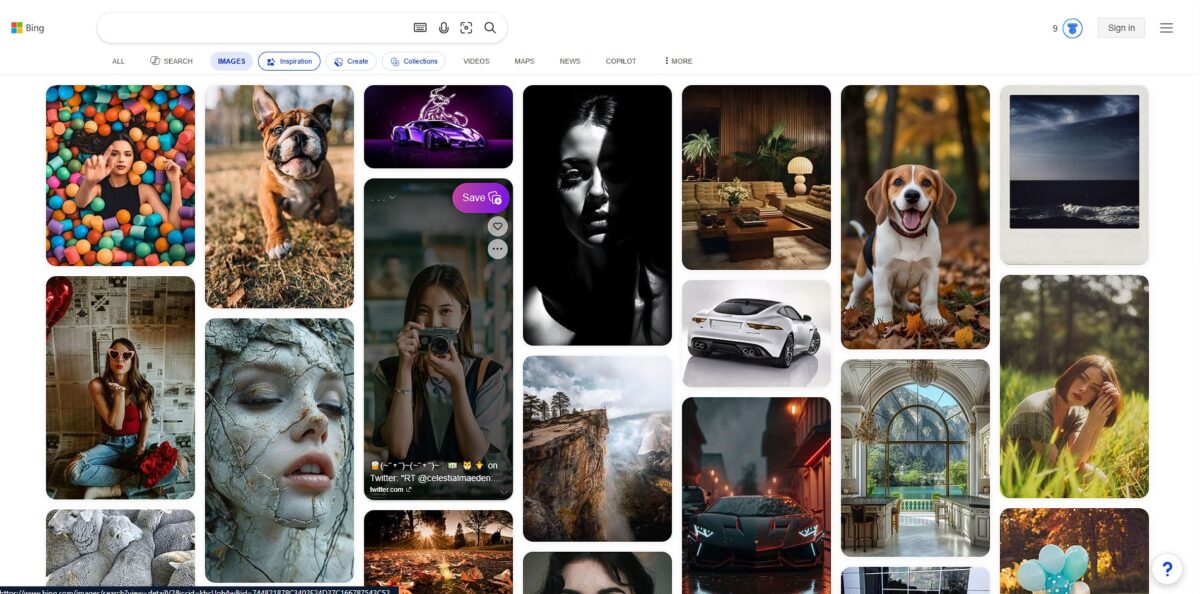
Bing Image Creator acts as a straightforward entry point to OpenAI’s DALL-E 3, sitting directly inside the Microsoft ecosystem without the typical Discord barriers or subscription fees. It translates conversational text into four distinct square visuals, allowing you to generate blog headers or social media assets using plain English rather than complex prompt syntax. I noticed that it handles specific text within images better than its predecessors, though it still occasionally misses the mark on complex spatial logic or photorealistic skin textures. For creators who need a usable graphic in seconds, that accessibility removes most of the technical friction. While it excels at vibrant digital art, the trade-off is a rigid 1:1 aspect ratio and aggressive safety filters that can block innocuous prompts. Reach for it during rapid-fire ideation when speed and cost outweigh the need for advanced editing tools.
How to start using Bing Image Creator?
Head to bing.com/create or open the Copilot pane in Microsoft Edge. You must sign in with a personal Microsoft account, as school or enterprise logins often hit a “not available” wall. The interface is sparse, so you jump straight from an idea to the first render without navigating a complex dashboard.
Takeaway: A personal Outlook or Hotmail account avoids access errors.Type a descriptive prompt into the single text bar. Focus on nouns and lighting styles like “vaporwave aesthetic” or “macro photography” instead of generic requests for art. The model translates natural language well, so you don’t need to learn the weighted syntax typical of Midjourney. You can iterate on a specific visual concept in plain English instead of wasting “boosts” on technical trial-and-error.
Takeaway: Start with a clear subject and add one style modifier at a time to stay in control.Hit the “Create” button to generate four square variations. Each attempt uses one “boost” to keep the render time under thirty seconds. Once your daily boosts are gone, the engine continues to work, but you will notice a significant lag in delivery. In long design sessions, that forces a slower, more intentional pace.
Takeaway: Save your boosts for complex scenes and let the slow queue handle simple experiments.Click on any image to expand it for a closer look at the details. You can download the 1024x1024 file or click “Customize” to push the image into Microsoft Designer. The editor lets you remove backgrounds or add typography without leaving the browser tab, turning a raw AI export into a finished social media asset in one workflow.
Takeaway: The “Edit” feature is the faster way to fix small composition issues rather than re-rolling the whole prompt.Browse your recent generations in the sidebar to keep track of your progress. Microsoft stores these for 90 days, but they disappear unless you manually save them to a collection. It’s easy to lose a perfect draft you forgot to download during a busy brainstorm.
Takeaway: Click the “Save” button on any generation you might want to reference next month.
Who is it for?
Social Media Managers
Skip the hour-long hunt for a stock photo that everyone else already used. This tool generates specific scenes, like a “cat drinking matcha in a cyberpunk cafe,” giving you unique assets for niche posts. It handles DALL-E 3 prompts well enough to include legible English text on signs, so you stop wasting time in Canva trying to overlay text on cluttered backgrounds.
Casual Bloggers and Substackers
If you need a hero image but lack a budget for custom illustrations, this fills the gap. It produces four variations per prompt, letting you pick the composition that fits your text layout. You get a visual hook without the legal headache of accidental copyright strikes. The square-only aspect ratio is a bit of a letdown for wide banners, though.
Rapid Prototypers
Front-end devs can generate quick placeholders for UI mockups instead of using “lorem ipsum” grey boxes. You can describe the exact lighting or color palette of your brand to see how a landing page might feel. While it won’t replace a UI designer, it helps visualize the final product during a sprint. Stakeholders get to “see” the concept before you write a single line of CSS.
D&D Players and Storytellers
Bring your character or world-building to life by describing specific armor or ancient ruins. It excels at fantasy and sci-fi styles, making it easier to share a reference with your group. A wall of text becomes a shared visual experience for your players. In testing, it struggled with specific anatomical details like the correct number of fingers, so don’t expect medical-grade accuracy.
Concept Artists in a Rut
Use it as a digital mood board to break through a creative block. Feed it a prompt and see how it interprets your abstract ideas to find a new angle on lighting or texture. It won’t give you a final, high-res file for production, but it sparks the initial “what if?” and automates the tedious early phase of collecting reference images.
Bing Image Creator pricing
Bing Image Creator occupies a rare space where top-tier generative tech costs nothing but your time and a Microsoft login. You won’t find a “Pro” button or a monthly billing cycle here. Instead, the economy runs on “Boosts”—tokens that move your request to the front of the server line. It is a frictionless way to test DALL-E 3 without the $20 monthly commitment required by other platforms.
You can experiment with complex visual concepts without worrying about a trial period expiring.
Once these hit zero, the generator still works, though you might wait a few minutes for a result, so there’s no hard lockout in the middle of a creative session.
You can trade points earned from search tasks or Edge browsing for extra boosts. In other words, you “buy” speed by using the ecosystem rather than your credit card, and heavy users get faster iterations for high-volume projects.
There are no hidden paywalls for higher resolutions or specific artistic styles. The catch: you get no control over aspect ratios and none of the advanced inpainting tools found in paid competitors. This matters because what you see is what you get, with no “upgrade to unlock” prompts interrupting your workflow.
Bing Image Creator key features
Full DALL-E 3 Access for $0
You get the same underlying tech as paid ChatGPT users without a monthly bill, so there’s no financial barrier to experimenting with professional-grade image generation.
Daily Fast Generation Boosts
Microsoft grants 15 to 25 boosts every 24 hours that move your prompts to the front of the server queue. Your first dozen ideas each day get immediate results, but while the boosts replenish daily, they disappear quickly during long design sessions.
Infinite Standard Speed Creation
Once boosts run out, the generator keeps working but at a slower pace. Images might take a few minutes to render instead of seconds. Either way, you never hit a hard wall that stops your creative flow.
Microsoft Rewards Integration
You can trade digital points earned from Bing searches or Edge usage for extra fast-generation boosts. This gamified system effectively lets you buy speed with time rather than cash, which helps with high-volume projects when you don’t want to open your wallet.
Zero Subscription Commitment
There are no Pro tiers or hidden paywalls for specific artistic styles or resolution settings. You get the full feature set just for having a standard Microsoft account. That’s one less recurring subscription to manage just to access niche tools.
Bing Image Creator Pros & Cons
Pros
Bing Image Creator runs OpenAI’s DALL-E 3, which translates natural language into visual layouts with surgical precision. It renders specific English text on signs and labels accurately, a feat where most models stumble into unreadable soup. I noticed it handles complex spatial logic well, placing objects exactly where you describe them, like a “neon sign reflecting in a rainy puddle.” This matters because you skip the frustration of “prompt hacking” and get usable graphics on your first try.
Cons
The platform locks you into a square 1:1 aspect ratio, making it less ideal for wide YouTube thumbnails or vertical mobile wallpapers. Safety filters act aggressively, occasionally blocking innocuous prompts because they trip a broad, invisible keyword flag. The “boost” system means speed is a finite resource; once your daily credits expire, generation times crawl significantly. Batch-producing large galleries in a single high-intensity session is hard as a result.
Use Bing Image Creator if you want…
- Instant DALL-E 3 visuals without a paid subscription
- Precise text rendering on custom signs and labels
- Rapid-fire ideation for social media and blog headers
- Zero-friction generation directly within your web browser
- Consistent prompt adherence for complex spatial scene logic
- Visualizing concepts quickly using simple natural language
- Free experimentation with professional-grade generative AI models
- Clean digital art styles for creative presentation slides
Bing Image Creator alternatives
 MidjourneyRead review →
 Adobe FireflyRead review →
 Canva Magic MediaRead review →
 Nano BananaRead review →
Bing Image Creator Reviews
The DALL-E 3 integration is incredibly sharp; I can finally get decent text inside my AI-generated graphics for free.
It is the fastest way to turn a random thought into a blog header without fussing over complex settings or Discord bots.
The daily boosts are generous enough for my social media needs, though I wish it supported non-square aspect ratios.
FAQ
Which AI model does Bing Image Creator use?
Bing Image Creator primarily uses OpenAI’s DALL-E 3 model to generate high-quality images from text prompts, though users can also select GPT-4o for certain generation tasks.
Do I need a Microsoft account to use Bing Image Creator?
Yes, a personal Microsoft account is required to sign in and generate images; work and school accounts are currently not supported for this specific service.
What are boosts and how do they work?
Boosts are credits that provide faster image generation; you typically start with a set amount each day, and once they are exhausted, image generation continues at a slower, standard speed.
Can I edit the images I generate?
Yes, you can use the built-in Customize button to open images in Microsoft Designer for editing, background removal, or adding text overlays.
Does Bing Image Creator support different aspect ratios?
No. The tool currently outputs only square (1:1) 1024x1024 images; the portrait and landscape options Microsoft briefly offered have been removed, so you need to crop or expand images in a separate editor.
Is Bing Image Creator free to use?
Yes, the service is free for anyone with a Microsoft account, and you can even earn additional fast-generation boosts through the Microsoft Rewards program.
How long does Bing store my generated images?
Bing maintains a creation history for up to 90 days, though you can permanently save your favorite images to collections within your Microsoft account.
Are there limits on what I can generate?
Yes, the tool has aggressive safety filters to prevent the generation of harmful, illegal, or inappropriate content, and users are limited to 200 prompts per 24-hour period.
Similar tools
 BannerbearTemplate-based API for generating on-brand images, PDFs, animations and videos at scale from your data via REST, Zapier, Airtable or AI agents.
 Generated PhotosLibrary of 2.6M+ AI-generated faces plus face and full-body human generators for model-release-free people images in design, ads and research.
 VheerBrowser-based AI studio for text-to-image, photo editing and image-to-video, with a free no-signup model plus credit access to Nano Banana, Sora 2