
BlackInk AI
Art GenerationUpdated November 10, 2026
AI tattoo design generator that turns a short idea into style-specific tattoo art, with placement previews, a stencil converter and temporary tattoo prints.
We may earn a commission when you sign up through our links. It does not affect our reviews.
What is BlackInk AI?
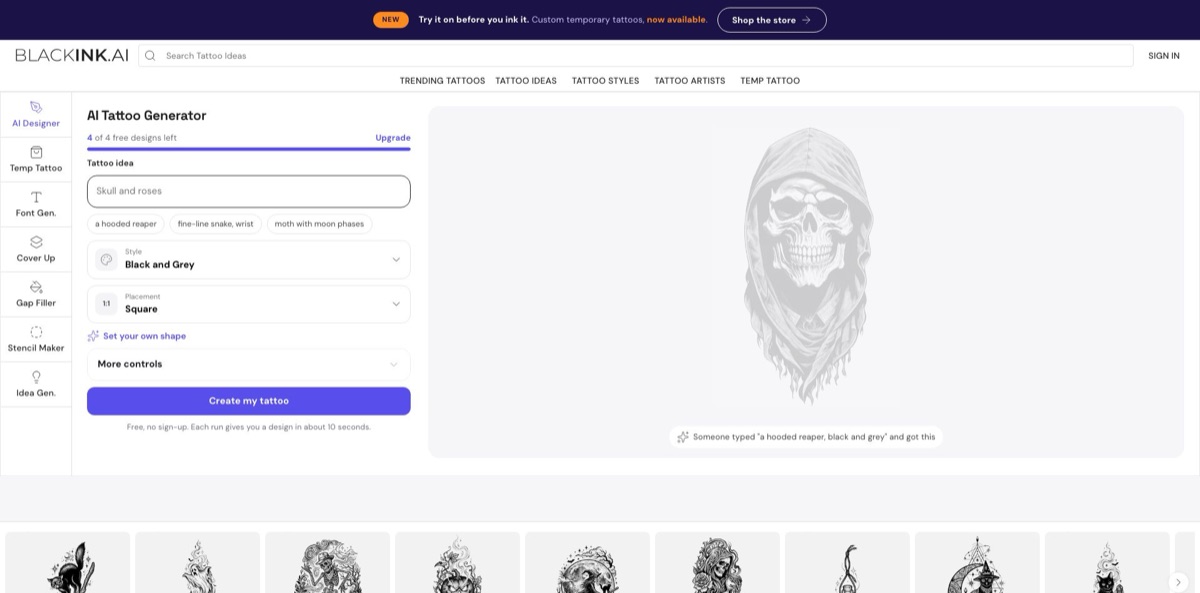
BlackInk AI is a browser-based tattoo design generator run by BlackInk AI, LLC in Chicago. You type a short idea such as “moth with moon phases”, pick a tattoo style and a body placement, and the model returns flash-style artwork in seconds that you can preview on skin, convert to a stencil or order as a temporary tattoo. It replaces weeks of scrolling Pinterest and Instagram for references with a quick way to explore directions before you book an artist. The weak spot is finish quality: independent reviewers describe results as sketchy or less refined than newer image models, and users say detailed concepts are hard to describe in the short prompt box. The vendor itself says to have an artist review and clean up every design. Pick it for idea exploration and client conversations, not for a needle-ready final.
How to start using BlackInk AI?
Open blackink.ai in any desktop or mobile browser. The AI Tattoo Generator sits at the top of the homepage, and you do not need an account for the first runs: a counter shows “4 of 4 free designs left”, and the page says each run returns a design in about 10 seconds. Separate tools live in the top menu: AI Designer, Font Gen., Stencil Maker, Idea Gen., plus Cover Up and Gap Filler galleries and the Temp Tattoo shop.
For a first real design, type your concept into the “Tattoo idea” field, or click one of the sample prompts such as “a hooded reaper” or “fine-line snake, wrist” to see how specific a good prompt should be. Then choose a Style (Black and Grey is the default, with Blackwork, Sketch, Minimalist, Realism, Japanese and more on the list) and a Placement. Square, Tall and Wide cover generic shapes, while Forearm, Half Sleeve, Chest and other options fit the art to a body area. Press “Create my tattoo”.
The screen that changes results most is “More controls”. Detail and complexity switches between Simple, Medium and Complex and is available while you still have free designs. Line weight (Default, Thin, Heavy) is a Pro control, and Modifiers let you push a design toward Masculine, Feminine or Symmetrical. For lettering, the Font Gen. tool works better than the main designer: it takes up to 30 characters on two lines and offers 20 font styles from Cursive and Old English to Gothic. If you already have a drawing, Stencil Maker accepts a PNG or JPG of at least 512x512 pixels.
Before anything goes near skin, zoom into the result. The FAQ admits that some outputs come out with weird shapes or bad symmetry, so treat each image as a draft for your artist rather than a finished stencil. Pro users can download a 2,048 x 2,048 pixel file, run the stencil converter or keep designs private; free creations are not private by default, since the Keep Private toggle is marked Pro only.
Who is it for?
First-timers
You know the theme but not the look, and a permanent decision makes every option feel risky. BlackInk lets you try the same idea in Blackwork, Minimalist or Realism and on different body areas, so you walk into the studio with a clear direction instead of a vague mood board.
Cover-up and filler planners
Covering an old piece or filling gaps in a sleeve is hard to picture. The Cover Up gallery alone lists more than 19,000 public cover-up designs, and the Gap Filler section does the same for small connector pieces, which gives you and your artist concrete references to react to.
Tattoo artists in consultations
Clients often struggle to describe what they want, and drawing three rough concepts for free eats your evenings. Generating several directions in front of the client speeds up that first conversation. The terms of service require a paid subscription when you use designs for client work.
Script and lettering fans
Names, dates and quotes are the most common first tattoos, yet picking a typeface from a flat font list says little about how it will read on skin. The font generator renders your text in 20 tattoo lettering styles, though the page warns that AI spelling can slip.
Commitment-shy collectors
If you want to live with a design before it becomes permanent, BlackInk prints any generated design as a plant-based jagua temporary tattoo that lasts one to two weeks, shipped from the US.
Illustrators and designers
Browsing compositions across nearly thirty styles is a fast warm-up for your own drawings. Keep in mind that the license forbids reselling or redistributing generated designs, so flash books and sticker packs are off the table.
BlackInk AI pricing
The model is simple: a handful of free runs, then one subscription called Pro Unlimited that you can pay monthly, quarterly or yearly. Every billing term includes the same features and no credit counting, so the only real decision is how long you expect to keep designing. The official pricing page states that all prices are billed in USD. Physical temporary tattoos are a separate purchase with their own price.
You get four free designs without signing up. Line weight control, private designs, the stencil converter and high-resolution downloads are reserved for Pro, and some gallery images stay blurred.
Unlimited designs, remixes and body visualizations, two designs from every idea, every style including Blackwork, Chicano and Geometric, sleeve and custom-shape templates, line weight, complexity and color controls, the stencil converter and HD downloads.
Same features as above.
Same features as above.
Standard shipping is free, orders ship to the US and Canada and usually arrive in 5 to 7 days.
The terms of service say fees for subscriptions and other digital services are non-refundable, and custom temporary tattoos can be returned only if they arrive damaged, defective or incorrect.
BlackInk AI key features
AI Designer with tattoo-specific controls
You describe an idea, pick one of the generator’s styles and a placement shape, then fine-tune detail and complexity, line weight and modifiers such as Symmetrical. Because the controls speak a tattoo vocabulary rather than generic image settings, you get results that look like flash art instead of illustrations.
Body placement previews and templates
Pro adds unlimited body placement visualization, templates for sleeves and other body areas, and custom shapes. Seeing proportions on an arm or chest exposes problems that a square image hides, like a design that is too busy for a wrist. It also gives your artist a clearer brief than a screenshot.
Image-to-Stencil converter
Upload your own PNG or JPG of at least 512x512 pixels and BlackInk crops it to a square, removes the background and converts it to a stencil-style line drawing. You can download the result or remix it into many variations. Your initial upload stays private, but remixes are public unless you are on Pro.
Tattoo font generator
Type a name, date or short quote of up to 30 characters across two lines and choose from 20 lettering styles such as Cursive, Old English, Script, Traditional and Gothic. It is a quick way to compare how the same words feel in different scripts.
Idea generator and design galleries
If you have no concept yet, Idea Gen. asks for a style preference (Black Ink, Minimalist or Color) plus your job, hobbies and favorite things, and suggests personalized concepts. Large public galleries organize ideas by placement, style and theme, including dedicated Cover Up and Gap Filler collections.
Temporary tattoos printed from your design
Any design you create can be ordered as a semi-permanent jagua tattoo that holds for roughly 10 to 16 days and fades on its own. The kit includes primer gel and transfer sheets, and the order arrives as a pack of three so a failed application is not wasted. It is the closest thing to a test drive before permanent ink.
Downloads, multilingual prompts and a private library
Pro downloads come at 2,048 x 2,048 pixels for print and stencil work, and prompts are accepted in more than 100 languages, though the FAQ recommends English for best results. According to the pricing page, designs stay in your library after you cancel.
BlackInk AI Pros & Cons
Pros
BlackInk AI is built for one job, and it shows. Styles, placements, line weight and complexity are named the way tattoo people talk, so you spend less time fighting a general image model with long prompts. Four free designs without an account let you judge it on your own idea, and one flat subscription removes credit anxiety while you iterate. The extras are practical rather than decorative: a font tool for lettering, a stencil converter, cover-up and filler galleries, and printed jagua temporaries for a real-world test. Pricing is published openly in USD with a cheap annual option. Use it to narrow ten vague ideas down to two strong directions before your consultation.
Cons
Output quality is the main complaint. Independent reviewers call the results sketchy, darker and less refined than newer models, and users say the short prompt box makes detailed, multi-element concepts hard to describe. Free designs are not private, and the license is narrower than the pricing FAQ suggests: the terms of service say BlackInk retains rights to generated designs and grants you a personal-use license, with client work requiring a subscription and resale banned. Subscription fees are non-refundable, and one Trustpilot reviewer reported trouble confirming a cancellation. Screenshot the Stripe confirmation whenever you cancel and keep it until the next billing date passes.
Use BlackInk AI if you want…
- Explore one tattoo idea across many styles quickly.
- Preview a design on your forearm, chest or sleeve.
- Turn your own sketch into a clean stencil.
- Compare tattoo lettering styles for a name or quote.
- Find cover-up and gap-filler ideas for existing ink.
- Give your tattoo artist a clearer visual brief.
- Wear a temporary version before committing to permanent ink.
- Generate fresh concepts from your hobbies and personality.
BlackInk AI alternatives
 Fotor Image GeneratorRead review →
 Canva Text to ImageRead review →
 MidjourneyRead review →
 Leonardo.aiRead review →
 Adobe FireflyRead review →
 IdeogramRead review →
BlackInk AI Reviews
A buyer of the printed temporary tattoos said the team kept in close contact until the order was right, and the tattoos themselves worked well.
One subscriber found the variety and quality of generations too limited to justify a subscription and was billed again after cancelling, because the cancellation flow never clearly confirmed it had gone through.
A user who already had a precise design in mind felt the prompt box was too small to describe it and the suggestions missed the point, so the $15 month felt like wasted time and money.
A software roundup praised the purpose-built interface and the font generator’s instant on-skin preview, while noting the layout feels dense at first and newcomers need some trial and error with prompts.
A tattoo artist comparing generators on a competing app’s blog liked that BlackInk was the only tool in the comparison with line weight and complexity controls, but found its designs darker and less refined than newer models.
FAQ
Is BlackInk AI free?
You can create four designs for free without signing up. After that you need the Pro Unlimited subscription to keep generating and to use Pro features such as line weight, private designs, stencils and HD downloads.
How much does BlackInk AI Pro cost?
As of November 2026, Pro Unlimited costs $15 for one month, $39.99 for three months or $72 for a year, all billed in USD with the same features on every term.
Can I use BlackInk AI designs commercially?
The terms grant a personal-use license for tattooing yourself or designing for a friend or family member. Tattoo artists may use designs with clients only with a paid subscription, and reselling or redistributing designs, for example as flash books or stickers, is not allowed.
Are my BlackInk AI designs private?
Not by default on the free tier: the Keep Private option is marked Pro only, and stencil remixes are public unless you are a Pro customer. Pro designs stay private in your library, and you can toggle visibility from My Collection.
Can I upload my own image or sketch?
Yes, through the Image-to-Stencil tool. It accepts PNG or JPG files of at least 512x512 pixels, crops them to a square, removes the background and converts the image to stencil-style line art.
Which languages does BlackInk AI support?
The AI tools accept prompts in more than 100 languages and translate non-English ideas automatically, but the FAQ recommends English for the most accurate results. The website itself is in English only.
How do I cancel my subscription or delete my account?
Go to Settings, then Billing, and cancel from the Stripe management dashboard. Account deletion sits under Settings, then Account Info; if you cannot log in, the privacy policy says emailed deletion requests are processed within 30 days.
Is there an official BlackInk AI mobile app?
The official site works in mobile browsers and does not link to any app. An iOS app called “BlackInk: AI Tattoo Generator” is listed under an individual developer with separate weekly and annual pricing, so check the seller name before subscribing there.
Similar tools
 CustomuseAI 3D creation platform that chains image, video and 3D models into node workflows for game-ready assets, Roblox items and scenes.
 VisualGPTCredit-based AI image and video studio that runs Nano Banana, GPT Image, Seedream, Flux and Kling for product photos, photo edits and
 LovartAI design agent that turns a chat brief into logos, social posts, product shots, slides and videos on one editable infinite canvas.