

Browse AI
Data AnalysisUpdated November 17, 2026
No-code web scraper that trains AI robots to extract and monitor website data, then sends it to Google Sheets, Airtable, webhooks or a REST API.
We may earn a commission when you sign up through our links. It does not affect our reviews.
What is Browse AI?
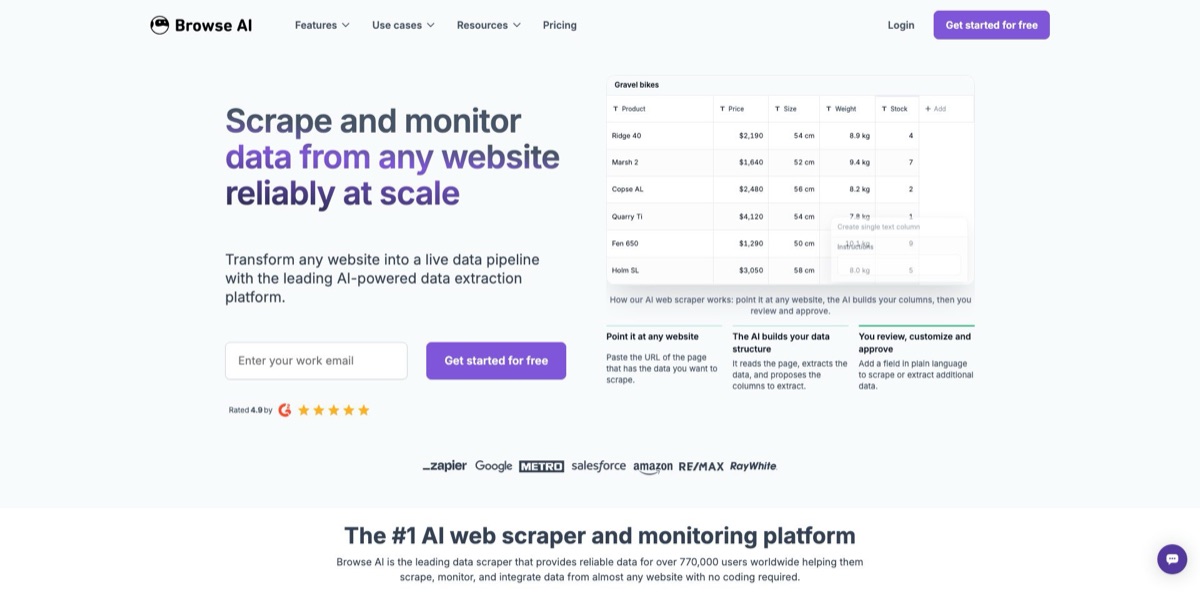
Browse AI is a cloud-based, no-code web scraper built by Browse AI Inc., a Vancouver startup founded in 2020. You give it a URL, and either its AI or a visual recorder trains a “robot” that pulls lists, text and screenshots from the page into a structured table. Robots can run on a schedule, watch pages for changes, chain together to crawl list and detail pages, and push results to Google Sheets, Airtable, Zapier, webhooks or a REST API. Residential proxies, retries and standard CAPTCHA handling are built in, so you don’t maintain scripts or proxy pools yourself. The weak spots are a credit meter that climbs fast on detail pages and protected sites like Amazon, plus user reports of robots struggling on complex, heavily dynamic sites. Pick it if you need recurring structured data from a handful of websites and nobody on your team wants to write Python.
How to start using Browse AI?
Create an account on the Browse AI dashboard. The Free plan needs no credit card, never expires and gives you 50 credits a month across 2 domains, which is enough to prove one use case. The site notes that signing up with a work email gets you team features and faster support. On the dashboard, click Build new robot and pick Extract structured data if you want a dataset, or Monitor for changes if you mainly care about alerts.
Next, enter the Origin URL. Point it at the page that already shows the data, such as a competitor’s pricing page rather than their homepage. Click Start Training Robot and, under AI Training, choose Table Studio. The AI reads the live page, proposes columns and lists, and fills in sample rows, which can take a few minutes. Use Add column to request extra fields (text, a list or a screenshot), describe what you want in the Instructions box, then hit Preview. After your plan’s allowance, each new AI-built robot costs 20 credits, which covers 5 previews.
If the data sits behind a login, tick This website needs logging in before you start. Logging in with session cookies still works in Table Studio, but a username-and-password login requires Robot Studio under Visual Training, where you show the robot what to click and capture. Training in Robot Studio uses no credits. The Chrome extension is the fallback for sites that neither studio can train. For search pages, set up input parameters so one robot can take a different keyword or location on every run.
Nothing is stored until you click Save Robot, so experiment freely. Once saved, the robot runs its first extraction straight away and shows the results as a table on its page. Check a few rows against the live site, then turn on monitoring (Hourly, Daily, Weekly or Monthly, with Daily as the default) and keep the email alert on. Finally, connect Google Sheets or a webhook, or upload a list of URLs as a bulk run to scale the same robot across many pages.
Who is it for?
E-commerce and pricing managers
You track dozens of competitor products by hand and always notice price changes a week late. A Browse AI monitor checks those pages on a schedule and emails you when a price or stock level moves. Your pricing decisions run on today’s data instead of last month’s spreadsheet.
Sales and lead-generation teams
Prospects live in online directories, marketplaces and listing sites, and copying them into a CRM eats whole afternoons. A list robot pulls names, links and details into Google Sheets or pushes them through Zapier or Make. Reps spend their time on outreach rather than copy-paste.
Recruiters and job-market analysts
Openings are scattered across Indeed, Glassdoor, FlexJobs and niche boards. Prebuilt robots extract titles, companies, salaries and locations without any training. You get one up-to-date table of the market instead of ten browser tabs.
Real estate investors and agents
New listings on Redfin, Compass or LoopNet disappear quickly, and manual checking misses deals. Prebuilt and custom robots capture prices, specs and links, and monitors flag new entries. You react to fresh inventory first.
No-code automation builders
You already run Airtable bases, Zapier zaps or Make scenarios, but they lack a reliable web data source. Browse AI acts as that source through native integrations, webhooks and a REST API on every plan, including the free one. Your workflows trigger on real website changes.
Data and AI teams
You need web data for dashboards or LLM pipelines but don’t want to maintain fragile scrapers and proxies. Bulk runs handle up to 500,000 URLs, and the Premium plan adds a managed team with a data-accuracy SLA. Engineers stay on core product work.
Browse AI pricing
Every plan is built on credits. One page costs 1 credit and ten rows of data cost 1 credit, and you pay whichever is more, so a list page with 50 products costs 5 credits. A standalone screenshot is 1 credit, and pages on heavily protected sites such as Amazon, LinkedIn and eBay start at 2 to 10 credits. All plans, including Free, get unlimited robots, the REST API, webhooks, bulk runs, residential proxies and formula columns. Annual billing saves 20% at the same credit volume and delivers the whole year of credits upfront. Plan credits reset at the end of each billing cycle, and when you run out, robots pause instead of charging you extra. Prices are in USD.
50 credits a month (up to 50 pages or 500 rows), 2 domains, 3 users and self support. No credit card and no expiry date, so it works as a permanent sandbox rather than a trial.
Month to month it costs $48 for 2,000 credits a month. You get 5 domains, 3 users and standard support; extra domains cost $4/month on annual billing ($5 monthly), and annual subscribers can top up credits at $0.024 each.
Monthly billing runs from $87 for 5,000 credits a month up to $399 for 30,000. It includes 10 domains, 10 users, priority support, extra domains at $2.40/month (annual) and top-ups from $0.017 down to $0.013 per credit. Setup and onboarding services start at $399.
This is a managed service: data engineers build and maintain your robots, transform and match data, deliver it into your systems and work to a 98% data-accuracy SLA, with a dedicated account manager and an NDA on request.
Every paid plan comes with a 60-day refund guarantee. Note that switching plans charges the new plan in full immediately and starts a fresh billing period.
Browse AI key features
Table Studio AI training reads a live page from the URL you paste and proposes the columns and lists worth extracting
You add or remove fields and describe new ones in plain language through the Instructions box, then preview the result before saving. Setting up a scraper becomes a review task rather than a coding task.
Robot Studio and the Chrome extension let you train robots visually with Capture list, Capture text and Capture screenshot. Robots can log in with encrypted credentials or session cookies, fill forms, open dropdowns, follow pagination and scroll through infinite lists. That covers the dynamic pages that simple point-and-click scrapers miss.
Monitoring and change detection run any robot on a schedule set in minutes, hours, days, weeks or months, with an advanced RRULE option for irregular patterns. A Change size setting decides how big a change must be before it counts, and email notifications tell you what moved. You can also extract only new records or compare captured screenshots visually.
Workflows and bulk runs connect robots so one collects URLs from a list page and the next scrapes every detail page behind it. Bulk runs take an uploaded list of up to 500,000 URLs with the same layout. A whole catalogue or directory turns into one dataset without manual looping.
Integrations and API send results to Google Sheets, Airtable, Zapier, Make, Pabbly Connect, Integrately and Amazon S3, or out through webhooks and the REST API. You can also export CSV or JSON files. Scraped data lands where your team already works, and the API is available even on the free plan.
Anti-bot handling bundles residential proxies, IP rotation, rate limiting, automatic retries and solving of standard CAPTCHAs such as reCAPTCHA and hCaptcha, plus geolocation for region-specific pages. When a site changes its layout, the AI tries to adapt the robot, and you can retrain it without losing workflows or integrations.
A library of 200+ prebuilt robots covers common targets such as Amazon search results, Indeed jobs, Redfin listings, Reddit posts and YouTube transcripts. You point one at a URL and run it in a couple of clicks. Formula columns then clean or categorize the output from a plain-language description.
Browse AI Pros & Cons
Pros
You can go from a URL to a working scraper without code, and Table Studio does most of the column setup for you. The free plan includes every feature, the REST API and webhooks, so you can prove a full pipeline before paying. Proxies, retries and CAPTCHA handling are part of the price instead of separate bills. Prebuilt robots cover popular sites, and the integration list reaches Sheets, Airtable, Zapier, Make and S3 out of the box. Security paperwork is in place too, with SOC 2 Type II, GDPR and CCPA listed and recorded passwords encrypted with AES-256. Many reviewers also praise the support team. Start with a prebuilt robot when one exists for your target site, since it skips training entirely.
Cons
Credit costs are hard to predict. Detail pages, premium sites at 2 to 10 credits each and frequent monitors drain a plan quickly, and unused plan credits do not roll over. Monthly billing is much pricier than annual, with Personal at $48 versus $19 a month. Several users report robots that work on simple pages but break or need help on complex, dynamic sites, and one long-time user saw extension recordings fail to upload. Robots return file and image links, not the files themselves, and data is kept for 90 days on self-serve plans. Older reviews mention slow support and billing disputes. Test your hardest target site on the free plan before you commit to a yearly payment.
Use Browse AI if you want…
- Turn competitor product pages into a live spreadsheet.
- Monitor prices and stock levels without checking pages manually.
- Scrape directories and listings for sales leads without code.
- Feed fresh web data into Airtable, Zapier or Make.
- Turn any website into a REST API endpoint quickly.
- Extract data from pages behind a login or search form.
- Run one trained robot across thousands of similar URLs.
- Get email alerts when important web pages change.
Browse AI alternatives


Browse AI Reviews
A Chrome Web Store reviewer who scrapes many differently formatted, frequently changing sites calls Browse AI the most powerful scraper they have used and praises the support team. They also admit it is pricey.
Product Hunt reviewers find it unusually easy for a web scraping tool and like how often it gets updated. Others say it handled only simple examples well and that support was slow to respond.
A long-time user on the Chrome Web Store says the extension degraded: recordings would not upload and the studio crashed when used with logged-in cookies. Support improved, but bug fixes from engineering took a long time.
Summaries of G2 and Capterra reviews credit ease of use, responsive support and the Zapier and Google Sheets integrations. The most common complaints are thin free-plan credits and credit usage that is hard to predict.
On Trustpilot, the profile is small and mixed: some users value having website data land in a spreadsheet automatically. Negative reviews focus on billing, including a cancelled subscription that kept being charged, and the company replied with an apology.
FAQ
Is Browse AI free?
Yes. The Free plan costs nothing, needs no credit card and does not expire, giving you 50 credits a month, 2 domains and access to every feature.
Do I need to know how to code?
No. You paste a URL and review the columns the AI suggests, or train a robot visually by clicking the data you want. Coding is only needed if you choose to work with the REST API.
How are Browse AI credits calculated?
One page costs 1 credit and ten rows cost 1 credit, whichever is higher. A standalone screenshot is 1 credit, and pages on protected premium sites such as Amazon or eBay cost 2 to 10 credits each.
Can Browse AI scrape data behind a login?
Yes, using either your session cookies or a username and password, but only for data you have permission to access. Passwords entered during training are encrypted with AES-256 and decrypted on the server only when a robot runs.
Does Browse AI have an API?
Yes. The REST API, webhooks and bulk runs are available on every plan, including Free, and let you manage robots, run tasks and retrieve results programmatically.
Which integrations does Browse AI support?
Native options include Google Sheets, Airtable, Zapier, Make, Pabbly Connect, Integrately, Amazon S3 and webhooks. You can also download results as CSV or JSON.
Is my data secure with Browse AI?
Browse AI lists SOC 2 Type II, GDPR and CCPA compliance, runs on AWS data centers in the US and uses Auth0 for sign-in. Extracted data is retained for 90 days on self-serve plans.
Can I cancel and get a refund?
Every paid plan carries a 60-day refund guarantee under the company’s refund policy. Payments are taken only in US dollars by card through Stripe.
Similar tools
 InnovatianaFrench managed data labeling service with in-house annotators for computer vision, NLP, RLHF and evaluation datasets, plus a self-serve Dataset Finder.
 Y2DocWeb tool that turns public YouTube videos into structured notes, timestamped transcripts and PDF, Markdown or Docx files, plus MP3 downloads.
 InfinityCall tracking and AI call analytics platform that ties phone calls to campaigns and keywords and sends call outcomes into Google, Meta