
Bulk Image Generation
Image GenerationUpdated November 20, 2026
Batch AI image generator that turns a prompt list or one brief into up to 100 images per run, with five models, background removal and face swap.
We may earn a commission when you sign up through our links. It does not affect our reviews.
What is Bulk Image Generation?
Built by VP Solutions, Inc. in San Francisco and running since 2024, this web app produces whole sets of AI images instead of one picture per prompt. You paste a list of prompts or describe the set to an agent, pick one of five model families (Flux, Nano Banana, Seedream, Ideogram or GPT-Image-2.5), and up to 100 images render in parallel, ready to download as a single ZIP. Batch background removal, face swap and an image-to-text tool live in the same workspace. That removes the slow loop of prompting, waiting and saving images one at a time in chat tools. The weak spots are a hard cap of 100 images per batch, no CSV upload and credit costs that swing widely with the model you choose. Pick it if you publish coloring books, sell print-on-demand designs, or need dozens of matching icons or ad variants every month.
How to start using Bulk Image Generation?
Sign up with Google or an email address from the homepage. The free plan gives you up to 10 images a month plus the image-to-text tool, while the bulk resizer, compressor, prompt generator and aspect ratio calculator work without an account at all. Agentic chat and batch generation are reserved for paid plans, so treat the free tier as a quick look at output quality rather than a working batch setup. Before upgrading, read the plan table carefully, because only Growth and higher include a commercial license.
Your first real job starts in the Agent tab, where a box asks what you want to generate. Describe the whole set in one sentence, for example 30 coloring pages of cottagecore animals with thick clean outlines and no shading, or tap one of the example chips such as Product Photography, Social Media Posts, Ad Banners or Logo Concepts. The agent writes the individual prompts for you. If you want tighter control, paste your own list instead and build each line from a fixed style block plus one changing subject.
The setting that matters most is the model, because it decides what each image costs. The default GPT-Image-2.5 takes 20 credits per image, light models such as Flux Schnell start at 2 credits, and premium options like Nano Banana Pro go up to about 70, with the exact price shown next to each model before you run. The vendor recommends Ideogram or GPT-Image-2.5 when an image needs readable text, Nano Banana or Seedream for photorealism and Flux for clean line art. For brand work, open Projects, create a project and add instructions plus reference images from your brand kit so every batch follows the same look.
When the batch finishes, preview the results, keep the strongest images and download them individually in full resolution or grab the whole set as one ZIP from the results page. If the set needs cleanup, ask the agent for batch background removal or a batch face swap and upload the source face together with the target images. The History tab keeps earlier runs, which helps when a client asks for a variation of last week’s set. Check the license on your plan before anything goes into a paid listing or ad.
Who is it for?
Coloring-book and KDP publishers
You need 30 or more pages in one consistent line style, and prompting them one by one eats whole evenings. One brief to the agent produces the full book draft in a single run. You spend your time curating pages instead of regenerating them.
Etsy and print-on-demand sellers
Stickers, shirts, mugs and posters live or die by catalog size. Batches of up to 100 designs let you test a theme across dozens of variations at once. The Growth plan’s commercial license covers selling those designs.
Performance marketers
Ad platforms reward testing many creatives, but a designer cannot hand you 50 variants by Friday. You can generate dozens of ad and social visuals from one brief and pick winners after a test. Ideogram or GPT-Image-2.5 handle headlines with readable text.
Indie game developers
Item art, icons and sprite sheets need one style across many assets. Describe the set once and get a coherent pack instead of mismatched single images. It works for prototypes and placeholders long before you can hire an illustrator.
E-commerce teams
Lifestyle scenes, product backdrops and packaging mockups pile up with every new collection. Generating a set and then removing backgrounds in bulk keeps the catalog moving without Photoshop. Expect to retouch hero shots where the exact product must appear.
Stock-image contributors
Themed sets sell better than single uploads on Adobe Stock and similar sites. A 100-image batch around one topic gives you material for a full submission. Check each platform’s AI content rules before uploading.
Bulk Image Generation pricing
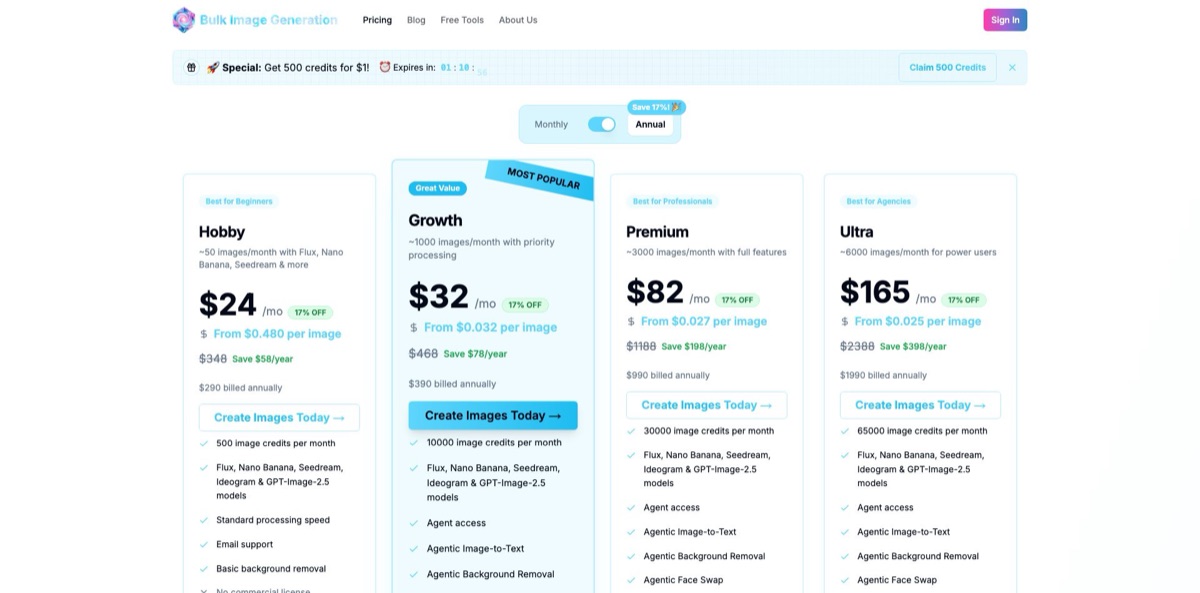
Every plan is a monthly or annual subscription with a fixed credit allowance, and annual billing saves about 17%. Credits refresh at the start of each billing cycle and unused credits expire, so they do not roll over. The number of images you actually get depends on the model: the pricing page estimates are averages, while the default GPT-Image-2.5 costs 20 credits per image and Flux Schnell as little as 2. Payment runs through Stripe with all major cards.
Up to 10 images a month and the image-to-text tool, with community support on Discord. Batch generation and agent chat are not included.
500 image credits, which the pricing page puts at about 50 images (only 25 at the default GPT-Image-2.5 rate). All five model families, standard queue, email support and basic background removal, but no commercial license.
10,000 credits, roughly 1,000 images, plus agent access, agentic image-to-text, background removal and face swap, a priority queue, high-resolution outputs and a commercial license.
30,000 credits, about 3,000 images, with the fastest queue, priority email support and a commercial license.
65,000 credits, about 6,000 images, with dedicated processing resources, custom integrations, a dedicated account manager and an SLA.
The pricing page promises a 30-day money-back guarantee, with refunds requested by email and returned through Stripe in about five business days. The Terms of Service, last updated 5 January 2025, still describe a strict no-refund policy, so keep the email confirmation if you rely on the guarantee. At the time of checking, the pricing page also advertised a time-limited offer of 500 credits for $1.
Bulk Image Generation key features
Parallel batch generation runs up to 100 images in one job instead of the one to four images many generators return per prompt. Each image can carry its own prompt, so a full product catalog, coloring book or ad set comes out of a single run. The FAQ puts a full batch at a few minutes.
The agent turns a one-sentence brief into individual prompts and runs them for you
You describe the subject, style and count, and it handles the prompt writing that usually takes longer than the generation itself. Agent access is listed from the Growth plan up.
Five model families sit on one subscription: Flux, Nano Banana, Seedream, Ideogram and GPT-Image-2.5
You can mix models inside one batch and compare results side by side, which beats paying for several separate generators. Each model has its own credit price, shown before you generate.
Batch editing applies background removal or face swap across a whole folder at once
That helps product catalogs that need clean cutouts and storybook series that need one character’s face on every page. Hobby includes basic background removal, while the agentic versions start on Growth.
Projects store brand-kit references and instructions so repeat batches keep the same colors and visual style
You create a project once, upload reference images and generate new sets on top of it. It reduces the drift that appears when every batch starts from a blank prompt.
API and MCP access, listed from Growth up, lets you trigger batches from your own tools or from assistants such as Claude and ChatGPT. That moves image sets into existing content pipelines without manual uploads. No public API documentation page was available at the time of checking.
A set of free tools runs in the browser without signup, including a bulk image resizer, compressor, format converter, image splitter, images-to-PDF, metadata remover, prompt generator, aspect ratio calculator and image-to-text converter. The image tools process files locally rather than uploading them. They are useful even if you never subscribe.
Bulk Image Generation Pros & Cons
Pros
The core idea is narrow and well executed: many different images from one brief, delivered as a set you can download in one ZIP. Five model families on a single bill save you from juggling separate subscriptions, and per-model credit prices let you prototype cheaply on Flux Schnell before paying for premium output. The Growth plan works out to roughly four cents per image at the pricing page’s estimate and includes a commercial license. Batch background removal and face swap mean the set does not need a second tool for cleanup. The free browser tools add value even outside the subscription. Use it for repeatable sets like coloring books, icon packs and ad variants, where volume and a shared style matter more than one perfect image.
Cons
Credits are where surprises hide. The image estimates on the pricing page are averages, and at the default GPT-Image-2.5 rate the Hobby plan buys only 25 images a month, while premium models cost even more. Unused credits expire at the end of each cycle. A batch tops out at 100 images, there is no CSV upload, and the vendor’s own comparison admits a lack of pay-as-you-go packs. The refund promise on the pricing page conflicts with the no-refund clause in the Terms of Service, and the terms also let the company use generated images for service improvement. Independent reviews are scarce. Start on Growth for a single month and check the per-model credit price before every large batch.
Use Bulk Image Generation if you want…
- Generate up to 100 different images in one run.
- Turn one written brief into a full image set.
- Build coloring books and KDP interiors much faster.
- Fill print-on-demand catalogs with themed design variations.
- Produce dozens of ad creatives for split testing.
- Compare Flux, Seedream, Ideogram and GPT-Image results together.
- Remove backgrounds across an entire product folder at once.
- Keep brand colors consistent with reusable project references.
- Download every finished batch as a single ZIP.
Bulk Image Generation alternatives
 IdeogramRead review →
 MidjourneyRead review →
 Leonardo.aiRead review →
 RecraftRead review →
 KiveRead review →
 Adobe FireflyRead review →
 getimg.aiRead review →
 OpenArtRead review →
Bulk Image Generation Reviews
Product Hunt launch commenters said the tool targets a real pain, recalling hours spent writing prompts and regenerating images one by one in Midjourney or DALL-E, though one noted the website itself still needed polish.
A marketer in the same launch thread reported using it for social media and app store visuals and praised how quickly it automates routine content, while others asked about brand consistency and an API, which now appears on Growth and higher plans.
Another early user was impressed by how many different styles one tool could produce at good quality, but these comments came at launch rather than after months of paid use.
On There’s An AI For That, opinion is split: 11 ratings average 3.3 out of 5, with six five-star and four one-star votes, which suggests results vary a lot from user to user.
FAQ
Is there a free plan?
Yes. The free plan gives you up to 10 images a month and the image-to-text tool, while batch generation and the agent require a paid plan. The browser-based resizer, compressor and prompt tools are free without an account.
Can I use the images commercially?
The pricing page includes a commercial license on Growth, Premium and Ultra and marks Hobby as having none. Treat Free and Hobby images as personal-use only.
How many credits does one image cost?
It depends on the model. The default GPT-Image-2.5 costs 20 credits, Flux Schnell starts at 2 and Nano Banana Pro goes up to about 70, with the price shown next to each model before you run a batch.
Can I upload a CSV of prompts?
No. The vendor’s own guides say there is no CSV upload, so you paste a prompt list or describe the set to the agent. Ideogram’s batch feature is an option if your prompts already live in a spreadsheet.
Does it have an API?
API and MCP access is listed for Growth and higher plans, so batches can be triggered from your own tools or AI assistants. No public documentation page was available at the time of checking, so request details from support.
Can I get a refund or cancel anytime?
You can cancel through the Stripe billing portal and keep access until the end of the paid period. The pricing page offers a 30-day money-back guarantee by email, but the Terms of Service still describe a no-refund policy, so get the refund confirmed in writing.
What happens to my images and data?
The terms grant you a non-exclusive, worldwide license to the images you generate and say the company does not claim ownership of your input images. They also reserve the right to use generated images to improve the service.
Is it the same as BulkImagen or other bulk image generators?
No. Bulk Image Generation is the subscription product at bulkimagegeneration.com, run by VP Solutions, Inc., while BulkImagen is a separate company that sells prepaid credit packs.
Similar tools
 RunComfyCloud ComfyUI platform with per-second GPU billing, 200+ ready workflows, hosted image and video models, LoRA training and a serverless API.
 ImgGen AIBrowser-based AI image generator and photo editing suite with background removal, 8K upscaling, restoration and an API on one credit balance.
 Mage SpaceBrowser-based AI studio that runs dozens of image, video and audio models on one account, with pay-as-you-go Gems or unlimited plans.