

Cabina.AI
AI AssistantsUpdated November 17, 2026
Token-based AI workspace that puts 55+ text, image, video and audio models, a RAG knowledge base and scheduled AI agents in one chat.
We may earn a commission when you sign up through our links. It does not affect our reviews.
What is Cabina.AI?
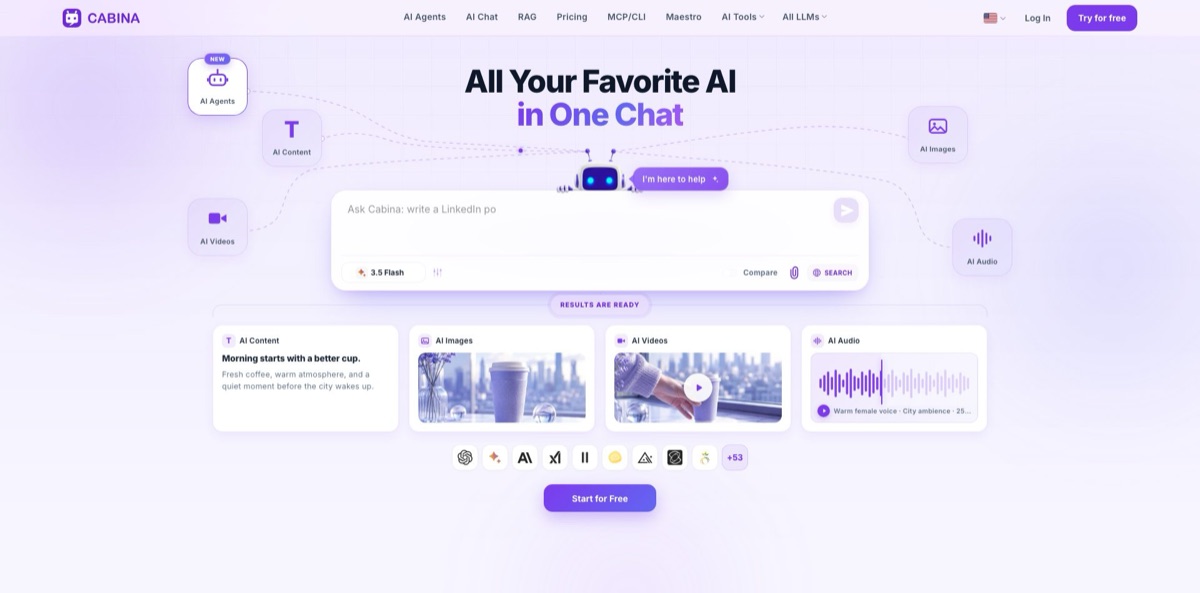
Cabina.AI is a browser workspace built by a Ukrainian team that connects one chat window to more than 55 models from OpenAI, Anthropic, Google, xAI, DeepSeek, Mistral, Midjourney, Runway, ElevenLabs and others, all paid from a single token balance. You can ask one model, switch mid-thread, or put two answers side by side in Compare mode, then move on to image editing, transcription, a document knowledge base or an autonomous agent that reports back in Telegram. The pitch is replacing several $20 subscriptions with one plan that starts at $4.99 a month. The weak spot is the token math: a Veo video costs 225 tokens while a Gemini reply costs about half a token, so heavy video or premium-model use drains the small plans fast. It suits people who use many models a little each rather than living inside one.
How to start using Cabina.AI?
Click Try for free on the homepage and register with an email and password or through Google. The Free plan gives you 50 Cabina Tokens, a basic model with limited daily access and 100 MB uploads, enough to judge the interface but not to run real work. Free-tier generations also cost more tokens than paid ones. If you want to test premium models without a subscription, a Pay-As-You-Go top-up starts at $3 and removes the free-tier limits for 100 days.
For a first real task, open a new chat, choose a model and give it something you would normally hand to ChatGPT, such as a client email. Then switch on Compare and send the same prompt to a second model, for example Claude next to GPT, or to two versions of the same model, and keep the stronger answer. For a harder question, build a Maestro preset: pick up to four models as answerers and one as the arbiter, which scores every answer out of ten and writes a final reply from all of them.
The screen worth learning next is AI Studio, a tab in the lower-left corner. Select Knowledge Base (RAG), click Create New Knowledge Base, and pull files from your device, Google Drive or OneDrive. Processing takes one to three minutes for a typical base. After that, click the Knowledge Base icon above any chat, choose the base, and whichever model you switch to answers from the same documents. Save the instructions you repeat in the Prompt Library and Roles, and Cabina loads them into each new chat automatically.
Before you scale up, open the Usage tab in your profile and click the (i) icon next to a generation to see what it cost. While testing image models, set the settings wheel to one image per generation, as the pricing FAQ recommends for beginners. On an Agent plan, click Create an agent, give it a name (the only required field), let Cabina write its soul from three answers, and send a first task in the web chat before you connect a Telegram bot. Run a scheduled template such as Morning briefing once by hand and check the output before you rely on it.
Who is it for?
Freelance content creators
You draft in one model, make thumbnails in another and record voiceovers in a third, paying a subscription for each. Cabina puts GPT, Claude, Midjourney, Flux, Nano Banana and ElevenLabs behind one balance and one history. Video is the expensive part, so budget it separately.
Small business owners and marketers
You want competitor prices checked, posts written in your tone and a summary every morning, without hiring an assistant. An Agent plan gives you an agent that searches the web, runs Python, remembers your preferences and sends results to Telegram on a schedule. Read its first few reports closely before you trust them.
Researchers and consultants
Long PDFs, contracts and tender packs overflow a normal chat context. The knowledge base indexes your files once and lets any model answer from them, citing passages when you ask. Compare mode helps when two models read the same clause differently.
Developers working in Claude Code or Cursor
You want an image, a short clip or a second model’s opinion without leaving the editor. Cabina’s MCP server exposes its catalogue to Claude Code, Codex, Cursor, Windsurf and other MCP clients behind one key, and the same key works for plain REST calls.
Model testers and AI-curious users
You read about each new model release and want to try it for a few dollars rather than another monthly plan. The $4.99 AI plan or a $3 top-up opens the catalogue, and Compare and Maestro make side-by-side tests quick. If you use ChatGPT all day and nothing else, ChatGPT’s own plan is simpler.
Small teams
Several people need AI access without each holding a personal subscription. Team pools share one token balance across two or more seats with Hermes agents included, and Enterprise adds a private cloud and isolated LLMs.
Cabina.AI pricing
Everything on Cabina is paid in Cabina Tokens. Each plan loads a token balance, and each request deducts tokens at a rate set per model: the pricing table lists a ChatGPT message at 5 tokens, a Claude message at 3.52, Gemini at 0.56, a Nano Banana image at 6.52 and a Veo video at 225. You can pay monthly or every six months for 10% off. Cards, Apple Pay and Google Pay go through WayForPay, crypto through WhitePay, and IBAN invoices start at $1,000. Unused tokens stay on the account for at least a year after a subscription ends, and requests that get no response are not charged.
You get 50 Cabina Tokens, a basic model with limited daily access and file uploads up to 100 MB, with no agents.
Top-ups of $3, $10, $20 or $50, with a lower cost per token on larger amounts; each payment lifts free-tier limits for 100 days.
You get 450 tokens (about 90 per dollar), every model in the catalogue, file, audio and video uploads, voice output and basic email support, but no agents. Cabina estimates this covers about 90 GPT messages, 800 Gemini messages, 69 Nano Banana images or 2 Veo videos.
You get 1,000 tokens (about 50 per dollar) plus one Hermes agent with up to three helper sub-agents, enough for roughly 201 GPT messages or 6 Veo videos.
You get 2,100 tokens (about 42 per dollar), three agents with up to three helpers each, and priority email support, enough for roughly 422 GPT messages or 13 Veo videos.
priced per seat for two or more users, with a shared token balance and Hermes agents. For a two-seat team the page lists Friends Pool at $29.97 per seat per month (500 tokens per seat), Team Pool at $68.94 (1,050), Business Pool at $149.89 (2,800) and Corporate Pool at $299.79 (7,000). Six-month billing adds 10% more tokens.
Custom. You get a private cloud with isolated LLMs, a customizable setup, priority technical support, team collaboration tools and employee training.
Cabina.AI key features
Multi-model chat with Compare mode
One chat reaches text models such as ChatGPT, Claude, Gemini, Grok, DeepSeek, Kimi, Qwen, Llama and Mistral, and you can switch between them while the context stays in place. Compare runs two models, or two versions of the same model, on one prompt side by side. Choosing a model becomes a quick visual check instead of copying between tabs.
Maestro for debated answers
A preset seats up to four models as answerers plus an arbiter that scores each reply out of ten, lists its strengths and weaknesses, and writes a final answer from all of them. Optional criteria such as accuracy, clarity or cost of ownership steer the judging. Every model in the run is billed as an ordinary message, so four answerers and an arbiter cost five calls and nothing on top.
Knowledge Base (RAG)
Upload PDF, Word, Excel, text and audio files or images with text from your device, Google Drive or OneDrive, and Cabina indexes them into a vector database. A chat can use one or several bases at once, and every model answers from your files rather than from general training data. Cabina says a single base can hold up to 1,000 PDFs and 2,000 documents, which suits tender packs, policy libraries and long reports.
Hermes agents
On the Agent plans you set up an agent in about 30 seconds, give it a soul that defines its tone and rules, and talk to it in a web chat or through your own Telegram bot. It comes with memory, web search, files and Python, 100+ ready-made skills and its own isolated environment, and it can pass parts of a task to up to three helper sub-agents. Schedule templates such as Morning briefing, Weekly review or Competitor news watch run on their own, or you can write any cron schedule.
MCP server and API
The MCP endpoint plugs Cabina’s model catalogue into Claude, ChatGPT, Codex, Cursor, Windsurf, Kimi and Copilot, authorized by OAuth or a Bearer API key. The same key handles REST calls from scripts, bots and CI jobs, and you can keep separate keys per environment and deactivate or revoke each one. Ask your coding agent for a Flux hero image and the file comes back in the same workflow.
Image editor and audio tools
The image editor covers inpainting, object removal, outpainting, background removal, find and replace, upscaling, variations and sketch-to-image, on any picture from your chat or an upload. For audio, Whisper and ElevenLabs Scribe transcribe recordings with TXT or SRT export, and ElevenLabs, OpenAI and Gemini voices read text aloud. You fix one corner of an image instead of regenerating the whole picture.
Prompt Library, Roles, Skills and AI Tools
Save prompts once and reuse them in any chat, give the model a role, load your own skills, and run one-click actions such as translate, humanize, rewrite or summarize. Cabina lists more than 35 such tools. Your setup follows you into every new chat, so you stop pasting the same instructions each morning.
Cabina.AI Pros & Cons
Pros
The entry price is low: $4.99 a month, or a one-off $3 top-up, opens a catalogue that runs from GPT and Claude to Midjourney, Veo and ElevenLabs, so you can try a new model without another $20 plan. Compare mode and Maestro turn model choice into a side-by-side check rather than a habit, and the knowledge base lets every model read the same files. The agent layer goes further than most multi-model hubs, with scheduled tasks, Telegram delivery, sub-agents and MCP connections in one package. Unused tokens last at least a year, and the Usage tab shows what each generation cost. Start on the AI plan and add an agent tier only when you have a recurring job for it.
Cons
The token pricing takes effort to read. Each model has its own rate, free accounts pay more per generation, and the agent plans give fewer tokens per dollar than the cheapest tier, so a monthly budget is hard to predict once video enters the mix. Public feedback is thin: Trustpilot shows three reviews, two of them one-star complaints about cost and unanswered emails, and G2 has none. Cabina runs in the browser with no dedicated mobile app listed on its site, and an independent directory review mentions occasional delays compared with the models’ own websites. Check the Usage tab every week, and keep heavy video work on a dedicated tool if cost matters.
Use Cabina.AI if you want…
- Replace several AI subscriptions with one token balance.
- Compare GPT, Claude and Gemini answers side by side.
- Chat with large PDFs through any model you choose.
- Generate images and short videos without separate accounts.
- Run a scheduled AI agent that reports in Telegram.
- Let several models debate a question before answering.
- Call 55+ models from Claude Code or Cursor.
- Try new models for a few dollars a month.
Cabina.AI alternatives
 MagaiRead review →
 1min.AIRead review →
 MonicaRead review →
 ChatHubRead review →
 NinjaChatRead review →
 GlobalGPTRead review →
 OpenRouterRead review →
Cabina.AI Reviews
Handy for working through large datasets and for comparing what different models return while keeping one saved profile for replies.
The idea of one hub for many models makes sense, but this reviewer found that paying through Cabina worked out several times more expensive than using the underlying services directly, so the convenience did not justify it.
An early user gave one star because emails to the company went unanswered, and concluded the service was not worth the effort.
FAQ
Is Cabina.AI free?
Yes, the Free plan costs $0 and includes 50 Cabina Tokens, a basic model with limited daily access and 100 MB file uploads. Paid plans start at $4.99 a month, and Pay-As-You-Go top-ups start at $3.
Which AI models can I use in Cabina.AI?
Cabina lists more than 55 models and versions, including ChatGPT, Claude, Gemini, Grok, DeepSeek, Mistral, Llama, Qwen and Kimi for text, Midjourney, Flux, Nano Banana, Ideogram and Leonardo for images, Runway, Veo, Kling and Luma for video, and ElevenLabs and Whisper for audio. New models are added as they ship.
How do Cabina Tokens work?
Each plan loads a token balance, and every request deducts tokens at the rate of the model you used, from fractions of a token for small text models to 225 for a Veo video. The Usage tab in your profile shows the cost of each generation.
Can I cancel my subscription?
Yes, you can cancel at any time, and the plan stays active until the end of the paid period. Unused tokens are kept for at least a year, and you can carry on with the Free plan and its limits.
Is my data private on Cabina.AI?
Cabina uses HTTPS and says account data is encrypted. Its privacy policy states that your content is sent to the AI providers behind each feature, such as OpenAI and Anthropic, and you can request access to or deletion of your personal data through its contact page.
Does Cabina.AI have an API or MCP server?
Yes. You create a personal API key in your profile and use it as a Bearer token for REST calls, or connect Cabina’s MCP server to Claude, ChatGPT, Codex, Cursor, Windsurf and other MCP clients.
Which languages does Cabina.AI support?
The interface is available in nine languages: English, Ukrainian, German, Spanish, French, Polish, Portuguese, Dutch and Finnish. You can write prompts in any language the chosen model supports.
What payment methods does Cabina.AI accept?
Bank cards, Apple Pay and Google Pay go through WayForPay with a $3 minimum, cryptocurrency through WhitePay with a $6 minimum plus a transfer fee, and IBAN invoices in USD, EUR or UAH are available on request from $1,000.
Similar tools
 MyMapAI canvas that turns a prompt, PDF or YouTube link into editable mind maps, flowcharts, SWOTs, genograms and slides, with GPT, Claude
 FirstupEnterprise employee communications platform with AI search, AI writing help and targeted delivery to app, email, intranet and signage.
 VapiDeveloper platform for building, testing and running voice AI agents that answer and place phone calls or talk to users inside apps.