

Cartoonize
Image EditingUpdated November 12, 2026
Browser-based photo editor that turns photos into cartoons, sketches and paintings, with AI background removal, face restoration and photo-to-anime tools.
We may earn a commission when you sign up through our links. It does not affect our reviews.
What is Cartoonize?
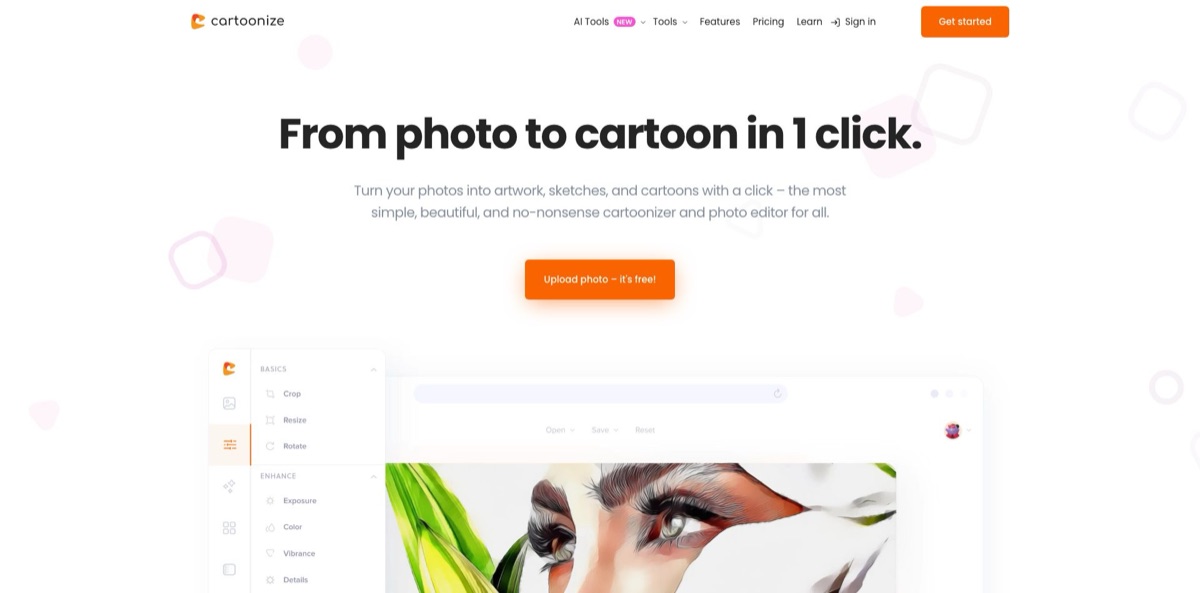
Cartoonize is a browser-based photo editor from eVeek, LLC that is built around one-click art effects. Its core is a library of cartoonizer, sketch, painting and NFT-style digital art effects, each with an intensity slider and finer controls, surrounded by everyday editing tools such as crop, resize, exposure, color replacement, text, layers, frames and masks. A newer AI layer adds background removal, face restoration, inpainting, upscaling, black-and-white colorization, photo-to-anime, face stickers and an image-to-prompt generator. The problem it solves is simple: you want a stylized portrait or a quick fix without learning Photoshop or installing anything. The weak spots are a free tier with ads, a watermark and only 3 AI credits a month, plus a lack of the advanced controls professionals expect. The product has also traded under the name Colorcinch. Pick it for casual creative edits, gifts and social images.
How to start using Cartoonize?
Go to cartoonize.net and click Get started or Upload photo. The editor opens in your browser at edit.cartoonize.net, and the official FAQ says the free Basic account needs no registration; you only create an account when you move to Pro and want to manage projects and billing. The editor may still ask you to create a free account before a download. It runs on Mac, Windows and Linux with an up-to-date Chrome, Safari or Edge, and nothing needs installing. The old Windows desktop program, Image Cartoonizer, is discontinued, so ignore any download pages for it.
For a first real job, upload a portrait and open the Effects menu. The features page groups them into Cartoonizer, Sketcher, Painting, Digital & NFT, Filters and Overlays. Click an effect to apply it, then drag the intensity slider that appears over its thumbnail. For more control, click the tune icon in the thumbnail’s corner to open extra settings; the FX Cartoonizer page says you can adjust intensity, brush strokes and clarity. When you like the look, click Apply. Skipping that step can leave you with an unedited or black export, as the vendor explained in a reply to one unhappy user on Trustpilot.
The second screen worth learning is the AI tools panel. It lists Face Restoration, Inpainting & Removal, Background Removal, Image Upscale, Image De-oldify, Face to Sticker, Prompt Generation and Photo to Anime, and each follows the same pattern: upload, let the model process the image, download the result. On the free plan these tools draw on 3 AI credits a month, so test them on your best photo rather than experimenting freely. The Text menu adds a text layer with ADD TEXT, and the Graphics menu lets you search the stock library or click UPLOAD YOUR OWN to bring in a logo.
Before you share anything, check the export. Go to Save, then My Computer, pick JPG, PNG or PDF and set the quality slider; for prints the help center recommends PDF at 400 DPI. Save as Project keeps an editable copy in your account, which you reopen from Open, then Open Project. You can switch on auto-save, which stores progress every 5 minutes. Look closely at free exports for the watermark before posting them.
Start with a cartoon effect at about half intensity, click Apply, and export a test JPG before you spend any of your monthly AI credits.
Who is it for?
Social media users
You want a cartoon or anime version of yourself for a profile picture or a post, but drawing apps and complex editors feel like overkill. Cartoonize gives you hundreds of ready effects with a slider to tone them down. You go from selfie to shareable avatar in a few minutes.
Gift makers and hobby crafters
Personalized portraits for mugs, cards or fabric prints are popular gifts, but commissioning an illustrator costs money and time. The cartoonizer and painting effects produce a stylized image you can export as a 400 DPI PDF for printing. Commercial use is allowed on both free and paid accounts, which helps if you sell what you make.
Families restoring old photos
Boxes of faded black-and-white prints rarely get digitized because repair work looks hard. Image De-oldify adds color and Face Restoration sharpens blurry faces, both in a couple of clicks. You end up with images ready to share with relatives instead of a scanning project that never finishes.
Small business owners and marketers
You need quick visuals for posts, promos and product shots without a designer. The editor combines background removal, a watermark tool, a meme generator, collages and a stock library of over 4 million photos. Simple social content stays in one browser tab.
AI art hobbyists
Writing detailed prompts for image generators is tedious when you already have a reference photo. Prompt Generation analyzes an uploaded image and returns a descriptive prompt you can paste into Midjourney, DALL·E or Stable Diffusion. It shortens the gap between an idea and a usable prompt.
Users on shared or locked-down computers
School, library and office machines often block software installs. Because Cartoonize runs entirely in the browser, you can edit on any computer that has a modern browser. You can also add it as a web app for offline editing on your own device.
Cartoonize pricing
The model is freemium with two account types: a free Basic account and a single Pro subscription billed monthly or yearly. The pricing page lists no team or seat-based plans and no credit packs; the editor’s plan comparison gives free accounts a small monthly AI credit allowance and lists AI credits as unlimited on Pro. The website takes credit and debit cards only, processed by Stripe. Prices on the pricing page are in US dollars; the editor’s checkout also offers plans in other currencies with different amounts, and the iOS app has its own price list.
No registration needed to start editing, essential effects and tools, limited sets of cartoonizer effects, fonts, filters, overlays, masks, graphics and frames, and 3 AI credits a month. Exports carry a watermark and the editor shows ads. The plan comparison marks the AI tools, AI styles and AI background removal as Pro features, with the free credits there for trying them. Commercial use is allowed.
All premium effects and features, all graphic collections, unlimited projects, higher-resolution export options, the full AI tools and AI styles such as Photo to Anime, Face Morphers and Ghiblify, no watermark, no ads, unlimited cloud storage and priority support. Monthly payments are not refundable.
Same features as monthly. Annual payments are not refunded either, but if you switch from annual to monthly billing within the first 30 days you may qualify for a full or partial refund.
The App Store listing, published under the Colorcinch name, shows separate in-app subscriptions, including Monthly Pro at $14.99 and Annual Pro at $119.99. Subscribing on the website is cheaper.
Cartoonize key features
Cartoonizer and art effects are the core of the product
Effects are grouped into Cartoonizer, Sketcher, Painting, Digital & NFT, Filters and Overlays, and each one has an intensity slider plus a settings window for brush strokes, clarity and other details. You can heart your favorites and find them later under Effects, then Favorites.
AI photo repair tools handle common fixes in one panel
Face Restoration smooths skin and sharpens blurry or old portraits, Inpainting & Removal erases unwanted objects, Image Upscale enlarges low-resolution images and Image De-oldify adds realistic color to black-and-white photos. Each runs as upload, process, download, so you do not need masking skills.
AI style tools turn people into characters
Photo to Anime offers several anime styles, Face to Sticker turns a face into a sticker, and the editor’s Pro list also includes Face Morphers and a Ghiblify style. These sit on top of the classic filter-based cartoonizer and give results closer to modern AI portrait apps.
Prompt Generation works in reverse of an image generator
You upload a photo, the model analyzes its composition, colors, textures and elements, and returns a structured text prompt you can edit and reuse in Midjourney, DALL·E or Stable Diffusion. It is handy for concept art, mood boards and recreating a look you like.
The essential editor covers everyday work
AI background removal, crop and resize with social media presets, exposure, color and vibrance, sharpen and blur, straighten and flip, replace any color, freehand drawing, text with outline and shadow, text masking, smart guides and a layers panel are all in the same workspace. Separate tool pages handle conversions such as PNG to JPG, JPG to PDF and image compression.
A built-in asset library saves trips to stock sites
The features page lists over 4 million high-resolution stock photos, over 50,000 vector graphics and icons, and hundreds of masks and frames. You can also upload your own graphics, which then appear in a Your Graphics panel for reuse.
Export and offline options round it out
Projects export as JPG, PNG or PDF at up to 400 DPI, auto-save can store progress every 5 minutes, and an installable web app lets you keep editing offline.
Cartoonize Pros & Cons
Pros
The editor is quick to learn: you pick an effect, adjust one slider and click Apply, so first results come within minutes even if you have never edited a photo. The cartoon, sketch and painting library is large and adjustable, which is rare among free browser tools. Everything runs in a browser on Mac, Windows and Linux with nothing to install, and an offline web app is available. The Pro plan is cheap next to most AI photo suites, at $9.99 a month or $83.88 a year, and it includes the AI tools, stock library and watermark-free export. Commercial use is allowed even on the free tier. Try several effects on the free plan before paying, because the effect library is the main reason to choose this tool.
Cons
The free tier is noticeably limited: exports carry a watermark, ads appear in the editor, effects, fonts and graphics are limited, and only 3 AI credits arrive each month. One G2 user reports pop-up ads that cover buttons on the free version. Professionals will miss advanced controls and precise retouching, and complex effects can be slow on large images or weak connections. Refunds are strict, with no money back on monthly plans and only a narrow 30-day window for annual ones. Branding is confusing too, since the site says Cartoonize while the editor, iOS app and review profiles still say Colorcinch. Set a calendar reminder before your renewal date and cancel from My Account on a desktop if you stop using it.
Use Cartoonize if you want…
- Turn selfies into cartoon or anime avatars quickly.
- Convert photos into sketches, paintings and digital art.
- Colorize and restore old black-and-white family photos.
- Remove backgrounds and unwanted objects without manual masking.
- Create personalized portrait gifts ready for 400 DPI printing.
- Generate detailed AI art prompts from a reference photo.
- Edit photos in any browser without installing software.
- Design quick social posts with stock photos and graphics.
Cartoonize alternatives
 BeFunkyRead review →
 FotorRead review →
 PixlrRead review →
 Cutout.ProRead review →
 VanceAIRead review →
 DzineRead review →
 ArtguruRead review →
Cartoonize Reviews
Most recent Trustpilot reviews, where the company is listed as Colorcinch, praise fast and friendly support for billing and subscription problems, and several mention that turning photos into cartoons is easy.
G2 reviewers call it surprisingly capable for a free browser editor and useful on computers without installed photo software, though one complains that pop-up ads on the free version cover tools and buttons.
A free-plan user on G2 notes that you cannot save work as an editable project and have to export a flat image instead, and hopes the feature comes to free accounts.
Low-rated Trustpilot reviews, mostly from 2019 to 2023, describe slow processing on large files, lost saved projects, desktop software downloads that stopped working and renewal charges that were refused or only partly refunded.
The iOS app carries a perfect App Store score, but from only six ratings, which is too few to judge mobile quality.
FAQ
Is Cartoonize free?
Yes. The Basic account is free and needs no registration to start editing, but it includes a watermark, ads, limited effects and graphics, and 3 AI credits a month. Pro removes these limits for $9.99 a month or $83.88 a year.
Is Cartoonize the same as Colorcinch?
Yes. Colorcinch.com redirects to cartoonize.net, the web editor and iOS app still use the Colorcinch name, and Trustpilot lists cartoonize.net under Colorcinch. Both names refer to the same editor from eVeek, LLC.
Can I use images I edit with Cartoonize commercially?
Yes. The official FAQ allows commercial use of images edited on both Basic and Pro accounts, provided you own the rights to the original photos. Sharing one account between several people is prohibited.
Can I cancel Pro and get a refund?
You can cancel at any time from My Account, but only from a desktop or PC, not from a phone or tablet. Monthly payments are not refunded, and an annual payment may be partly or fully refunded only if you switch to monthly billing within the first 30 days.
Is there a Cartoonize mobile app?
Yes, on iOS, where it is listed as Colorcinch AI Photo Editor and priced separately from the web plans. The website also points to an Android version, but the linked Google Play listing returned a not-found page on 2026-11-11.
Does Cartoonize work offline?
Partly. The editor is a web app, and the features page says you can install it as a progressive web app and keep editing projects offline. The homepage adds that saved projects can be resumed from any computer once you are back online.
What payment methods does Cartoonize accept?
The website accepts credit and debit cards only, handled by Stripe. In-app subscriptions on iOS are billed through the App Store.
What happens to my data if I close my account?
Deactivating your account cancels Pro immediately and permanently deletes saved projects and personal information. The privacy policy focuses on account and advertising data and does not spell out how long uploaded photos are kept, so avoid uploading sensitive images.
Similar tools
 HamaFree browser-based AI eraser that removes people, objects, text and blemishes from photos with a brush, plus an inpainting API for developers.
 BgEraserBrowser-based AI background remover that turns up to 20 photos per batch into transparent PNGs without an account, plus offline apps for
 ImgkitsBrowser-based set of AI photo tools for background removal, object cleanup, upscaling, old photo restoration, image generation and image-to-video.