
Chatbox
AI AssistantsUpdated October 5, 2026
Chatbox is a powerful desktop AI hub for managing multiple models privately with local storage and apps for desktop and mobile.
We may earn a commission when you sign up through our links. It does not affect our reviews.
What is Chatbox?
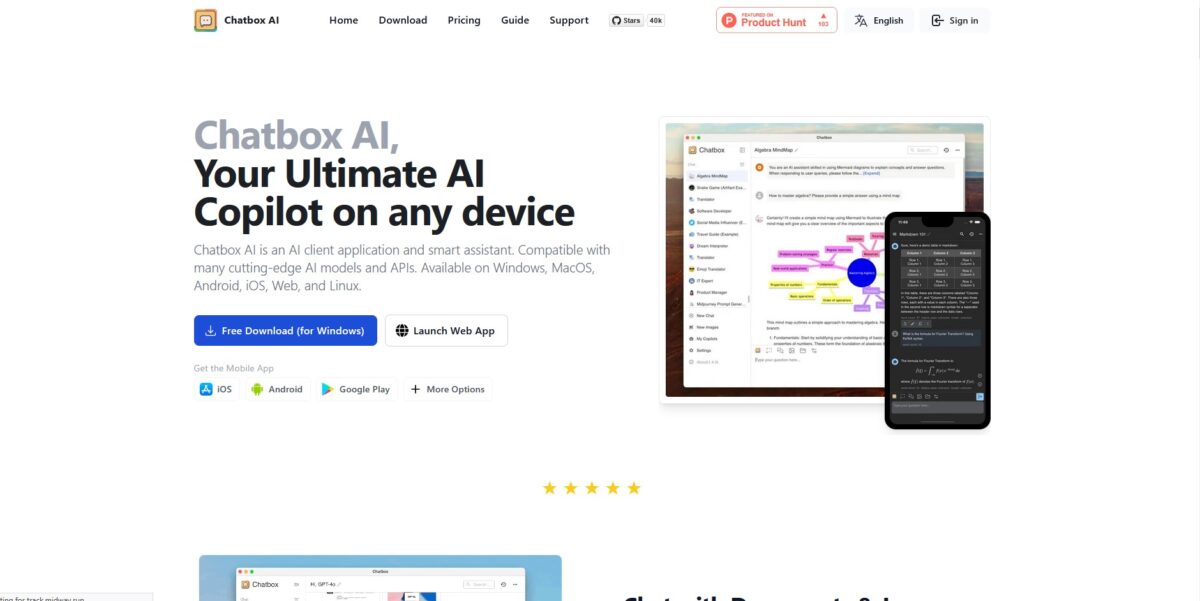
Chatbox functions as a centralized desktop hub for managing various language models, storing your chat history and configuration locally on Windows, Mac, or Linux. It replaces the fragmented experience of juggling multiple browser tabs for ChatGPT, Claude, and Gemini with a single interface where you can swap providers instantly. The UI leans toward prompt debugging and developer workflows, though the “new chat” button is awkwardly tucked at the bottom of the sidebar. What you get in return is a private, searchable vault of every prompt and response that doesn’t rely on a provider’s cloud storage. The trade-off is a lack of native iCloud or cloud sync, meaning your data stays siloed on the specific machine where you created it. Use Chatbox if you want a local, privacy-first command center for your own API keys.
How to start using Chatbox?
Grab the installer for Windows, macOS, or Linux directly from the website. If you’re on mobile, stick to the official stores to avoid knock-off clones. Once installed, the first screen hits you with a login prompt. You’ll need to register on the site to grab a free license or hook up a paid plan. Your plan is tied to the account itself, so the same license works on your desk and your phone, even though each device keeps its own chat history.
Launch the app and head straight for the Settings. This is where you decide your AI backbone. You can either use your own API keys for providers like OpenAI and Anthropic or opt for the built-in Chatbox AI service. Using your own key puts the burden of network stability and account management on you. The official service acts as a plug-and-play alternative, handling the backend plumbing so you can focus on writing code or docs.
If you’re handling sensitive local data, don’t ignore the Ollama integration. This lets you point Chatbox toward models running entirely on your own hardware, like Llama or Mistral. It turns the app into a private interface that doesn’t leak your internal README files to a cloud server. This matters because it gives you a sandbox for private experimentation without recurring API costs.
For a smoother workflow, look for the Knowledge Base feature in the desktop client. You can drag and drop your private PDFs or local folders here to let the AI index them. It stops the bot from guessing and forces it to use your actual project context for answers. Indexing takes a moment, but it beats copy-pasting code snippets every time you start a new thread.
Who is it for?
Privacy-First Professionals
Keep your proprietary data on your own SSD instead of a vendor’s cloud. You can run local models or plug in your own API keys to ensure sensitive client details never train a third-party model. You also get an audit trail for data residency that a standard browser-based chatbot can’t provide.
Multi-Model Researchers
Compare how GPT-4o, Claude 3.5, and Llama 3 handle the same complex prompt without switching browser tabs. It allows for distinct “artifacts” and side-by-side management of different logical engines in one desktop interface, which exposes the specific biases or strengths of each model before you commit to a long-term integration.
Offline Developers
Write and debug boilerplate code while traveling or in low-connectivity zones. Since it supports local LLM backends, your workflow doesn’t break when the internet does. No more “network error” interruptions killing your focus during a deep-work session.
Context-Heavy Multitaskers
Organize dozens of specific AI threads by project or client folder within a native app. The interface handles long conversation histories better than a cluttered web UI, making it easier to find that one specific regex fix from last week. It spares you the mental load of searching through a flat, chronological list of chats.
Low-Latency Power Users
Skip the loading time of heavy web pages by interacting with an optimized desktop client. It feels snappier when processing large text blocks because it doesn’t wait for a browser to render complex DOM elements. A faster feedback loop translates directly into more tasks finished per hour.
Chatbox pricing
Chatbox pricing is built on the reality that most people already pay for AI elsewhere. It treats the interface as a utility layer rather than a walled garden. You choose between using their managed infrastructure or plugging in your own API keys to pay only for the tokens you actually consume.
Free: $0/month. New accounts get a small daily allowance to test the waters, but the real value is the BYOK (Bring Your Own Key) mode. It lets you link your OpenAI or Anthropic keys to use a local desktop interface without a monthly commitment. If you only need a few complex prompts a week, that keeps you out of the $20 monthly subscription trap.
Takeaway: Best for developers who already have API credits and just want a better UI than a web browser.
Lite: $3.99/month. This tier removes the friction of managing keys and provides a stable baseline for casual chatting. It handles standard text tasks without requiring you to monitor token usage in a dashboard. I noticed it works well for simple proofreading but might feel restrictive if you start uploading massive PDF libraries.
Takeaway: A good fit if you want a local app experience without the headache of API management.
Pro: $13.99/month (or $7.99/month billed annually). This moves you into serious productivity territory with higher quotas and priority access. It allows for more frequent model switching and deeper document analysis during long research sessions. The lower annual price makes it competitive with single-model subscriptions while offering more variety.
Takeaway: The annual plan gets you pro-level features at nearly half the cost of a standard ChatGPT Plus sub.
Team: $19.99/user/month. This adds a management layer for small groups to share resources and workflows. It centralizes the billing so you aren’t chasing individual invoices from five different developers.
Takeaway: Necessary only if you need to standardize AI tools across a collaborative workspace.
Chatbox key features
Cross-Model Superchat
Switch between GPT-4o, Claude 3.5, and Gemini 1.5 Pro within a single conversation thread. This prevents losing your context or file uploads when you need a second opinion from a different engine. That matters because you can compare reasoning without re-explaining your project from scratch.
Native Desktop Integration
Run the app as a dedicated window on Windows, macOS, or Linux with local data storage. It bypasses the need for a browser tab, keeping your workspace clean and your chat history accessible even when you’re offline. No more hunting through browser history for that one specific prompt from last Tuesday.
Visual Context Processing
Upload screenshots or PDFs directly into the chat for instant UI debugging or document analysis. The OCR engine identifies text in images, allowing you to ask questions about specific design elements or error messages. In practice, you can share a visual bug report and get a fix without typing out the entire stack trace.
Custom Expert Personas
Activate specialized AI assistants tailored for legal advice, coding, or marketing strategies. You can define specific system prompts or use pre-built experts to ensure the output matches the required professional tone. That saves you from manually setting the persona every time you start a new task.
Integrated Productivity Toolkit
Generate LaTeX formulas, Markdown tables, and structured charts directly in the chat interface. It renders technical notation correctly, which works well for academic research or complex data summaries. The result is shareable assets instead of messy raw text that needs manual reformatting.
Real-Time Web Integration
Connect the models to live internet search to verify recent news or documentation updates. It bridges the gap between the model’s training cutoff and current events, pulling fresh links directly into the conversation. So your answers reflect the latest library releases instead of outdated 2023 documentation.
Chatbox Pros & Cons
Pros
Chatbox eliminates the need for a dozen open browser tabs by acting as a native desktop wrapper for multiple models. It stores your conversation history and project data in a local database rather than on a third-party server. In testing, it handled large markdown files without the formatting glitches often seen in web interfaces, leaving you with a private, offline-accessible archive of your technical brainstorms and code snippets. The app feels snappy on macOS and Windows, letting you trigger AI prompts via global shortcuts while staying in your IDE.
Cons
The interface relies on you providing your own API keys for the most advanced reasoning engines. This means you must manage multiple billing accounts across providers like OpenAI or Anthropic to get the best results. The trade-off for its local-first privacy is that your chat history doesn’t automatically sync between your laptop and mobile devices unless you manually export data. I noticed the UI can feel cluttered when switching between different model configurations or local LLM instances. That technical overhead of setting up API connections might frustrate users who just want a one-click subscription.
Use Chatbox if you want…
- …a single desktop hub for all your AI models.
- …to keep your chat history stored locally and private.
- …cross-platform productivity across Windows, Mac, and Linux.
- …to boost your daily workflow with a native copilot.
- …tight integration of GPT, Claude, and Gemini engines.
- …to manage complex projects without switching browser tabs.
- …a high-performance interface for your favorite LLMs.
Chatbox alternatives
Chatbox Reviews
Excellent all-in-one interface that makes switching between multiple AI models incredibly smooth and fast.
Love the system prompt customization and the ability to run local models through Ollama without high resource usage.
Having the same setup on desktop and mobile is a lifesaver for my workflow, though the mobile web browsing could use more features.
Stable and quick desktop client that keeps my chat history organized better than any official web interface.
Incredible tool for developers; being able to provide specific temperature controls gives me exactly the output I need.
FAQ
Can I use my own API keys with Chatbox?
Yes, Chatbox supports a Bring Your Own Key (BYOK) model, allowing you to connect your own API keys from providers like OpenAI, Anthropic, and Google to gain full control over your costs and model selection.
Where is my chat history and data stored?
Chatbox is designed with a local-first approach, meaning your chat history, prompts, and settings are stored directly on your device rather than on a central server to ensure maximum privacy.
Does Chatbox support local AI models?
Yes, Chatbox can integrate with tools like Ollama and LM Studio, enabling you to run and chat with open-source models locally on your own hardware without an internet connection.
Can Chatbox analyze documents like PDFs?
Chatbox includes a built-in document center that allows you to upload and interact with PDFs, Word files, and text documents for tasks like summarization, translation, or data extraction.
Is there a mobile version of Chatbox available?
Yes, Chatbox is a cross-platform application available for Windows, macOS, and Linux on desktop, as well as native apps for iOS and Android devices.
What is the difference between Chatbox AI and the standard client?
The standard client is a free open-source interface for your own keys, while the Chatbox AI service is a paid subscription that provides a plug-and-play experience with access to multiple premium models without needing individual API accounts.
Similar tools
 KreoCloud AI takeoff and estimating platform that measures, counts and prices construction drawings, with an AI agent that runs multi-step jobs.
 Cabina.AIToken-based AI workspace that puts 55+ text, image, video and audio models, a RAG knowledge base and scheduled AI agents in one
 PlerdyWebsite analytics and CRO suite with heatmaps, session replay, free A/B testing, SEO audits and an MCP connector for asking Claude or