

ChatGOT
AI AssistantsUpdated October 26, 2026
Multi-model AI assistant that bundles chat, PDF Q&A, image generation, slide decks and custom bots in one web app and Chrome extension.
We may earn a commission when you sign up through our links. It does not affect our reviews.
What is ChatGOT?
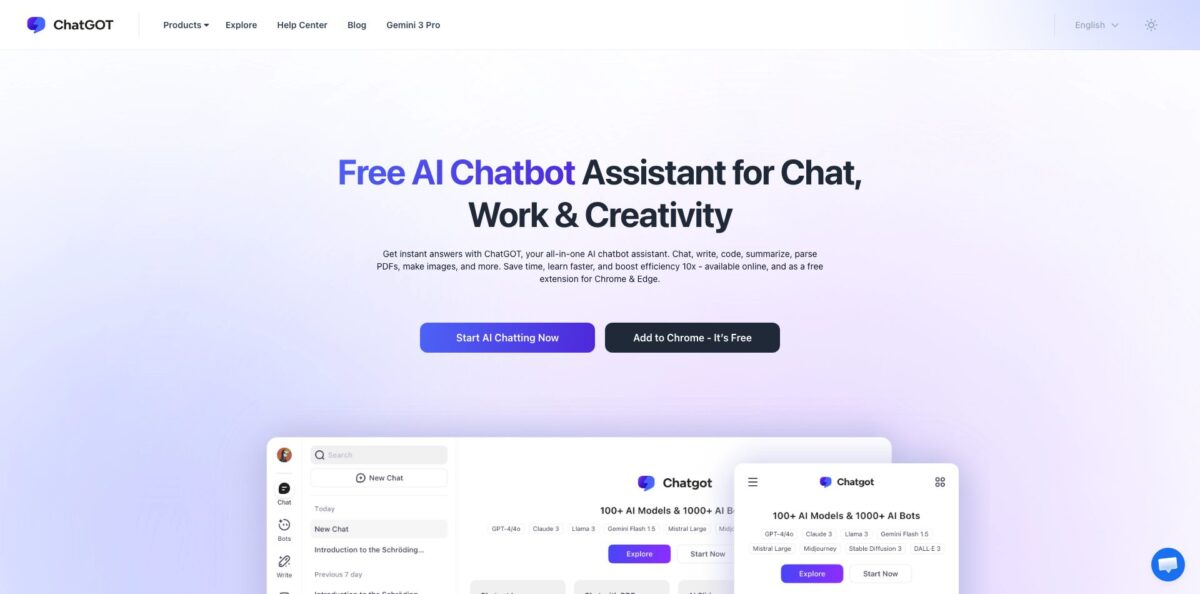
ChatGOT is a browser-based AI assistant that puts several third-party language models, an image generator, a PDF reader, a slide maker and a catalog of custom bots behind one login and one subscription. Instead of paying each provider separately, you pick a model or bot in the sidebar, or tag several with @ in the same thread and compare their answers. It also ships as a Chrome extension that opens in a sidebar on any page. The problem it removes is hopping between chat apps for small daily jobs like emails, summaries and quick images. The weak spots are transparency and limits: the free tier is 10 standard queries a day, the public model catalog mixes current and long-retired models, and the legal pages do not name the company that runs the service. Take it for cheap, casual multi-model access, not as a core work tool.
How to start using ChatGOT?
Open chatgot.io and click Start AI Chatting Now, or install the extension with Add to Chrome and pin it to the toolbar so it opens beside any page. The homepage says no sign-up is needed, but the site’s own FAQ tells you to sign up, and purchase history, cross-device sync and the bots you create all depend on an account. If you sign in with a Google account, the privacy policy says your email address is stored for authentication and may receive promotional emails. A new account starts on the Free plan with 10 standard queries per day, and the pricing FAQ names GPT-4o mini and Claude 3 Haiku among the free models.
Your first real task belongs in Chat, the first item in the left toolbar. Pick a model, then ask something you would do anyway, such as rewriting a client email or explaining an error message from your code. To compare models, type @ and tag one bot, or tag several in the same message to get multiple answers at once, then ask one of them to critique the others. The pricing page does not explain how tagged replies are counted against your quota, so watch how your remaining queries move after a multi-bot question.
The rest of the left toolbar holds Bots, PDF, Slides, Imagen and Translate. In PDF you upload a document and every reply revolves around it, so no special prompt is needed; the ChatPDF page accepts PDF files up to 50 MB. In Imagen, the parameter controls to the right of the input box set image size, aesthetics and model version. Bots has Create Bot for a role-based assistant and Explore, then My Creation, for editing or deleting the ones you built. Settings, in the lower-left corner, is where you manage the account, Subscriptions, Invite rewards and Contact Us.
Treat every answer as a draft. The FAQ itself advises more specific instructions when a response is inaccurate and suggests splitting multi-part questions into steps. In ChatPDF, original-text positioning jumps to the passage an answer came from, which is the fastest way to check quotes and figures before you reuse them. If you upgrade, confirm the active plan under Settings, then Subscriptions, where the Change Plan button also sits. To cancel, open the account details in Settings, find the subscription record, click the three-dot menu and choose cancel; the plan stays active until the paid period ends.
Who is it for?
Students on a tight budget
Long readings, unfamiliar concepts and assignment outlines eat up evenings. ChatPDF summarizes papers and translates foreign-language sources side by side, and the chat can walk you through a problem step by step. The free 10 queries a day run out quickly in exam weeks, so Pro is the realistic tier.
Freelance writers and marketers
You draft emails, social posts and slogans all day and want a second opinion on tone. AI Writer and the slogan generator handle short copy, and tagging two models on one brief gives you two angles to choose from. Expect to edit longer pieces yourself.
AI hobbyists comparing models
You want to see how DeepSeek, GPT, Claude and Gemini models answer the same question without paying each provider. The @-mention system puts their replies in one thread so differences are easy to spot. Check which model versions are actually offered once you log in, because the public pages disagree.
Researchers who live in the browser
Switching to a separate chat tab breaks your reading flow. The Chrome extension opens ChatGOT in a sidebar, and paid plans add real-time web access and AI Pro Search, so quick questions get answered next to the page you are reading.
Bloggers who need quick visuals
Stock photos rarely match your post, and a separate image subscription is hard to justify for a few headers a month. Imagen offers several image models with style controls and reference-image uploads, and Pro includes 300 standard images per month for featured images and social cards.
ChatGOT pricing
ChatGOT sells monthly usage bundles rather than seats or tokens. Each plan splits usage into Standard Queries and Advanced Queries, plus separate allowances for standard images, advanced images and AI Slides credits, but the pricing page does not say which models fall into which bucket. Only monthly prices are published. The refund policy mentions annual subscriptions, yet no annual price appears on the pricing page. Payment methods listed include Visa, PayPal, Google Pay and Stripe.
10 standard queries per day. The pricing table marks advanced queries, images, AI Slides credits, Chat with PDF, real-time web access, custom bots, AI Pro Search and chat with images as not included, even though several marketing pages describe those tools as free. Inviting friends through the Invite option earns extra queries.
6,000 standard queries, 400 advanced queries, 300 standard images, 50 advanced images and 50 AI Slides credits per month. It adds Chat with PDF, real-time web access, custom bots, AI Pro Search and chat with images, removes the daily cap, and promises no request limits during high-traffic periods plus 2X faster responses.
8,000 standard queries, 500 advanced queries, 500 standard images, 100 advanced images and 100 AI Slides credits per month, with the same feature set as Pro. The extra $6 mostly buys images and slide credits, while advanced queries rise by only 100.
not offered. There is no business plan, seat management or admin console on the pricing page; invoices are issued on request by email.
Refunds are strict. Outside the EU and Turkey you can request one within 24 hours of the first charge on a monthly plan or 72 hours on an annual plan, and only if you have not used the service. EU and Turkey residents get a 14-day window, and the company reserves the right to refuse anyone who has been refunded before.
ChatGOT key features
Multi-model chat with @-mentions: In Chat you choose a model, type @ to send a question to a specific bot, or tag several to get parallel answers in one thread. You can also ask one model to judge another’s response, which the About page pitches as a way to cross-check answers. Comparing models becomes a single conversation instead of four browser tabs.
Bots catalog and custom bots: The Bots section lists official model bots plus categories such as Writing, Productivity, Research & Analysis, Programming and Education, and the help center puts the catalog at 1,000+ bots. Create Bot lets you define a role like writer, translator, tutor or marketer without code. Per the Terms of Service, each bot draws on the monthly queries of its underlying model, so a bot is a saved setup, not extra capacity.
ChatPDF: Upload a PDF of up to 50 MB and the conversation automatically focuses on that document for summaries, outlines and Q&A. Side-by-side translation shows the original and translated text together, and original-text positioning jumps to the section an answer comes from. Long reports and foreign-language papers become much quicker to check. The pricing table lists Chat with PDF as a Pro and Max feature.
Imagen image generation: The image tool offers ChatGOT Imagen, Stable Diffusion 3, DALL·E 3, Ideogram and SDXL-Lightning, with controls for aspect ratio, stylization, weirdness, variety and a Standard or Raw mode. You can start from a text prompt or upload a reference image for image-to-image variations. ChatGOT says its outputs carry no watermark, and Pro includes 300 standard and 50 advanced images per month.
AI Slides: Enter a topic or convert a document, and Slides drafts an outline and a deck from a set of templates; the help center says it supports PowerPoint and Google Slides generation. Decks come from a separate pool of 50 AI Slides credits on Pro and 100 on Max. That covers occasional class or meeting decks rather than daily production.
Chrome extension and writing tools: The extension opens ChatGOT in a sidebar on any web page, and its store listing mentions voice input and web search. It has about 5,000 users and was last updated in September 2025 as version 1.1.66. On the web side, AI Writer, AI Humanizer, the sentence and slogan generators and a Translate tool cover short-form writing, which makes ChatGOT a quick helper while you browse.
ChatGOT Pros & Cons
Pros
The price is the main draw. Pro costs $9.9 a month and bundles chat, PDF analysis, image generation, slide decks and custom bots, with separate monthly quotas for each, so you are not paying for four tools. The @-mention system is practical for comparing models: one question can go to several bots in the same thread, and you can ask one model to critique another. The Chrome extension keeps the assistant one click away while you read or write elsewhere. Payment is flexible, with PayPal and Google Pay alongside cards, and the free tier lets you judge answer quality without entering any payment details. Start on Free, compare two models on your real tasks, then upgrade to Pro monthly only if the quotas fit.
Cons
Transparency is weak. The public bot catalog still lists GPT-3.5, Claude v1 and Claude v2 next to pages promoting Gemini 3 Pro and Sora 2, the full model list sits behind a login, and the pricing page never says which models count as Standard or Advanced queries. Marketing copy promises 100% free and unlimited use, yet the pricing table caps Free at 10 queries a day and reserves PDF chat, images, web access and custom bots for paid plans. The Terms of Service and Privacy Policy do not name the company behind the service, and monthly refunds close 24 hours after purchase and only if you have not used it. Keep confidential files out of it and set a reminder before each renewal.
Use ChatGOT if you want…
- Compare answers from several AI models in one thread.
- Chat with PDF files up to 50 MB.
- Generate watermark-free images from text prompts or references.
- Turn a topic or document into a slide deck.
- Ask AI questions from a Chrome sidebar on any page.
- Build simple role-based bots without writing code.
- Translate documents with original and translation side by side.
- Draft short emails, posts and slogans on a budget.
ChatGOT alternatives




ChatGOT Reviews
A Product Hunt reviewer who tried the early group-chat version liked tagging ChatGPT, Claude and Llama bots with @ in one conversation, but ran into lag and freezing that spoiled longer sessions.
A one-star Product Hunt review called the interface clumsy and said the free daily quota turned out smaller than advertised, which felt like poor value for a model available free elsewhere.
On Indexator, one user found 10 questions a day too few to be useful and could not get file uploads to work, while another praised precise math explanations but lost access once the tool moved behind a paywall.
Chrome Web Store reviewers rate the extension 4.6 out of 5 and like having chat, ChatPDF and translation in a sidebar, though most of those short reviews were posted on a single day around launch.
The small Trustpilot profile shows only one-star ratings; the latest, from 2026, accuses the assistant of making unrequested code edits and then charging for the queries needed to fix them.
FAQ
Is ChatGOT free to use?
Yes, the Free plan gives you 10 standard queries per day at no cost. The pricing table reserves Chat with PDF, image generation, real-time web access, custom bots and AI Slides for the Pro and Max plans.
Which AI models does ChatGOT offer?
The pricing FAQ names GPT-4o mini and Claude 3 Haiku as free models, and the public bot catalog lists DeepSeek V3, DeepSeek R1, GPT-4o, Gemini Flash 2.0 and Claude 3 Sonnet among others. Separate pages promote Gemini 3 Pro and Sora 2, but the full current list is only visible after you log in.
Do I need an account to use ChatGOT?
The homepage says you can start without signing up, but purchase history, cross-device sync, subscriptions and your own bots require an account. You can sign in with a Google account.
How do I cancel a ChatGOT subscription?
Go to Settings, open the details of your account information, find the subscription record, click the three-dot menu and choose cancel. Your plan stays active until the end of the period you already paid for.
Can I get a refund?
Only within a short window and only if you have not used the service: 24 hours after the first charge for monthly plans and 72 hours for annual plans. Residents of the EU and Turkey can request a refund within 14 days.
Is my data private on ChatGOT?
The privacy policy says conversations are encrypted, stored on ChatGOT servers and not shared with third parties, and that you can request deletion. The site also uses Google Analytics and Microsoft Clarity session recording, and the legal pages do not name the operating company, so avoid uploading sensitive documents.
Is there a ChatGOT browser extension or mobile app?
The official extension is on the Chrome Web Store, and the web app works in mobile browsers. App stores carry several similarly named AI apps from other publishers, so check the developer before installing one.
What payment methods does ChatGOT accept?
The pricing FAQ lists Visa, PayPal, Google Pay and Stripe, with more options shown at checkout. Invoices are available on request by email to support.
Similar tools
 FreedomGPTMulti-model AI app that puts hundreds of chat, image and video models, including its own censor-free Liberty models, behind one credit balance.
 ElephasPrivate desktop AI for Mac and Windows that answers questions from your own documents with page-level citations and hides personal details first.
 MagaiPaid AI workspace that puts ChatGPT, Claude, Gemini, Grok and dozens of image and video models in one chat, with memory and