

ChatGPT
AI AssistantsUpdated October 5, 2026
OpenAI's ChatGPT is a versatile AI assistant for writing, coding, and problem-solving through natural, human-like conversation.
We may earn a commission when you sign up through our links. It does not affect our reviews.
What is ChatGPT?
ChatGPT acts as a text-based interface for OpenAI’s large language models, predicting the next word in a sequence to simulate human conversation. It functions as an adaptable draft generator that converts messy bullet points into structured reports or identifies syntax errors in your Python scripts. I noticed it handles general explanations and boilerplate code with ease, though it often struggles with niche facts or complex citations where it might hallucinate details. This matters because it shifts your workload from manual creation to editorial review, effectively killing the “blank page” problem. The trade-off is a loss of unique personal voice for the sake of speed. While it excels at synthesizing broad topics, it is less reliable for deep research requiring verified sources. Use it as a tireless first-draft partner, but always verify the output for factual accuracy before publishing.
How to start using ChatGPT?
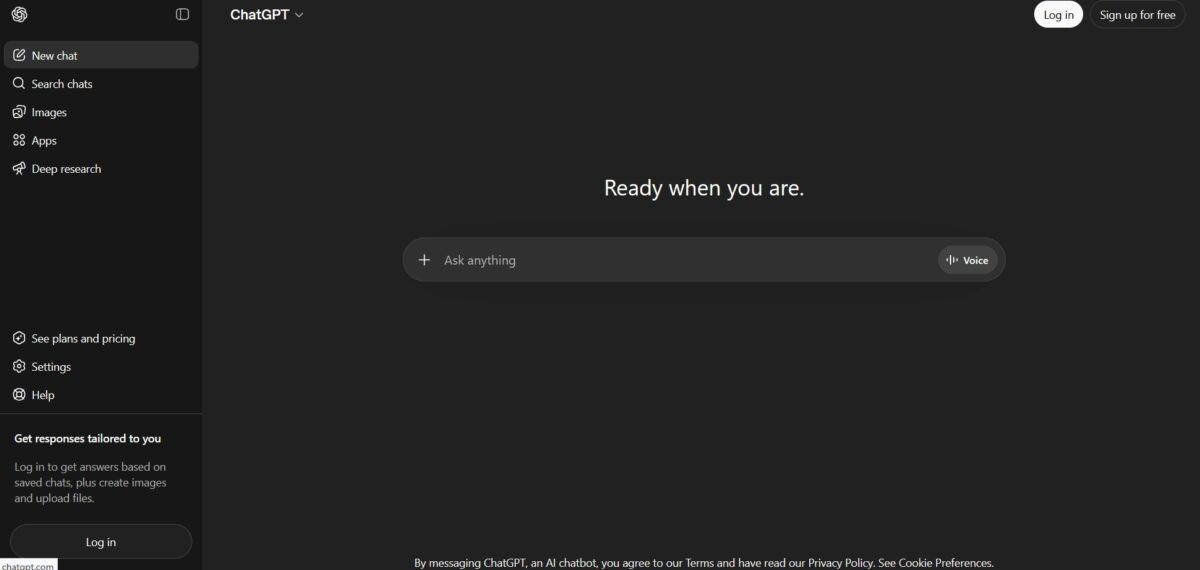
Head to chat.com or grab the app for iOS or Android. You can jump straight into a chat without an account, but your history won’t save. For anything beyond a quick trivia question, sign up with an email or existing Google/Apple account. This lets you sync conversations across your phone and laptop so you don’t lose that half-finished README draft, and over time your history becomes a persistent knowledge base for your specific projects.
Once you’re in, look for the message bar at the bottom. Don’t just say “hi”—give it a job. Try something like, “Refactor this nested Python loop for better readability” or “Explain this Terraform error like I’m a junior dev.” I noticed that asking it to “think step-by-step” or “use a professional but punchy tone” cuts through the generic, wordy fluff it sometimes generates. Clear constraints lead to code or text you can actually use without a total rewrite.
The left sidebar is your command center. It tracks your threads chronologically, and you can archive or delete old sessions to keep things tidy. If a conversation gets too long, the bot often starts to lag or lose the thread of earlier instructions. Starting a fresh chat helps reset its focus so it doesn’t get confused by stale context from three hours ago, and a clean context window means more accurate technical answers.
Check the model selector at the top if you have a Plus subscription. Switching to the latest flagship model gives you access to web browsing and data analysis features, which are great for verifying documentation or parsing CSV files. If you just need a quick spell check, the basic model is faster. Choosing the right version for the task prevents you from burning through your high-priority message limits on trivial fixes.
Who is it for?
Stuck Developers
Use it to debug that specific React error or brainstorm a cleaner way to map your arrays. It handles the syntax heavy lifting so you can focus on system architecture. No more scrolling through three-year-old Stack Overflow threads that don’t match your current library version.
Overwhelmed Content Creators
Feed it your messy voice notes and turn them into a logical five-post Twitter thread. It strips out the filler and finds the “hook” you missed while rambling. That closes the gap between a raw idea and a format that actually gets read.
Non-Native Speakers
Polish your emails to sound natural without losing your personal tone. It catches subtle phrasing errors that standard spell-checkers ignore, like awkward preposition use in business proposals. Clarity builds professional trust faster than a perfectly spelled but confusing sentence ever will.
Job Hunters
Paste a specific job description and your resume to see exactly where your experience doesn’t align. It identifies missing keywords and suggests ways to rephrase your bullet points to match the recruiter’s specific requirements.
Casual Researchers
Get a plain-English explanation of how a semiconductor works or why interest rates are moving. It breaks down technical walls without you needing to read a 40-page whitepaper or watch a half-hour video. You get the core concept in seconds and can follow the conversation without feeling lost.
ChatGPT pricing
OpenAI’s pricing structure feels like a progression through different compute tiers rather than just a feature list. You start with basic access that costs nothing, but moving up the ladder buys you higher rate limits and priority access to the reasoning models that handle complex logic.
Free: $0/month. You get the latest flagship models, like GPT-5, but with strict caps. Once you hit those limits, the system downgrades you to smaller, faster models that lack deep reasoning. During peak US business hours, these limits trigger much faster. This works for quick emails, but it will stall if you try to analyze a 50-page PDF.
Takeaway: Fine for testing the water, but expect interruptions during busy workdays.
Plus: $20/month. This is the sweet spot for solo developers or creators. It grants 5x more messages than the free tier and early access to features like Deep Research and Sora video generation. You also get a larger context window, which keeps the AI from “forgetting” the beginning of a long coding session, so you aren’t constantly re-pasting code blocks to remind it what you’re building.
Takeaway: Buy this if you use the tool daily for work to avoid hitting the “try again tomorrow” wall.
Pro: $200/month. Targeted at researchers and power users who need the “o1 pro mode” for heavy compute tasks. You get unlimited access to the highest-tier reasoning models and priority during outages. For most, the $180 jump from Plus is steep, as the quality difference is only obvious in hyper-specific scenarios like advanced math or multi-hour data analysis.
Takeaway: Stick to Plus unless your job requires literal hours of constant, high-level reasoning every single day.
Team: $25–$30/user/month. This plan adds an admin console and shared workspaces for your department. Crucially, OpenAI doesn’t use your data to train its models here by default. It prevents the “shadow AI” problem where employees might accidentally leak company secrets into the public training set.
Takeaway: Choose the annual billing ($25) to get enterprise-grade privacy without the full enterprise price tag.
Enterprise: Custom pricing. Large organizations get unlimited usage, SSO, and the longest context windows available. You’ll need to talk to a sales rep to get a quote, which typically starts around $60/user depending on volume. This tier is less about the chatbot and more about security compliance and large-scale data processing.
Takeaway: Only necessary if your IT department requires SOC 2 compliance or SAML integration.
ChatGPT key features
Rapid Shell Scripting
Feed the chat a list of manual deployment steps to get a functional bash script. It excels at converting logical steps into syntax-correct automation, though in testing it occasionally forgot to handle specific directory permissions. Still, you stop wasting twenty minutes on a task that should take two.
Instant Document Formatting
Paste a wall of unorganized meeting notes to generate a structured project brief. It strips away the conversational fluff and creates logical headings, saving your team from deciphering messy bullet points. In short, it gets you from raw thought to shareable project documentation.
Live Web Fact-Checking
Use the search feature to pull data from recent documentation or news articles. It bypasses the old knowledge cutoff by fetching current links and summaries directly from the internet. The result: answers based on today’s library versions instead of outdated forum posts.
Code Refactoring
Submit a bloated function to see a version with cleaner modules and better naming conventions. It handles the cognitive load of identifying repetitive patterns that make your codebase difficult to maintain. This matters because it forces you to write more readable code for your future self.
Natural Language SQL Generation
Describe the data you need in plain English to receive a complex join query. It works well for analysts who know the data structure but forget the specific syntax for niche window functions. You get to focus on data insights rather than debugging commas and brackets.
Contextual Email Drafting
Provide three bullet points about a missed deadline to get a professional, non-defensive response. It finds a balanced tone that is difficult to hit when you are stressed or rushed. That protects your professional relationships by taking emotional bias out of sensitive comms.
ChatGPT Pros & Cons
Pros
ChatGPT acts as a tireless pair programmer. It generates boilerplate code across dozens of languages instantly, which clears the path for solving actual logic problems. It handles tedious tasks like converting JSON structures to TypeScript interfaces with surprising precision, which takes the cognitive friction out of repetitive syntax work. You can dump a messy log file into the chat to identify a specific stack trace error without scanning thousands of lines manually. The interface keeps your flow state intact by providing immediate, conversational answers that often replace a twenty-minute deep dive into documentation.
Cons
The model often prioritizes sounding helpful over being factually correct. It frequently invents library methods that do not exist or suggests outdated API endpoints, especially for fast-moving frameworks. This creates a hidden tax on your time because you must verify every critical claim it makes. Its speed comes at a price: a tendency to “hallucinate” logical steps in complex math or deep architectural reasoning. Why this matters: relying on its output without testing can introduce silent security vulnerabilities or logic bugs into your production environment. I’ve seen it confidently provide a “working” solution that fails the moment you run it against a compiler.
Use ChatGPT if you want…
- Untangle complex spaghetti code into clean modules.
- Draft production-ready documentation for any legacy repo.
- Automate repetitive shell scripts and deployment commands.
- Brainstorm viral technical blog post ideas instantly.
- Debug obscure compiler errors without searching forums.
- Simulate complex stakeholder feedback for project briefs.
- Extract actionable insights from dense technical research.
- Verify algorithmic logic using real-time code execution.
- Draft personalized professional emails to recruiters.
ChatGPT alternatives




ChatGPT Reviews
Incredibly versatile for drafting emails, though it sometimes misses the finer nuances of my brand voice.
A massive help for troubleshooting code, but I always verify the logic since it occasionally invents functions.
Perfect for summarizing long articles quickly, even if the tone can feel a bit robotic at times.
Excellent for brainstorming creative concepts when I am stuck, though I have to fact-check its data points.
Speeds up my workflow by generating solid first drafts, but it requires a careful editorial eye to finish.
FAQ
Does ChatGPT use my personal data to train its models?
OpenAI may use conversations from individuals to improve its models, but you can opt out by disabling the Improve the model for everyone toggle in your Data Controls settings. For business users on Team or Enterprise plans, data is not used for training by default.
Can ChatGPT browse the internet for real-time information?
Yes, the latest models like GPT-5 can access the live web to fetch current information, check facts, and provide direct links to sources. This feature is available on the free tier too, though paid plans get higher limits.
Is there a limit to how many messages I can send?
Yes, usage limits vary by plan. For example, Free users may have a limit of 10 messages every 5 hours on flagship models, while Plus users have higher limits, such as 160 messages every 3 hours. Once a limit is reached, the system may switch to a smaller, faster model.
Can I use ChatGPT for free?
Yes, ChatGPT offers a free plan that provides access to its flagship models with certain message limits. Users can also access tools like web browsing and file uploads on the free tier, though with more restrictions than paid versions.
What is the difference between Temporary Chat and regular chat?
Temporary Chats do not appear in your history, do not create memories, and are not used to train OpenAI’s models. They are reviewed only for abuse monitoring and are deleted within 30 days.
How can I export my data from ChatGPT?
You can export your data by navigating to Settings, selecting Data Controls, and clicking on the Export Data button. A file containing your account information and conversations will be sent to your registered email address.
Similar tools
 KreoCloud AI takeoff and estimating platform that measures, counts and prices construction drawings, with an AI agent that runs multi-step jobs.
 Cabina.AIToken-based AI workspace that puts 55+ text, image, video and audio models, a RAG knowledge base and scheduled AI agents in one
 PlerdyWebsite analytics and CRO suite with heatmaps, session replay, free A/B testing, SEO audits and an MCP connector for asking Claude or