

ChatHub
AI ChatUpdated November 10, 2026
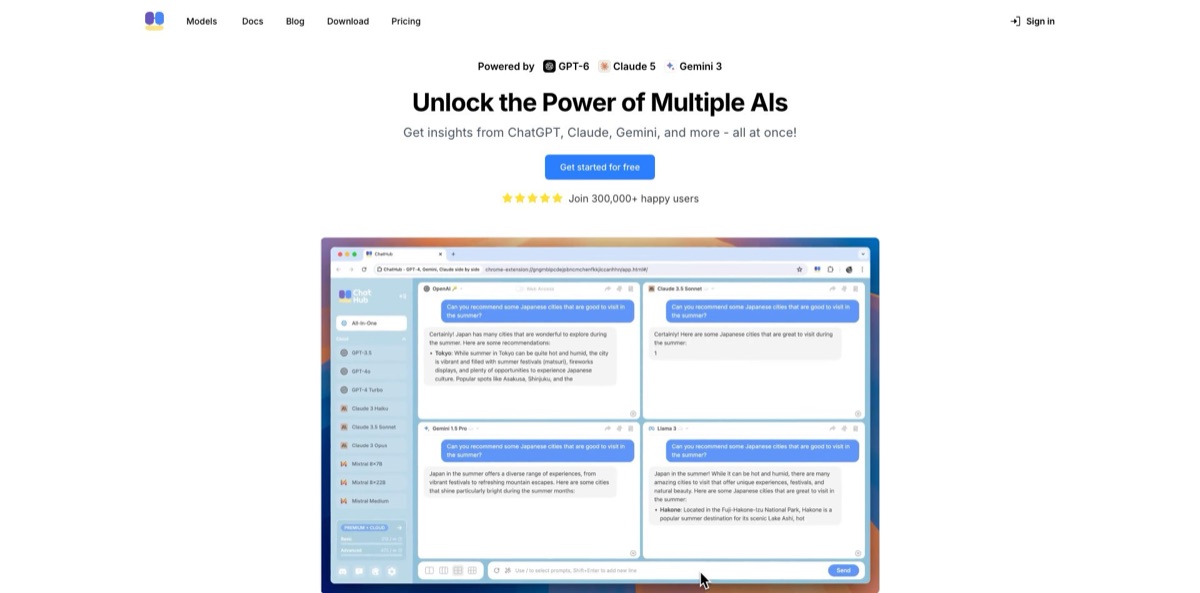
Multi-model AI chat app that sends one prompt to up to six chatbots, including GPT, Claude and Gemini, so you can compare their answers side by side.
We may earn a commission when you sign up through our links. It does not affect our reviews.
What is ChatHub?
ChatHub is a multi-model chat client: you type one prompt and get answers from up to six AI models in parallel panes, drawn from a hosted catalog of 30+ models that includes GPT, Claude, Gemini, Grok, DeepSeek, Qwen and Llama. It runs as a web app, a Chrome extension, iOS and Android apps and Windows and macOS desktop apps, and one subscription replaces separate API keys or provider plans. The problem it removes is blind trust in a single model’s answer; when three models agree and one drifts, you know exactly where to check. The weak spots are the monthly query caps on the cheaper plan, extension connectors that occasionally break when providers change their sites, and support that some paying users describe as slow. Pick it if you compare models every day or want broad model access without juggling several subscriptions.
How to start using ChatHub?
Create an account at app.chathub.gg with Google, Apple or an email address. Registration comes with a free usage quota, so you can try the comparison view before paying anything. If you live in the browser, install the extension from the Chrome Web Store instead, or download the Windows and macOS desktop builds (Intel and Apple Silicon) from the download page. The iOS and Android apps share one subscription with the web app, and the pricing page lists them among the paid plan features.
Your first real scenario should be a question where a wrong answer costs you something: a contract clause, a statistic for a report, a stubborn bug. Choose a model for each pane, send the prompt once and read the answers side by side. The places where models disagree are the places you verify. Type a forward slash in the chat box to pull a saved prompt from the Prompt Library, and once you have read the replies, use Summarize Chat to have AI merge them into one answer.
Next, set your defaults. In the web app, Settings has a Custom Instructions field where you describe your role and the answer style you prefer, and every model then follows it. In the extension, the left sidebar lets you choose between ChatHub’s own AI service, your logged-in chatbot accounts or your own API keys. The Custom Chatbots section in the extension’s Settings page adds any model with an OpenAI-compatible API through the Add button, including OpenRouter, Together.ai, Xinference or a local Ollama install.
Before you rely on an answer, ground it. Switch on Web Access for current facts, upload a PDF, Doc or TXT file in the web app so the models answer from your source, and drop in Excel or CSV files to let the Code Interpreter run Python on them. Code Preview renders generated HTML and Mermaid diagrams in place, so you can see whether the code actually works before copying it. For images and videos, check the credit estimate on the Generate button before you submit a job.
Who is it for?
Researchers and analysts
You need facts you can defend, and one model’s confident answer is not enough. Sending the same question to several models shows instantly where they disagree, which is exactly where you should open a primary source. Web Access and document upload let you pin answers to current pages and your own files.
Developers and prompt engineers
You want to know which model handles your prompt best before wiring it into a product. ChatHub runs the same prompt across GPT, Claude, Gemini, DeepSeek and others in one view, and the extension accepts your own API keys or a local Ollama model. Code Preview renders HTML output, so you compare working results rather than walls of text.
Writers and content creators
Tone, structure and hooks vary a lot between models, and hopping between tabs to collect drafts wastes time. ChatHub puts the drafts next to each other so you can take the best paragraph from each. The Image Generator and AI Translator cover visuals and multilingual versions in the same account.
Students and educators
Paying separately for ChatGPT Plus, Claude Pro and a Gemini plan adds up quickly. One ChatHub plan covers flagship models from all three, and the Notebook beta answers questions about long PDFs, EPUB books and audio with citations to the passage behind each claim.
Teams choosing an AI provider
Before committing budget to one vendor, you want evidence from your own tasks. Running real prompts through several models for a few weeks gives you that comparison, and ChatHub offers seat-based team discounts through its sales contact.
Power users with existing AI accounts
If you already pay for ChatGPT or Claude, the free browser extension can put your logged-in accounts side by side. Expect the same usage caps you have on those sites, plus occasional breakage when a provider changes its web app.
ChatHub pricing
ChatHub sells two subscriptions that differ only in usage allowance, billed monthly or yearly in US dollars. Both bundle hosted model access, so you do not need provider API keys. The allowance splits into basic model queries (efficient models such as DeepSeek and Kimi), advanced model queries (flagship GPT, Claude and Gemini models) and a credit balance shared by the image and video generators. Prices below come from the official pricing page as of November 2026.
Signing up for the web app gives you a free usage quota to try the platform, and the browser extension is free when you connect your own chatbot accounts or API keys. Premium features such as six-pane chat, Web Access and document upload require a paid plan.
You get 10,000 basic model queries, 1,500 advanced model queries, 3,000 image and video credits and 300 document uploads per month, plus every premium feature and the iOS and Android apps. Some help pages still call this plan Pro+.
Basic and advanced model queries are unlimited, the credit balance rises to 10,000 per month and document uploads are unlimited, with the same features as Pro.
Purchased credits are used after your plan allowance runs out and expire after 3 months.
Custom. Seat-based discounts are available through the Contact Us button on the pricing page.
Image costs vary widely by model, from 2 credits for Fast SDXL to 48 for Nano Banana Pro, so the 3,000 Pro credits cover roughly 60 premium images or 1,500 quick drafts. First purchases are refundable within 7 days on a prorated basis, but renewals are not refunded.
ChatHub key features
Side-by-side chat with up to six models
You pick a model for each pane, send one prompt and get the answers in parallel, then keep the conversation going with all of them at once. Disagreement between models becomes a visible signal instead of something you discover after publishing.
A hosted catalog of 30+ models
The public model list showed 34 models from 17 providers in November 2026, including OpenAI, Anthropic, Google, xAI, DeepSeek, Alibaba, Meta, Mistral AI, Moonshot AI and Perplexity, each tagged Basic or Advanced. ChatHub’s docs say important new releases are usually added within hours. You get new frontier models without opening another account.
A browser extension that takes your own accounts and keys
The free Chrome extension can route each pane through ChatHub’s AI service, your logged-in chatbot account or your own API key, and Custom Chatbots adds any OpenAI-compatible endpoint such as OpenRouter, Together.ai, Xinference or local Ollama models. It also opens in Chrome’s side panel next to the page you are reading. That makes it the cheapest way in if you already pay for model access elsewhere.
Summarize Chat, Web Access and file analysis
One click asks AI to merge the parallel answers into a single summary, Web Access adds current search results, and you can attach up to three images per message when the model supports vision. Documents in PDF, Doc or TXT format are uploaded in the web app, while Excel and CSV files go to a Code Interpreter that writes and runs Python. Together they turn a raw comparison into a grounded answer.
Image and video generation on shared credits
The Image Generator works with GPT Image 2, Nano Banana, Seedream, FLUX.2 and other models from text or reference images, and the Video Generator uses Seedance 2.5 and MiniMax H3 for clips of 4 to 15 seconds with optional start and end frames. Both draw on the same monthly credit balance, and the Generate button shows the estimated cost before you submit.
ChatHub Notebook (beta)
Separate from multi-model chat, Notebook takes long sources such as PDFs, EPUB books and MP3 audio, answers questions about them and can combine them with web search. Every answer and saved report carries citations to the supporting passage, so you can judge whether a conclusion holds up. Save important findings right away, because the beta is changing quickly.
Apps on every screen plus small AI tools
ChatHub runs on the web, as a Chrome extension, on iOS and Android and as Windows and macOS desktop apps, and the same account includes an AI Translator that outputs several languages at once and a Web Summarizer. Code Preview renders HTML and Mermaid diagrams inside the chat, similar to Claude Artifacts.
ChatHub Pros & Cons
Pros
The core idea works: one prompt, several answers and disagreement you can spot at a glance. A single subscription covers flagship GPT, Claude and Gemini models plus a long tail of DeepSeek, Qwen, Grok and Mistral models, and new releases tend to appear quickly. The extension is free and flexible, accepting your own accounts, API keys or local Ollama models, while the Unlimited plan removes query counting for heavy users. Summarize Chat, Code Preview, the image and video generators and the cited Notebook mean you rarely need a second tool. The Chrome Web Store listing holds a 4.5 rating from about 1,300 ratings and 200,000 users. Use ChatHub as your default comparison desk and keep single-provider apps for their exclusive features.
Cons
Pro caps advanced models at 1,500 queries a month, and credits drain fast with premium image models such as Nano Banana Pro at 48 credits per image. Extension connectors that rely on your logged-in accounts break when providers change their sites; GitHub issues from 2025 and 2026 describe Claude spinning, Gemini not responding and Qwen demanding a login, though fixes usually follow. Some features live in only one client: document upload and custom instructions are web-only, while custom chatbots and the side panel are extension-only. The public GitHub code is an old version, current releases are closed source, and some App Store reviewers complain about unanswered support emails. Test your exact model lineup inside the 7-day refund window before paying for a year.
Use ChatHub if you want…
- Compare answers from GPT, Claude and Gemini at once.
- Catch hallucinations by spotting where models disagree.
- Replace several AI subscriptions with one monthly plan.
- Test one prompt across many models before shipping.
- Run your own API keys and local models together.
- Summarize several model answers into one response.
- Generate images and short videos from the same account.
- Query long PDFs, books and audio with cited answers.
ChatHub alternatives
 OpenRouterRead review →
 MonicaRead review →
 MaxAIRead review →
 1min.AIRead review →
 ChatboxRead review →
 Overchat AIRead review →
ChatHub Reviews
Chrome Web Store reviewers like having the major chatbots on one page and describe it as an easier version of LMArena, though one reports frequent timeouts or empty replies once more than three models are selected.
Extension users on GitHub and the Chrome Web Store report individual bots failing when connected through their own accounts, such as Claude spinning without an answer or Gemini showing only the first word, with the Gemini bug fixed in version 4.1.1.
App Store users rate the mobile app 4.4 out of 5 and call it handy for daily tasks, but one reviewer says the web version works fine while the app had login failures and a keyboard covering the input field.
One paying subscriber on the App Store doubts that the premium model labels match the models actually served and says support emails went unanswered.
Early Product Hunt reviewers valued easy API-key access through the browser add-on and side-by-side comparison, while a later reviewer felt the bundled models forgot instructions quickly and called the plan poor value.
FAQ
Is ChatHub free?
Partly. The web app includes a free usage quota after sign-up, and the browser extension is free when you connect your own chatbot accounts or API keys. Premium features and larger quotas need Pro at $19/month or Unlimited at $39/month.
Do I still need ChatGPT Plus or Claude Pro?
No. ChatHub’s paid plans include advanced GPT, Claude and Gemini models without separate provider subscriptions or API keys, within your plan’s monthly allowance.
How many chatbots can I compare at once?
Up to six models in one conversation on paid plans. Each pane can use a different model, and Summarize Chat can merge their answers into one.
Does ChatHub store my chats or use them for training?
ChatHub’s privacy policy says chat history is saved locally in your browser, chat data is not used for model training, and uploaded documents are deleted from its servers 24 hours after upload. The policy dates from March 2023, so ask support how history syncs across the mobile and desktop apps.
Can I use my own API keys or local models?
Yes, in the browser extension. You can use your own API keys or logged-in chatbot accounts, or add Custom Chatbots for any OpenAI-compatible API, including OpenRouter, Together.ai and local Ollama models.
Does ChatHub have a public API?
No. ChatHub is an interactive client and subscription product and does not offer programmatic access to its hosted models; for API access, a router such as OpenRouter or a provider’s own API is the better fit.
How do refunds and cancellation work?
Purchases are refundable within 7 days, prorated by the days you used, while renewals are not refunded. You turn off auto-renewal from your ChatHub profile page.
Is ChatHub open source?
Not anymore. The chathub-dev repository on GitHub still hosts an older GPL-3.0 version of the extension, but the maintainer confirmed in March 2026 that current releases are closed source.
Similar tools
 Chat 4O AIAll-in-one AI workspace with GPT, Claude, Gemini and Grok chat plus image and video models like Veo, Kling and Nano Banana, paid
 LiveChatAIAI customer support agent trained on your website, docs and Q&As, with human live chat handoff, AI Actions, and WhatsApp, Slack and
 Kore.aiEnterprise agentic AI platform for building, governing and improving voice and chat AI agents for customer service, HR, IT and business processes.