

ChatTube
AI ChatUpdated November 11, 2026
Web app and Chrome extension for asking questions about YouTube videos, with timestamped answers, summaries, transcripts and mind maps.
We may earn a commission when you sign up through our links. It does not affect our reviews.
What is ChatTube?
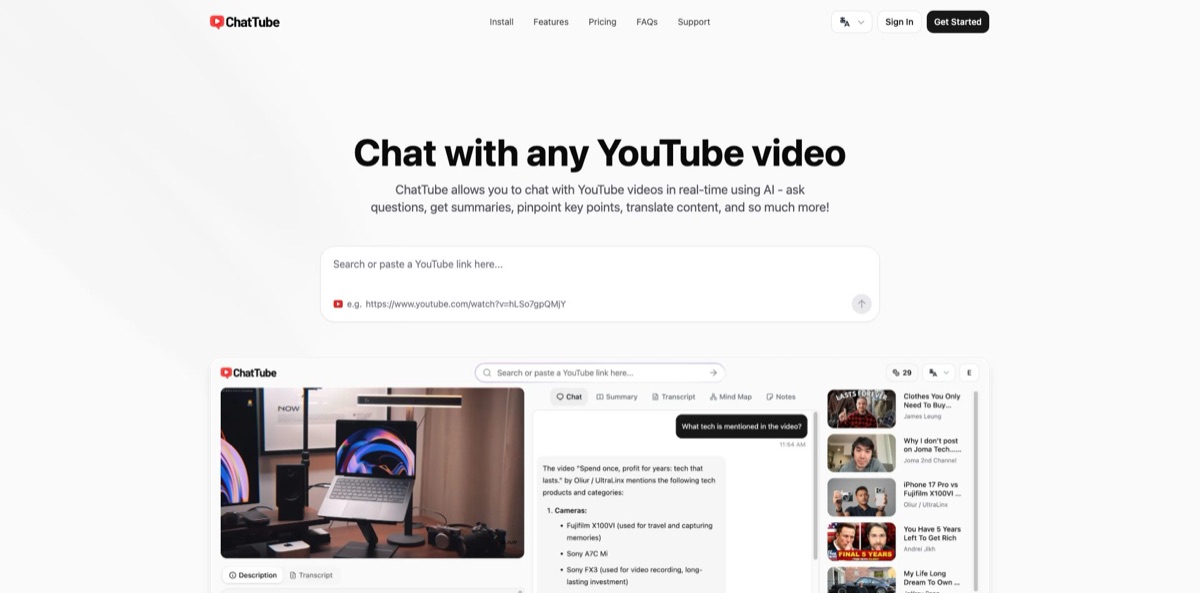
You paste a YouTube link, or open a video with the Chrome extension installed, and a ChatGPT-based assistant answers questions using that video’s transcript as its reference. Answers come with clickable timestamps, so a two-hour lecture turns into a search problem instead of a scrubbing problem. When a video has no captions, the service transcribes the audio with OpenAI’s Whisper, then lets you chat, summarize, translate or build a mind map from the result. The weak spot is the free allowance: ChatTube’s own pages describe it inconsistently, and paid plans cap how long a caption-less video can be. It also works from links to YouTube videos and podcasts rather than files you upload. Pick it if you regularly mine long videos for specific facts and want the answer linked to the exact moment it was said.
How to start using ChatTube?
You have two entry points. On the web, paste a YouTube URL into the input field on chattube.io and sign up or log in when asked. For the browser route, add the extension from the Chrome Web Store, open any YouTube video and sign in. The extension runs on Chromium-based browsers only, so Firefox and Safari users should stay with the web version. Neither route asks for payment details to begin.
Your first real test should be a question you can verify. Open a tutorial or lecture you half remember, click “Chat with this video now” and ask where a particular topic comes up. The reply arrives with timestamps you can click to jump to that part of the embedded player. Ask something narrow, because a precise question shows quickly whether the answer stays faithful to the source.
The main screen sits under the video and is organized in tabs. The “Transcript” tab holds the full text, with a language selector at the top and a “Translate” option for converting captions. “Copy” and “Download” buttons export the text as TXT, Word or PDF. If you want replies in another language, click the settings icon in the top bar and set your preferred chat language. Summaries and mind maps live in the same view and use the same timestamp navigation.
Before you rely on an output, click two or three timestamps and confirm the speaker really says what the answer claims. This matters most for videos without captions, where the text comes from automatic transcription and names or technical terms can be misheard. Then export what you need or leave it in your account, since chats and video history are saved so you can return to a conversation later.
Who is it for?
Students
Recorded lectures run long and the one explanation you need is buried somewhere in the middle. ChatTube lets you ask about it directly and jump to the timestamp. Revision shifts from rewatching to targeted checking.
Teachers
Building worksheets and comprehension questions from a video usually means watching it with a notepad. ChatTube’s own use-case list names this scenario, and teachers in Chrome Web Store reviews describe doing exactly that. You still need to check the output against your curriculum.
Researchers
Talks and interviews are slow to scan and hard to cite. Timestamped answers and downloadable transcripts give you a text record with a pointer back to the original moment. Treat the transcript as a working draft for anything you plan to quote.
Developers
Coding walkthroughs hide one useful command inside forty minutes of setup. You can ask how a specific step works and land on the right segment. This suits tutorials better than videos where the code only appears on screen and is never spoken aloud.
Non-native speakers
Plenty of useful videos exist in only one language. ChatTube translates captions while keeping their timestamps, and you can chat in your own language. That removes most of the friction of following a talk in a language you read better than you hear.
Marketers and content creators
Comparing product reviews or tracking what competitors publish eats hours. Summaries across several videos give you the main claims quickly. Paid plans also cover podcast transcription, which helps if you repurpose long interviews.
ChatTube pricing
ChatTube charges a flat subscription and meters usage two ways. Chat credits are a daily allowance for talking to videos, while AI credits are a separate balance for supported AI features, with each MCP tool call deducting one credit. The plans also differ in how long a caption-less video or podcast episode can be. The pricing page shows USD, and switching to annual billing currently displays a 50% discount labelled as a flash sale, so check that it still applies when you buy.
ChatTube’s FAQ says new users receive 3 free credits, while its use-case page promises 3 free video conversations each day. Expect a small allowance and confirm the current limit in your account.
You get 30 chat credits per day and 2,000 AI credits, with transcription of caption-less videos up to 45 minutes and podcasts up to 2 hours.
This tier raises the allowance to 100 chat credits per day and 5,000 AI credits, with caption-less videos up to 2 hours and podcasts up to 3 hours.
Chat credits are unlimited, AI credits reach 20,000, and transcription covers caption-less videos up to 4 hours and podcasts up to 6 hours.
All three paid plans include transcript translation, video summaries, transcript downloads, priority email support and priority access to new features. No team or enterprise plan is listed. The terms allow refunds within 14 days of your first purchase, and you can process one yourself from the subscription page in your dashboard.
ChatTube key features
Video chat with timestamped answers
You ask a question in plain language and the assistant replies using the transcript and video content as its reference. Each answer links to the moment it came from, so you can verify it in one click. That makes it practical for checking a single fact in a long recording.
Transcription for videos without captions
ChatTube grabs official captions when they exist and otherwise transcribes the audio with Whisper, which supports more than 98 languages. Paid plans set the length ceiling, from 45 minutes on Essential to 4 hours on Pro. You get usable text from videos that YouTube leaves without a transcript.
Structured summaries
Long videos are condensed into sections with short headings and bullet points, and every point carries a clickable timestamp. Summaries can be generated in your preferred language. You can scan the outline, skip what you do not need and watch only the relevant segments.
Mind maps from videos
The tool organizes key points into sections and nodes, and both link back to their timestamps. Maps can be exported and shared, and ChatTube says most captioned videos convert in under a minute. This works well for visual learners and for planning notes around a lecture.
Caption translation and export
Captions can be translated into more than 10 languages, including Spanish, German, Japanese, Korean and Arabic, while keeping timestamps aligned with the original. Export options are TXT, Word and PDF. There is no translation API to configure, so subtitles for study or research take a few clicks.
Podcast transcription
Beyond YouTube, paid plans transcribe podcast episodes, up to 2 hours on Essential and 6 hours on Pro. A sister product, SpotScribe, focuses on Spotify podcast transcripts. This helps if your research is spread across video and audio shows.
MCP server for AI clients
A server at chattube.io/mcp lets connected clients, including ChatGPT, search YouTube, pull transcripts and read public video data after you authorize them through OAuth. Each tool call costs one AI credit. You can bring video data into an assistant you already use instead of switching tabs.
ChatTube Pros & Cons
Pros
The core idea is focused and easy to grasp: paste a link, ask a question, click the timestamp to confirm the answer. Handling videos without captions removes the usual dead end of transcript-based summarizers, and one interface covers chat, summaries, translated subtitles and mind maps. Paid plans are inexpensive next to general AI subscriptions, especially at the annual sale rates. The project also looks actively maintained, with an extension update in October 2026 and a privacy policy revised in November 2026 to cover its MCP server. Start on the web version, then add the extension if you spend most of your day on YouTube.
Cons
The free allowance is explained differently across ChatTube’s own pages, so you cannot be sure what you get until you sign up. The pricing page does not say how often AI credits renew. Public feedback is thin: the Chrome listing shows 21 ratings, and at least one user objected strongly to an upgrade popup that could not be closed, which the developer attributed to a countdown bug and says is fixed. Answers rely on ChatGPT, so mistakes remain possible, and the workflow is built around pasted links, with no file upload option described. Verify anything important against the timestamp before using it.
Use ChatTube if you want…
- Ask questions about long YouTube videos without rewatching them.
- Jump straight to the moment an answer comes from.
- Generate transcripts for videos that have no captions.
- Translate YouTube subtitles while keeping their original timestamps.
- Turn lectures into clickable mind maps for revision.
- Export video transcripts as TXT, Word or PDF.
- Build worksheets and study questions from educational videos.
- Connect YouTube data to ChatGPT through an MCP server.
ChatTube alternatives



ChatTube Reviews
Teachers on the Chrome Web Store say they use it to produce worksheets and questions from videos and that it saves them real preparation time, though these short store reviews say little about accuracy on difficult material.
One Chrome Web Store reviewer found the extension very useful but named the daily cap on the free version as its only flaw; the developer replied that the allowance was three video conversations per day.
A Spanish-language store review calls it good for interacting with videos but notes that the AI does not always answer precisely, so you sometimes have to clarify your question to get a better reply.
A March 2026 store review called the extension invasive after a popup appeared to block the interface and push a purchase; the developer responded that a countdown bug kept the popup from closing and that an update fixed it.
An AlternativeTo administrator described it in 2023 as easy to use, fast and well integrated into the YouTube page, while pointing out the lack of a dark mode and a habit of replying in the first person as if it were the video’s author.
FAQ
Is ChatTube free?
There is a free tier, but its size is described inconsistently: the homepage FAQ mentions 3 free credits for new users, while a use-case page mentions 3 free video conversations per day. Paid plans start at $6.99/month.
Does ChatTube work with videos that have no captions?
Yes. It transcribes the audio with OpenAI’s Whisper when captions are missing, and paid plans allow caption-less videos of up to 45 minutes, 2 hours or 4 hours depending on the tier.
Which browsers does the ChatTube extension support?
The extension works on Chromium-based browsers. If you use Firefox or Safari, you can use the web version at chattube.io instead.
What languages does ChatTube support?
You can set a preferred chat language in the settings, and captions can be translated into more than 10 languages, including Spanish, French, German, Japanese, Chinese, Korean and Arabic. If you need one that is not listed, ChatTube asks you to contact support.
Can ChatTube read YouTube comments?
The homepage FAQ says comments are not part of video chat and that this is on the roadmap. The privacy policy does list comments among the public data its MCP tools can return to connected AI clients.
What happens to my data?
Chats and history are saved to your account until you remove them, and account deletion requests are completed within 30 days after identity verification. AI providers receive the task content needed to generate answers, and production logs are kept for up to 30 days.
Can I get a refund or cancel?
The terms allow refunds within 14 days of your first purchase, and you can process one yourself from the subscription page in your dashboard. Check that page for current cancellation options on your plan.
Does ChatTube have an API?
No public REST API documentation turned up, but ChatTube runs an MCP server that connected AI clients such as ChatGPT can use through OAuth. Each tool call deducts one AI credit from your balance.
Similar tools
 Chat 4O AIAll-in-one AI workspace with GPT, Claude, Gemini and Grok chat plus image and video models like Veo, Kling and Nano Banana, paid
 LiveChatAIAI customer support agent trained on your website, docs and Q&As, with human live chat handoff, AI Actions, and WhatsApp, Slack and
 Kore.aiEnterprise agentic AI platform for building, governing and improving voice and chat AI agents for customer service, HR, IT and business processes.