

Civitai
Art GenerationUpdated October 5, 2026
Civitai is a community-driven platform for discovering, downloading, and sharing specialized Stable Diffusion AI art models and LoRAs.
We may earn a commission when you sign up through our links. It does not affect our reviews.
What is Civitai?
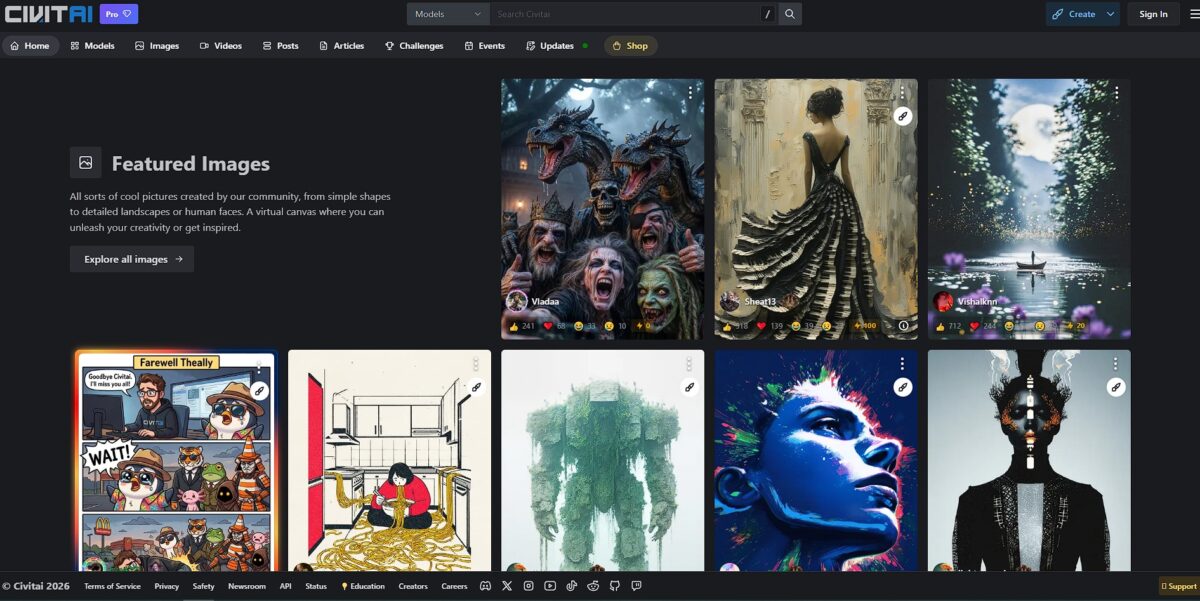
Civitai functions as a massive, community-driven clearinghouse for Stable Diffusion checkpoints, LoRAs, and embedding files. It eliminates the hunt through obscure Discord servers or scattered GitHub repos by centralizing custom models. Most users visit to download specialized styles—like specific anime aesthetics or photorealistic textures—to run on their local hardware. I noticed the site leans heavily into adult content, which can make browsing in public a bit of a gamble. This platform turns a complex file-hunting exercise into a visual, searchable library for creators. That matters because it gives you instant access to the exact visual logic needed for a project without training a model from scratch.
How to start using Civitai?
You start by browsing the model library without an account. It is the fastest way to see what the community is actually building. The layout feels chaotic at first, but the “Most Reactions” filter quickly surfaces the most reliable checkpoints and LoRAs, so you don’t end up downloading broken or experimental files that waste local storage.
When you find a style you like, check the “Model Card” for specific triggers. Most creators list the exact words needed to activate a specific character or aesthetic. Download the .safetensors file and drop it into your local Stable Diffusion models folder, which gives your local machine the specific visual logic required for consistent results.
If you don’t want to manage local Python environments, use the on-site generator. It costs “Buzz” credits but handles the heavy lifting on their servers. The trade-off is less privacy for faster iterations. This works well for testing a model before committing to a multi-gigabyte download, though the UI can feel a bit cluttered with ads and social features.
To stay organized, create a personal collection of your favorite finds. It acts as a visual bookmark for specific versions, which is crucial when a creator updates a model and accidentally changes the output style. You can always find the exact tool used for a specific project.
Who is it for?
Local GPU tinkerers
If you run Automatic1111 or ComfyUI, this is your primary parts warehouse. It eliminates the hunt through scattered Discord channels for specific .safetensors files. Every style and character model you need to put your hardware to work sits in one place. Useful tip: Check the model version history to avoid downloading buggy initial releases.
Anime and manga creators
The library leans heavily into stylized aesthetics and specific character LoRAs. In practice, it is significantly easier to find a “90s cel-shaded” look here than on generalist platforms. This gives you a consistent visual logic for your series without drawing every reference sheet by hand.
Professional concept artists
You can download specialized checkpoints for architectural renders or photorealistic textures to block out scenes. It works well for rapid prototyping, though the sheer volume of adult content can make the front page a minefield in a professional studio. Still, it cuts hours off the initial mood-boarding phase. Gotcha: Always verify the license type before using a model for a commercial client project.
LoRA and Checkpoint trainers
This is the main stage to publish your fine-tuned models and get instant feedback from a massive user base. The platform provides storage and visibility that a private GitHub repo can’t match. This exposure helps you build a reputation in the generative AI community. Choice rule: Upload high-resolution sample images to ensure your model gets indexed properly by the search algorithm.
Prompt engineers and learners
Instead of guessing how a specific image was made, you can often click “Copy Generation Data” to see the exact seed, sampler, and CFG scale. It transforms a black-box process into an open-source tutorial. You can reverse-engineer complex visual effects this way.
Civitai pricing
Civitai is one of the few places where you can grab 5GB checkpoint files without touching your wallet. Most of the platform remains accessible for $0, which is a massive win for local GPU enthusiasts who just want to hoard models. However, they use a virtual currency called Buzz to manage high-demand tasks like on-site model training or rapid image generation.
You get unlimited downloads for core models and LoRAs. It is perfect for local users who handle their own rendering hardware.
This adds a monthly Buzz stipend and a unique badge. You get a small boost in generation speed on their web UI.
Increases your Buzz allowance and storage limits. This matters if you are frequently training LoRAs on their cloud instead of using local scripts.
Maximum Buzz and priority access to new site features. You are essentially subsidizing the hosting costs for the rest of the community.
Variable pricing for one-off currency purchases. Use this to skip the subscription and pay only for the training time you actually consume.While downloading is free, certain high-performance models require you to be logged in, and some community-created assets use an “early access” window gated by Buzz. That means you either wait a few days for the public release or pay the tax to get it now. This setup keeps the lights on without blocking the open-source spirit of Stable Diffusion.
Civitai key features
Centralized Model Repository
It hosts thousands of Stable Diffusion checkpoints, LoRAs, and embeddings in one searchable place. This stops the endless hunt through dead Discord links or obscure GitHub repos when you need a specific style. With every necessary .safetensors file in a single library, you save hours of configuration time.
SafeTensors Adoption
Most files use the SafeTensors format to prevent malicious code execution during model loading. While standard pickle files pose a security risk, these files load faster and keep your local GPU environment secure. Switching between experimental models becomes much less stressful for your hardware, and you get a layer of data safety that older formats lack.
Model Versioning and Lineage
Creators upload multiple iterations of the same model, letting you roll back if a new update breaks your specific prompt workflow. You can see exactly which base model—like SD 1.5 or XL—was used to train the derivative. Your generations stay consistent even as the community moves to newer architectures.
On-Platform Generation (Buzz)
You can test models directly in the browser using Buzz credits without touching your own VRAM. It works well for quick vibe checks, though serious artists will still prefer local ComfyUI for complex workflows. It is a lifesaver when you are away from your main rig but need to verify a prompt idea, and it lowers the entry barrier for users without high-end NVIDIA cards.
Community Showcase and Metadata
Every model page features a gallery of user-generated images complete with the exact prompts and settings used. Instead of guessing how to trigger a specific LoRA, you can copy the “trigger words” directly from successful examples. That cuts out the trial-and-error phase of learning a new model’s quirks.
Model Comparison Tools
The site allows you to view different versions of a model side-by-side to see how training data changed the output. The UI is cluttered, but the depth of technical data helps you pick the right tool for a project based on visual evidence rather than marketing descriptions.
Civitai Pros & Cons
Pros
Civitai centralizes thousands of specialized .safetensors files, so you stop hunting through dead Discord links or scattered GitHub repos. I noticed the “Most Reactions” filter surfaces reliable checkpoints quickly, which saves you from wasting local disk space on broken experimental models. The platform allows you to download massive 5GB base models without opening your wallet. For local GPU enthusiasts who want to build custom workflows, that is a low entry barrier. While it excels for local Stable Diffusion tinkerers, the on-site generation provides a low-cost testing ground for those without high-end hardware. Check the model version history to avoid downloading buggy initial releases.
Cons
The interface often feels chaotic, and search performance can be sluggish when the community floods the feed with new uploads. The content rating system requires multiple steps in user settings to toggle, which makes it harder to filter out adult content on the fly. The sheer volume of community data results in inconsistent moderation and occasional bot-generated spam. An ecosystem this open carries a higher risk of encountering low-quality files or controversial imagery, so finding truly usable assets takes more manual effort than on curated hubs. Use the “green” site filter if you need a workspace safe for professional environments.
Use Civitai if you want…
- To source the best Stable Diffusion checkpoints and LoRAs
- To build consistent characters using specialized community models
- To experiment with hyper-realistic or anime-specific art styles
- To download open-source models for local GPU generation
- To join a thriving community of AI art innovators
- To discover trending models through user-rated feedback loops
- To train and share your own custom creative weights
Civitai alternatives



Civitai Reviews
The undisputed king of Stable Diffusion models. The interface is a bit of a mess, but the sheer variety of LoRAs and checkpoints is unmatched.
FAQ
What is an AI checkpoint on Civitai?
An AI checkpoint is a foundational model file, typically between 2GB and 7GB, that contains the core knowledge for generating images in a specific style, such as photorealism or anime.
What is the difference between a Checkpoint and a LoRA?
A checkpoint is a complete standalone model that defines the overall style, while a LoRA is a much smaller add-on file used to inject specific characters, objects, or artistic nuances into a base checkpoint.
What are Buzz credits and how do they work?
Buzz is Civitai’s internal currency used to tip creators, participate in bounties, and access on-site generation services. Users can earn Buzz through community engagement or by purchasing it directly.
What is the benefit of the .safetensors file format?
The .safetensors format is a security-focused file type designed to prevent the execution of malicious code that could be embedded in older pickle-based .ckpt files.
How do I use a model I downloaded from Civitai?
Most models are designed for local tools like Automatic1111 or ComfyUI. You place checkpoints in the models/Stable-diffusion folder and LoRAs in the models/Lora folder within your local installation.
What are trigger words?
Trigger words are specific tags provided by model creators that must be included in your text prompt to activate the unique features or characters trained into a specific model or LoRA.
Does Civitai support adult content?
Yes, Civitai allows adult content but requires users to be logged in and have specific content filters enabled to view or download it.
Can I generate images directly on the Civitai website?
Yes, Civitai offers an on-site generator that allows users to test models and LoRAs in the cloud without needing a powerful local GPU.
Similar tools
 CustomuseAI 3D creation platform that chains image, video and 3D models into node workflows for game-ready assets, Roblox items and scenes.
 VisualGPTCredit-based AI image and video studio that runs Nano Banana, GPT Image, Seedream, Flux and Kling for product photos, photo edits and
 LovartAI design agent that turns a chat brief into logos, social posts, product shots, slides and videos on one editable infinite canvas.