

CodeGPT (IntelliJ plugin)
Developer ToolsUpdated October 5, 2026
CodeGPT is a flexible AI coding assistant for JetBrains IDEs featuring multi-model support, agentic planning, and autocomplete.
We may earn a commission when you sign up through our links. It does not affect our reviews.
What is CodeGPT (IntelliJ plugin)?
CodeGPT functions as a flexible bridge between your IntelliJ IDE and various large language models, allowing you to swap between providers like OpenAI, Anthropic, or local Ollama instances. It embeds a chat interface and autocompletion directly into your workspace, so you can refactor methods or generate unit tests without tabbing out to a browser. I noticed the session restore feature is particularly handy when you need to pick up a complex debugging conversation exactly where you left it after a restart. Your mental flow and project context survive long development cycles. While it offers incredible model flexibility, you are responsible for managing your own API keys and costs. Use it as your primary workspace companion if you want a custom-tailored AI experience rather than a locked-in ecosystem. Turn on local model support if you need to work on sensitive code offline.
How to start using CodeGPT (IntelliJ plugin)?
Open your IntelliJ-based IDE and head to the Plugins marketplace. Search for CodeGPT and hit install. You might need a quick restart to let the background services settle. That way the AI side panel initializes correctly alongside your project tree.
Next, find the CodeGPT icon in your sidebar or use the double-shift shortcut to open the configuration. You must choose a provider like OpenAI, Anthropic, or even a local Ollama instance. Paste your API key into the field. I noticed the plugin sometimes hangs if you forget to enable billing on your provider’s side first. This setup allows the plugin to bridge your IDE with external intelligence.
The real work starts with the context settings. Index your local files so the assistant actually knows your project’s structure. This prevents the AI from suggesting generic snippets that don’t fit your specific classes or dependencies. You can then right-click any block of code to explain or refactor it instantly. You stay inside the editor instead of hunting for answers in a browser tab.
If you are working with sensitive code, check the privacy settings immediately. You can toggle how much data leaves your machine. The plugin handles standard code completion well, though its chat interface is where it truly earns its keep for complex logic. Use it to generate unit tests or commit messages based on your actual diffs.
Who is it for?
The Model-Agnostic Developer
If you dislike vendor lock-in, this plugin lets you toggle between OpenAI, Anthropic, or local models. You control the brain behind your code completion rather than accepting whatever a single provider dictates. In practice, you can use specialized models for complex logic and cheaper ones for boilerplate.
Privacy-Conscious Engineers
You can point the extension to a local Ollama instance to keep every line of source code on your machine. The configuration for local endpoints is straightforward, making it easier to work on sensitive internal projects without triggering security alerts, and it removes the risk of data leaks to external cloud providers.
The Legacy Code Wrangler
It excels at explaining cryptic, undocumented methods in older Java or .NET codebases. Highlight a messy function and ask the chat sidebar to decipher the logic or suggest a modern refactor. A slow manual audit turns into a faster, guided cleanup of technical debt.
The Multi-IDE Power User
Since it works across the entire JetBrains suite, you get a consistent AI interface whether you are in IntelliJ, PyCharm, or WebStorm. You stop relearning keyboard shortcuts every time you switch from a Python backend to a React frontend. That cuts the mental friction of moving between different development environments.
The Cost-Optimizer
If you already have your own API keys, you only pay for the tokens you actually consume during a session. This approach avoids the waste of a flat $20 monthly subscription if you only need assistance during heavy refactoring weeks. Your tooling cost tracks your project’s intensity directly.
Unit Testing Specialists
It generates test suites based on your actual file structure and naming conventions. It handles edge cases better when you provide context from your local project files rather than a generic prompt, and it automates the repetitive “grunt work” of ensuring code coverage.
CodeGPT (IntelliJ plugin) pricing
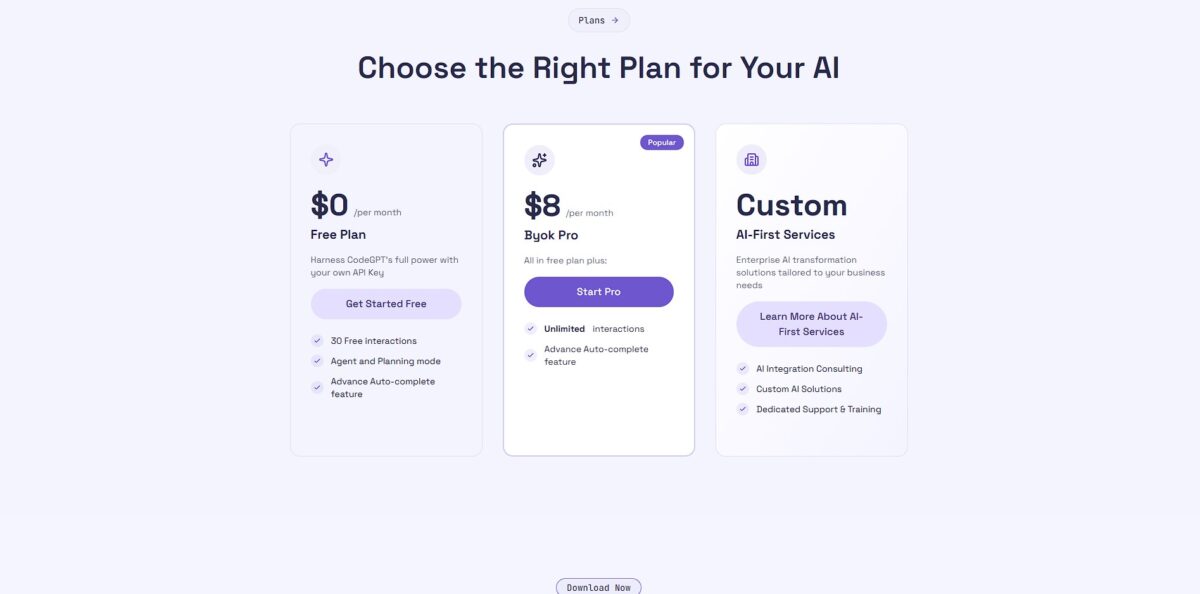
Choosing a plan depends on whether you already pay for AI models elsewhere or want an all-in-one setup. The plugin allows you to connect your own API keys, which keeps costs predictable and tied to your actual usage. The interface stays the same regardless of the tier, so you aren’t fighting a crippled UI if you stay on the entry level.
You get 10 interactions a day on Economy models, a $1 welcome credit for premium models and unlimited use of your own API keys or local models. It works well for testing the plugin logic or occasional script fixes. That matters because you can verify the IntelliJ integration without entering credit card details.
This adds unlimited Economy models, unlimited autocomplete, agentic mode and a monthly allowance for premium Claude, GPT and Gemini tasks, and you can still plug in your own API keys from providers like OpenAI or Anthropic. With your own keys, you only pay the AI provider for the tokens you actually consume during long refactoring sessions.
This adds pooled team credits, centralized billing and an admin dashboard with usage stats for the whole department, so premium models work without external keys. Nobody has to juggle individual API quotas across the team.
CodeGPT (IntelliJ plugin) key features
Generates contextual code completions directly in your editor
You stop typing repetitive boilerplate while the model suggests logic based on your current file. You keep your flow without constant context switching.
Connects to multiple LLM providers like OpenAI or Anthropic through your own API keys
You choose the specific brain behind your code assistance rather than being locked into one vendor. This matters because it gives you control over cost and model performance.
Offers a dedicated chat interface for architectural questions and debugging
Instead of Googling error codes, you paste the stack trace into the sidebar for an immediate breakdown. Your IDE becomes a collaborative environment.
Executes pre-defined code actions like refactoring or explaining selected snippets
Highlight a messy function and select a prompt to clean it up according to your preferred style. The “grunt work” of code maintenance gets handled for you.
Restores previous chat sessions so you never lose track of a complex problem
You can pick up a debugging session right where you left off after a restart. The mental model you built during a long coding stretch stays intact.
CodeGPT (IntelliJ plugin) Pros & Cons
Pros
CodeGPT turns IntelliJ into a living terminal for various LLMs without the usual context-switching friction. It pulls your local codebase into the conversation, so you stop pasting files into a browser. Session restore saves time when you jump back into a complex refactor after a crash, keeping the mental thread of your project across IDE restarts. It works well for developers who want model flexibility, letting you swap between OpenAI and local providers like Ollama easily. Use it to automate repetitive unit test generation directly within your existing file structure.
Cons
The configuration UI in IntelliJ can feel cluttered compared to more native-feeling AI tools. You have to manage your own API keys for most providers, which adds a layer of administrative overhead. The chat interface sometimes hangs when processing massive folders, requiring a manual cache clear to restore speed. The trade-off is more control at the cost of occasional stability hiccups during heavy indexing. It is less ideal for teams wanting a zero-config, “it just works” experience out of the box. Privacy settings are granular but require manual tuning to ensure sensitive keys stay off-server.
Use CodeGPT (IntelliJ plugin) if you want…
- Get complex code completions directly within IntelliJ.
- Chat with your codebase using custom AI providers.
- Automate repetitive unit test generation for faster delivery.
- Refactor legacy functions with context-aware AI suggestions.
- Explain cryptic error messages without leaving your IDE.
- Integrate local LLMs for maximum coding privacy.
- Execute natural language prompts to modify source files.
- Restore previous coding sessions with persistent chat history.
CodeGPT (IntelliJ plugin) alternatives

CodeGPT (IntelliJ plugin) Reviews
User feedback converges on one strength above all: model freedom. Developers who moved over from Copilot repeatedly point to the same deciding factor — you can aim the plugin at a local Ollama instance or bring your own Anthropic key, so proprietary code stays inside your network and the bill stays at raw API rates. The chat sidebar and session restore earn steady praise from people doing long refactoring work across a legacy codebase.
The complaints are just as consistent. The settings panel feels dense next to first-party tools, indexing a large monorepo eats memory, and managing your own keys moves the administrative burden onto you. Reviewers also note something worth remembering before you judge the plugin: the quality of what you get back is largely a verdict on whichever model you wired up, not on CodeGPT itself.
FAQ
Which AI models can I use with CodeGPT?
CodeGPT is model-agnostic, allowing you to connect via your own API keys to providers like OpenAI, Anthropic, Google, and Mistral, or run local models through Ollama and LM Studio for total privacy.
Can I use CodeGPT for free?
Yes, the Free plan includes 10 interactions a day on Economy models plus unlimited use of your own API keys or local models, though unlimited autocomplete, agentic mode and a premium-model allowance require the Professional plan.
Does CodeGPT support local LLMs?
Yes, you can connect to local providers like Ollama to run models entirely on your own hardware, ensuring your code never leaves your machine and works without an internet connection.
What is Agentic Mode in CodeGPT?
Agentic mode allows the AI to move beyond simple chat by planning and executing multi-step tasks, such as refactoring code across multiple files or creating comprehensive test suites autonomously.
Is my code used to train AI models?
By default, CodeGPT prioritizes privacy and does not use your code for training. If you use your own API keys, your data is subject to the specific privacy policy of that provider, such as OpenAI or Anthropic.
Does CodeGPT work with IntelliJ IDEA and other JetBrains IDEs?
Yes, CodeGPT is available as a plugin for the entire JetBrains ecosystem, including IntelliJ IDEA, PyCharm, and WebStorm, providing consistent AI assistance across your preferred development environment.
What are CodeGPT Credits?
Credits allow you to access premium managed models directly through the extension without needing to set up your own individual API accounts with multiple different AI providers.
Similar tools
 Novita AIDeveloper cloud with one API for 200+ open-weight AI models, plus GPU instances, dedicated endpoints and isolated sandboxes for AI agents.
 You.comDeveloper platform of web search, content extraction, cited research and model inference APIs that feed AI agents and RAG apps real-time web
 QodoAI code review platform that runs specialized agents on every pull request, enforces team rules and checks changes against tickets and linked