

ColorifyAI
Art GenerationUpdated November 18, 2026
Browser-based AI coloring page maker that turns text prompts, photos and names into printable line art and builds multi-page coloring books.
We may earn a commission when you sign up through our links. It does not affect our reviews.
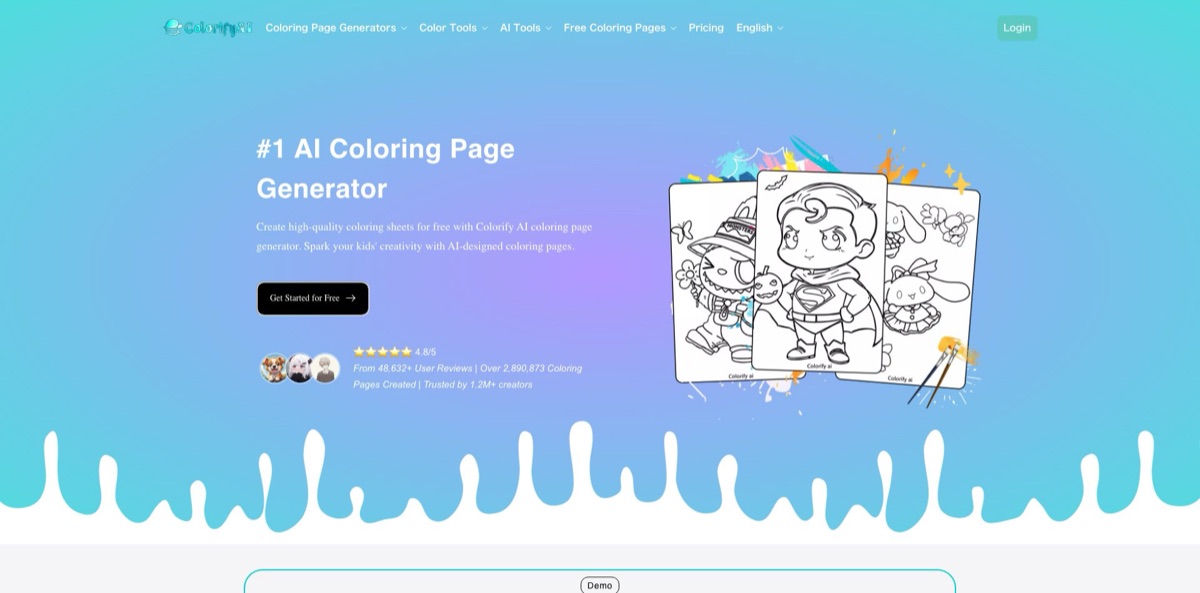
What is ColorifyAI?
ColorifyAI is a browser-based studio, started in 2024, that does one job well: it turns a short text prompt or an uploaded photo into black-and-white line art you can print. The text generator offers 15 art styles and three AI models, the photo converter has four line styles with 1K, 2K and 4K output, and a Coloring Book Generator stretches one story into a cover plus at least five linked pages. Around that core sit a free library of 1,000+ printable pages, an online colorizer and a sketch-to-image tool. It saves the hours parents, teachers and sellers spend hunting for printables or tracing photos by hand. The weak spots are licensing statements that contradict each other across pages, watermarks on free output and commercial rights only from the $29.90 Plus plan. Pick it for fast personal and classroom sheets; read the plan terms before selling.
How to start using ColorifyAI?
Open colorifyai.art and scroll to the demo block, which has two tabs: Text to Coloring Page and Photo to Coloring Page. According to the homepage FAQ, your first try is free with no login, and signing in claims free credits for more generations. The photo converter page separately promises 5 free conversions every day. Treat the free tier as a trial: the pricing page lists “No watermark” as a paid-plan feature, so expect a mark on free downloads, and free users are limited to personal use.
For a first real job, make one page for a child or a class. Type a simple phrase such as “Dragon”, “Unicorn” or “Race Car”, pick one of the 15 art styles, set the page size and choose a model. A Simple BG option keeps backgrounds clean for younger kids, a Language Translator handles prompts written in other languages, and the Inspiration Library gives you ready ideas when you are stuck. If you want words on the page, put them in the prompt, for example a coloring page with the text “Happy birthday”. Download the result as PNG or PDF straight away, because the homepage says history is kept for only up to 1 day.
The screen worth learning properly is Photo to Coloring Page. Upload a photo (batch uploads need the Plus plan, per the FAQ), then pick a line style: Full Line Art, Simplified Art, No BG or Old Version. A slider preview lets you compare the original and the line art, and you can export at 1K, 2K or 4K. After conversion you can switch between three opacity modes, Sketching, Tracing and Coloring, which turn the same output into a tracing sheet for beginners. The page lists a basic model, GPT Image 2 and Nano Banana; if one result looks muddy, regenerate with another model or a simpler style. Photos with clear outlines, good contrast and uncluttered backgrounds convert best.
When you need more than one page, open the Coloring Book Generator. Add a title and a short story or idea, choose a 3:2, 1:1 or 2:3 page size, and generate a cover with at least five connected scenes, downloadable as a print-ready PDF or a PNG pack. Before you print a full batch, check a single page at the size you plan to use, since thin lines and tiny details are the first things to disappear on a home printer. If the pages are headed for Etsy, Amazon KDP or a paid product, confirm you are on Plus or Pro, because the Basic plan is marked as not for commercial use.
Who is it for?
Parents
Kids ask for a coloring page of their exact obsession, whether that is a dinosaur on a skateboard or the family dog, and generic printables never match. ColorifyAI turns that request into a sheet in seconds, and the photo converter can turn a pet or holiday snap into line art. The free daily allowance covers a rainy afternoon without a subscription.
Teachers and homeschoolers
Prep time goes into hunting for worksheets that fit this week’s topic. The text generator and the Coloring Book Generator turn a lesson theme or a short story into a set of matching pages, and the side tools include a worksheet generator and flashcard maker. One educator recommended it in the Apple Education Community for exactly this kind of classroom use.
Coloring book sellers on KDP and Etsy
Drawing a full book interior by hand takes days of line work. Batch generation, 4K output and the book generator speed up drafting, and the Plus and Pro plans grant commercial use. You still need to vet every page for quality and avoid prompts that name licensed characters.
Party planners and gift makers
Personalized items sell, and a child’s name in a decorative frame is an easy win. The Name Coloring Pages generator offers templates with mandalas, holiday themes, geometric patterns and cartoon borders, plus preset or uploaded backgrounds. It works for birthday favors, place cards and classroom name tags.
Beginner artists
Tracing is a practical way to learn proportions, but finding clean outlines of your own references is tedious. The photo converter’s Tracing and Sketching opacity modes give you guide lines from any picture, and Sketch to Image AI shows how a rough drawing might look in 14 styles, from Watercolor to Manga.
ColorifyAI pricing
ColorifyAI sells monthly credit subscriptions plus one-time credit packs. Generating a coloring page costs 1 credit, while its other AI features use more credits because they need more GPU time, according to the pricing FAQ. Every paid plan lists the same feature set: Nano Banana and Seedream as premium models, 4K resolution (over 480 DPI on A4), the AI Image Generator and Editor, batch generation, six AI color and sketch tools, the Coloring Book Generator and no watermark. The plans differ in credits, commercial rights and support. Yearly billing is advertised as 17% off. All prices below come from the official pricing page and are in USD.
Your first try needs no login, signing in adds free credits, and the photo converter allows 5 free conversions a day. Output is for personal use only, and the pricing page reserves “No watermark” for paid plans.
250 credits a month, so roughly 250 coloring pages, with the full paid feature set. The plan is marked as not for commercial use and has no priority support.
900 credits a month, commercial use of everything you generate and priority customer support. The pricing page labels it Most Popular, and it is the entry point for anyone selling pages.
2,500 credits a month with the same commercial rights and priority support as Plus, aimed at high-volume book production.
Packs top up your balance but do not grant subscription features.
Refunds are offered only if you have not used any credits. Monthly plans can be upgraded once the current plan is set to cancel at the end of the period, unused credits carry over to the new plan, and annual subscribers have to email support to upgrade. Cancellation lives under your profile avatar, then User Info, then Cancel Subscription.
ColorifyAI key features
Text to Coloring Page turns short prompts into line art using 15 art styles and three AI models
Options include Simple BG for clean backgrounds, a Language Translator for prompts in other languages and an Inspiration Library of ready ideas. You download the page as PNG or PDF, so a custom sheet goes from idea to printer in a few clicks.
Photo to Coloring Page extracts outlines from uploaded pictures in four line styles: Full Line Art, Simplified Art, No BG and Old Version. A slider compares before and after, exports run at 1K, 2K or 4K, and Plus subscribers can upload in batches.
The Coloring Book Generator builds a cover and at least five connected pages from a title and a short story
You choose 3:2, 1:1 or 2:3 pages and download a print-ready PDF or PNG pack. This saves the layout work that usually eats as much time as the drawings.
Name Coloring Pages turns any name into a decorated sheet with templates such as mandalas, holiday themes, geometric art and cartoon borders. You can pick a preset background or upload your own image. It is the quickest route to personalized party favors and classroom name tags.
Three opacity modes on photo conversions, Sketching, Tracing and Coloring, change the same output from faint guide lines to a full coloring sheet. Beginners get a tracing exercise from any reference photo.
Coloring tools work in the other direction: Line Art Colorizer offers 100+ preset colors plus custom shades with tap-to-fill, undo and erase, while Sketch to Image AI recolors drawings in 14 styles, including Watercolor, Manga, Ghibli, Crayon and Colored Pencils. Kids can color on a tablet without printing, and artists can preview palettes.
A free library of 1,000+ printable pages is sorted by theme, downloadable as PDF or PNG
It covers holidays, unicorns, mermaids and many popular cartoon franchises. Use it for home and classroom fun, but keep the franchise pages out of anything you sell.
ColorifyAI Pros & Cons
Pros
ColorifyAI keeps the path from idea to printable page short. One prompt box, a style picker and PNG or PDF download cover most needs, and the vendor quotes about 3 seconds per page. The photo converter is the standout, with four line styles, 4K export and tracing modes that turn family photos into practice sheets. The Coloring Book Generator adds a cover and linked scenes, which most single-page generators skip. Credit pricing is easy to read because one page costs one credit, and the free daily allowance is enough to judge quality before paying. The privacy policy says guest uploads are deleted within 24 hours, and the photo page says your photos are not used for AI training. Spend your free conversions on your hardest photo first.
Cons
Licensing is the main headache. The homepage FAQ and pricing page restrict commercial use to Plus and Pro, yet the Coloring Book Generator page calls the tool free, watermark-free and fine for commercial projects. The About page says the product is tailored for children, while the Terms require users to be at least 13. The Terms also still carry an unfilled placeholder where the governing jurisdiction should be. Model names differ between pages, and independent reviewers describe the drawings as simpler and less detailed than paid rivals. Refunds vanish once you spend a credit. Screenshot the plan terms on the day you subscribe, and have a parent or teacher run the account.
Use ColorifyAI if you want…
- Turn simple text prompts into printable coloring pages.
- Convert family photos and pets into clean line art.
- Build a complete coloring book from one story.
- Create personalized name coloring pages for parties and classrooms.
- Print tracing sheets for beginner drawing practice.
- Color line art online on a tablet without printing.
- Draft coloring book interiors for KDP or Etsy listings.
- Download free themed printables in PDF or PNG.
ColorifyAI alternatives


ColorifyAI Reviews
An educator in the Apple Education Community recommended it for class projects in 2024, praising the single prompt box, no login, no ads and no public gallery of other users’ images; results came back quickly and looked pretty good, though some prompts needed rewording.
On the indexator.ai directory, users describe coloring pages as effortless to make and the results as pretty good, but the average sits at a modest 3.7 out of 5 from 11 ratings.
A 2026 roundup of AI coloring page generators called it the fastest of the group and liked its simple, clear pages for young children, but found the drawings less detailed than paid tools and the options thin for long or complex books.
FAQ
Is ColorifyAI free?
You can try it without an account, claim free credits by signing in and convert up to 5 photos a day for free. Free output is for personal use only, and watermark-free downloads are listed as a paid-plan feature.
Can I sell coloring books made with ColorifyAI?
The homepage FAQ and pricing page allow commercial use only with an active Plus or Pro subscription. The Basic plan is marked as not for commercial use, so upgrade to Plus at $29.90/month before you list anything.
How many credits does a coloring page cost?
One coloring page costs 1 credit. Other AI features on the site use more credits because they need more GPU time.
Can I turn a photo into a coloring page?
Yes. Upload a photo on the Photo to Coloring Page tool, choose one of four line styles and download at 1K, 2K or 4K in PNG or PDF.
Are my uploaded photos private?
The photo converter page says uploads are encrypted, deleted shortly after processing and never used for AI training. The privacy policy adds that guest uploads are deleted within 24 hours, while logged-in accounts may keep generation records as history that you can delete.
Can kids use ColorifyAI on their own?
The Terms require users to be at least 13, and younger users need a parent or guardian’s consent. For younger children, a parent or teacher should run the account and hand over the printed pages.
Does ColorifyAI offer refunds?
Refunds are offered only if you have not used any credits. You can cancel at any time from your profile avatar under User Info, and you will not be charged again.
Does ColorifyAI support other languages?
The site is available in English, Spanish, German, Portuguese and French, and the text generator includes a Language Translator for prompts written in other languages.
Similar tools
 Pixel DojoSubscription AI studio with 80+ image and 60+ video models, consistent characters, LoRA training and an agent that builds ads and short
 ArtbreederBrowser-based AI art studio for mixing, breeding and editing images with gene sliders, prompts, collages and a remix-friendly community.
 mnml.aiAI rendering studio for architects and designers that turns sketches, photos and SketchUp, Revit or Rhino views into photoreal renders and short