
ColoringBook AI
Art GenerationUpdated November 17, 2026
Browser-based AI generator that turns text prompts and photos into printable coloring pages and multi-page coloring books for kids, classrooms and KDP.
We may earn a commission when you sign up through our links. It does not affect our reviews.
What is ColoringBook AI?
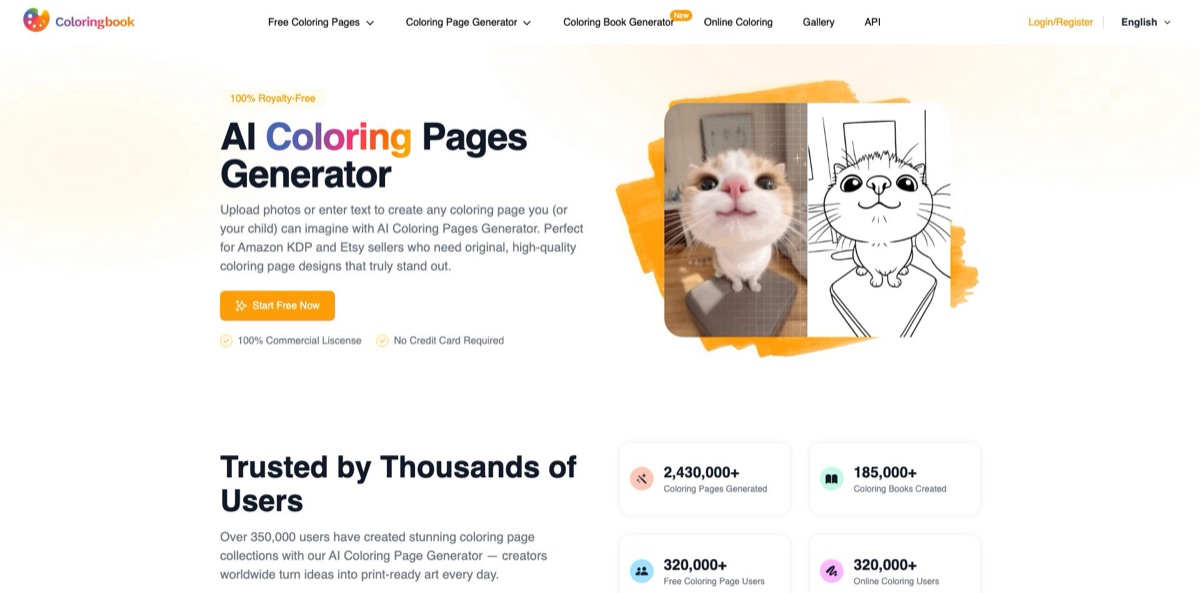
ColoringBook AI is a browser-based generator built for one narrow job: black-and-white line art that you can print and color. You type a scene or upload a photo, and the model returns a clean outline tuned to an age level, from simple shapes for toddlers to dense patterns for adults. Around that core sit a story mode that builds coloring books of up to 200 pages with a recurring character, a colorizer, an online coloring canvas and a free library of more than 34,000 printable pages. It removes the slowest part of making coloring material: drawing or sourcing dozens of matching outlines. The weak spots are a small free allowance, a 687 x 1024 px default size that needs upscaling for print, and selling rights that the plan cards grant only from Professional up. Pick it if you make coloring pages for kids, classrooms or Amazon KDP.
How to start using ColoringBook AI?
Open coloringbook.ai and click Start Free Now or Login/Register. No credit card is required, and every new account gets 4 free credits a month that refresh automatically, plus one free trial run of the story coloring book generator. If you only want to color, the Online Coloring tool works without an account; you need to sign up only to save your progress. The interface is available in ten languages, including English, Spanish, German, French, Portuguese, Japanese, Korean, Vietnamese and both Simplified and Traditional Chinese.
Your first real job happens in the dashboard, where you pick a creation mode. Text to Coloring Page takes a written description, such as the site’s own example of four aliens buying ice cream on the moon under a starry sky. Photo To Coloring Page takes a single uploaded image, picks out the main subject and can strip a cluttered background. Before you generate, set the target age group so the enhancer adjusts line density and difficulty for toddlers, children, teenagers or adults. The Name and Birthday generators sit in the same menu for personalized pages.
For a full book, open the Coloring Book Generator, which works in three steps. In Step 1 you describe the main character in text or upload a reference image, enter the story outline and choose the number of pages. In Step 2 the AI shows two character turnaround sheets and a draft outline; you pick one character model and edit page titles if needed. In Step 3 you click Start Generation. Keep the page limits in mind: Starter and Hobby cap books at 10 pages, while Professional and Business allow up to 200.
Everything you make lands in Dashboard, My Creations, and stays there even if you cancel later. Download single pages as PNG and books as PDF (the book generator also offers ZIP). Before you print, switch on Upscale for Print, which lifts the standard 687 x 1024 px output to 2748 x 4096 px. On Professional and Business, the KDP Builder formats the book to Amazon’s page dimensions and safe margins and exports a KDP-ready PDF. If you upload family photos, note that privacy mode, which keeps your pages out of public view, needs an active subscription.
Who is it for?
Amazon KDP publishers
You need dozens of interior pages per title that look like they came from one artist. The story mode keeps one character consistent across up to 200 pages, Batch Mode cuts repetitive prompting, and the KDP Builder handles trim and margins. Selling rights on the plan cards start at Professional, so budget for that tier.
Etsy and print-on-demand sellers
Customers want their pet, child or wedding photo as a coloring page, and freelance illustrators are slow and expensive for that kind of order. Photo To Coloring Page turns an upload into line art in seconds, and the Name generator adds personalized lettering. You can quote same-day turnaround on custom gifts.
Teachers and homeschooling parents
Finding pages that match this week’s topic usually means hours of searching or buying bundles that miss the point. Here you type the lesson theme, choose the age level and print a set for the whole class. The Business plan is pitched at the education sector if you produce sheets for several groups.
Parents planning birthdays and quiet time
A party page with the child’s name, a favorite hero and a cake is a typical request, and the Birthday generator is built for it. The free library and the no-login online canvas cover the days when you just need something to color right now. Four free credits a month are enough for occasional custom pages.
Illustrators and comic artists
Colorize Drawing applies six styles, from flat fills to colored pencils, to your own line art, which helps you test palettes before committing hours to a piece. Text to Coloring Page can also produce clean outlines for fan bonus pages. It speeds up exploration, not final artwork.
App and workflow developers
The API exposes text-to-image, image-to-image, name, birthday and colorize endpoints at $0.04 per request on a prepaid balance. You can add coloring page generation to a kids’ app or an automation without building a line-art model yourself.
ColoringBook AI pricing
ColoringBook AI sells subscriptions with a monthly allowance of coloring pages, billed monthly or yearly with a 30% discount on the yearly option. Each generation spends credits depending on quality and format. Plan credits refresh on your subscription anniversary rather than the 1st of the month and do not roll over, while credits from add-on packs are separate and do not expire. The pricing page leads with the yearly per-month figures, so read the “/Year” line before you click Subscribe. Prices below are in USD as of November 16, 2026.
4 credits a month that refresh automatically, one free trial of the story book generator, the free printable library and online coloring. Privacy mode is not included.
Up to 100 coloring pages a month, email support, personal use, printable quality, watermark removal, premium brushes and palettes for online coloring and books of up to 10 pages. No Batch Mode, no KDP Builder.
Up to 300 pages a month, 24/7 email support and early access to new features. Still personal use with 10-page books, and still no Batch Mode or KDP Builder.
Up to 1,000 pages a month, commercial use, books of up to 200 pages, Batch Mode and the KDP Builder. This is the plan marked Most Popular.
Up to 5,000 pages a month with the same feature set as Professional, aimed at sellers scaling output and at teachers.
A one-time $0.50 credit is added after your first eligible card binding, and website credits cannot be used for API calls.
Refunds are narrow: requests must arrive within 3 days of purchase, you are not eligible once you have used more than 10 credits, and a processing fee of up to 6% may apply.
ColoringBook AI key features
Text to Coloring Page turns a written description into line art in one click
An enhancer adjusts detail and difficulty for toddlers, children, teenagers or adults, and the site says it handles several subjects, scenes and names in a single prompt. You get printable pages for niche themes that no ready-made book covers.
Photo To Coloring Page converts a single uploaded image into an outline
The model identifies the main subject, keeps people and pets in focus and offers optional background removal for messy shots. Pets, family photos, buildings and vehicles all work as inputs, which makes it the quickest route to personalized gifts.
The Coloring Book Generator builds a story book of up to 200 pages from a character description and a plot outline
It generates two character turnaround sheets for you to choose from, then keeps that character’s look on every page and links the pages into one storyline. You avoid the drifting faces and mismatched styles that plague books assembled from single prompts.
Batch Mode and the KDP Builder, available on Professional and Business, handle volume and publishing
Batch Mode generates many pages in one workflow with a consistent style, and the KDP Builder sets page dimensions and safe margins and exports a PDF ready for Amazon upload. Together they replace hours of manual layout in a design tool.
Upscale for Print and watermark removal prepare files for real paper
The standard 687 x 1024 px output is enough for screens, while upscaling produces 2748 x 4096 px pages with sharper lines for home printers and print-on-demand.
Colorize Drawing and Online Coloring cover the other half of the hobby
The colorizer accepts JPG or PNG line art and applies one of six styles: Flat Coloring, Crayon, Water Color, Impasto, Marker or Colored Pencils. The online canvas offers a brush, paint bucket and eraser with AI border detection, and it runs without a login.
The ColoringBook API brings the same generators into your own product
Endpoints cover text-to-image, image-to-image, name-to-image, birthday-to-image and colorize, you can create up to 5 API keys, and you poll a task until it completes. If some images in a request fail, their share of the fee is refunded to your balance.
ColoringBook AI Pros & Cons
Pros
Every mode outputs line art made for coloring, so you skip the step of converting general AI art into clean outlines. The age-level setting is practical for parents and teachers, and the story book generator tackles the hardest part of a KDP coloring book: keeping one character recognizable across many pages. Per-page cost is low, since Professional covers up to 1,000 pages a month for $39.99, or $27.99 on yearly billing. Failed generations return their credits automatically, and your creation history survives cancellation. The free library of over 34,000 pages and the no-login online canvas add value even before you generate anything. Use the free library for generic themes and spend credits only on pages nobody else sells.
Cons
Licensing terms contradict each other: the homepage advertises a commercial license and the FAQ says every paid plan includes commercial rights, yet the Starter and Hobby cards list personal use only. The pricing page shows yearly per-month figures first, and one Trustpilot reviewer did not realize the cheapest price meant a yearly commitment. Default output is 687 x 1024 px, small enough that another reviewer called results pixelated. Refunds expire after 3 days or 10 credits, the free tier is only 4 credits a month, and privacy mode is paywalled. Independent reviews are scarce, with four on Trustpilot. Ask support to confirm commercial rights in writing before you publish anything.
Use ColoringBook AI if you want…
- Turn family and pet photos into printable coloring pages.
- Generate custom coloring pages from short text prompts.
- Build story coloring books with one consistent main character.
- Publish KDP coloring book interiors as formatted PDF files.
- Create lesson-matched coloring sheets for your classroom each week.
- Make personalized name and birthday coloring pages for parties.
- Colorize line art in crayon, marker or watercolor styles.
- Add coloring page generation to your app through an API.
ColoringBook AI alternatives




ColoringBook AI Reviews
A Trustpilot reviewer generated a custom page with a dog, a birthday cake and personalized bubble text, said it came out exactly as described and called it the best coloring page generator they had used.
Another Trustpilot user paid to try the service for one coloring book, used more credits than the refund policy allows, and still praised support for waiving the policy when they asked.
A third Trustpilot reviewer liked the site but picked the cheapest plan to keep images private, then found it required a yearly commitment that was not clearly shown, and struggled to find support contact details.
A one-star Trustpilot review says the remaining credits disappeared before the paid month ended after the user turned off renewal, and that the generated images looked pixelated.
A Product Hunt commenter found it much faster than hunting online for a specific picture to color, but wanted to know how far line weight and detail can be adjusted.
FAQ
Is ColoringBook AI free to use?
Yes, with limits. Every account gets 4 free credits a month and one free story book trial, and the library of free printable pages and the online coloring tool cost nothing.
Can I sell coloring books made with ColoringBook AI on Amazon KDP?
The Professional and Business plan cards list commercial use and include the KDP Builder, which exports a KDP-ready PDF. Starter and Hobby are marked personal use, so check the terms or ask support before selling pages made on those plans.
What file formats and resolution does ColoringBook AI export?
Single pages download as PNG and books as PDF, with ZIP available from the book generator. Standard output is 687 x 1024 px, and Upscale for Print raises it to 2748 x 4096 px.
Are my uploaded photos and generated pages private?
The company says content is stored with encryption and not shared without consent. Privacy mode, which keeps every generated page visible only to you, requires an active subscription.
Do unused credits roll over to the next month?
No. Plan credits expire when your subscription renews on its anniversary date, while credits from add-on packs are separate and do not expire.
Can I get a refund from ColoringBook AI?
Only within 3 days of purchase and only if you have used 10 credits or fewer, and a processing fee of up to 6% may apply. Requests go to support@coloringbook.ai or service@coloringbook.ai.
Does ColoringBook AI have an API?
Yes. Each generation request costs $0.04 from a prepaid USD balance that is separate from website credits, and you receive $0.50 after your first eligible card binding.
Does ColoringBook AI work on mobile?
Yes, it runs in any modern browser on phones, tablets and computers with no app to install. The company recommends a desktop browser for building full multi-page books.
Similar tools
 Pixel DojoSubscription AI studio with 80+ image and 60+ video models, consistent characters, LoRA training and an agent that builds ads and short
 ArtbreederBrowser-based AI art studio for mixing, breeding and editing images with gene sliders, prompts, collages and a remix-friendly community.
 mnml.aiAI rendering studio for architects and designers that turns sketches, photos and SketchUp, Revit or Rhino views into photoreal renders and short