

CometAPI
Developer ToolsUpdated October 5, 2026
CometAPI is a unified gateway providing access to 500+ AI models through a single, enterprise-grade API endpoint.
We may earn a commission when you sign up through our links. It does not affect our reviews.
What is CometAPI?
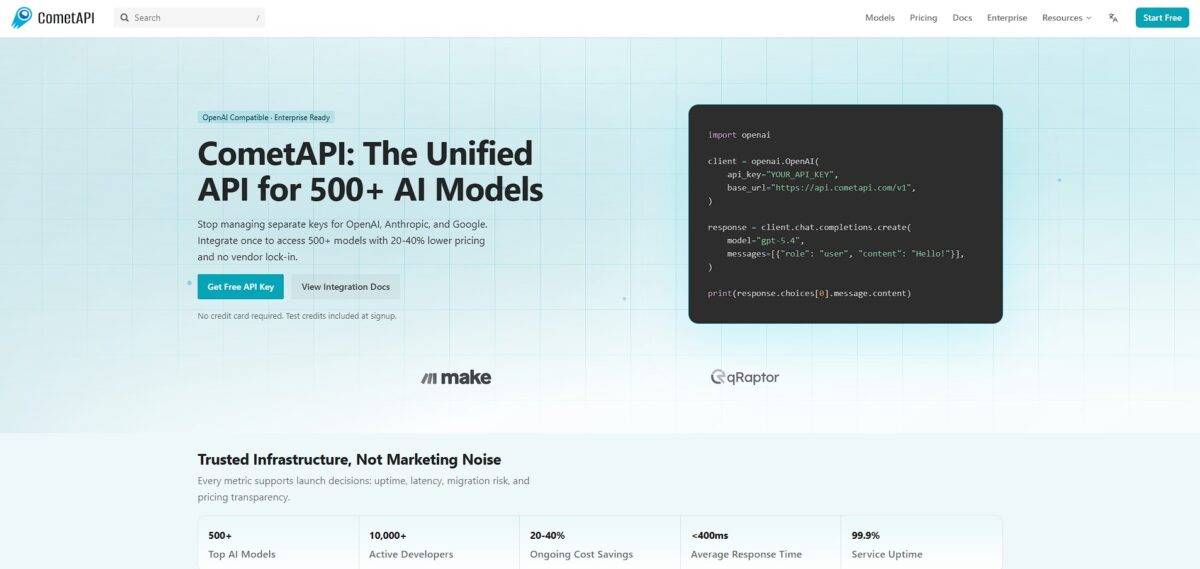
CometAPI acts as a unified traffic controller for your LLM calls, funneling requests to various providers through a single endpoint to prevent vendor lock-in. It handles the messy backend work of tracking token usage and managing request concurrency so your app doesn’t choke during traffic spikes. While individual model APIs often lack deep observability, this gateway adds a layer of analytics that reveals which models actually drain your budget. I noticed it simplifies the switch from an expensive model to a cheaper alternative since you only change one line of config rather than refactoring your entire auth logic. This matters because it ensures your application remains functional even if a specific provider suffers an outage or changes their rate limits. Use it to centralize your AI infrastructure, but keep in mind that adding a gateway introduces one more point of failure between your code and the model.
How to start using CometAPI?
Start by creating an account at CometAPI. You verify your email and gain immediate access to the dashboard. The interface is clean and skips the usual enterprise clutter, so you can focus on finding the right model rather than fighting a UI.
Navigate to the API Token section to generate your first key. You click “Add Token” and copy the string. It usually follows a standard prefix format. This single key replaces the dozen credentials you normally track for OpenAI, Anthropic, and Google, putting your billing and security in one spot.
Integration is simple if you use the OpenAI SDK. You just swap the base_url to CometAPI’s endpoint and drop in your new key. For most Python scripts, the transition is nearly instant. This saves you from rewriting logic when switching from GPT-4 to Claude 3.5 Sonnet. Less time on boilerplate, more on actual features.
If you prefer low-code tools like Make, search for the CometAPI module in the app directory. You paste your token into the connection field to authorize requests. This works well for automated workflows like sentiment analysis on incoming form data. You pay for it with a slight increase in latency compared to direct API calls, but non-technical team members can manage AI logic themselves.
Check your usage metrics in the dashboard after running a few test prompts. You can see tokens consumed and cost breakdowns per model. This transparency prevents surprise bills at the end of the month and lets you optimize spending based on real-world data.
Who is it for?
The Multi-LLM Architect
If you are tired of tracking separate API keys for OpenAI, Anthropic, and Google, this is your single point of entry. It replaces a messy folder of .env files with one unified token. You spend far less time on credential management and boilerplate configuration.
Cost-Conscious Solo Founders
It helps you find the cheapest inference path without rewriting your entire backend. You can swap an expensive GPT-4 call for a more affordable Claude 3.5 Sonnet instance by changing one string in your request. Every token is optimized, which helps preserve your runway.
The Reliability Engineer
It acts as a safety net when a specific provider suffers a regional outage or hits a rate limit. It keeps apps online by automatically routing traffic to healthy alternatives, so “model unavailable” errors never reach your end users.
Prototyping Speedrunners
If you need to benchmark prompts across ten different model families in one afternoon, this gateway removes the integration friction. You use a standard OpenAI-compatible SDK to talk to any LLM in their library. You pick a winner based on actual performance rather than marketing hype.
Low-Code Automators
It works well for teams using tools like Make to build AI workflows without a dedicated DevOps person. You connect one module and gain access to 500+ models for sentiment analysis or data extraction. Expect a minor latency hit compared to a direct connection; in return, non-technical staff can manage complex AI logic.
CometAPI pricing
CometAPI ditches the traditional subscription model for a structure that mirrors the raw cost of the intelligence you consume. You pay for what flows through your code, often at rates lower than going direct to the primary providers. This setup prevents the common headache of juggling five different credit card bills for five different LLM providers.
This allows you to test your integration logic across several models without any initial spend. You see how different models handle your specific prompts before you commit to a budget.
There are no monthly platform fees. You pay for the tokens used at a rate typically 20% lower than official API pricing. This helps lower the financial barrier when scaling a wrapper or an internal agent. In testing, the savings were most visible when routing high volumes of text through models like Claude Sonnet, which directly improves the margins of your AI features.
Large teams can request custom pricing and dedicated support. This works well for corporations needing a single, unified invoice for all AI activity, though solo devs will find more value in the standard flexible rates.
CometAPI key features
Access over 500 AI models through a single OpenAI-compatible endpoint
You stop chasing documentation for ten different providers and just swap the model name in your config file. Integration time when testing new LLMs drops from days to minutes.
Route requests to cheaper providers for mainstream models like GPT-4 or Claude 3.5
You redirect traffic to lower-cost nodes without touching your core logic. On high-volume production apps, that cuts your monthly API bill by about 20%.
Handle high-concurrency workloads with sub-400ms average response times
Your app stays snappy even during traffic spikes that might choke a single provider’s rate limits. Your end users are spared “spinning loader” fatigue.
Switch between providers like Anthropic, Google, and DeepSeek with zero vendor lock-in
If one provider goes down or changes their terms, you flip a switch to a competitor. Your infrastructure gets a safety net that doesn’t depend on one company’s stability.
Monitor all model usage and costs through one centralized dashboard
You stop hunting for invoices across five different credit card statements and see exactly which model is burning your budget. “Black box” AI spending turns into predictable line items for your finance lead.
CometAPI Pros & Cons
Pros
CometAPI removes the friction of managing a dozen different provider accounts. You drop one API key into your environment variables and gain instant access to hundreds of models. This simplifies your codebase since you don’t have to write custom integration logic for every new LLM. I noticed switching between Gemini and GPT-4 takes seconds rather than a complete refactor. This matters because it prevents vendor lock-in and lets you use the best model for a specific task. Use this to maintain uptime when a single provider hits rate limits or goes down.
Cons
The platform lacks transparency regarding how it handles provider-specific features like Google’s input caching. You might end up paying more for long-context tasks because you don’t get the native cache discounts. The dashboard is functional but sparse, which might frustrate users accustomed to the polished interfaces of major hyperscalers. Some users reported that Anthropic models feel more restricted here compared to using them directly. In creative or complex prompts, that can lead to unexpected refusals. Choose a direct connection if your workflow depends heavily on saving costs through massive input caches.
Use CometAPI if you want…
- Access 500+ AI models through one OpenAI-compatible endpoint.
- Reduce inference costs by about 20% immediately.
- Switch providers instantly without rewriting any integration code.
- Launch production-ready AI features in under ten minutes.
- Eliminate the headache of managing dozens of API keys.
- Scale multi-agent systems with ultra-high concurrency support.
- Benchmark prompts across multiple model families simultaneously.
- Avoid vendor lock-in with a provider-agnostic infrastructure.
CometAPI alternatives



CometAPI Reviews
Saves me from juggling twenty different API keys. The unified dashboard for tracking costs across Claude and GPT-4 is a massive relief for my monthly accounting.
The latency is surprisingly low for an aggregator. I switched my production backend to their endpoint in one afternoon without rewriting any of my core logic.
It is great for testing different models side-by-side, but the floating prices can be tricky to predict. Excellent for prototyping before committing to a single provider.
The security scanning on prompts gave my team peace of mind. It’s even a bit cheaper than going direct, and the time saved on integration is the real win.
FAQ
How many AI models are available through CometAPI?
CometAPI provides access to over 500 different AI models, including popular ones like GPT-4, Claude 3.5, and Gemini 2.0, through a single unified interface.
Is CometAPI compatible with the OpenAI SDK?
Yes, CometAPI is fully OpenAI-compatible, meaning you can use the official OpenAI library and simply update the base URL and API key to start making requests.
Does CometAPI provide free tokens for testing?
New users typically receive one million free tokens upon registration, allowing for initial experimentation and benchmarking across various models without upfront costs.
Can I use CometAPI with automation tools like Make?
Yes, CometAPI has dedicated modules for Make that allow you to create chats, list models, and execute custom API calls directly within your automated scenarios.
What is the average latency for requests made through CometAPI?
The platform maintains an average response time of less than 400ms, ensuring low-latency performance suitable for real-time applications and production environments.
Does the platform support image and video generation models?
Beyond text-based LLMs, CometAPI supports multi-modal models for text-to-image, image-to-text, and video generation, such as GPT Image and Doubao.
Similar tools
 Novita AIDeveloper cloud with one API for 200+ open-weight AI models, plus GPU instances, dedicated endpoints and isolated sandboxes for AI agents.
 You.comDeveloper platform of web search, content extraction, cited research and model inference APIs that feed AI agents and RAG apps real-time web
 QodoAI code review platform that runs specialized agents on every pull request, enforces team rules and checks changes against tickets and linked