

Composio
Developer ToolsUpdated October 26, 2026
Integration platform that gives AI agents and assistants managed-auth access to 1,500+ apps through SDKs, MCP and a runtime tool router.
We may earn a commission when you sign up through our links. It does not affect our reviews.
What is Composio?
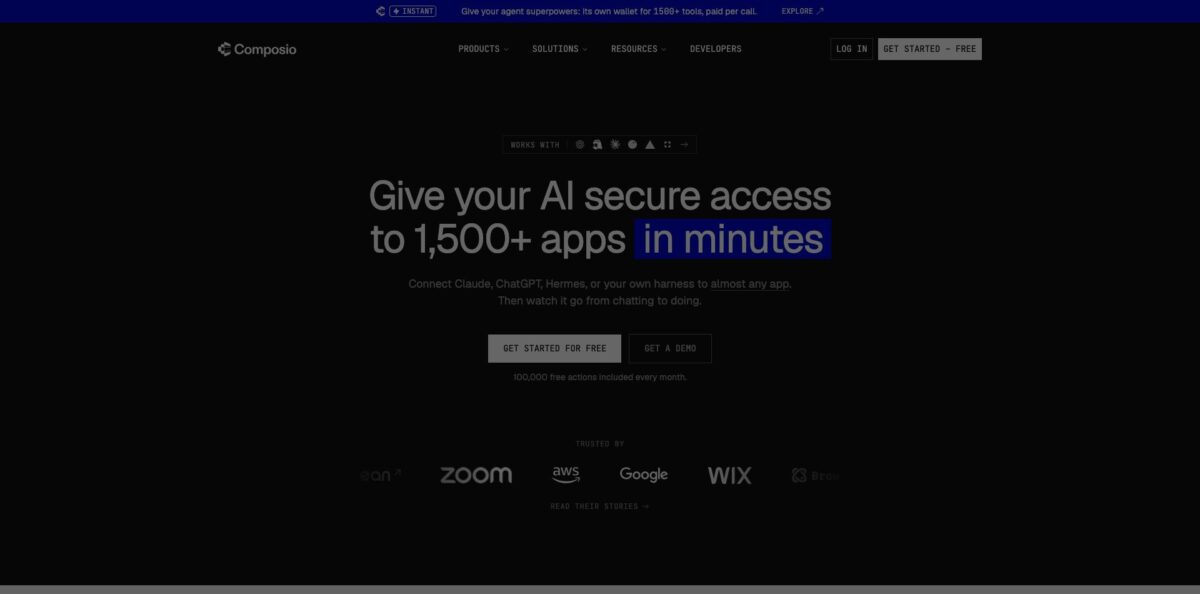
Composio is an integration layer that sits between a language model and the apps it needs to act in. Instead of writing an OAuth flow, token refresh logic and a tool schema for every service, you create a session for each end user, hand the agent the tools that session exposes, and Composio handles consent screens, credential storage and the actual API calls across a catalogue the company now puts at 1,500+ toolkits, from Gmail and Slack to GitHub, HubSpot and Supabase. It works with OpenAI, Anthropic, Vercel AI SDK, LangChain, CrewAI and any MCP client, and a consumer flavour called Composio For You plugs the same connections into Claude, ChatGPT, Codex or Cursor. The weak spot is trust: you route user credentials through a third party, and Composio disclosed a serious breach in May 2026. Pick it if you build agent products and would rather not maintain hundreds of connectors yourself.
How to start using Composio?
Sign up on the Composio dashboard; the Hobby plan needs no credit card. Open Settings, find the API keys section under your project and copy the key into a
.envfile asCOMPOSIO_API_KEY, next to the key for your model provider such asOPENAI_API_KEYorANTHROPIC_API_KEY. Then install the SDK. In Python that iscomposioplus a provider package such ascomposio-openai-agents(the docs require Python 3.11 or newer and warn that the oldcomposio-corepackage is a legacy v1 SDK that does not work with sessions). In TypeScript you install@composio/corewith a provider like@composio/openai-agentsor@composio/vercel, on Node.js 22 and ESM only.Next, create a session for a user. The quickstart calls
composio.sessions.create(user_id=”user_123”)in Python orcomposio.create(“user_123”)in TypeScript, thensession.tools(). In production that ID should be a stable user ID from your own database, because every ID gets its own set of connected accounts. Pass the returned tools straight into your framework:Agent(tools=tools)for OpenAI Agents, an SDK MCP server for the Claude Agent SDK, orstreamTextfor the Vercel AI SDK. For multi-turn chats, store the session ID and restore it rather than creating a new session on every message.The first real test is a task that needs an app, for example “Summarize my unread emails from today.” If the user has not connected Gmail yet, the agent returns a Connect Link; the user opens it, approves the OAuth scopes, and tells the agent to continue. The docs suggest a system prompt that tells the agent to share that link when a connection is missing and to confirm before it creates, updates or deletes anything. If you want to receive events rather than just send actions, register one webhook URL per project and create triggers for a user’s connected account.
Before shipping, check the execution logs in the dashboard, which record the user, session, tool and result of every call. Decide early whether you will use Composio-managed OAuth apps or your own: the managed apps let you skip setup, but the pricing page caps their free allowance lower, and with your own app the consent screen shows your brand. Set spend caps if you are on Pro, and rotate API keys on a schedule.
Who is it for?
AI startup founders
Your product promises an agent that books meetings, updates the CRM and files tickets, but each integration is weeks of OAuth plumbing and maintenance. Composio replaces that with one SDK and a per-user session. Your engineers spend their time on the agent experience instead of on token refresh bugs.
Developers using Claude Code, Codex or Cursor
You want your coding agent to read Linear issues, open GitHub pull requests or query Supabase without wiring each service by hand. The CLI, Claude Code plugin and a single MCP URL connect those apps in minutes. Expect a one-time sign-in per app.
Non-technical power users
You already live in Claude or ChatGPT and want it to act in Gmail, Google Calendar, Notion and Slack. Composio For You connects those apps without code and supports several accounts per app, such as separate work and personal inboxes. Connections stay with Composio, so switching assistants does not mean reconnecting everything.
Platform and security teams
Leadership wants agents rolled out across the company, and you need to know who touched what. Composio logs every execution, supports SSO and SCIM on Enterprise, and offers IP allowlisting, zero data retention and customer-managed keys. A bring-your-own-cloud deployment is available for stricter environments.
Automation builders and agencies
You build agents for clients and need white-labeled connection screens. Basic white-labeling is included on every plan, and advanced white-labeling is a one-time per-connection add-on on Pro. Triggers let a client’s agent react to new emails or Slack messages instead of polling.
Indie hackers and hackathon teams
You need working integrations by Sunday. The free tier’s 100,000 tool calls a month covers most prototypes, and the 30k-star GitHub repository has examples for most popular frameworks.
Composio pricing
Composio charges by usage rather than by seat. The unit is a tool call, meaning one action your agent runs in an app, plus trigger events, sandbox LLM tokens and optional add-ons. There are three plans, and the Hobby tier is hard-capped, so you never get billed on it.
No credit card required. Includes 100,000 tool calls and 50,000 trigger events per month, unlimited connected accounts on your own OAuth app or API key, 3 team members, 1M sandbox LLM tokens, a 2,000 requests-per-minute rate limit, OAuth management, sessions, custom tools and MCP, and basic white-labeling. Calls through Composio-managed OAuth apps count up to 20K of your free allowance. Usage pauses at the cap until the next month.
Everything in Hobby plus a $29 monthly usage credit that expires at the end of the month. Overage runs $0.0003 per tool call, $0.003 per trigger event and $3.75 per million sandbox LLM tokens. Unlimited team members, 10,000 requests per minute, spend caps, a read-only dashboard role and a self-serve DPA. Add-ons include BAA at +$0.0003 per call, zero data retention and IP allowlisting at +$0.0001 per call each, and advanced white-labeling at $0.30 per connection, one-time.
Custom. Committed volume with discounts, annual invoicing, SSO and SCIM, customer-managed keys, advanced white-labeling, MSA, DPA and BAA included, custom rate limits, custom integrations on request, and dedicated support with SLAs.
Watch the extras. Composio-managed apps bill $0.0005 per tool call once their free share is used, and on paid plans each managed connection beyond the first 1K costs $0.10 once. Instant Tools, which run on Composio’s own provider accounts so you need no third-party API keys, deduct provider charges from your balance at 0% markup on top of the regular tool-call rate.
Composio key features
Managed authentication handles OAuth consent, API keys, token storage, refresh and scopes for every connected account
Each end user connects an app once through a Connect Link, and the model never sees raw credentials. You avoid building and maintaining an auth layer for hundreds of providers.
Sessions and the tool router load tools at runtime instead of stuffing every schema into the prompt
Meta-tools such as COMPOSIO_SEARCH_TOOLS, COMPOSIO_MANAGE_CONNECTIONS and COMPOSIO_EXECUTE_TOOL let the agent find the right action across the catalogue, plan steps and catch common errors first. This keeps the context window small even when thousands of tools are available.
MCP support exposes a session as an MCP endpoint through session.mcp.url, so Claude Desktop, Cursor, OpenAI Agents or any MCP-compatible client can use the same connections. The MCP Gateway gives teams one managed endpoint for all tools. If an app is missing from the catalogue but has its own MCP server, you can add it for free.
Triggers deliver events from connected apps as signed POST requests to one webhook URL per project
Slack, Asana, Notion and Outlook push events in real time, while Gmail and Google Calendar are polled, which the docs say can lag by up to about 15 minutes on managed auth. Your agent can start work when something happens instead of waiting to be asked.
The sandbox workbench gives each multi-step job an isolated remote runtime for code, files and intermediate results
An agent can chain tool calls and model calls in Python, for example pulling Sentry errors, ranking them and opening Linear issues, without dumping huge API responses into its context.
Framework-agnostic providers cover OpenAI, Anthropic, Vercel AI SDK, Google, LangChain, CrewAI, Mastra and more
Switching models is described as a one-line change, and your tools and connections carry over. You are not locked into one LLM vendor because of your integrations.
Governance and security features include per-execution audit logs, granular scopes per connected account, SOC 2 Type II and ISO 27001:2022 certification, and bring-your-own-cloud deployment. After the May 2026 incident, Composio added envelope encryption for OAuth credentials, hashed API keys and scoped keys. These controls are what security reviewers will ask about first.
Composio Pros & Cons
Pros
Composio removes the least rewarding part of building an agent product: writing and babysitting OAuth flows, token refresh and API wrappers for every service your users want. The catalogue is very large, sessions keep each user’s accounts separate, and the tool router stops thousands of tool schemas from flooding the context window. The free tier is generous at 100,000 tool calls a month, and Pro overage at $0.0003 per call is cheap compared with per-task automation pricing. Support for MCP and every major agent framework means you can change models or clients without rebuilding integrations. Start on the free plan and wire one high-value toolkit end to end before adding more.
Cons
You are handing user credentials to a third party, and in May 2026 attackers reached internal Composio systems, leaked about 0.3% of active connections and forced a mass API key rotation. The company has published a detailed remediation report, but security teams will ask about it. Individual tools can misbehave: GitHub issues describe a Gmail draft deletion that removed a whole thread and a YouTube upload that never sent the video file. SDK versions have changed significantly, and some framework providers have open bugs. Self-hosting is limited to Enterprise. Test every destructive action on a sandbox account and require human confirmation in production.
Use Composio if you want…
- Connect your AI agent to Gmail, Slack and GitHub.
- Skip building OAuth flows for every app.
- Give each end user separate, scoped app connections.
- Let Claude or ChatGPT take actions in your apps.
- Expose hundreds of tools through one MCP endpoint.
- Trigger agents from new emails or Slack messages.
- Run multi-step tool chains in an isolated sandbox.
- Switch LLM frameworks without rewriting integrations.
Composio alternatives



Composio Reviews
Founders reviewing it on Product Hunt say managed authentication is the main win: one team picked it over Pipedream so users could connect apps in one click, and another chose it over Nango and Merge to reach Gmail, Slack and Notion without rebuilding each integration.
A developer on Hacker News says Composio made setting up MCP servers with Claude Desktop much simpler, even while criticising a company blog post as promotional.
Another Hacker News user could not get an Instagram connection through Composio to work, hit a 400 error repeatedly and gave up after reading that others had the same problem.
One commenter backed out of connecting Google Mail because the sign-up flow asked for personal details such as date of birth and street address, which felt like too much.
Developers on GitHub report friction with specific framework providers, such as a Mastra integration that failed to load tools and was still broken for one user months later, so check open issues for your stack first.
FAQ
Is Composio free?
Yes. The Hobby plan costs $0 and includes 100,000 tool calls, 50,000 trigger events and 3 team members per month without a credit card. It is hard-capped, so usage pauses at the limit instead of billing you.
What counts as a tool call?
A tool call is one action your agent runs in a connected app, such as sending an email or creating a GitHub issue. On Pro, calls beyond your included usage cost $0.0003 each, and some add-ons such as BAA or sandbox execution add a small per-call amount.
Which AI assistants and frameworks does Composio work with?
Composio works with ChatGPT, Codex, Claude, Claude Code, Cursor and any MCP-compatible client. For developers it has Python and TypeScript SDKs with providers for OpenAI Agents, the Claude Agent SDK, Vercel AI SDK, LangChain, CrewAI and others.
Is Composio secure?
Composio states it is SOC 2 Type II and ISO 27001:2022 certified, encrypts OAuth tokens and API keys, and offers IP allowlisting, zero data retention and customer-managed keys. It disclosed a security incident in May 2026 and published a remediation report, so review its Trust Center before connecting sensitive accounts.
Can I self-host Composio?
Not on the self-serve plans. The SDKs are open source on GitHub, but the platform runs on Composio Cloud, and a deployment in your own cloud is offered as part of Enterprise.
What if the app I need is not in the catalogue?
If the app has an MCP server, you can add it as a custom MCP server for free. You can also write custom tools, use proxy execute to call an endpoint Composio has not wrapped while it still handles auth, or request a custom integration on Enterprise.
Do I need to code to use Composio?
No. Composio For You connects your apps to Claude, ChatGPT and other assistants without code. The developer platform, SDKs and triggers are aimed at engineers building their own agents.
Can I use my own OAuth app instead of Composio’s?
Yes. Composio-managed apps are the default and let you skip setup, but with your own OAuth app or API key you get the full free allowance and your own branding on consent screens.
Similar tools
 Novita AIDeveloper cloud with one API for 200+ open-weight AI models, plus GPU instances, dedicated endpoints and isolated sandboxes for AI agents.
 You.comDeveloper platform of web search, content extraction, cited research and model inference APIs that feed AI agents and RAG apps real-time web
 QodoAI code review platform that runs specialized agents on every pull request, enforces team rules and checks changes against tickets and linked