

Copyter
Content CreationUpdated November 24, 2026
Spanish-first AI writing platform that researches keywords, drafts SEO articles and publishes them to WordPress, with image, voice and chat tools.
We may earn a commission when you sign up through our links. It does not affect our reviews.
What is Copyter?
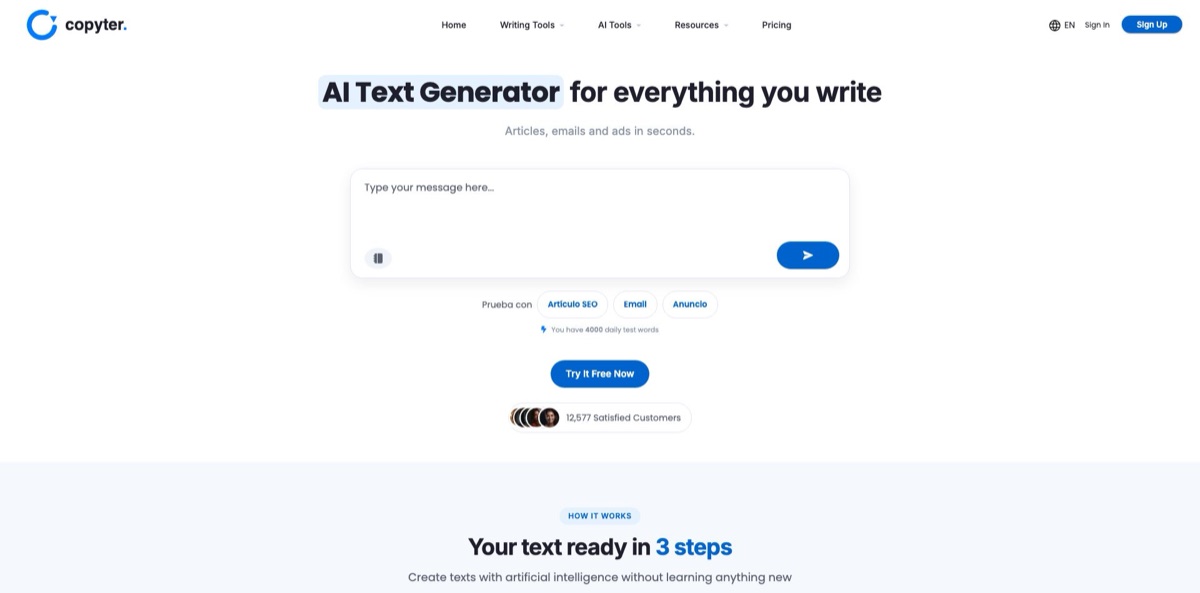
Copyter is a browser-based AI writing platform that began as a template copywriter and now centres on SEO articles. You describe a topic in plain language, it pulls keyword data, drafts a structured article with H2 and H3 headings and internal links, then publishes it to WordPress and pings search engines through IndexNow. Paid plans add Google Search Console data, a content plan, a site audit and AI visibility checks in ChatGPT and Gemini. Around that core sit more than 70 writing tools and chats, a Stable Diffusion image generator and text-to-speech with 400+ voices, all running on models from OpenAI, Anthropic, Google, ElevenLabs and Stability AI. The product is built Spanish-first, so the root domain, blog and legal pages are in Spanish. The weak spot is a thin public track record. Pick it for affordable, WordPress-bound blog content in Spanish or other languages.
How to start using Copyter?
Go to copyter.com/en/register and sign up with Google or with your name, email address and country. The pricing section promises a trial without a card, and the AI chat page says free users get daily free words and credits, while the image and voice tools display small starter balances such as 5 images and 200 speech characters. The root domain opens in Spanish whatever your browser language, so bookmark the /en version or pick English from the language menu, which lists about 20 interface languages.
For a first real job, open the SEO Article Generator and type what you want to rank for the way you would brief a person, for example a how-to topic in your niche. Copyter looks at search intent, picks primary and secondary keywords and returns a draft with a heading hierarchy instead of a wall of text. Article length is capped by plan: up to 1,500 words on Starter, 3,000 on Pro and 4,000 on Agencia. You can write in English or any of the 30+ supported languages, and the company says its Spanish output is written natively rather than translated.
The screen that changes the results is the project setup. Create a project for your domain, then connect Google Search Console. Copyter asks only for the read-only webmasters permission and uses your queries, clicks and positions to build a content plan, suggest content ideas and run a site audit with content fixes. Pro and Agencia add real search volume and keyword difficulty, plus AI visibility tracking for a set of questions in ChatGPT, and in Gemini on Agencia. In the Integrations section, link WordPress with your site address, username and an application password, which you can revoke from WordPress at any time.
Before anything goes live, read the draft in the editor, extend weak sections and add first-hand detail, figures and sources the model cannot know. Copyter can send the article to WordPress as a draft or as a published post, adds internal links automatically and notifies search engines through IndexNow. Treat that speed with care: an Originality.ai test in 2025 flagged Copyter output as entirely AI-written, so expect to rework intros, examples and claims before the page carries your name.
Send your first articles to WordPress as drafts, not live posts, so you can fix facts and tone before IndexNow notifies search engines.
Who is it for?
Spanish-language bloggers
You run a blog for a Spanish-speaking audience, and most AI writers hand you text that reads like a translation. Copyter is built to write native Spanish and adapts to your brand tone, so you spend less time fixing stiff phrasing. You still need to add your own examples before publishing.
Small SEO agencies
Juggling several client sites means separate keyword lists, briefs and CMS logins. The Agencia plan covers 10 projects, 150 articles a month and 25 team members, with WordPress publishing for each site. It works as a cheap production line for first drafts, as long as an editor signs off every piece.
Founders and solo marketers
You want organic traffic but cannot justify a writer or an expensive SEO suite. Starter connects Search Console, builds a content plan from real data and publishes up to 20 articles a month for $14. You get a steady publishing cadence without hiring, though the strategy is still yours.
WordPress site owners
Copy-pasting from a chat window into the block editor, then fixing headings and links, eats an hour per post. Copyter pushes formatted articles straight to WordPress and adds internal links on the way. That removes the most tedious part of publishing, but check every link it inserts.
Multilingual content teams
Teams serving several countries need the same article structure in different languages. Copyter writes in 30+ languages with a consistent template, and Pro allows 10 team members. Native speakers should still review anything that goes to market.
Creators who need quick voiceovers
You make videos or podcasts and want narration without recording. The text-to-speech tool offers 400+ voices across 144 languages and dialects with MP3 download, and paid plans include 20K to 400K characters a month. Short scripts fit easily; long audiobooks will burn through the allowance.
Copyter pricing
Copyter sells flat subscriptions in US dollars instead of per-seat fees or pay-as-you-go credits. Tiers differ by the number of projects (sites), SEO articles per month, maximum words per article, images, text-to-speech characters and team members, while every plan includes all 70 chats and tools. You can start with a free trial that needs no card, and payments go through Stripe or PayPal.
No card required, with daily free words and credits for the chat and writing tools and small starter balances on the image and voice tools. The site does not publish exact free limits, so treat it as a test drive.
One project, 20 SEO articles a month of up to 1,500 words each, Search Console connection, a content plan with real search data, 25 content ideas, site audit, automatic internal linking, WordPress publishing, IndexNow, 30 images, 20K characters of text-to-speech and 2 team members.
Three projects, 60 articles a month of up to 3,000 words, the advanced writing model, real search volume and difficulty, AI visibility on ChatGPT with 5 tracked questions, 100 content ideas, 100 images, 100K speech characters and 10 team members.
Ten projects, 150 articles a month of up to 4,000 words, AI visibility on ChatGPT and Gemini with 20 tracked questions, 300 content ideas, 300 images, 400K speech characters and 25 team members.
There is no enterprise or custom tier on the public page. Pricing has also shifted over time: a 2025 review listed a token-based ladder from $9 to $119 a month, and the SEO Article Generator page still shows per-model word quotas for GPT-4o mini and Claude 3.5 Sonnet that the homepage table has dropped. Check what the checkout page shows before you pay.
Copyter key features
The SEO Article Generator takes a plain-language topic, researches search intent and target keywords, and writes an article with an H2/H3 hierarchy, readable paragraphs and the length the query calls for. Keyword volume and difficulty come from DataForSEO, according to the privacy policy. You skip the outline-and-brief stage and start from a structured draft.
Search Console integration reads your queries, impressions, clicks and positions through a read-only Google permission
Copyter turns that into a content plan, a list of content ideas and a site audit with suggested content fixes. You write what your site can realistically rank for instead of guessing, and the tokens are stored encrypted and kept out of model training.
WordPress publishing connects through an application password and sends articles as drafts or live posts with formatting intact. Automatic internal linking adds links to your existing pages, and IndexNow notifies participating search engines right away. The copy, paste and reformat routine disappears from your week.
AI visibility tracking on Pro and Agencia watches a set of 5 or 20 questions in ChatGPT, and in Gemini on the top plan
It shows whether AI assistants surface your site for the prompts you care about. That gives you an early read on AEO and GEO work that classic rank trackers miss.
More than 70 writing tools and chats cover essays, rewrites, SEO titles, meta descriptions, outlines, code and social posts in 30+ languages. The AI chat accepts images and voice input and runs on GPT and Claude models. Small writing jobs stay in the same account as your blog pipeline.
Text-to-speech and speech-to-text give you 400+ voices across 144 languages and dialects, downloadable as MP3, plus audio transcription. The privacy policy lists ElevenLabs for voice synthesis and cloning and OpenAI for transcription. Narration for a short video or an audio version of a post takes minutes.
The AI image generator runs on Stable Diffusion with presets for style, medium, lighting, mood and artist references, from anime to pixel art. Monthly allowances range from 30 to 300 images depending on plan. It handles blog headers and social visuals, not brand-grade product photography.
Copyter Pros & Cons
Pros
You get an unusually complete blog pipeline for the money: keyword research, Search Console data, a content plan, drafting, internal links, WordPress publishing and IndexNow, starting at $14 a month. Spanish output is a deliberate focus rather than an afterthought, which helps if other tools give you translated-sounding copy. Images, voice and the 70-tool library sit in the same account, and every paid plan includes team seats. The Search Console permission is read-only, and the privacy policy names exactly which AI providers receive your prompts. Reviewers on G2 and Capterra describe the interface as easy to pick up. Start with one project and one topic cluster to see whether the drafts match your niche.
Cons
The public evidence is thin: a handful of reviews on G2, Capterra and GetApp, most written before the shift to SEO articles, while the homepage testimonials and its 12,577-customer counter are vendor-hosted. English feels secondary, with the root domain, blog, terms and even the Agencia plan name left in Spanish. Pricing pages disagree with each other, and refund terms are not spelled out. Originality.ai’s detector flagged the output as AI-written, and the 1,500-word cap on Starter limits pillar content. There is no advertised API. Budget editing time for every article and ask support about refunds before paying annually.
Use Copyter if you want…
- Turn a keyword into a published WordPress article.
- Write native Spanish blog posts without translation artefacts.
- Plan content from your own Search Console data.
- Publish up to 150 SEO articles a month.
- Track whether ChatGPT and Gemini mention your site.
- Add internal links and IndexNow pings automatically.
- Create voiceovers in 144 languages and dialects.
- Keep writing, images and audio in one subscription.
Copyter alternatives
 KoalaWriterRead review →
 Jasper AIRead review →
 RightBloggerRead review →
 GravityWriteRead review →
 SurgeGraphRead review →
 Easy-Peasy.AIRead review →
Copyter Reviews
G2 reviewers like how much the tool covers, from AI images and copywriting to text-to-speech and chat, and one found the voices close to realistic; the recurring complaint is that paid plans feel pricey.
One G2 user relies on the multilingual output and tone selection to translate documentation, but felt the per-user price was steep next to Grammarly.
A G2 reviewer who used templates, docs and voiceover for blog posts and club captions called it a productivity boost, yet said the free 1,000-word allowance was too small to judge whether paying was worth it.
Capterra reviewers praise the simple interface and fast first drafts for marketing content, emails and training material, while noting that output needs editing for accuracy and brand tone and that niche industry templates are missing.
Originality.ai, which sells an AI detector, rated ease of use 9/10 but features and price 6/10, and its detector flagged the generated article as fully AI-written.
FAQ
Does Copyter have a free plan?
There is a free trial that needs no card, with daily free words and credits for the writing and chat tools. Paid plans start at $14 a month, or $134 a year.
Can Copyter write in English, or only in Spanish?
It writes in 30+ languages, including English, and the English site lives at copyter.com/en. The product is built Spanish-first, so the blog, the terms and some interface labels appear only in Spanish.
Which AI models does Copyter use?
The homepage says it works with GPT and Claude. The privacy policy lists OpenAI, Anthropic and Google for text, OpenAI, Google and Stability AI for images, ElevenLabs for voice and DataForSEO for search data.
How does the WordPress integration work?
You connect your site in the Integrations section with its address, a username and a WordPress application password. Copyter then sends articles as drafts or published posts, and you can revoke the password from WordPress whenever you like.
Is my Search Console data safe with Copyter?
Copyter requests only the read-only Search Console permission, stores access tokens encrypted and says it does not share the data or use it to train AI models. You can disconnect it from the project settings or from your Google account permissions.
Can I cancel my Copyter subscription anytime?
Monthly plans are billed monthly, and the pricing table says you can cancel anytime. Annual plans are charged once a year and the public terms do not spell out refunds, so ask hello@copyter.com before buying one.
Does Copyter offer an API?
The site does not advertise a public API or developer documentation. Integrations are limited to WordPress publishing and Google Search Console.
Who runs Copyter and how do I delete my account?
The privacy policy names Copyter.com as the data controller, and the terms are governed by the laws of Arequipa, Peru. Account deletion and data requests go to hello@copyter.com.
Similar tools
 Contents.comEnterprise AI content platform that writes, translates and illustrates on-brand content, with batch generation, approval workflows and audit trails.
 DocswritePublishing hub that sends Google Docs, Drive folders and Sheets to WordPress, Webflow, Shopify and 8 more destinations, with an AI writer
 WritefullAcademic writing AI for Word, Overleaf and the browser, with journal-trained language edits, an Academizer, a paraphraser and title and abstract generators.