

Coursebox
Education AIUpdated October 19, 2026
AI course creator that turns documents and prompts into full courses with quizzes, videos and an AI tutor, plus a white-label LMS.
We may earn a commission when you sign up through our links. It does not affect our reviews.
What is Coursebox?
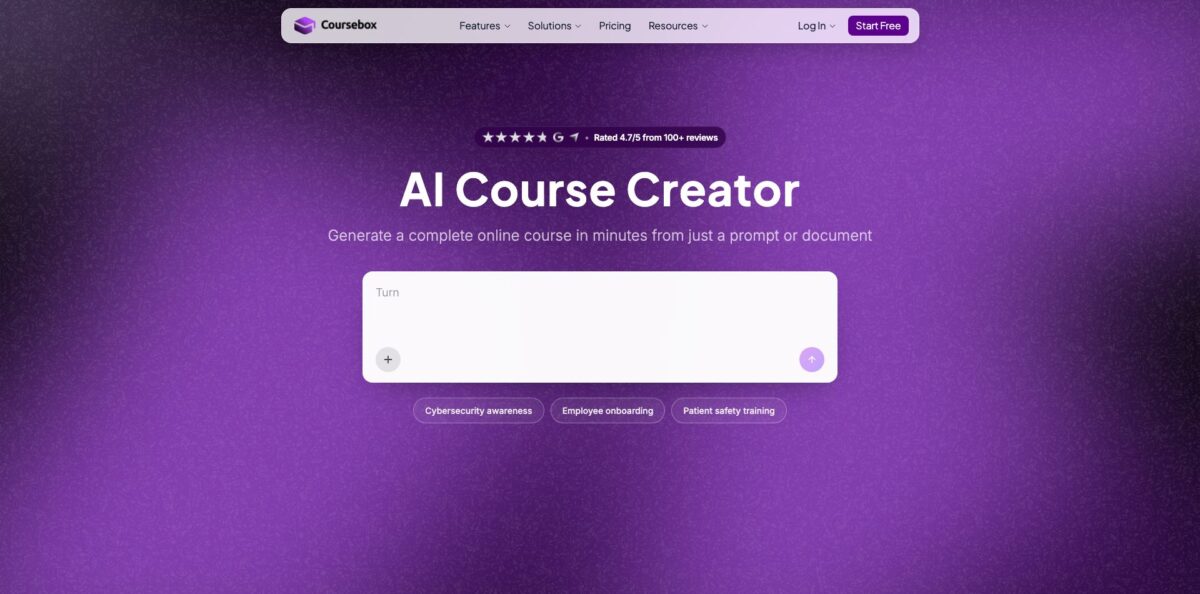
Coursebox is an AI course authoring tool with a learning management system attached. You give it a topic, your goals and your source files (PDF, Word or PowerPoint), and it plans an outline, writes the lessons, drafts quizzes and narrated avatar videos, and sets up an AI tutor that answers learner questions from your material. The finished course can live on a branded Coursebox portal or leave as SCORM or LTI for Moodle, Canvas, Cornerstone or TalentLMS. The pitch is speed: a training manual becomes a reviewable draft in minutes instead of weeks of instructional design. The weak spots are polish and control. Reviewers describe design and branding options as limited, reporting as basic, and generation speed as uneven. Pick it if you need a lot of decent training content fast; look elsewhere if pixel-level visual design matters more than turnaround.
How to start using Coursebox?
Sign up on the Free plan, which needs no credit card. You get enough AI allowance for three mini courses of up to five pages each, 150 AI page credits, 100 AI tutor messages and one minute of AI video. That is small, but it is enough to see whether the generator understands your subject before you pay anything.
For the first real course, start from a document rather than a blank prompt. Upload an employee handbook, a slide deck or a compliance policy, describe the audience and the outcome you want, and Coursebox proposes an outline of chapters and lessons. It also pulls diagrams, charts and photos out of the source file and drops them into the matching lessons. According to Coursebox, most document-based courses are ready in under two minutes.
Next, open the draft in the course editor. You can rewrite text, reorder lessons, swap images and change quiz questions by hand in the drag-and-drop builder, or simply tell the AI what to change in chat. This is where you add the extras: knowledge checks per module, a final exam, branching scenarios, flashcards, or a presenter-led video built from one of 500+ avatars.
Before sharing, review every quiz question and video script, then decide where the course will run. On Coursebox itself you publish to your portal and invite learners. If your company already has an LMS, export SCORM or connect through LTI instead, and check that completions and grades flow back correctly with a test learner account.
Who is it for?
Corporate trainers and L&D teams
You have onboarding, safety and compliance material sitting in PDFs that nobody reads. Coursebox turns those files into structured courses with quizzes and completion tracking. You spend your time reviewing content instead of building slides from scratch.
Accredited training providers
Registered training organisations need assessments mapped to units of competency. Coursebox has an AI Units of Competency allowance on paid plans and AI grading against rubrics, which cuts the manual marking load on short answer and assignment questions.
Course creators and coaches
You want to package your expertise and sell it without stitching together five tools. Coursebox lets you set a price and take payments through Stripe, PayPal or Paystack, or sell through Shopify and WooCommerce, with no per-learner fees eating into margins.
Instructional designers
You still own the learning design, but the first draft no longer takes days. The AI drafts outlines, quizzes and scenarios that you then refine, and SCORM export means the output fits whatever LMS your client already runs.
Colleges and universities
Lecturers can convert existing course notes into interactive modules with an AI tutor trained only on that content. Enterprise adds single sign-on, a signed agreement and a choice of hosting region for institutions with procurement rules.
Nonprofits and small teams
Volunteer onboarding and internal training rarely get a budget for an LMS with per-seat pricing. Unlimited learners on every plan means you can train everyone without counting heads.
Coursebox pricing
Coursebox prices by plan and AI allowance rather than by learner. Every plan, including Free, has unlimited learners. What changes between tiers is the pool of AI credits (course pages, images, tutor messages, video and voice minutes), branding, export formats and LMS features. Paid self-serve plans are cheaper when billed yearly, which the pricing page frames as two months free, and they can be cancelled at any time without losing your courses.
Three mini courses of up to five pages each, 150 AI page credits, 2 AI images, 100 AI tutor messages, 1 minute of AI video and 10 voice minutes, all as a one-time allowance. Courses carry a “Created with Coursebox” watermark.
Aimed at individuals building and selling courses. You get 500 AI page credits, 20 AI images, 1,000 AI tutor messages, 5 minutes of AI video and 50 voice minutes per month, roughly ten courses a month. The watermark is removed, and you get certificates, PDF, HTML and SCORM export, basic reports and one admin seat.
The AI allowance jumps to 7,000 page credits, 300 images, 10,000 tutor messages and 75 video minutes per month. You add your logo and colours, self-hosted SCORM and LTI export, and SCORM import.
Same AI allowance as Pro, plus the full white-label LMS: your own domain, learner and group management with CSV import, learning pathways, points and badges, a resource library and calendar, and advanced reporting with CSV export. One admin seat is included; extra admin seats cost $83/month each on yearly billing, and each seat adds a full AI credit allowance.
Custom. A signed annual agreement with a minimum two-year initial term. It adds multiple portals, API access, a 99.9% uptime SLA, a choice of hosting region, MSA and DPA paperwork and a dedicated support contact. SSO is a paid add-on at $3,000/year.
Coursebox key features
Document to course generation
Upload a PDF, DOCX or PPTX and Coursebox builds chapters, lessons, quizzes and an AI tutor from it, placing extracted diagrams and charts in the right lessons. You skip the copy-paste stage that eats most of a course build.
AI quiz generator and grading
Quizzes can be multiple choice, open answer or drag and drop, generated from a topic, a URL or an uploaded file, with adjustable count and difficulty. Written answers and assignments are graded by AI against your rubric, with an explanation of why an answer is right or wrong. Every question stays editable before you publish.
AI training videos
The tool writes a script from your course content and renders a presenter-led video using 500+ stock avatars, or a custom avatar from an uploaded photo on higher plans. You can also upload an existing PowerPoint and add an AI voiceover. Videos can be generated in over 100 languages, which helps teams that train across regions.
AI scenarios
Learners step into a role-play where the AI plays the other person or narrates the situation, reacts to each decision and gives feedback. Use it for sales calls, patient conversations or safety incidents where practice beats reading. It is one of the more distinctive parts of the product.
AI tutor inside every course
Each learner gets a chat assistant trained on that course’s content, so answers stay on topic rather than drifting into general web knowledge. You can name it and give it a photo to match your brand. It answers questions at any hour, which reduces the support load on trainers.
White-label LMS and course sales
On Pro + LMS you run training on your own domain with your logo, colours, emails, certificates and mobile app, plus groups, learning pathways and gamification. Courses can be sold through Stripe, PayPal, Paystack, Shopify or WooCommerce, and every plan allows unlimited learners.
Coursebox Pros & Cons
Pros
The core promise holds up in user feedback: Coursebox takes existing material and produces a structured, usable course far faster than building one by hand. Reviewers on Capterra repeatedly mention time saved on course creation and management, and smoother tracking of learner progress. Unlimited learners on every plan removes the per-seat maths that makes many LMS platforms expensive as a team grows. The feature set is broad for the price, with quizzes, AI grading, avatar videos, role-play scenarios, an AI tutor, certificates and SCORM or LTI export in one place. Privacy answers are clear too: AI runs on Microsoft Azure OpenAI and your content is not used to train public models. Start on Free with one real document to confirm the drafts match your subject before committing.
Cons
Speed comes at the cost of control. Reviewers say design and branding options feel limited, so courses can look similar to each other unless you put in manual work. Reporting is described as basic, and Coursebox itself has acknowledged requests for deeper analytics. Some users report that heavy content loads slowly and that generation speed and server stability are inconsistent. Pricing has a steep step from Creator to Pro, and the white-label LMS only arrives at $250 a month on yearly billing. Enterprise requires a two-year minimum term, and one reviewer complained about getting no refund for unused months. Read the cancellation terms and test performance with your largest file before you sign.
Use Coursebox if you want…
- Turn training manuals into interactive online courses quickly.
- Generate graded quizzes straight from your own documents.
- Create avatar-led training videos without filming anyone.
- Give learners an AI tutor trained on course content.
- Run branded training on your own domain.
- Sell courses without paying per-learner fees.
- Export finished courses as SCORM or LTI.
- Practise difficult conversations through AI role-play scenarios.
Coursebox alternatives
Coursebox Reviews
Saves a lot of time on building and managing courses and makes tracking student progress much easier, though some of the analytics and reporting could go deeper.
Easy enough to start building courses almost right away without technical skills, and the AI structuring of content is genuinely helpful, but design and branding options feel limited.
Fast at turning material into a course, yet generation speed and server stability are still inconsistent, and heavier content can load slowly.
Good tool for producing courses, but after pausing for several months the user could not get any refund for unused time when cancelling.
FAQ
Is there a free plan?
Yes. The Free plan needs no credit card and covers three mini courses of up to five pages each, with a small one-time AI allowance and a Coursebox watermark on published courses.
Is there a limit on the number of learners?
No. Every plan, including Free, allows unlimited learners, so costs depend on AI usage and features rather than headcount.
Can I use Coursebox courses in my existing LMS?
Yes. Paid plans export SCORM, and Pro tiers add self-hosted SCORM and LTI 1.3 for platforms such as Moodle, Canvas, Cornerstone and TalentLMS. Creator’s dynamic SCORM needs an active subscription to keep working.
Is my content used to train AI models?
Coursebox says your content is never used to train public AI models. It runs its AI on Microsoft Azure OpenAI, hosts data in the EU on ISO 27001-certified infrastructure and encrypts it in transit and at rest.
What file types can I turn into a course?
You can upload PDF, Word (DOCX) and PowerPoint (PPTX) files, among others, or start from a topic or URL. Images and diagrams from the file are placed into lessons automatically.
How many languages does Coursebox support?
Courses, quizzes and AI videos can be created and delivered in over 100 languages, with quiz questions, answer options and feedback translated automatically.
Does Coursebox have an API?
API access is listed as part of the Enterprise plan on the pricing page. Other plans can connect to thousands of apps through Zapier.
Can I cancel at any time?
Self-serve plans can be cancelled from account settings with no contract; your account and courses stay in place. Enterprise is sold under a signed agreement with a minimum two-year initial term.
Similar tools
 EducatoAI exam prep platform that builds a study plan around your test date, with practice questions, mock exams and a tutor that
 TutorGPTMulti-model AI study workspace with step-by-step homework solvers, chat with GPT, Claude and Gemini, plus slide, image and voice generators.
 UplupAI quiz and form builder that turns a prompt, PDF or URL into scored quizzes, personality tests and lead-capture funnels with CRM