
Craiyon
Image GenerationUpdated October 21, 2026
Free browser-based AI image generator from the team behind DALL·E mini, with text-based photo retouching, background removal, upscaling and SVG export.
We may earn a commission when you sign up through our links. It does not affect our reviews.
What is Craiyon?
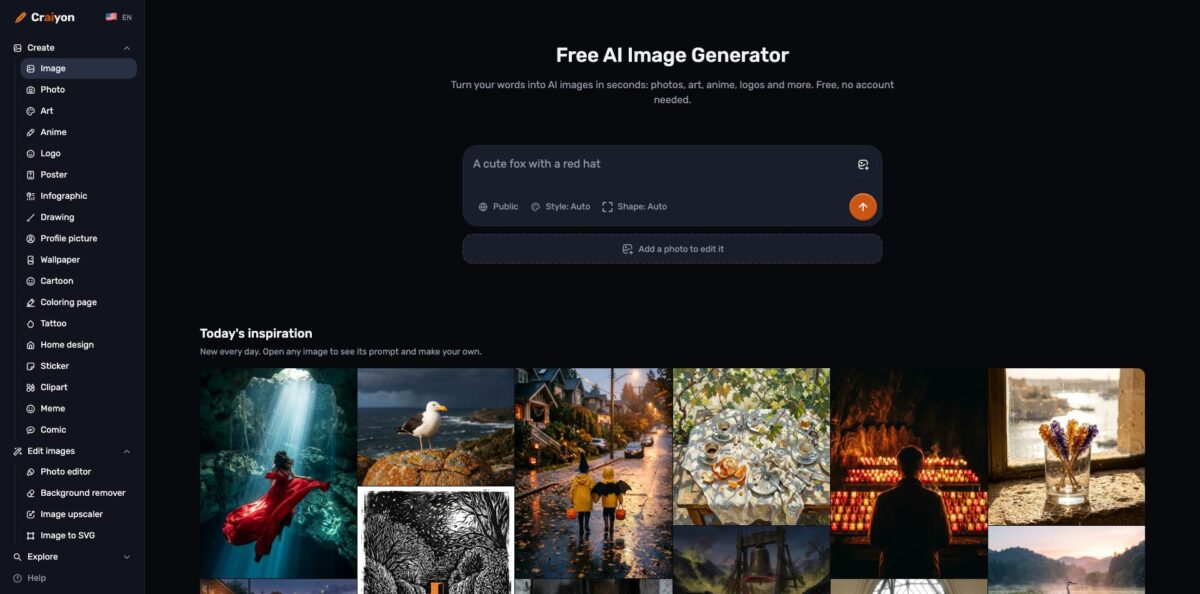
Craiyon is a browser-based text-to-image generator built by the team that released DALL·E mini in June 2021, renamed in 2022 and now running its own in-house models (the About page lists versions v3 through v5, with v6 announced as coming soon). You type a description in any language, pick one of six style modes and a shape, and get images in seconds without creating an account. Around the generator sits a small editing suite: text-based Retouch, a photo editor for your own uploads, a background remover, an upscaler, SVG conversion and short animations. It solves the “I need a quick picture right now and don’t want to pay” problem better than most rivals. The trade-off is that free images are watermarked, public and slower at peak hours, and the top-quality model sits behind a subscription. Pick it for casual visuals, memes, coloring pages and drafts rather than polished commercial art.
How to start using Craiyon?
Open craiyon.com in any browser and you can generate straight away: the homepage prompt box works without signing up, and the FAQ confirms that free use needs no account. Creating a free account is still worth it, because the tutorial notes that the Like button for saving favorites and the Recent History view are only available to logged-in users. There is no mobile app yet; the FAQ says one is coming soon, so on a phone you use the website.
For your first real image, write the prompt the way you would describe it to a person. Craiyon’s own tutorial recommends layering subject, action, environment, style, mood and technical details, so “a cat” becomes “a fluffy orange tabby cat sitting on a wooden windowsill, looking outside at falling snow, cozy indoor lighting”. Under the prompt box set Style (Artistic, Photo, Illustration, Anime, Vector or Raw) and Shape (square, portrait or landscape), or leave both on Auto. To exclude things, write “without” or “no” directly into the prompt, since there is no separate negative-prompt field anymore.
Once results appear, click any image to open its details view. From there you can download it, type a change into the Retouch field below the image (“add sunglasses”, “make it nighttime with a full moon”), use it as input for a new generation, remove the background, view similar images or order it printed on a t-shirt or mug. If you have your own photo, open the Photo editor instead, upload a JPG, PNG or WebP up to 10 MB and describe the edit. Retouching, photo edits, upscaling, SVG and video all draw on edit credits, while plain text-to-image generation does not.
Before you use an image anywhere public, check the licensing conditions for your tier. Free images carry a watermark, are visible to anyone with the link, and must credit craiyon.com if you publish them. Paid plans remove the watermark, keep images private and drop the attribution requirement. Commercial use is allowed on every account type as long as you follow the Terms of Use and respect third-party characters, logos and brands.
Who is it for?
Meme makers and casual creators
You want a funny or weird image in under a minute and refuse to pay for it. Craiyon’s free tier, no-signup access and huge public gallery fit that habit exactly. The watermark rarely matters for a group chat or a forum post.
Teachers and parents
Coloring pages, classroom posters, illustrated worksheets and party invitations are built-in use cases with their own dedicated generator pages. You can describe what you need in your own language and print the result. Remember to credit Craiyon if you stay on the free plan.
Bloggers and small content sites
You need header images and social graphics on a tight budget. The Supporter plan removes the watermark and attribution rule, so images go straight into posts. Text-only generation is unlimited on paid plans, which suits high-volume, low-stakes visuals.
Small business owners and makers
Logo drafts, sticker designs, clipart and t-shirt artwork are all covered by dedicated generators, plus a background remover for product shots. It works well for mockups and early concepts. For a final brand identity, plan on a designer or a more controllable tool.
Hobbyists who edit their own photos
The text-based Photo editor handles background swaps, outfit changes, old-photo restoration and casual headshots without learning layers or masks. Edits use credits, so a subscription makes sense if you do this weekly. Expect to repeat a request in other words if a detail drifts.
Game modders and tabletop players
Character concepts, item art, isometric rooms and texture ideas come fast and cheaply. One Trustpilot reviewer used it to build a Minecraft texture pack much quicker than by hand. Iterate in Raw mode when you need precise control over the look.
Craiyon pricing
Craiyon uses a freemium model: text-to-image generation is free within limits, and three paid tiers add unlimited generation on the highest-quality model, privacy and a monthly allowance of edit credits. Credits are spent on retouching, editing your own photos, using a reference image, upscaling, SVG conversion and videos; generating from text alone never costs credits on a paid plan. Prices below are from the official pricing page in USD as of October 2026, and the yearly option is billed upfront with two months free.
A limited number of images, free daily credits for edits, watermarked output, public images, possible waits at busy times, and a requirement to credit craiyon.com when you use images.
Unlimited images, 100 edit credits every month, no watermarks, private images, HD downloads, no attribution, plus animate, upscale and vectorize.
Everything in Supporter with 300 edit credits a month, top priority during busy periods and early access to new features. Craiyon labels this tier as the most popular.
Everything in Professional with 1,200 edit credits a month, four times the Professional allowance, aimed at people who edit and animate every day.
Unused monthly credits do not roll over, yearly plans get the same monthly allowance as monthly ones, and extra credit packs can be bought from your account. Sales are non-refundable, though you can cancel anytime from account settings and keep access until the end of the term.
Craiyon key features
Free text-to-image generation with no signup
You type a prompt in any language, choose Auto or one of six styles, and get images in seconds. This is the core of the product and the reason it has produced more than 5 billion images since 2021. You can test an idea before deciding whether it deserves a paid tool.
Six style modes including Raw
Artistic, Photo, Illustration, Anime and Vector each add their own automatic styling, while Raw strips those enhancements so your words alone define the look. Dedicated pages for logos, tattoos, posters, stickers, coloring pages and comics wrap the same engine with tuned defaults.
Retouch by description
Open any image, type a change such as “change the man’s shirt to red” or “extend into portrait mode”, and Craiyon edits that image instead of generating a new one. It can add or remove objects, swap backgrounds, change the style or relocate the subject. You keep the composition you liked and fix only the part that went wrong.
AI photo editor for your own uploads
Upload a JPG, PNG or WebP up to 10 MB and ask for a new background, an outfit or hair change, an old-photo restoration, a studio headshot or a sketch turned into a product shot. The editor aims to keep the face, pose and lighting while changing only what you request. Each edit shows its credit cost before you send it.
Finishing tools in one place
A background remover with transparent, white, black or custom-color output, an image upscaler, image-to-SVG vectorizing and short video animation all sit next to the generator. You skip exporting to three separate apps to prepare a sticker, a logo draft or a social clip.
Searchable gallery and daily ideas
Thousands of hand-picked collections are organized by theme, every image reveals its prompt, and “similar images” surfaces related results in one click. The homepage and several generator pages refresh with new ideas daily. This shortens the learning curve because you start from prompts that already work.
Craiyon Pros & Cons
Pros
Craiyon is one of the few image generators you can use properly without an account, a trial or a credit card, and text-only generation never eats credits on paid plans. Prompts work in your own language, and the six style modes plus dedicated generators for coloring pages, logos, stickers and posters make it approachable for people who have never written a prompt. The built-in Retouch, photo editor, background remover, upscaler and SVG export cover most finishing jobs in the same tab. Commercial use is permitted even on the free tier with attribution. Start free, and upgrade only when watermark-free private output becomes a real need.
Cons
Free output is watermarked, public to anyone with the link, and must credit Craiyon, which rules it out for client work unless you pay. At busy times free users can hit “too much traffic” messages and waits, and reviewers on G2 and Product Hunt mention distracting ads on the free site. Image quality has improved since the DALL·E mini days, yet users still report misread instructions, odd faces and a lean toward illustrated rather than photorealistic results. There is no public API and no mobile app, and purchases are non-refundable, with at least one Trustpilot complaint about slow billing support. Test your exact use case on the free tier before subscribing.
Use Craiyon if you want…
- Generate free AI images without creating an account.
- Create printable coloring pages, posters and party invitations.
- Write image prompts in your own native language.
- Edit uploaded photos by describing the change in words.
- Remove backgrounds and upscale images in one place.
- Turn logo or sticker drafts into scalable SVG files.
- Make quick memes, stickers and social media graphics.
- Find working prompts by browsing a large public gallery.
Craiyon alternatives





Craiyon Reviews
Reviewers like getting a usable image for free without a trial or sign-up, though they find the output leans toward drawings and paintings rather than photorealism.
A hobbyist credits it with building a realistic Minecraft texture pack far faster than drawing every tile by hand.
Some users say it misreads clear instructions and needs many retries, and they feel the best results are pushed behind a paid upgrade.
Early fans call it powerful for a free tool and good at common objects, while noting that human faces can fall into the uncanny valley and the free site is crowded with ads.
A subscriber reports months of unanswered requests about an accidental charge, so billing support is a recurring weak point in complaints.
FAQ
Is Craiyon really free?
Yes. Anyone can create images for free without an account, within limits; free images carry a watermark, are public and may queue at busy times.
Is Craiyon the same as DALL·E mini?
Yes. Craiyon started as DALL·E mini in 2021, created by Boris Dayma and team, and was renamed Craiyon in 2022. It is not affiliated with OpenAI’s DALL·E.
Can I use Craiyon images commercially?
Yes, on any account type, as long as you follow the Terms of Use. Free users must credit craiyon.com, while subscribers can use images without attribution.
Are my Craiyon images private?
On the free plan, images are public to anyone with their link. All paid plans keep your images private and off Craiyon’s public pages.
How do Craiyon credits work?
Credits pay for retouching, editing uploaded photos, reference images, upscaling, SVG conversion and videos. Text-only generation uses no credits, and unused monthly credits do not roll over.
Does Craiyon have an API?
No. The pricing FAQ says there is no public API at the moment, though one is planned.
Is there a Craiyon mobile app?
Not yet. Craiyon says a mobile app is coming soon, and the website works in mobile browsers in the meantime.
Can I cancel or get a refund?
You can cancel anytime in one click from your account settings and keep access until the end of the term. Sales are non-refundable, but Craiyon asks you to contact support if something goes wrong.
Similar tools
 BannerbearTemplate-based API for generating on-brand images, PDFs, animations and videos at scale from your data via REST, Zapier, Airtable or AI agents.
 Generated PhotosLibrary of 2.6M+ AI-generated faces plus face and full-body human generators for model-release-free people images in design, ads and research.
 VheerBrowser-based AI studio for text-to-image, photo editing and image-to-video, with a free no-signup model plus credit access to Nano Banana, Sora 2