

Crisp
AI ChatUpdated November 10, 2026
Customer messaging platform with a shared inbox, live chat widget and Hugo AI agent that answers on web chat, email, WhatsApp and social apps.
We may earn a commission when you sign up through our links. It does not affect our reviews.
What is Crisp?
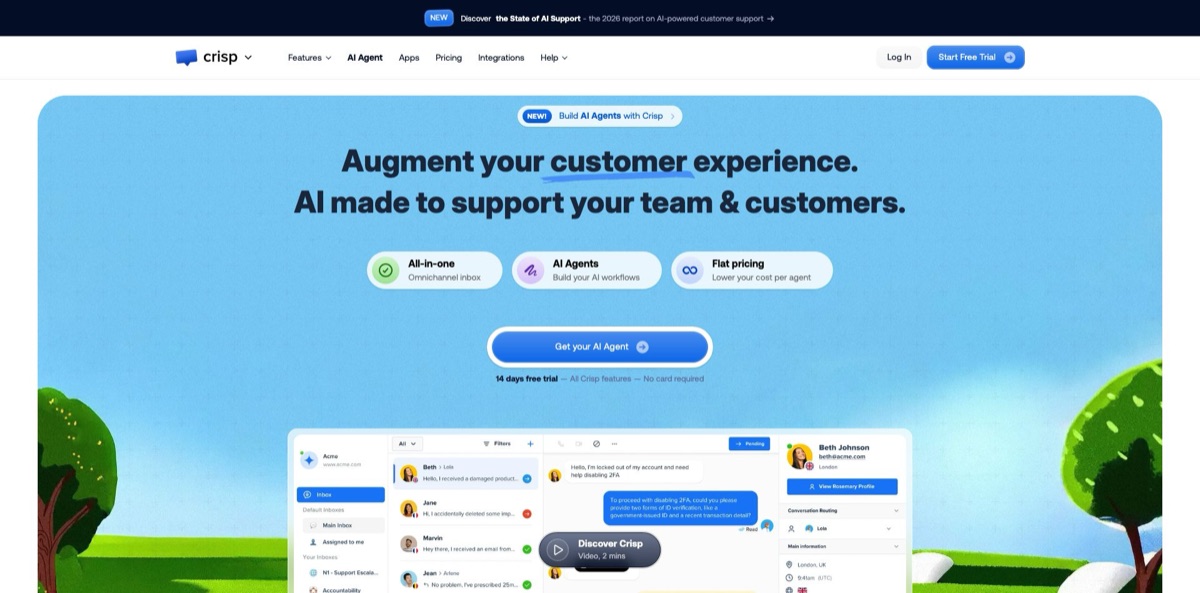
Crisp is a French customer messaging platform that combines a website chat widget, a shared team inbox, a help center, a lightweight CRM and an AI layer in one workspace. Conversations from live chat, email, WhatsApp Business, Messenger, Instagram, Telegram, SMS and other channels land in the same inbox, where Hugo, Crisp’s AI agent, can answer first using your website, help articles, files and Q&A snippets, then escalate to a human with the context attached. Agents also get Hugo Copilot for drafts, summaries and handover notes. Billing is a flat price per workspace rather than per seat, with AI usage drawn from a monthly credit pool. The weak spots are the credit math once that pool runs out and user reports of uneven AI answers. It suits small and mid-sized teams that want chat, email and AI support without per-agent pricing.
How to start using Crisp?
Create an account from the Signup button on crisp.chat. Every new workspace starts with a 14-day trial of all features and no card required, and the pricing page also links to a Free plan signup if you only need the basic widget. Then install the chat widget: Crisp offers a WordPress plugin, a Shopify app and chat SDKs for websites, iOS, Android and React apps, so most sites go live with a plugin or a snippet rather than custom code. Install the desktop or mobile apps as well so new chats reach you when the browser tab is closed.
Next, connect the channels your customers already use. Email, Messenger and Telegram are available from the Mini plan, while WhatsApp Business, Instagram, SMS, Viber, Line and phone need Essentials or Plus. Then open the AI Agent section from the left menu and go to Agent → Settings to give Hugo a name, an avatar and a business description, which is the most useful single piece of context it gets. In the Train section, add Questions & Answers snippets, crawl your website (with filters to skip pages that do not matter) and upload CSV, PDF or TXT files. Hugo also retrains on your Crisp knowledge base whenever an article is created, updated or deleted.
Then shape behavior under Guidance → Instructions: tone, what Hugo must never promise, how to format answers and when to hand off. Keep facts in the training sources and behavior in the instructions, since Crisp’s own docs warn against mixing the two. Guidance → Routing lets you describe situations, such as a product quality complaint or a partnership request, and choose an action like escalating to a human or starting a workflow. In settings you can also select the AI model or let Hugo pick one automatically, set an auto-resolve delay and enter office hours.
Before going live, open Evaluate → Playground and ask the questions your customers really send. Tests there stay in a sandbox, but they still consume AI credits. When the answers look right, go to Agent → Activation, tick Enable agent for new conversation, set the default target to Answer with AI Agent and, if you want, limit Hugo to specific channels. Hugo-handled chats then appear in a separate Automated inbox, and anything it escalates moves to your main inbox. Check Topics and Analytics after the first week to see where it struggled.
Who is it for?
Early-stage SaaS founders
You answer support, sales questions and bug reports yourself from a chat bubble and an inbox. The Free plan covers two seats and the widget, and Mini adds email and Hugo, so one person can keep everything in one place. Once a few help articles exist, Hugo can take the repetitive “how do I” questions off your plate.
Ecommerce support teams
Shopify, WooCommerce, Adobe Commerce and PrestaShop integrations put order data next to the chat, and Hugo can connect to tools such as Shopify or Stripe to check orders and account details. “Where is my order” stops being a manual lookup. WhatsApp and Instagram arrive on Essentials, which is where most stores will land.
Growing teams squeezed by per-seat pricing
Crisp charges per workspace, with 10 seats on Essentials and 20 on Plus, plus $10 per month for each extra agent on Plus. If you rely on part-time or seasonal agents, that model is easier to budget than tools that bill every seat. The trade-off is that AI usage is metered separately through credits.
European companies with data residency rules
Crisp is built in France, hosts data on European servers, offers a Data Processing Agreement on every plan and lets you run Hugo on models hosted by Crisp. That shortens procurement and privacy reviews compared with US-hosted AI agents. Check the model setting, because OpenAI, Anthropic and Google models are also on the menu.
Product teams that want in-app help
Chat SDKs for mobile and React apps, a help widget, MagicBrowse co-browsing and Hugo Widget Tools that guide users inside your product let support happen on the screen where the problem is, so users get unstuck without leaving the app.
Multilingual support desks
LiveTranslate translates messages in more than 50 languages, and the Multilingual AI option translates replies on any channel. A small team can cover several markets without a native speaker for each one. Spot-check AI answers in less common languages, since at least one reviewer saw Hugo reply in the wrong language.
Crisp pricing
Plans are billed per workspace, not per agent, and every plan includes unlimited conversations. AI is metered on top: each paid plan includes a monthly pool of Hugo credits expressed in US dollars, which resets every billing cycle and does not roll over. Crisp’s help center puts an average Hugo-handled conversation at $0.05 to $0.10, depending on the model, message length, knowledge size and number of replies. When the pool is empty, Hugo stops answering and new chats go to human agents unless you enable Pay-As-You-Go with a spending limit. The prices below come from the official pricing page in US dollars and exclude VAT. Yearly billing can be switched on in the app after you subscribe, but the page does not publish a yearly rate.
Two seats, 100 customer profiles, the website chat widget, contact form, shared inbox, mobile and desktop apps, developer APIs and the ecommerce integrations. No AI credits and no Hugo, and widget customization is not part of this tier.
Four seats, 5,000 customer profiles, the email inbox plus Messenger, Telegram and X DMs, Slack, chat triggers, canned responses, a custom email domain and unlimited data retention. Hugo AI Agent is included with $5 of credits, which Crisp estimates at around 90 automated conversations.
Ten seats, 50,000 profiles and two sub-inboxes. Adds WhatsApp Business, Instagram, SMS, Viber, Line and phone, the workflow builder, knowledge base, analytics, routing rules, MagicBrowse, LiveTranslate, Hugo Copilot, voice-to-text and integrations with HubSpot, Pipedrive, Zoho, Zapier, Make and n8n. Includes $25 of AI credits, around 450 automated conversations.
20 seats included, extra agents at $10/month each, 200,000 profiles and five sub-inboxes. Adds the ticketing system with a customer portal, white labelling, Stripe and Salesforce integrations, AI site search, an AI spam filter, AI-based triggers, enhanced rate limits and advanced analytics. Includes $75 of AI credits, around 1,350 automated conversations.
Custom. Dedicated onboarding, a personalized SLA, custom features, team training and enhanced rate limits, priced on request.
Crisp also offers 50% off for nonprofits and students, and 20% off when you subscribe three additional Essentials or Plus workspaces under one account.
Crisp key features
Hugo AI Agent
Trained on Q&A snippets, a website crawl, CSV, PDF and TXT files and your Crisp knowledge base, Hugo answers across web chat, email, WhatsApp, Messenger and Instagram. Instructions set tone and limits, while routing rules describe situations that should trigger an escalation or a workflow. Simple questions get resolved without your team, and the rest reach the inbox with the conversation history attached.
Actions through MCP
Hugo can use native integrations such as Stripe, Shopify, WooCommerce and Status Page, servers from an MCP Store that Crisp says lists more than 26,000 entries, or your own MCP server. That lets it check account details, track orders or issue refunds within the rules you define. The agent moves from answering questions to finishing tasks.
Choice of AI model
You can run Hugo on OpenAI, Anthropic, Google Gemini or Mistral models, on models hosted by Crisp for stricter EU hosting needs, or let it choose automatically. Cheaper models lower the cost per conversation, while stronger ones handle tricky reasoning.
Hugo Copilot in the inbox
On Essentials and Plus, agents open Copilot from the message editor and use the /summary, /draft and /handover commands, plus reusable Copilot Skills for recurring procedures. Drafts never send automatically: an agent adds them to the composer and reviews them first. Long or messy conversations get resolved faster while a human keeps the final word.
Omnichannel shared inbox and CRM
Chat widget, email, WhatsApp Business, Messenger, Instagram, Telegram, X, SMS, Viber, Line and phone feed one inbox with assignment, sub-inboxes, private notes and canned responses. The built-in CRM keeps profiles, segments and timelines next to every conversation. Agents see who the customer is without switching apps.
Workflows and the end of MagicReply
The no-code workflow builder handles structured flows such as collecting details, booking meetings or looking up orders, and Hugo can start a workflow and take the conversation back afterwards. Workflow runs do not consume Hugo credits. The older MagicReply bot block is now marked as deprecated, and Crisp publishes a migration guide to Hugo.
Monitoring and knowledge gaps
Topics classify conversations, Hugo Analytics shows what was resolved or escalated, Observability exposes each step, tool call and model behind an answer, and AI Suggestions turns recurring unanswered questions into proposed knowledge additions. Failed answers become concrete fixes to your training data instead of guesswork.
Crisp Pros & Cons
Pros
Flat per-workspace pricing is the headline: ten agents on Essentials cost the same $95 as two, and conversations are unlimited, so a growing team avoids per-seat creep. Hugo is included from Mini rather than sold as a separate product, and Crisp’s own estimate of $0.05 to $0.10 per AI-handled conversation is positioned against the per-resolution fees many AI support tools charge. You also get a long channel list, EU hosting, a choice of AI models including Crisp-hosted ones, and real tool use through MCP. Reviewers on Shopify and G2 regularly praise the responsive support team. Start your trial on Essentials if you need WhatsApp or Copilot, since those are the features most teams end up wanting.
Cons
AI spending is less predictable than the flat plan price suggests: credits are token-based, Playground tests and trials consume them, and once the pool is empty Hugo hands every new chat to humans unless Pay-As-You-Go is on. Some G2 reviewers report Hugo hallucinating, answering in the wrong language or routing to the wrong inbox, and duplicate chats that cannot be merged. Email handling is basic, with complaints about missing bulk actions and formatting, the Free plan is narrow, and some users found account deletion awkward. Set a Pay-As-You-Go cap, review the Automated inbox daily during the first weeks, and keep a human owner on email-heavy queues.
Use Crisp if you want…
- Answer repetitive support questions automatically with an AI agent.
- Manage chat, email and WhatsApp from one inbox.
- Pay per workspace instead of per support agent.
- Keep customer data hosted on European servers.
- Let AI check orders and accounts through MCP tools.
- Draft, summarize and hand over conversations with Copilot.
- Translate support conversations into more than 50 languages.
- Add live chat to WordPress or Shopify without coding.
Crisp alternatives





Crisp Reviews
A Shopify merchant on the Essentials plan found the AI writing help underwhelming, with Copilot returning plain answers instead of full email drafts and the Predict option sometimes wrong, and also missed bulk actions and formatting in the email inbox.
A French Shopify store calls Crisp far cheaper than competing help desks for similar capabilities and says the support team fixed a tricky WhatsApp setup within minutes.
G2 reviewers say Hugo handles repetitive questions well and feels affordable per resolved conversation compared with hiring more staff, and that a custom MCP connection lets it take on more complex tasks.
A May 2026 G2 review describes duplicate chats for the same user that cannot be merged, plus Hugo occasionally hallucinating, replying in the wrong language or sending conversations to the wrong inbox.
A WordPress site owner found the plugin easy to install but says signup drops you into a paid trial, which hides what the free plan includes, and that basic widget styling sits behind the paid tiers.
FAQ
Is there a free version of Crisp?
Yes. The Free plan costs $0 and includes two seats, the website chat widget, the shared inbox and the mobile apps, but no AI credits and no Hugo. Paid plans start with a 14-day trial of all features, and no card is required.
What is Hugo, and do I need a separate subscription?
Hugo is Crisp’s AI agent. It has its own marketing site but runs inside your Crisp workspace, and it is included from the Mini plan, so no separate subscription is needed.
How much does an AI-handled conversation cost?
Crisp’s help center estimates $0.05 to $0.10 per Hugo-handled conversation, depending on the model, message length and knowledge size. Paid plans include $5, $25 or $75 of monthly credits, and usage beyond that requires Pay-As-You-Go.
What happens when the AI credits run out?
Hugo stops answering and new conversations are escalated to human operators until the credits reset. Turning on Pay-As-You-Go in AI Agent → Billing keeps Hugo running within a spending limit you set.
Which AI models can Hugo use?
Hugo supports OpenAI GPT, Anthropic Claude, Google Gemini and Mistral models, plus models hosted by Crisp for teams with stricter EU hosting requirements. You can pick one manually or let Hugo choose automatically.
Where is my data hosted?
Crisp says data is hosted on European servers on every plan, with a Data Processing Agreement, TLS encryption, data replication and two-factor authentication. Hugo is described as GDPR-compliant.
Does Crisp have an API and integrations?
Yes. Developer APIs are available on all plans, and integrations include WordPress, Shopify, WooCommerce, Slack, HubSpot, Zapier, Make, n8n, Stripe and Salesforce depending on the plan. Hugo can also connect to custom MCP servers.
What happened to MagicReply?
MagicReply was Crisp’s earlier AI answer block for chatbots and the inbox. It is now marked as deprecated, and Crisp provides a guide for migrating MagicReply chatbots to Hugo AI Agent.
Similar tools
 Chat 4O AIAll-in-one AI workspace with GPT, Claude, Gemini and Grok chat plus image and video models like Veo, Kling and Nano Banana, paid
 LiveChatAIAI customer support agent trained on your website, docs and Q&As, with human live chat handoff, AI Actions, and WhatsApp, Slack and
 Kore.aiEnterprise agentic AI platform for building, governing and improving voice and chat AI agents for customer service, HR, IT and business processes.