

Customuse
Art GenerationUpdated November 13, 2026
AI 3D creation platform that chains image, video and 3D models into node workflows for game-ready assets, Roblox items and scenes.
We may earn a commission when you sign up through our links. It does not affect our reviews.
What is Customuse?
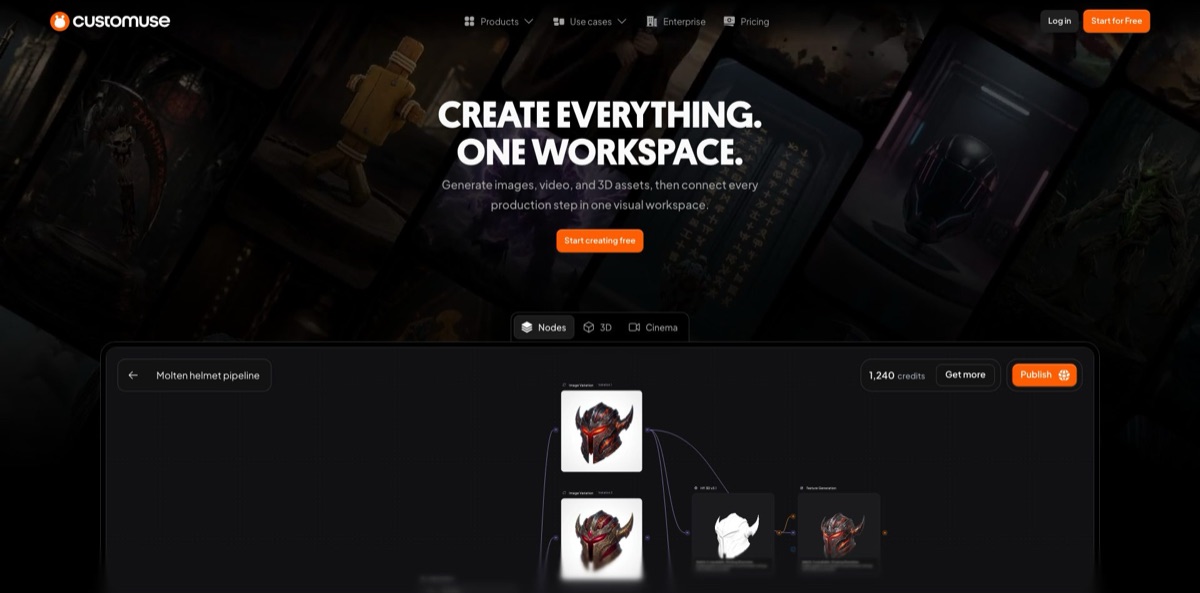
Customuse is a browser and mobile workspace that wraps third-party generators, including GPT Image, Nano Banana, FLUX, Kling, Seedance, Tripo, Meshy and Hunyuan 3D, inside a node editor, a 3D editor and a scene tool called Cinema Studio. The London startup began as a Roblox skin and clothing maker, and its Android app still carries that name, but the web product now sells itself as an AI 3D creation platform for game studios, Roblox developers, VFX teams and product designers. The problem it targets is the handoff: rather than generating a raw mesh in one tool and fixing topology, textures and rigs in three others, you chain those steps as nodes and export FBX, GLB or USD. Weak spots are credit costs that are not published per generation and a mobile app that draws steady complaints about paywalls. Pick it if you ship game or Roblox assets in volume.
How to start using Customuse?
Click Start for Free on customuse.com and create an account. The free tier covers the core design tools, community templates and your first downloads, while the pricing FAQ presents AI credits, unlimited exports, watermark removal and commercial rights as reasons to upgrade, so plan on the $14.99 Starter plan or higher before you judge the AI side. The iOS and Android apps sign in to the same account: a subscription bought on the website is tied to your email and username, while one bought through an app store is cancelled through that store.
Your first real job should be a single asset you actually need. Open Generate 3D and choose Text to 3D, Image to 3D or Multi-view to 3D, or start in Image & Video to explore a concept with FLUX, GPT Image or Nano Banana first. A common path is concept image, then image-to-3D with Tripo, Meshy or Hunyuan 3D. The Optimise Image for 3D step now defaults to Nano Banana 2 at 4K, and Meshy T2.5 can build low-poly models with a target of up to 30,000 faces when you need something light enough for a game.
The screen that defines the product is the Nodes Editor. Each generator, retexture or extraction step becomes a node, and you can branch experiments, rerun a node with another model and select a group of nodes to save it with Create Flow into My Flows. Workflow templates give you a starting graph to remix. Creators with Agent access can open an agent panel, describe what they want and let it add nodes or run branches; Auto mode takes a credit target, which is checked between steps, so a single step can still overshoot it.
Before anything leaves the platform, inspect it. The 3D viewer has lighting presets and material views for color, roughness and metallic maps, and you can check a character’s skeleton or play animations from My Assets. Select finished outputs and download them as a ZIP in GLB, FBX or texture formats such as PNG, TIFF or EXR. Roblox creators on Pro with a linked account can use Send to Roblox to add compatible models to Development Items, and where the Unreal integration is enabled, a compatible Customuse plugin receives rigged characters.
Who is it for?
Roblox UGC creators
Making layered clothing that actually fits the avatar usually means hours of manual fitting. Customuse fits tops and trousers to the blocky R15 body while keeping materials and UVs, exports layered-clothing FBX files and runs validation before export. Pro adds direct upload, so you skip a trip through Roblox Studio for each item.
Game studio 3D artists
A hero prop can eat days of high-poly modeling, retopology and texturing. The studio workflow chains high-poly generation up to 2 million polygons, quad retopology, low-poly output and PBR texturing in one graph. You spend your time judging and fixing results instead of cleaning UVs from scratch.
Roblox experience developers
Live games need thumbnails, props, signs and event outfits on a schedule. Customuse generates thumbnails styled for Roblox, world assets and classic shirts and pants, plus R6 or R15 animations from a text prompt or reference video. Saved flows let you rerun the same recipe for the next seasonal drop.
Character artists working in Unreal Engine
Dressing and rigging a character is fiddly work. Character Tools places garment layers around a body, keeps hats rigid and lets sleeves bend with joints, and a compatible plugin sends rigged characters with fitted clothing to Unreal as playable characters.
VFX, product and interior visualization teams
Prompt-only image tools give you little control over camera and layout. Cinema Studio lets you block out a 3D scene, set lighting, cameras and motion in its Stage, Render and Compose workspaces, and generate images or video from that structure, so client revisions are less of a lottery.
Small creative teams sharing a budget
Several artists burning one credit pool need visibility. Studio includes three seats, a shared library and usage by team, and owners can assign roles and set individual credit limits.
Customuse pricing
Customuse charges for AI credits, and every generation tool draws from that balance: images, 3D models, textures and world assets. The pricing FAQ says different tools use different amounts, but no per-tool credit table is published, so you only learn the real cost of a workflow by running it. Paid plans renew monthly or yearly, and yearly billing takes 20% off the base price of each plan. The web pricing page loads in USD, and the FAQ notes that prices appear in local currency where available. The App Store lists its own in-app Pro purchases ranging from $6.99 to $59.99, so mobile prices do not necessarily match the web.
Core design tools, community templates and a first set of downloads. The FAQ frames AI credits, unlimited exports, watermark removal and commercial rights as upgrades, and reviewers on the App Store and Trustpilot mention a cap of two or three downloads on the free plan.
1,000 fixed monthly AI credits, core design tools and templates, unlimited exports and commercial rights. Extra credits can be bought inside the product. The Starter card does not list watermark removal; Pro does.
A slider raises the allowance to 4,000 credits for $45, 5,000 for $55 or 7,000 for $65 a month; on annual billing the 20% discount applies to the $35 base only. Pro adds full access to AI generation tools, no Customuse watermark and live chat support.
It includes 3 seats and scales to 8, with tiers of 12,000 credits for $129, 15,000 for $149 and 20,000 for $179 a month. You get a shared team workspace and credit pool, usage visibility by team, Brand Kit, priority rendering and priority team support.
Custom. Built for 9 or more seats, with custom credit packages, multiple teams, SSO, group-based access control, API access, custom integrations, onboarding and a security and compliance review.
Customuse key features
Multi-model hub
One account gives you image models from OpenAI, Google and Black Forest Labs, video from Kling 3 Pro, Seedance 2.0 and Veo 3.1, and 3D from Tripo, Meshy and Tencent’s Hunyuan 3D. The studio page says new models are benchmarked weekly and you can switch models per node. You avoid juggling five subscriptions and five export formats.
Nodes Editor with Flows and AI Agents
Generation, retexturing, layer separation and clothing extraction all live as nodes on an infinite canvas with comments, arrows and sticky notes. Create Flow turns a selection into a reusable recipe with chosen inputs and outputs, and the agent panel can plan, edit and run branches for you.
Game-ready 3D pipeline
The studio workflow covers high-poly generation up to 2M polygons, quad-only retopology with edge loops, low-poly meshes and PBR maps (albedo, normal, roughness, metallic, ORM) with textures up to 8K. Multi-material assets keep their material slots, and exports go out as FBX, GLB or USD for Unreal, Unity or a custom engine. You get files your engine accepts rather than a raw scan-like mesh.
Roblox toolkit
Prompt layered clothing such as jackets, hoodies or armor and have it fitted to the avatar, generate classic shirts and pants, Roblox-style thumbnails and world props, and create R6 or R15 animations. Pro creators can send compatible models straight to Development Items. The free online tools add a Roblox clothes preview, a 3D file viewer and a converter for GLB, GLTF, OBJ, FBX and STL files.
Character Tools and Unreal Engine export
Garment layers are auto-placed around a body, humanoid Tripo rigs are recognized for character setup, and cloth exports strip tiny invalid triangles that would break simulation. With the Unreal integration and a compatible plugin, rigged characters arrive in Unreal as playable characters with their clothing. This shortens the path from concept outfit to something you can walk around in.
Cinema Studio
Block out a 3D scene, place characters and objects, then set lighting, cameras and motion across the Stage, Render and Compose workspaces before generating images or video. Structure from the 3D layout keeps shots more consistent than prompting each frame separately.
Team controls and IP terms
Owners assign roles, set per-member credit limits and review usage, and paid team workspaces now default to private generation. Enterprise workspaces block public publishing even after a downgrade, the enterprise page states that your team owns its uploads and outputs, and the studio page says Customuse does not train on studio uploads.
Customuse Pros & Cons
Pros
Customuse puts the whole asset chain in one graph: concept image, mesh, retopology, textures, rigging and export, with the freedom to swap Tripo, Meshy or Hunyuan 3D on any node. The changelog shows weekly or fortnightly updates through 2026, from AI Agents in June to Roblox layered-clothing fitting and Unreal character export in November, so the product is moving fast. Roblox support goes deeper than most 3D generators, with R15 fitting, thumbnails, animations and direct upload. The phone apps hold 4.7-star averages on both stores across more than a million ratings. Studio pricing with shared credits and per-member limits suits small teams. Start with one saved flow and reuse it rather than prompting from scratch every time.
Cons
Credit costs are opaque: the pricing page admits tools consume different amounts but publishes no table, so budgeting a project means trial runs. The free tier no longer covers AI generation in any meaningful way, and Trustpilot sits at about 2 out of 5, mostly from people angry about download paywalls, trials that turned into charges and a hard-to-find cancel option. Mobile reviewers complain about constant upgrade prompts, lag and crashes that lost work. Several key features, such as Unreal export and agents, depend on integrations or access flags. Read the billing terms before starting any trial, and cancel through the same channel you paid with.
Use Customuse if you want…
- Chain image, 3D and texture models in one graph.
- Generate Roblox layered clothing fitted to the R15 body.
- Turn concept art into rigged, game-ready FBX or GLB files.
- Retopologize dense AI meshes into clean quad topology.
- Upload Roblox items without opening Roblox Studio each time.
- Send rigged, dressed characters straight into Unreal Engine.
- Compose 3D scenes before generating images or video.
- Share one credit pool across a small art team.
Customuse alternatives



Customuse Reviews
A long-time Google Play user who made Roblox clothes for others says generation is no longer possible for free and that the subscription feels too expensive for casual use, adding they would pay a smaller amount.
On the App Store, one reviewer finds the editor easy and the AR tracking accurate for Roblox clothing, but objects that many templates are marked PRO and that random crashes erased their work.
Another App Store reviewer complains about lag when adding images or text and a two-download limit on the free plan, and says they would rather go back to Roblox Studio.
Trustpilot reviews are mostly negative: buyers describe a Start for free offer that became a paid trial, a paywall just to download a clothing template and a cancel button that is hard to find, while a few short posts praise dressing characters and making shoes.
A recent Google Play review says the app pushes a Pro subscription every few seconds, which makes casual use frustrating even for people who like the designs.
FAQ
Is Customuse free?
There is a free tier with core design tools, community templates and a few downloads, but AI credits are positioned as a paid upgrade. The cheapest paid plan, Starter, costs $14.99 a month for 1,000 credits.
Which AI models does Customuse use?
The homepage lists GPT Image 2, Nano Banana models, FLUX, Kling 3 Pro, Seedance 2.0, Veo 3.1, Tripo v3.1 and P1, Meshy 7 and Hunyuan 3D v3.1. You can switch models per node in the Nodes Editor.
Can I upload directly to Roblox from Customuse?
Yes, for eligible assets. The changelog ties Send to Roblox and the upload queue to Pro creators with a linked Roblox account, and layered clothing can also be exported as FBX for manual upload.
What file formats can I export?
3D models download as GLB or FBX, and the studio workflow also lists USD. Textures export as JPG, PNG, TIFF or EXR, with resolutions up to 8K on supported models.
Does Customuse train on my uploads?
The game studio page says Customuse does not train on studio uploads, and the enterprise page says your team owns its references and outputs. Paid team workspaces default to private generation, and Enterprise contracts can add NDA and retention terms.
Is there an API?
API access and custom integrations are listed for the Enterprise plan only. Self-serve plans work through the web app and the iOS and Android apps.
How do I cancel my subscription?
Cancel through the channel you used to subscribe: web subscriptions from your Customuse account, app store subscriptions from Apple or Google. The pricing FAQ links to a step-by-step cancellation guide and a separate refund request guide.
Does Customuse work on mobile?
Yes. There are iOS and Android apps, and a subscription bought on the website works in them because it is attached to your email and Customuse username.
Similar tools
 VisualGPTCredit-based AI image and video studio that runs Nano Banana, GPT Image, Seedream, Flux and Kling for product photos, photo edits and
 LovartAI design agent that turns a chat brief into logos, social posts, product shots, slides and videos on one editable infinite canvas.
 PromeAIBrowser-based AI design studio that turns sketches, photos and 3D views into photorealistic renders, then edits, upscales or animates them into video.