

Deevid AI
Video GenerationUpdated October 5, 2026
Advanced mobile-first AI video aggregator transforming text and images into high-quality 1080p clips for social creators.
We may earn a commission when you sign up through our links. It does not affect our reviews.
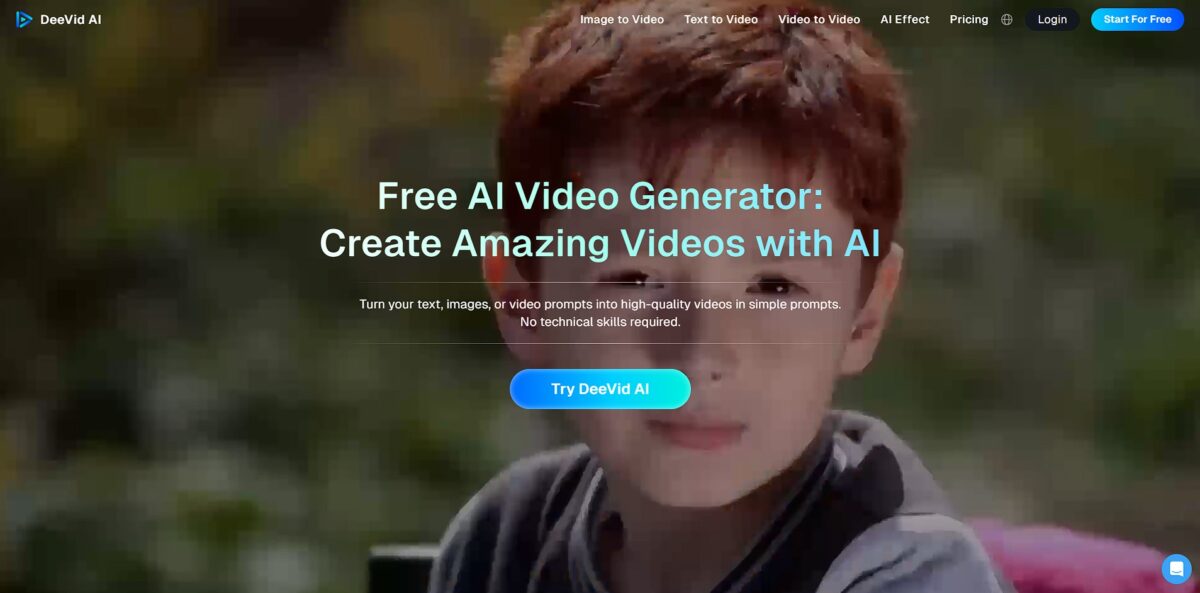
What is Deevid AI?
DeeVid AI functions as a mobile-first video aggregator that taps into third-party models like Veo3 and Sora to churn out 1080p clips from simple text or photos. It bypasses the technical slog of manual keyframing by using an “AI agent“ to automate transitions and camera moves, which works well for vertical social content but lacks the granular control needed for frame-by-frame precision. The platform leans heavily on viral-ready presets like “AI Hug” or “360° Microwave” effects, making it a fast lane for trend-chasing creators rather than a professional cinematic suite. This matters because it shifts your effort from technical editing to pure prompt experimentation. Use DeeVid AI if you need volume and speed for Reels, but look elsewhere for complex narrative projects requiring fixed character consistency.
How to start using Deevid AI?
You start by heading to the DeeVid AI site or downloading the app to create an account. Registration usually requires an email or social login to track your credit balance. This setup is fast, letting you jump into the dashboard without a complex onboarding walkthrough. Since everything is cloud-based, you don’t need to worry about local hardware specs or cooling fans ramping up during a render.
The dashboard presents three main entry points: text, image, or video. If you have a specific script, paste it into the text-to-video box to let the AI generate a clip from scratch. It’s effective for social posts where you need a quick visual to match a headline but lacks the granular control of a traditional timeline editor. Your role shifts from manual editor to a director giving high-level instructions.
If you already have assets, upload a static photo to the Image-to-Video tool to add motion. You can choose specific transitions or let the AI fill in the action between two keyframes for a smoother look. I noticed the results are best when the original image has a clear subject; cluttered backgrounds can sometimes lead to odd warping. This approach saves you from the tedious task of keyframing every single movement in software like After Effects.
For existing footage, use the Video Style Transfer to apply new filters or genres. This is a quick way to refresh old content for different platforms without filming new scenes. While it handles style changes well, it won’t fix fundamental issues with the original footage’s framing or lighting. Think of the AI as a creative overlay, not a miracle cure for bad source material.
Before hitting export, preview your work to check the pacing and character consistency. Once satisfied, generate the final file, which typically outputs in a social-ready 1080p format. Keep an eye on your credit indicator as each generation consumes a portion of your monthly allowance. It works well for high-volume social creators but might feel restrictive if you prefer endless experimentation.
Who is it for?
Solo Social Media Managers
Juggling five different client accounts manually is a recipe for burnout. DeeVid centralizes the chaos by tapping into Veo3 and Sora models to churn out 1080p clips from simple text. You can keep a daily posting schedule without spending eight hours on a single edit.
Bootstrapping E-commerce Sellers
Hiring a studio for a product shoot often costs more than the initial inventory. You can transform static product photos into motion ads that actually grab attention on a crowded feed. That lowers the entry barrier for professional-looking video marketing.
Mobile-First Creators
Some of us prefer working from a phone while commuting rather than being tethered to a desktop. The app-centric design focuses on quick iteration rather than deep-dive timeline editing. It fits into the pockets of time between other tasks.
Performance Marketers
Testing ten different ad variants shouldn’t take ten days. The aggregator approach lets you cycle through different visual styles to see which one sticks with your target demographic. Fast data beats slow “perfection” every time.
AI Experimenters
If you want to compare how different backend models interpret the same prompt, this is a solid playground. It works well for seeing the difference between Veo3 and Sora outputs, though it’s less ideal for those needing highly specific, frame-by-frame control. It also saves you from subscribing to five different standalone platforms.
Deevid AI pricing
Deevid AI operates on a credit system that scales based on how much raw footage you need to churn out. It skips complex seat-based licensing, making it easy to predict costs if you know your monthly output volume. I noticed the entry tier is narrow, meant for testing rather than full campaigns.
Enough to generate about 4 short clips to test the AI agent’s movement logic.
This covers roughly 50 simple image-to-video conversions for social feeds. Solo creators can experiment without a heavy financial commitment.
Designed for active accounts producing up to 300 assets. The cost per video drops significantly here, which helps when you need to iterate on several versions of an ad.
High-volume tier for agencies needing up to 1,500 monthly generations. This removes the friction of rationing credits during heavy production weeks. The credit-to-video ratio varies depending on resolution and length, so track your usage after the first few renders. Pick the Pro plan if you plan to post more than twice a week; the Lite tier runs out quickly if you do multiple takes.
Deevid AI key features
Convert text scripts into 1080p video clips by matching your descriptions with automated scene generation
It saves hours of manual B-roll hunting by pulling relevant visuals for you. A rough idea becomes a watchable draft in minutes.
Animate static portraits or product photos using the image-to-video tool
You can describe specific movements like a “360-degree microwave effect” or a character hugging, adding motion to otherwise flat social posts. The motion is smoother on simple backgrounds than on crowded ones. You can also repurpose old Instagram photos into new video content.
Synchronize character lip movements with uploaded voiceovers or cloned AI voices
The lip-sync tool matches the mouth shape to the audio, which is helpful for creating talking-head educational content without a camera crew. It eliminates the uncanny valley effect of silent digital avatars.
Apply artistic style transfers to existing footage to change the visual mood instantly
You can turn a standard phone video into an anime sequence or a vintage noir film using prompt-based filters. A consistent aesthetic across different camera sources becomes easy to hold.
Generate multiple variations of a video at once using batch processing tools
Agencies can create different versions of an ad with varied transitions or color grades in one rendering session. A/B testing for social media marketing campaigns gets much faster.
Use the start-to-end frame feature to define exactly how a scene evolves
By providing two reference images, the AI fills the movement between them, giving you better control over scene transitions than a blind prompt. I noticed this works well for slow pans but struggles with fast jumping. For narrative storytelling, the results are more predictable.
Access a library of over 50 trending video effects to mimic viral social media styles
You can apply pre-built layouts and rhythms that feel native to TikTok feeds without learning complex editing software. Your content looks current with minimal effort.
Deevid AI Pros & Cons
Pros
DeeVid AI skips the complex keyframes of heavy editors. You can jump from a text prompt to a 720p or 1080p video clip in about a minute. The interface keeps tools in plain view, which helps beginners avoid a steep learning curve. The integrated lip-sync tool handles audio cues well, syncing mouth movements to dialogue without extra software. Accessing several models like Sora 2 and Kling in one dashboard simplifies the process of testing different visual styles. You can prototype social media content across multiple AI engines without switching browser tabs. Stick to the Pro plan if you need 1080p resolution and a larger credit buffer for daily experiments.
Cons
The 8-second limit on video duration makes it difficult to build long-form narratives. Character faces often warp or distort as the camera moves, which breaks the immersion of cinematic scenes. You have almost no manual control over specific frames, so you rely entirely on text prompts for adjustments. Credits disappear quickly if a render misses the mark and requires multiple retries. The free plan offers very little room to test these limits, as it offers only a small one-time credit allowance and no daily credit resets. This matters because you might pay for a subscription before knowing if the physics and facial details meet your project needs. Use specific lighting descriptors in your prompts to help the engine maintain visual stability during movement.
Use Deevid AI if you want…
- Convert raw text into viral social media clips instantly.
- Animate static photos into cinematic 1080p video sequences.
- Restyle existing footage with advanced AI visual filters.
- Create lifelike talking avatars with perfect lip-syncing.
- Automate high-volume content production for marketing campaigns.
- Generate trending AI effects like hugs or 360-degree pans.
- Keep a consistent visual style across short social clips.
- Produce professional explainers without expensive film crews.
Deevid AI alternatives



Deevid AI Reviews
The AI agent automates transitions and camera moves perfectly for my Reels, but the credit system is frustratingly opaque. I burned through a weekly plan in one afternoon just trying to fix a single character distortion.
I love the trending effects like the AI Hug for quick social hooks, though the results often look a bit too “AI-glossy” for professional work. It’s a great time-saver for volume, but don’t expect deep cinematic control.
Technical support is nonexistent and the annual billing catch is a nightmare. The lip-sync works well enough for simple demos, but the unpredictable video quality makes it hard to justify the high price tag.
FAQ
What types of input can I use to create videos?
You can use text prompts, static images, or existing video clips as input to generate new content or transform styles.
Can I customize the video output?
Yes, you can personalize videos by selecting different styles, effects, templates, and formats to match your specific project needs.
Is there a free trial for DeeVid AI?
Yes, DeeVid AI offers a trial option with limited credits so users can test the platform’s video generation capabilities before subscribing.
Does DeeVid AI support image-to-video animation?
Yes, the tool includes an Image-to-Video feature that allows you to transform static photos into dynamic, animated video clips.
Can I add voice-overs and subtitles to my videos?
Yes, the platform features an AI voice cloning tool for narrations and an automatic subtitle generator to improve accessibility and engagement.
What is the maximum video length I can generate?
DeeVid AI is typically designed for short-form video content, though specific length limits can vary based on the subscription tier and model used.
Does DeeVid AI offer a refund policy?
Due to the nature of AI infrastructure costs, DeeVid AI generally maintains a no-refund policy, encouraging users to evaluate the service via the free trial first.
How do I cancel my DeeVid AI subscription?
You must cancel your subscription at least seven days prior to the renewal date through the subscription management section on the website or via email support.
Similar tools
 AIAIAll-in-one AI studio that puts Veo, Sora, Kling, Seedance and other models behind one credit balance for video, images, music and voice.
 ToMoviee AIWondershare's AI creative studio that turns text prompts and images into short videos, pictures, music, sound effects and voiceovers.
 Morph StudioBrowser AI video studio that runs Seedance, Kling, Veo and its own style transfer model, with a storyboard canvas for multi-shot clips.