
Dezgo
Image GenerationUpdated November 17, 2026
Browser-based AI image and video generator with a no-account free tier, about 70 model apps and prepaid pay-as-you-go pricing shared with its developer API.
We may earn a commission when you sign up through our links. It does not affect our reviews.
What is Dezgo?
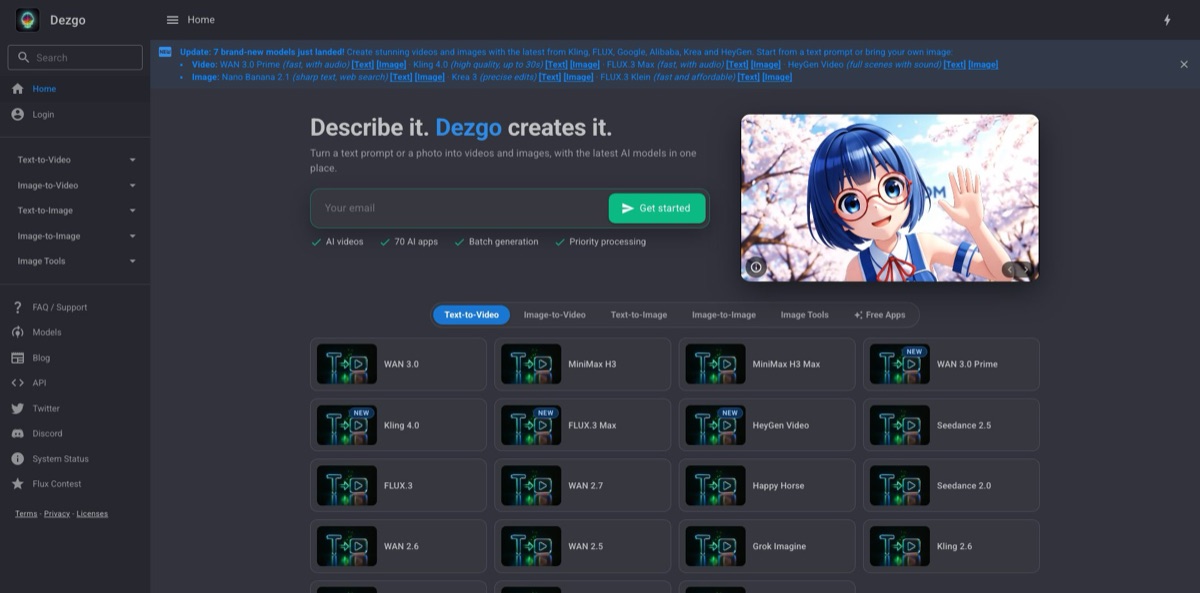
Run by Dezgo SAS, a French company registered in Paris, Dezgo is a browser-based generator that puts about 70 AI apps behind one menu. You get text-to-image and image-to-image with Flux, Stable Diffusion and newer hosted models such as Nano Banana 2.1, Krea 3 and Qwen Image 3, text-to-video and image-to-video with Kling 4.0, WAN 3.0, Veo 3.1 and Seedance, plus upscaling, background removal and inpainting. It removes the usual subscription question: a free version works without an account, and the paid Power Mode is a prepaid balance in US dollars, charged per request, that also powers a developer API. The weak spots are polish and price visibility on the newest models: reviewers find the interface dated, and video prices appear only inside the app. Choose it for cheap, flexible per-image generation rather than a full design suite.
How to start using Dezgo?
Open dezgo.com and pick a mode from the menu: Text-to-Video, Image-to-Video, Text-to-Image, Image-to-Image or Image Tools. The free version needs no account, but it comes with rate limits, capped resolution and capped sampling steps, and it shows ads. AI video and the latest image models are reserved for the paid Power Mode. The terms require you to be at least 18 years old, and they apply to free use, paid use and the API alike.
For a first image, open Text-to-Image, type a description into the Prompt field and press Run. The classic Stable Diffusion page defaults to the AbsoluteReality 1.8.1 model, and the Flux page uses Flux Schnell. Choose Portrait, Square or Landscape, then open More Options. There you find a pre-filled negative prompt, a Guidance slider (the help text puts the sweet spot between 6 and 10), steps, the sampler, a seed field and a LoRA setup. To stress part of the prompt, add “+” after a word or wrap several words in brackets with a weight between 0 and 2.
The screen that changes how Dezgo behaves is the lightning icon in the top-right corner. Click Login, enter your email and open the magic link Dezgo sends you: there is no password, and the account is created on first sign-in. Then go to My Account, enter an amount of at least $10 in the Balance panel and click Deposit to pay on a Stripe-hosted checkout page. Back in the app, the lightning icon turns green with a price tag when Power Mode is on and shows a grey “FREE” label when it is off. The price of the current request updates there in real time as you change settings.
Before you use an output, check the license of the model you picked. Each app page names it, for example CreativeML Open RAIL-M for Stable Diffusion, Apache 2.0 for Flux Schnell and Google’s Gemini API terms for Nano Banana 2.1. Run the keepers through Upscale or Remove background, and download PNG files. In Power Mode, History keeps your recent requests for up to 30 days, so a lost file can be downloaded again. Developers create a key under API Keys in the same account dashboard.
Who is it for?
Casual creators
You want a picture for a post, a slide or a party invite without creating yet another account. Dezgo opens straight into a prompt box, and the free version needs no sign-up at all. Expect rate limits and lower resolution until you switch on Power Mode.
Tabletop and indie game makers
Character portraits, item art and scene concepts for a campaign add up fast. The catalogue includes dozens of style-tuned checkpoints labelled realistic, anime, drawing, painting or 3D render, and default image prices start at a fraction of a cent. Free-tier quality may not be enough for finished artwork, so budget a small top-up.
Stable Diffusion tinkerers
You care about samplers, seeds, guidance values and LoRA files but do not own a strong GPU. Dezgo exposes those controls in the browser across SD 1.x, SDXL, SDXL Lightning and Flux, and the API accepts up to four LoRAs per request. Fix the seed, change one setting at a time and compare the results side by side.
Developers adding image features
You need an HTTP endpoint for generation, inpainting, upscaling or background removal with a predictable cost per call. Responses that start a job carry headers with its price and your remaining balance in USD, and an OpenAPI file lets you generate a client. A text moderation endpoint helps when your users type their own prompts.
Social video makers
You want to try Kling, WAN, Veo and Seedance clips without four separate subscriptions. Dezgo lists them side by side and shows each job’s price before you run it. Compare a short clip across two models before committing to longer, pricier renders.
Subscription-averse occasional users
You generate in bursts, maybe twice a month. A prepaid balance that never expires fits that rhythm better than a monthly plan you forget to cancel. Top-ups are non-refundable, though, so deposit only what you expect to use.
Dezgo pricing
There are no subscriptions. You either use the free version or fund a prepaid balance that Power Mode and the API draw from at the same rates. The cost of each request depends on the model, resolution, step count and add-ons, and the app shows it before you press Run. All prices and balances are in US dollars; if you pay in another currency, your bank applies the exchange rate.
No account needed, with rate limits, capped image resolution and capped sampling steps, and ads on the page. AI video and the newest image models are not included.
With default settings, classic Text-to-Image (512x512) costs $0.0019 per request, or about 5,263 images for $10, and Text-to-Image XL costs $0.0075, or about 1,333 images. Flux at 1024x1024 costs $0.0029 and XL Lightning $0.0032 by default. The balance never expires, and payments are final and non-refundable.
Flux costs $0.000725 per megapixel per step at four steps or more, each LoRA adds $0.0040 on Flux or $0.0051 on SDXL, background removal is $0.001 per image, and upscaling ranges from $0.0005 to $0.0051 depending on input size.
Dezgo publishes no rate card for these. The price for your chosen resolution and duration appears next to the lightning icon before each run.
deposits of $100 or more get 10% off, $500 or more 15% off and $1,000 or more 20% off, paid out as bonus credit, so a $1,000 deposit credits $1,250.
contact Dezgo for a custom plan if you expect to deposit more than the top discount tier.
Checkout runs on Stripe and accepts cards, PayPal, Apple Pay, Google Pay, Link, UPI, Alipay and other local methods, with availability varying by country and device.
Dezgo key features
One menu for image and video models
The home page lists video apps for WAN 3.0, MiniMax H3, Kling 4.0 (clips up to 30 seconds), FLUX.3 Max, HeyGen Video, Seedance 2.5, Grok Imagine and Veo 3.1, next to image models such as Nano Banana 2.1, Krea 3, FLUX.3 Klein, Qwen Image 3 and Flux 2 Pro. Featured models carry a one-line note, such as fast with audio or sharp text with web search. You can compare providers on the same prompt without holding an account at each one.
A deep Stable Diffusion catalogue
The models page lists over 100 checkpoints across SD 1.x and 2.x, SDXL, SDXL Lightning, Flux and dedicated inpainting models, from DreamShaper and Realistic Vision to Juggernaut XL and T-shirt design models. Every entry carries a style tag and the creator’s name.
Fine-grained generation controls
Negative prompt, guidance, steps, sampler, seed and LoRA slots sit under More Options, and the API raised its LoRA limit to four files of up to 170 MB each. Prompt weighting works with plus and minus signs or numeric weights, and a transparent-background add-on returns cut-out PNGs straight from generation. That turns repeatable experiments into a matter of fixing the seed and changing one value.
Built-in image tools
ControlNet keeps the structure of a reference image (Canny edges, for example), text inpainting replaces an object you describe in words, and Edit image from text applies short instructions, such as adding snow to a scene, through Instruct-Pix2Pix. Upscale doubles resolution with Real-ESRGAN for inputs up to 768x768, and Remove background returns the subject with transparency. Most quick fixes happen without leaving the browser.
A documented developer API
Requests go to api.dezgo.com with an X-Dezgo-Key header, accept JSON or form data and return a raw PNG, while response headers report the job price and your balance in USD. The docs include an OpenAPI file, Node.js examples and a changelog. The public reference covers image endpoints and a text moderation endpoint; video models are not listed there, so ask support before you build a video pipeline on it.
Prepaid billing with a live cost preview
The price of the current request updates as you change size, steps or count, batch generation runs several results in parallel, and Power Mode adds priority processing. History stores 30 days of requests for re-download. You always know what a run costs before you start it.
Published content rules
Terms revised on 24 September 2026 ban sexually explicit content on every service, including the API and free use, and Dezgo runs automated moderation on generation requests. Several premium apps, such as Kling 4.0 and Nano Banana 2.1, are marked as SFW-only models.
Dezgo Pros & Cons
Pros
The entry cost is close to zero. The free version runs without an account, and a $10 top-up buys thousands of classic Stable Diffusion images at $0.0019 each. There is no subscription to cancel, the balance never expires, and the exact price of each request is shown before you run it. Dezgo also gathers premium video and image models next to more than 100 open checkpoints, so one balance covers Kling, Veo, Flux and SDXL experiments. Developers get the same rates through a documented API with per-call cost headers and volume bonuses up to 20%. Start with the free tier, then fund a small balance for the models you actually use.
Cons
The free tier is limited: resolution and sampling steps are capped, generation is rate-limited, and ads appear on the page. Reviewers describe the interface as dated and the cost logic as confusing at first, and with roughly 70 apps in the menu, choosing a model takes some reading. Video and the newest image models have no public price list, so you only see the cost inside the app. Payments are non-refundable, the public API reference does not cover video, and independent reviews are few. Reviewers also report that faces and hands often come out wrong. Test your typical prompt on two or three models before depositing more than the minimum.
Use Dezgo if you want…
- Generate images in the browser without creating an account.
- Pay per image instead of a monthly subscription.
- Compare Kling, Veo and WAN videos from one balance.
- Run Stable Diffusion checkpoints with LoRAs and custom samplers.
- Add image generation to your app through an API.
- Remove backgrounds and upscale images in one place.
- Replace objects in a photo by describing them.
- Keep unused credit without any expiry date.
Dezgo alternatives



Dezgo Reviews
A Stable Diffusion user on Reddit who wanted artwork for D&D games found the free settings too weak in quality and asked whether paid generation with higher sampling would be worth it.
Another Reddit user complained that new free models kept repeating the same anime styles rather than adding variety; Dezgo’s team replied that it skips models whose creators forbid use on generation services.
One Reddit post described a run of suddenly pixelated, low-quality results on consecutive generations, and the author asked whether others saw the same problem.
A Fritz.ai reviewer liked the no-account browser access, quick generations and built-in ControlNet, inpainting and upscaling, but found the interface dated, the credit logic confusing at first and faces and hands often off.
Trustpilot has only a handful of reviews, split between users praising free, good-quality image generation with faster results for about $10 and one-star complaints about billing and file safety that the page does not substantiate.
FAQ
Is Dezgo free?
Yes. The free version works without an account, but it has rate limits, capped resolution and sampling steps, and ads. AI video and the newest image models need the paid Power Mode.
Do I need a subscription for Power Mode?
No. Power Mode is prepaid and pay as you go: you deposit at least $10, each request is deducted from your balance, and the balance never expires. There are no recurring charges.
Can I use Dezgo images commercially?
Yes. Dezgo says you own the rights to your outputs, including for commercial use, as long as you follow the license of the model you used, such as CreativeML Open RAIL-M for Stable Diffusion.
Does Dezgo have an API?
Yes. Create a key under API Keys in your account, send requests to api.dezgo.com with the X-Dezgo-Key header, and pay from the same balance at Power Mode rates. The older RapidAPI version is a separate, deprecated service.
What content is allowed on Dezgo?
The terms revised on 24 September 2026 ban sexually explicit content, non-consensual imagery and any sexualized depiction of minors across the website and API. Requests pass through automated moderation, and violations can lead to suspension.
Can I get a refund on my Dezgo balance?
No. Payments are final and non-refundable, and you cannot withdraw money from your account. Your balance stays usable with no expiry date.
Which payment methods does Dezgo accept?
Stripe checkout supports cards, PayPal, Apple Pay, Google Pay, Link, UPI, Alipay and other local options, depending on your country and device. Prices are charged in US dollars.
How long does Dezgo keep my generations?
In Power Mode, the History feature stores your recent requests for up to 30 days so you can download results again. Save anything you want to keep on your own device.
Similar tools
 RunComfyCloud ComfyUI platform with per-second GPU billing, 200+ ready workflows, hosted image and video models, LoRA training and a serverless API.
 ImgGen AIBrowser-based AI image generator and photo editing suite with background removal, 8K upscaling, restoration and an API on one credit balance.
 Bulk Image GenerationBatch AI image generator that turns a prompt list or one brief into up to 100 images per run, with five models,