

Digen
Video GenerationUpdated October 27, 2026
AI video studio for browser and iPhone that animates photos, syncs lips and runs Seedance, Veo and Kling next to its own Real Motion models.
We may earn a commission when you sign up through our links. It does not affect our reviews.
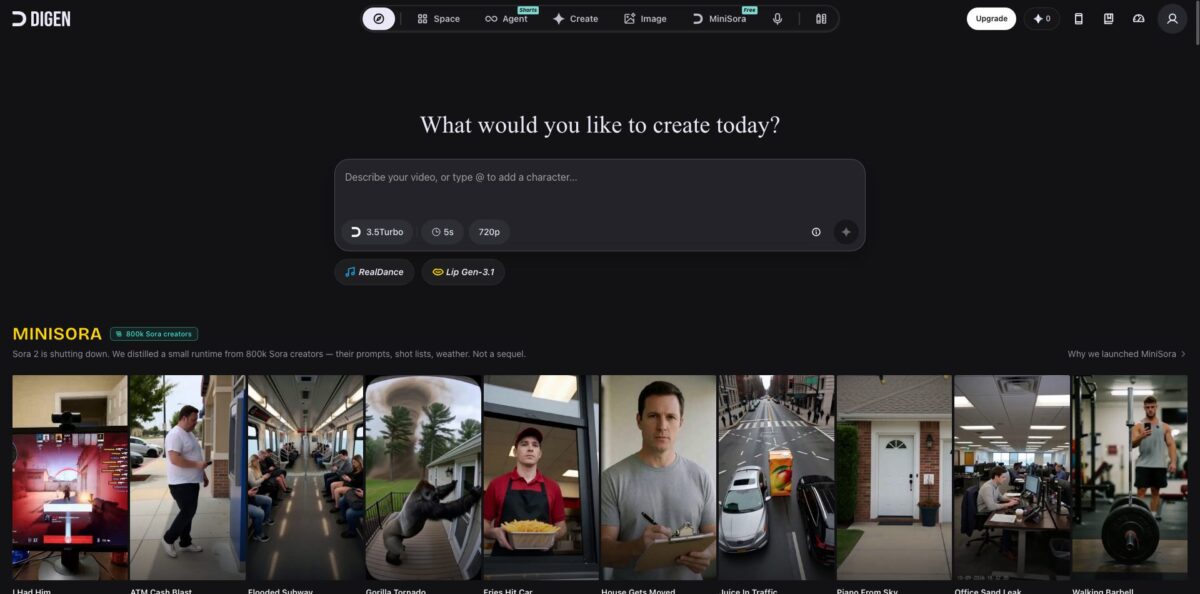
What is Digen?
Behind the digen.ai domain sits a browser and iPhone studio that puts dozens of AI video and image models behind a single prompt box. Next to its in-house engines (Real Motion for image-to-video, Lip Motion for lip sync, Act Motion for motion transfer) it gives you access to third-party models such as Seedance 2.0, Veo 3.1, Kling 3.0, Grok Video and MiniMax H3, plus Nano Banana and GPT Image for stills. An Agent layer turns a short brief into a finished clip through skills like Movie Maker and Drama, and developers get an API and MCP server. The draw is price: plans start at a few dollars a month, and the top tier makes several house models unlimited. The weak spot is the business side, because Trustpilot reviews are dominated by cancellation and billing complaints. It suits short-form creators who want many models cheaply and will watch their billing closely.
How to start using Digen?
Open digen.ai and you land on the Explore feed, a wall of community clips and templates with a prompt box at the top. Sign up for a free account to start generating. Free users receive a daily login bonus of 50 credits, which Digen calls Meme, so you can try the house models before paying anything. If you prefer your phone, the DIGEN app on the App Store offers the same tools and supports subscriptions through Apple.
The quickest first project is animating a photo. In the prompt box (“Describe your video, or type @ to add a character”), pick a model from the selector, set the duration and resolution, then describe the motion you want. The Real Motion house models run on the cheaper Meme credits, so they are the place to learn how prompts behave. You can also click Use Template on any Explore card to copy a ready-made setup, such as an effect or a trending meme format, and swap in your own image.
The screens worth learning next are Create, Voice and Tools. Create holds Lip Motion, which syncs a still portrait to uploaded or generated audio, and Act Motion, which maps the movement from a reference video onto your photo. Voice offers Voice Design (a voice from a text description) and Voice Clone (a voice from a sample). Tools covers the AI Video Upscaler, FPS Booster, AI Image Upscaler and watermark removal. For multi-shot work, open the Agent at agent.digen.ai, type / to pick a skill such as Movie Maker or Drama, and describe your idea.
Before you export, check the credit cost of the model you used on the Compare plans page, because prices differ sharply between house models and premium third-party ones. Credits are only charged on successful generations, and daily limits reset at midnight UTC. Paid plans remove the watermark and export at up to 1080p; Digen’s FAQ notes that it can take about 30 minutes after subscribing for watermark-free downloads to switch on. Your history stays in Space, and paid plans can keep videos private.
Test on free daily credits first, and if you subscribe, note the cancellation path (My Profile, Subscriptions, More options) on day one.
Who is it for?
Short-form meme creators
You make quick, absurd clips for TikTok, Reels or Shorts and need volume more than polish. Templates, Effect Models and MiniSora, Digen’s model for deadpan found-footage gags, let you remix trending formats in minutes, and the community feed shows what is working right now.
Model shoppers on a budget
You want to try Seedance 2.0, Veo 3.1, Kling 3.0 and Grok Video without paying four separate subscriptions. One Digen plan gives you a Pro Meme balance that works across all of them, and the cheapest tier starts at $4.99 a month.
Small e-commerce and ad marketers
You need UGC-style product videos and talking-head ads for Meta or TikTok campaigns. Lip Motion turns a single photo plus a script into a speaking presenter, and the official Commerce UGC and Product Ads skill in the Agent is built for affiliate shorts.
Short drama and story creators
Serialized micro-dramas need consistent characters across many clips. The Drama skill works from a locked screenplay and reference assets and produces 10-second reference-to-video units one at a time, while K-POP Idol builds one consistent virtual idol across clips.
Music and dance creators
You want a music video concept or a character dancing to a track without filming anyone. The Music Video skill drafts MV concepts, and Dance Video Maker lets you upload a character, pick a dance style and control the rhythm.
Developers and automation builders
You want video generation inside your own app or AI assistant. Digen exposes a REST API with streaming, an MCP server for clients such as ChatGPT, Cursor and Claude, and a CLI, all authenticated with an API key from your account.
Digen pricing
Digen runs on two credit pools. Meme pays for house models such as Real Motion, Lip Motion and Act Motion, while Pro Meme pays for premium third-party models like Veo 3.1, Seedance 2.0, Grok Video and MiniMax H3. Every paid plan adds 200 Meme per daily login, and some house models become unlimited on higher tiers. Prices on the subscription page are shown in USD and most appear as discounts against crossed-out list prices, so expect them to move. Annual billing is advertised at 40% off.
A 50 Meme daily login bonus, limited use of house models and tools, and watermarked exports. Under the plan terms, Digen may view, use, modify and publish images you create on the free plan.
6,000 Meme and 2,200 Pro Meme per month, up to 300 videos, up to 36 seconds of Seedance 2.0 at 480p, 2 concurrent jobs with 5 queue slots, 1 Agent task at a time, 1080p output, no watermark and a commercial license. Nano Banana 2 Lite images, Image Motion and upscaling are unlimited.
15,000 Meme and 5,600 Pro Meme, up to 750 videos, up to 93 seconds of Seedance 2.0, 8 queue slots, 2 Agent tasks and permanent video storage.
36,000 Meme and 13,000 Pro Meme, up to 216 seconds of Seedance 2.0, 10 queue slots, 3 Agent tasks and a Priority Care Team. Real Motion 3.5, MiniMax H3 Fast, GPT Image 2, Lip Motion Gen-3 and Act Motion Gen-2 become unlimited.
monthly bundles that include an Ultra-tier membership plus extra credits or unlimited use of one model. Unlimited Image costs $14.99 and includes Ultra Pro; MiniSora costs $19.99; Real Motion 3.5 Fast costs $29.99; MiniMax H3 Fast, Nano Banana and Sora 2 passes cost $49.99 each; Seedance 2.0 costs $69.99; unlimited Veo 3.1 costs $169.99.
Custom pricing. Shared workspace, seat management, centralized billing and invoices, a priority team queue and volume discounts, arranged by contacting Digen.
Two policies matter before you pay. Upgrades cannot yet be done on your own and go through support chat or email. If a renewal hits before you cancel, the FAQ promises an unconditional refund when requested within 7 days of the charge.
Digen key features
Real Motion house models generate video from a still image or a text prompt, with Real Motion 3.5 as the current flagship and 3.2, 3.1 and 2.6 still available. Paid plans generate clips of up to 15 seconds at up to 1080p, and Ultra Max makes Real Motion 3.5 unlimited. Because these models run on the cheaper Meme pool, they are where you can iterate freely.
A multi-model wall puts Seedance 2.0, Veo 3.1, Kling 3.0, Grok Video 1.5, MiniMax H3, Gemini Omni Flash and HappyHorse 1.0 in the same selector, alongside image models such as Nano Banana Pro, GPT Image 2, Seedream 5.0 Lite, FLUX.2 [klein] and Z-Image. You switch models without switching accounts, and the credit cost of each one is published on the Compare plans page. That makes side-by-side comparisons of the same prompt cheap and fast.
Lip Motion and Voice turn a portrait into a talking or singing clip
Lip Motion Gen-3 syncs an image to uploaded audio or to speech made with the built-in text to speech, while Voice Design creates a new voice from a description and Voice Clone copies one from a sample. Digen’s app listing says lip sync works on animals as well as people, which is handy for pet and mascot content.
Act Motion and Effect Models handle motion transfer and stylized gags
Upload an action video and one photo, and Act Motion Gen-2 retargets the full-body performance onto your character while keeping the face consistent, with no green screen or keyframes. Effect Models apply preset transformations, such as turning objects into cake or a person into a gym bro, in one tap.
Digen Agent and Open Skills package whole workflows into reusable prompts
The official Movie Maker skill aims for a finished 10-second cinematic clip, Drama works shot by shot from a locked screenplay, and Shorts Maker, Music Video, K-POP Idol and MiniSora cover other formats. Creators have published more than 11,000 community skills, ranked by usage, which you can install and remix.
API, MCP and CLI access let you call the same capabilities from code
The REST API streams results as Server-Sent Events, and the MCP server connects ChatGPT, Cursor, Claude and other clients over Streamable HTTP with a Bearer key. Plan benefits also list ComfyUI workflow support.
Built-in finishing tools include an AI Video Upscaler, AI Image Upscaler, FPS Booster for smoother motion and watermark removal. Free accounts pay credits per use, and paid plans make them unlimited. You can polish a clip without exporting to a separate editor.
Digen Pros & Cons
Pros
Few platforms bundle this many current video models for so little money. For the price of a lunch you get monthly credits that reach Seedance, Veo, Kling and Grok, and Ultra Max turns Real Motion 3.5, MiniMax H3 Fast and several image models into unlimited generators. Credits are only deducted for successful jobs, the free tier refills every day, and the Agent skills save real time on multi-shot formats like short dramas and music videos. Developers get a documented API and MCP server instead of a closed app. Positive reviewers consistently point to value and model variety. Use the free daily credits to shortlist two or three models before committing to any plan.
Cons
Billing is the red flag. Trustpilot rates Digen 1.5 out of 5 across roughly 150 reviews, most describing cancel buttons that failed, charges after cancellation requests and support emails left unanswered for weeks. Digen added a self-service web cancellation flow in September 2026, but similar complaints continued into October. Upgrades still require contacting support, the plan lineup with passes and two credit pools is confusing, and prices are framed as rolling promotions. Users also report slow queues, failed or weak generations and app crashes. Pay with a card you can block, and save a screenshot of every cancellation confirmation.
Use Digen if you want…
- Test Seedance, Veo and Kling under one subscription.
- Animate product photos into short social video clips.
- Turn a portrait and voiceover into a talking-head ad.
- Transfer dance moves from a reference video onto characters.
- Remix trending meme templates without filming anything yourself.
- Produce serialized short dramas with consistent recurring characters.
- Generate unlimited images on a low monthly budget.
- Call AI video models from your own app via MCP.
Digen alternatives
 Kling AIRead review →
 PixVerseRead review →
 RunwayRead review →
 PikaRead review →
 Hailuo AIRead review →
 Vidu AIRead review →
 Deevid AIRead review →
 DomoAIRead review →
Digen Reviews
Happy subscribers on Trustpilot mostly praise value: many video and image models in one membership at a fraction of what competing apps charge, with daily credits that let you check quality before paying.
Users who lean on Real Motion and Image Motion describe the house models as reliable and like Space for keeping project history, though they find the third-party models less well integrated than the built-in ones.
The most common complaint is billing: reviewers describe cancel buttons that throw errors, renewals charged after a cancellation request and support emails that go unanswered for weeks.
Some paying users say generation is slow, with short clips taking minutes or failing on a queue-too-high message, and that weak outputs still consume credits.
On the App Store, users like the generous free daily options across models but report frequent crashes and long load times on iPhone.
FAQ
Is Digen free to use?
Yes. A free account gets a 50 Meme daily login bonus and limited use of house models and tools, with watermarked exports. Paid plans start at $4.99 billed monthly or $2.99 per month billed annually.
What is the difference between Meme and Pro Meme?
Meme is the credit for Digen’s own models such as Real Motion, Lip Motion and Act Motion. Pro Meme pays for premium third-party models like Veo 3.1, Seedance 2.0, Grok Video and MiniMax H3, and each plan includes a separate monthly balance of both.
How do I cancel a Digen subscription?
On the web, click your avatar, go to My Profile, then Subscriptions, open More options and choose Cancel subscription. App Store and Google Play subscriptions must be cancelled in your phone settings, and a renewal can be refunded if you ask within 7 days of the charge.
Who owns the videos and images I create?
Ultra, Ultra Pro and Ultra Max subscribers keep full ownership and can keep their work private. On the free plan you get a non-exclusive commercial license, while Digen may view, use, modify and publish the images you create.
Does Digen have an API?
Yes. You create an API key in your account and call the REST API, which streams results as Server-Sent Events, or connect any MCP client to the Digen Agent MCP server with the same key.
Is there a Digen mobile app?
Yes, the DIGEN app is on the App Store for iPhone, with the same video, image and lip sync tools as the website. The website also advertises an Android version, so check Google Play availability in your region.
Which video models can I use on Digen?
The lineup includes Digen’s Real Motion, Lip Motion, Act Motion and MiniSora models plus Seedance 2.0, Veo 3.1, Kling 3.0, Grok Video 1.5, MiniMax H3, Gemini Omni Flash and HappyHorse 1.0. Availability and credit costs change often, so check the Compare plans page.
Are there age or regional restrictions?
Digen’s Agent Use Policy states that the service is for users 18 and over and is not offered in mainland China. The website itself is available in more than a dozen languages, including Spanish, French, Japanese, Korean, Hindi and Arabic.
Similar tools
 AIAIAll-in-one AI studio that puts Veo, Sora, Kling, Seedance and other models behind one credit balance for video, images, music and voice.
 ToMoviee AIWondershare's AI creative studio that turns text prompts and images into short videos, pictures, music, sound effects and voiceovers.
 Morph StudioBrowser AI video studio that runs Seedance, Kling, Veo and its own style transfer model, with a storyboard canvas for multi-shot clips.