

Docsumo
Data AnalysisUpdated November 19, 2026
Intelligent document processing platform that extracts, classifies and cross-checks data from bank statements, invoices and insurance forms at volume.
We may earn a commission when you sign up through our links. It does not affect our reviews.
What is Docsumo?
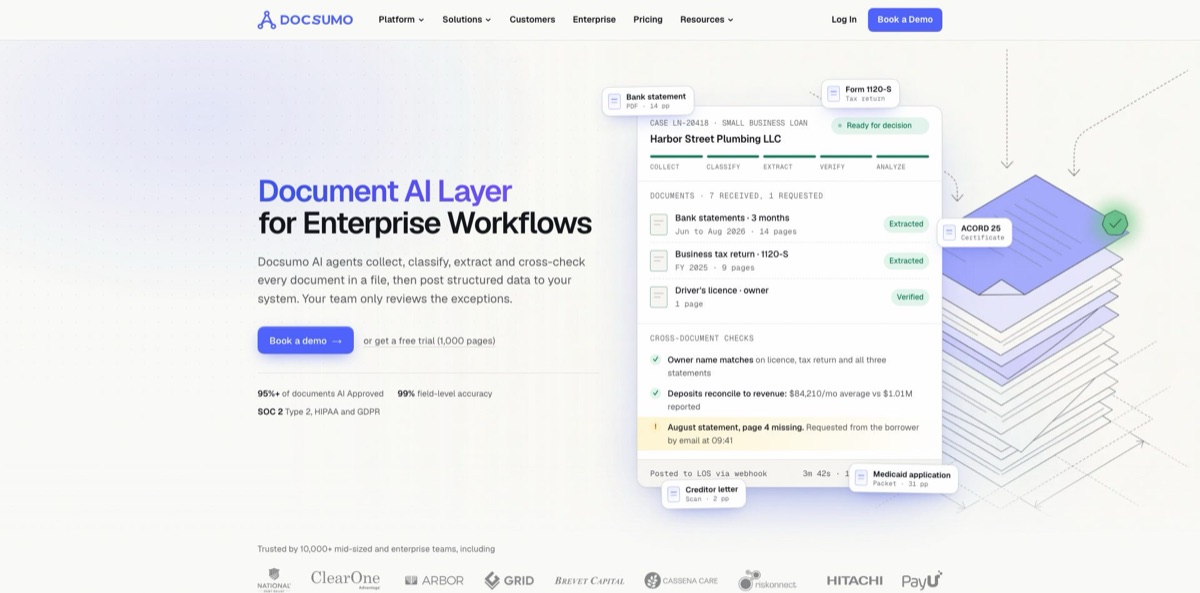
Docsumo is an intelligent document processing (IDP) platform, founded in 2019 and headquartered in New York, that turns bank statements, pay stubs, invoices, ACORD forms and similar paperwork into structured data. LLM-based models classify and split incoming files, extract fields and table rows with a confidence score on each value, and send only uncertain or failed values to a human reviewer. On the top plan, documents are grouped into cases and checked against each other, so a borrower’s name, deposits and stated revenue must agree across the whole file. The weak spots are opaque pricing, setup fees and a trial that starts with a sales call, plus accuracy that users say drops on poor scans and handwriting. It fits operations teams in lending, insurance, healthcare and accounts payable that process documents at volume.
How to start using Docsumo?
There is no instant self-serve sign-up on the current site. Click “Try free for 14 days” on the pricing page or “get a free trial (1,000 pages)” on the homepage, enter your name, work email and company, and pick a time for a short setup call. On that call the Docsumo team loads a few of your documents and configures extraction with you, after which you have 14 days, up to 1,000 pages and 10 user seats to test on your own files.
For your first workflow, open AI Models Hub from the left navigation and pick a pre-trained document type, such as US bank statements, invoices, pay stubs or an ACORD form. Click Use, name the document type and upload a few files, or proceed with the sample document if you only want to see the output. Supported formats are PDF, JPG, JPEG, PNG and TIFF, with Excel files accepted only for rent rolls, P&L statements and balance sheets. Each file can be up to 35 MB and 200 pages, and password-protected PDFs are rejected, so remove the password before you upload.
The screen you will spend most time in is the review screen. It shows the original page next to the extracted fields, and each value carries a green tick when the model is confident or a yellow eye icon when it is not. You set the confidence threshold per field in field settings, correct values by annotating the page or drawing table grids, then click Confirm and download the result as Excel or JSON. If you add fields the pre-trained model does not know, Docsumo’s guide asks you to annotate at least 20 documents before training an advanced model, and to retrain once you have approved 50 or more documents.
Once extraction looks right, connect it to the rest of your stack. Grab an API key under Settings, then API & Webhooks, and send results to your system by webhook as JSON, or feed documents in by email, Zapier or a connected cloud folder. For multi-step processes, describe the workflow to Sumo AI, the assistant in the right-hand panel: it asks a few questions, proposes a plan for your approval, builds the workflow block by block and starts a test run on your samples. Publish only after the run history shows clean results, and note that a separate test environment is listed as a Business plan feature.
Who is it for?
Lending and underwriting teams
Income verification means reading months of bank statements, tax returns and pay stubs line by line. Docsumo extracts every transaction row, reconciles deposits against stated income and flags missing pages or months. Cross-document checks and the case view sit in the Enterprise plan, so budget for that tier if your decisions depend on the whole file.
Debt settlement and financial services operations
Creditor letters, checks and remittance advices pile up faster than staff can key them in. Batch uploads with CSV export take over the typing, and one G2 reviewer uses Docsumo mainly for large volumes of checks. Expect some tuning whenever a new check or letter format shows up.
Insurance compliance and underwriting teams
Certificates of insurance and ACORD 25, 125, 126 and 140 forms arrive from hundreds of vendors and brokers. Docsumo pulls coverage limits, compares them with your requirements and flags expiring or non-compliant certificates, so reviewers work on exceptions instead of every form.
Accounts payable and finance operations
Line items on multi-page invoices are where generic OCR usually gives up. Docsumo captures every line, catches duplicates before payment and posts clean records to your ERP, and Enterprise adds vendor matching against your master data.
Healthcare revenue-cycle and eligibility teams
Claim forms, EOBs, insurance cards and referral letters carry protected health data. HIPAA compliance, SOC 2 Type 2 controls and role-based permissions apply on every plan, which shortens the security review before a pilot.
Developers adding document features to a product
You get a REST API, webhooks with a confidence score on every field, a test environment on Business and a hosted MCP server for Claude Code, Cursor and other agents. There is nothing to host.
Docsumo pricing
Docsumo no longer publishes prices. The official page lists a free trial and two paid tiers sold on a custom quote, and three factors set that quote: the pages you process per month or year, the workflow steps around each document (classification, master data lookups, cross-document checks, automated workflows) and how you pay. Monthly plans reset credits each month, annual plans load the full credit up front for use at any time in the term, and the homepage mentions up to 10% off annual subscriptions, with a further discount for multi-year deals. Setup fees come on top of the subscription and depend on how complex your documents are and how much help you need.
Up to 1,000 pages, 10 user licences, every pre-trained document AI model, field and table extraction, the AI document reviewer, AI prompting and refinement, continuous learning, pre-built integrations, webhooks, APIs and Excel downloads. The trial begins with a setup call.
Custom quote based on volume. Everything in Free plus unlimited users, auto-classification and splitting, AI-transform for validations and categorization, custom document pipelines, rich permissions, a test environment, audit logging, custom third-party integrations, and a dedicated account manager and solutions engineer.
Custom quote based on volume. Everything in Business plus AI-powered automated workflows, AI-led case management, cross-document validations, real-time document analytics, master data lookup and database mapping, and priority support through a private Teams or Slack channel. The page marks it as the most popular plan.
Docsumo takes prepaid card payments, plus wire transfers for annual subscriptions, and monthly plans run on auto-pay. Unused monthly credits do not roll over. To cancel, you notify support at least 30 days in advance. Some help-center articles still describe older self-serve plans called Starter, Growth and Pro, and software directories quote assorted starting prices; neither matches the current official page, so treat them as outdated.
Docsumo key features
AI Models Hub
Pre-trained models cover bank statements, pay stubs, tax forms, ACORD forms, invoices, bills of lading, IDs and more, so you can start on day one without templates or training data. When a layout is new, you can define a field or a table with a plain-English prompt instead of drawing boxes. Docsumo claims 99% field-level accuracy across 250+ document types in production; treat that as a vendor figure and measure it on your own files.
Classification and splitting
A 60-page mixed upload is broken into the statements, pay stubs and IDs inside it, and each piece goes to the right model. You can use the general auto-classifier or train a custom one on your own document types. Auto-classification and splitting are listed under the Business plan, not the free trial.
Confidence scores and a waterfall of models
Every field carries a confidence score, and when one model is unsure about a value, the next model checks it. Only fields still below the threshold you set reach a person, with the source line highlighted on the review screen. Reviewer corrections feed continuous learning, so accuracy on your layouts should improve over time.
Case management with cross-document validation
A case holds every document in a loan, claim or onboarding file, with a checklist of what is required. Names, amounts, dates and account numbers are compared across documents and marked pass, fail or pending, and Copilot answers what failed and why or writes a case summary. Request forms let you ask an applicant for a missing page and drop the upload straight back into the case.
Prompt-to-workflow Agents Builder
Describe a process in plain English and the AI Agent Builder lays out ingestion, classification, extraction, validation and review blocks on a canvas, each still editable. Workflows can start when files arrive, on a schedule, when a case changes stage or by hand, and every run records its trigger, version, status and the input and output of each block. Templates such as MCA loan review and SMB cash flow analysis are set up together with the Docsumo team.
Integrations and MCP
Documents come in by upload, email, API, Zapier or a connected Google Drive, OneDrive, SharePoint, Dropbox, Box or Amazon S3 folder, and data goes out by REST API, webhook, Excel or CSV export, Google Sheets or Salesforce. A hosted MCP server lets Claude, Cursor, ChatGPT, Gemini CLI and other agents work with your account through your API key, within the standard limit of 10 requests per second.
Security and admin controls
Docsumo states SOC 2 Type 2, ISO 27001, HIPAA and GDPR compliance on every plan, encryption in transit and at rest, and a policy of not using your documents to train shared or third-party models. Admins get Okta single sign-on, enforced multi-factor authentication, team permissions per document type, secret management for workflow credentials and an exportable activity log.
Docsumo Pros & Cons
Pros
Docsumo classifies and splits mixed uploads, extracts tables down to individual transactions or invoice lines, scores every field and, on Enterprise, checks documents against each other before anyone opens the file. Reviewers on G2 and Capterra repeatedly praise extraction accuracy, a review screen that puts fields beside the original page, and a support team that helps tune models during onboarding. One Gartner Peer Insights reviewer who tried about 30 document formats rated it the most accurate of the products demoed. Developers get a clear path into existing systems through the REST API, webhooks, a test environment and an MCP server, and SOC 2 Type 2, ISO 27001 and HIPAA coverage handles most compliance questions. Start with one document type and one integration, then add case checks once the extraction numbers hold up.
Cons
Pricing is fully quote-based, setup fees are extra, and even the free trial begins with a booked call, so you cannot quietly test it over a weekend. Cross-document validation, case management and master data lookups, the features that most set it apart, sit in the Enterprise tier. Users report that accuracy drops on poor-quality scans, handwritten entries and unusual layouts, which need several rounds of corrections, and that implementing a custom workflow takes real effort. A few reviewers mention uneven processing times and inconsistent communication from the vendor team. Get a written quote at your real monthly volume, and run your messiest files during the trial.
Use Docsumo if you want…
- Extract every transaction row from bank statements automatically.
- Turn multi-page invoice line items into clean ERP records.
- Verify certificates of insurance against your coverage requirements.
- Split mixed uploads into correctly classified documents.
- Cross-check names and amounts across a whole loan file.
- Route only low-confidence fields to human reviewers.
- Build document workflows from a plain-English description.
- Connect document extraction to Claude or Cursor through MCP.
- Keep HIPAA and SOC 2 controls on sensitive paperwork.
Docsumo alternatives



Docsumo Reviews
A manufacturing manager on G2 says Docsumo pulls data accurately from documents with different layouts and that the side-by-side review screen makes fixes quick, but accuracy falls on poor scans and handwriting, and new layouts take a few rounds of training.
A G2 reviewer who processes large batches of checks values the batch upload and CSV export, while noting that widely varying check formats still need cleanup, ongoing tuning and costs that become noticeable at higher volumes.
A reviewer in accounting on G2 moved from a competing IDP tool in under a month and liked the test environment and master data mapping, though scanned PDFs still produce occasional 0/O and 1/I mix-ups.
A software developer on Capterra found the webhooks easy to build on for invoice extraction, but a wide variety of invoice layouts sometimes confuses the model, so a person still corrects the errors.
A 2025 Capterra review calls the tool easy to use yet criticizes the vendor’s maturity, citing disappointing results on paid services and scheduled calls that were missed or joined late.
FAQ
Does Docsumo have a free plan?
There is a free trial rather than a permanent free plan: 14 days, up to 1,000 pages and 10 users, set up with the Docsumo team on a short call. After that you move to a quote-based Business or Enterprise plan.
How much does Docsumo cost?
Docsumo does not publish prices. Quotes depend on page volume, the workflow steps you need and monthly versus annual billing, with up to 10% off annual plans and setup fees charged separately.
Do I need training data to get started?
No. Pre-trained LLM-based models read common document types without templates, and you can add fields with a prompt. Custom fields the pre-trained model misses need at least 20 annotated documents before you train an advanced model.
Which file formats and sizes does Docsumo accept?
PDF, JPG, JPEG, PNG and TIFF files up to 35 MB and 200 pages each, with Excel accepted only for a few types such as rent rolls, P&L statements and balance sheets. Password-protected files cannot be processed.
What languages does Docsumo support?
The OCR engine and custom model training cover more than 50 languages, including Arabic, Chinese, Hindi, Japanese, Spanish and Ukrainian.
Is my data used to train AI models?
Docsumo says your documents are not used to train shared or third-party models and that data is encrypted in transit and at rest. The platform is SOC 2 Type 2, ISO 27001, HIPAA and GDPR compliant.
Does Docsumo have an API?
Yes. Every plan includes the REST API and webhooks, and a hosted MCP server connects AI agents such as Claude Code, Cursor and ChatGPT to your account with your Docsumo API key.
How do I cancel a Docsumo subscription?
Notify the support team at least 30 days in advance; Business and Enterprise customers go through their customer success manager. Access continues until the end of the billing period you already paid for.
Similar tools
 RossumIntelligent document processing platform that uses a proprietary transactional LLM to capture, validate and export data from invoices and orders.
 VeryfiDocument AI platform whose OCR APIs turn receipts, invoices, checks and bank statements into JSON, with built-in fraud checks and a mobile
 SprigEnterprise survey platform where AI agents design studies, run adaptive surveys across email, panels and apps, and turn responses into reports.