

Docswrite
Content CreationUpdated November 24, 2026
Publishing hub that sends Google Docs, Drive folders and Sheets to WordPress, Webflow, Shopify and 8 more destinations, with an AI writer and MCP server.
We may earn a commission when you sign up through our links. It does not affect our reviews.
What is Docswrite?
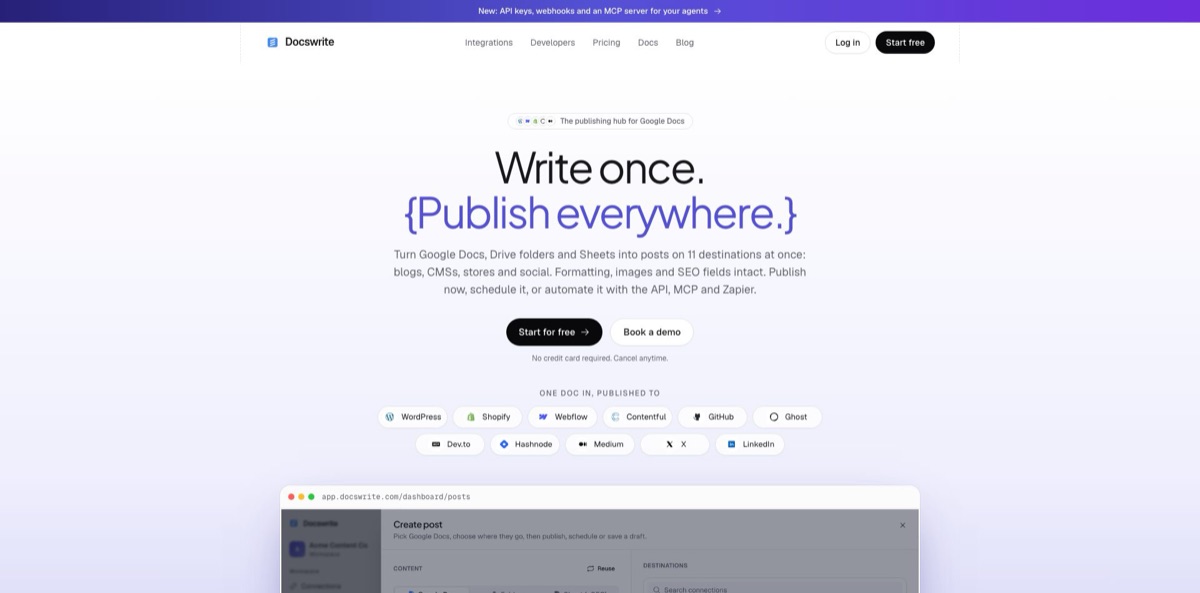
Docswrite is a web-based publishing layer that sits between Google Docs and the places your content goes live. You keep writing in Docs, a Drive folder or a Google Sheet, and it converts each file into a formatted post for WordPress, Webflow, Shopify, Ghost, Contentful, Medium, Dev.to, Hashnode, GitHub, X or LinkedIn, uploading images and filling slug, tags, categories and Yoast or Rank Math fields on the way. The AI side has three parts: an AI Writer that drafts articles from a topic or keywords, AI rewrites of an article into an X thread or LinkedIn post, and a hosted MCP server that lets Claude, Cursor or ChatGPT publish through your connected sites. The weak spot is that the AI Writer is a basic add-on next to dedicated SEO writers, and the public review base is tiny. Pick it if copy-pasting finished docs into a CMS is your bottleneck.
How to start using Docswrite?
Click Start for free on the homepage and sign in with Google. No card is needed, and the free tier gives you 5 exports in total and 1 connection. In the dashboard, click Connect Google Account and grant Drive access; the help center says Docswrite requests only the permissions needed to read the documents you select and cannot modify your original docs. Then connect a destination: WordPress through one-click authorization, an application password or the optional Docswrite plugin, Webflow by signing in, Shopify by installing its app, and Ghost, Dev.to, Hashnode or Medium by pasting a token.
Your first real job should be an article that is already finished in Google Docs. Make a copy of the template doc linked in the help center, which puts a small table at the top for title, slug, categories, tags, excerpt, author, post_type and SEO fields such as yoast_focuskw, yoast_title and yoast_metadesc. Write the body below the table as usual, with headings, lists, tables and images. Docswrite reads that table on export, so writers set metadata inside the doc and never need a WordPress login.
The export settings screen is where most decisions happen. Pick one doc, several docs or a whole Drive folder, then tick every destination it should go to. For WordPress you choose post, page or a custom post type, categories and tags, ACF and SEO field mapping, the featured image (the first image in the doc or an image URL), the author, image compression and the status: draft, publish now or schedule. If you would rather have AI start the draft, open AI Hub in the sidebar, enter a topic, keywords or a prompt, click Start Writing, then use Export to send the result through the same settings.
Click Publish to WordPress, or the equivalent button for another destination, and Docswrite returns a live link for every post. Scheduled posts sit on the calendar until they go live, and publishing the same doc again updates the existing post instead of creating a duplicate. Open each post on the site and check heading levels, tables and image sizes, since every theme renders converted HTML a little differently. Once the flow works, Business plan users can trigger the same publish from Trello, Notion or Airtable through Zapier, or from their own code through the REST API.
Send your first three docs as WordPress drafts, compare them with the originals, and only then switch the template to publish or schedule.
Who is it for?
Newsroom editors
Local and regional publishers file stories in Google Docs, then someone re-keys each one into WordPress with Newspack fields. Docswrite carries the subtitle, article summary and SEO fields over from the doc, and the Enterprise plan is pitched at news sites and magazines. One fewer copy-paste step per story adds up across a daily news cycle.
Content agencies
You manage many client WordPress sites, and every freelance writer needs a login on each one. Connections let writers publish from Docs without CMS access, with 10 sites on Business and unlimited sites on Enterprise. Reviewers on WordPress.org cite bulk publishing, clean formatting and support.
Programmatic SEO builders
You have a spreadsheet of cities, products or comparisons and need one page per row. The Google Sheets mode fills a Docs template once per row and can group rows into listicles. Its product page documents WordPress only, though the homepage also names Webflow and Shopify, so confirm your CMS first.
Multi-platform content marketers
A post on your blog, a copy on Medium and a teaser on LinkedIn usually means three manual edits. The composer sends one doc to several destinations with per-destination tags and canonical URLs, and AI can turn the article into an X thread or LinkedIn post. You keep one source of truth instead of three drifting versions.
AI agent builders: Your agent can draft content, but it still needs a safe way to post it. The hosted MCP server and REST API give it list_connections and publish_post, with OAuth 2.1, idempotency keys, retries and signed webhooks. You avoid storing WordPress passwords in agent configs.
Developer advocates
Technical writers who cross-post tutorials to Dev.to, Hashnode, Medium and GitHub get each platform’s format from one doc, with Markdown for the developer sites. Google Docs stays the review surface for editors. Posting the same tutorial to four platforms stops eating an afternoon.
Docswrite pricing
Docswrite sells flat monthly or yearly subscriptions in US dollars, billed through Stripe. Plans differ by how many Google Docs you can publish each month, how many connections (sites, stores and CMSs) you can attach, the number of seats and access to automation. X and LinkedIn accounts never count toward the connection limit, every plan reaches every destination, and paying yearly saves about 16%.
5 exports in total, 1 connection, every destination and the Docswrite-hosted blog. Webhooks, bulk import and Zapier are not included, so treat it as a trial rather than a working plan.
75 Google Docs a month, 75 programmatic SEO posts a month, 3 connections, 3 seats, image compression, bulk Google Docs import, Yoast, Rank Math and Newspack fields, and email support. Zapier, the REST API and Google Team Drive are not included.
Unlimited Google Docs and programmatic SEO posts, 10 connections, 5 seats, Zapier automation, REST API access, Google Team Drive and priority support.
Unlimited connections and seats, everything in Business, plus a free automation setup. The plan starts through a Talk to us contact form rather than self-serve checkout.
Two details deserve a check before you pay. The pricing table lists 75 programmatic posts a month on Start-Up, while an FAQ on the same page says 1,000, and neither the pricing page nor the AI Writer page states how many AI articles each plan includes. API calls made with an org key are limited to 60 requests per minute per key. You cancel from Settings > Billing, the plan runs to the end of the paid period, and everything you published stays on your site.
Docswrite key features
The multi-destination composer sends one doc, several docs or a whole Drive folder to any mix of 11 destinations, creating one post per doc per destination. Output adapts to each target: HTML for WordPress, Shopify and Ghost, Markdown for GitHub, Dev.to and Hashnode, and rich text mapped to Webflow and Contentful fields. You stop maintaining separate copies of the same article for each platform.
A metadata table at the top of the doc carries title, slug, tags, categories, author, excerpt, post type, ACF fields and Yoast, Rank Math or Newspack settings. Docswrite reads it on export, applies it to the post and creates new categories or tags when needed. Writers control SEO fields without touching the CMS admin, though Yoast and Rank Math fields need the optional Docswrite plugin on WordPress.
Image handling uploads every picture in the doc to the destination, into the Media Library on WordPress, instead of hot-linking it from Google. Optional compression shrinks files on the way, and the first image can become the featured or cover image. Image-heavy posts, which break most copy-paste workflows, come through intact.
Programmatic SEO turns a Google Sheet into posts
Column names become variables in a Google Docs template, Docswrite fills the template once per row, and Group By publishes one listicle per group instead. Tags, categories and SEO settings apply to the whole batch; the product page lists WordPress as the destination, while the homepage also mentions Webflow and Shopify.
Docswrite AI, found under AI Hub, takes a topic, keywords or a prompt and drafts a structured article with headings in an editor. You review and edit, then export it with the same formatting, image and SEO handling as a Google Doc, to a WordPress site or a Docswrite-hosted blog. The same AI can turn any article into an X thread or LinkedIn post that you edit before it goes out.
The hosted MCP server at api.docswrite.com/mcp lets Claude Code, Cursor, ChatGPT or another MCP client list your connections and publish Markdown, HTML or a Google Doc to up to 20 of them in one call. Sign-in uses OAuth 2.1 with PKCE or an org API key, and the REST API mirrors the same actions. Publish jobs get up to 5 attempts with backoff, idempotency keys make repeated calls safe, and webhooks signed with HMAC-SHA256 report published or failed posts.
A shared calendar shows scheduled and published posts across every connection, and you press + on a day to schedule one
Workspaces hold shared connections, seats and per-workspace API keys, so editors publish without CMS admin rights. On Business and above, the Zapier app triggers publishing from Trello, Notion, Monday, ClickUp, Asana or Airtable.
Docswrite Pros & Cons
Pros
Docswrite removes the most tedious step in a Docs-based workflow: rebuilding a finished article inside a CMS. Headings, tables, code blocks and images survive the trip, and metadata travels in the doc itself, so writers never need a WordPress account. Destination coverage is broad for the price, with WordPress, Webflow, Shopify, Ghost, Contentful and developer platforms on every plan, and republishing updates the same post instead of duplicating it. The developer layer is unusually complete for a Docs-to-CMS tool, with documented MCP tools, OAuth scopes, rate limits, idempotency and signed webhooks. The few public reviews consistently praise responsive support and bulk imports. Start with one WordPress connection and the doc template, then add destinations once the output matches your theme.
Cons
The AI part is thin. The AI Writer page names no model, gives no article limits and publishes only to WordPress or a hosted blog, so it will not replace a dedicated SEO writer. Programmatic SEO is documented for WordPress only, Wix, Bluesky and Threads are still coming soon, and HubSpot is not supported. Start-Up excludes Zapier and the API, and the pricing page contradicts itself on programmatic SEO limits. The help center security page says documents need link sharing enabled to be processed, which some teams will not accept for embargoed drafts. Public reviews number only a handful across WordPress.org, Product Hunt, G2 and Trustpilot. Confirm the sharing requirement and plan limits with support before you move a large archive.
Use Docswrite if you want…
- Publish finished Google Docs to WordPress in one click.
- Send one article to several platforms at once.
- Set Yoast or Rank Math fields from the doc.
- Generate hundreds of WordPress pages from a Google Sheet.
- Let Claude or Cursor publish through MCP safely.
- Keep writers out of the CMS admin entirely.
- Schedule posts across every channel on one calendar.
- Turn blog articles into X threads and LinkedIn posts.
Docswrite alternatives



Docswrite Reviews
A WordPress.org reviewer needed to move an image-heavy Google Doc into WordPress after other converters fell short, and found Docswrite simple and reliable while it asked for only minimal Drive access; they also liked the design of a hosted service paired with a lightweight plugin.
An agency managing many content sites wrote on WordPress.org that, after comparing options, Docswrite was the only scalable tool that handled formatting well, and singled out its support.
On Product Hunt, a user who publishes to several websites said the tool saves two to three hours a day because author, Yoast title, description, focus keyword and tags are all set inside the Google Doc.
A small publisher on G2 said it automated uploading Google Docs articles to WordPress with images and metadata; they hit one back-end upload failure, which the team resolved quickly.
In a Google Workspace Marketplace review of the official WordPress.com add-on for Google Docs, one user said that add-on did not work for them and they switched to Docswrite instead.
FAQ
Is there a free plan for Docswrite?
Yes. The free tier gives you 5 exports in total and 1 connection with no credit card, enough to test a few docs before choosing Start-Up at $29/month.
Do I need a WordPress plugin to use Docswrite?
No. You can connect through one-click authorization or an application password over the WordPress REST API. The optional Docswrite plugin is only needed if you want to set Yoast or Rank Math fields.
What AI features does Docswrite have?
There is an AI Writer in the AI Hub that drafts articles from a topic or keywords, AI conversion of articles into X threads and LinkedIn posts, and a hosted MCP server that lets AI agents such as Claude or Cursor publish to your connected sites.
Which platforms can Docswrite publish to?
WordPress, Webflow, Shopify, Ghost, Contentful, Medium, Dev.to, Hashnode, GitHub, X, LinkedIn and a Docswrite-hosted blog. Wix, Bluesky and Threads are listed as coming soon, and HubSpot is not supported.
Does Docswrite have an API?
Yes. The REST API with org API keys is included on Business and Enterprise and is limited to 60 requests per minute per key. OAuth calls, which MCP clients use, are limited to 120 per minute per grant, and a Zapier app covers no-code triggers.
Is my Google Drive content safe with Docswrite?
The help center says Docswrite requests minimal permissions, cannot modify your original docs, encrypts traffic with TLS 1.3 and runs on SOC 2 Type II compliant DigitalOcean infrastructure behind Cloudflare. The same page says documents need link sharing enabled to be processed, so check that against your confidentiality rules.
What happens to my posts if I cancel?
They stay published on your site. You cancel from Settings > Billing, and the plan keeps working until the end of the paid period.
Can I pull existing WordPress posts back into Google Docs?
Yes. The help center lists WordPress-to-Google-Docs export, including bulk export, so you can move old posts into Docs, edit them with your team and republish.
Similar tools
 Contents.comEnterprise AI content platform that writes, translates and illustrates on-brand content, with batch generation, approval workflows and audit trails.
 CopyterSpanish-first AI writing platform that researches keywords, drafts SEO articles and publishes them to WordPress, with image, voice and chat tools.
 WritefullAcademic writing AI for Word, Overleaf and the browser, with journal-trained language edits, an Academizer, a paraphraser and title and abstract generators.