

Dzine
Image EditingUpdated November 11, 2026
Browser-based AI image and video studio with a layered canvas, prompt editing, consistent characters, lip sync and dozens of third-party models.
We may earn a commission when you sign up through our links. It does not affect our reviews.
What is Dzine?
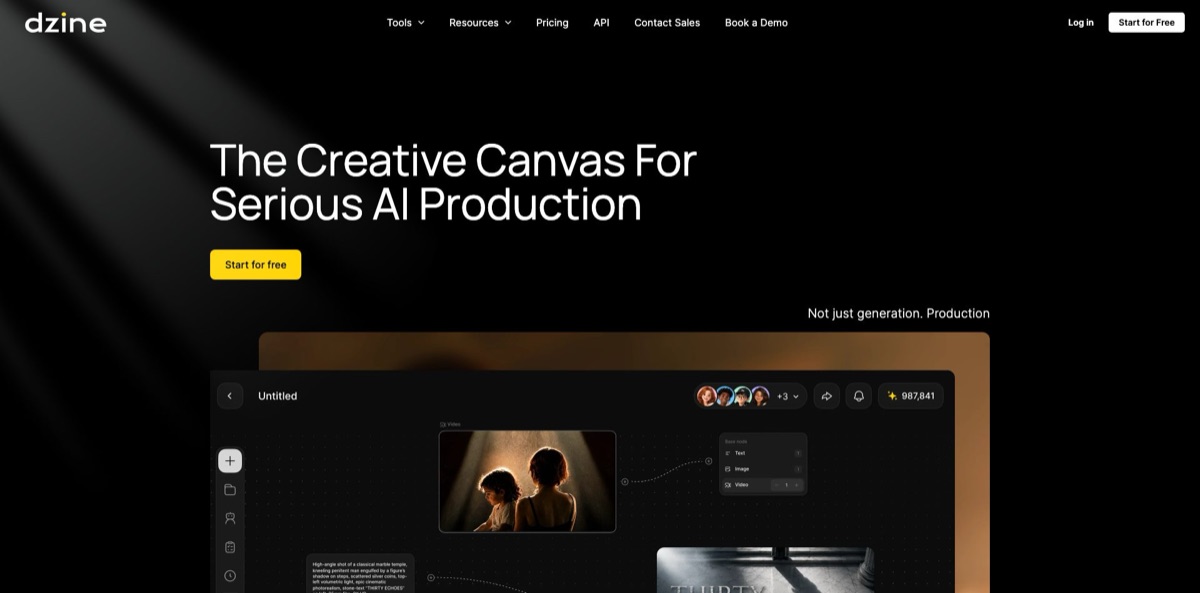
Formerly called Stylar, the service was renamed Dzine in July 2024 and has grown from a style-transfer tool into a browser studio for AI images, video and lip sync. At its core sits a layered canvas: you arrange photos, shapes and sketches, Image-to-Image merges them into a new layer that keeps your composition, and AI Editor tools repaint, insert, erase or expand a selected area. A Chat Editor sends plain-language edits to models such as GPT Image 2.5, Nano Banana Pro, Seedream 5.0 and Midjourney, all paid from one credit balance. That spares you separate subscriptions and keeps characters consistent from scene to scene. The weak spots are cost predictability and trust: most editing tools are paid-only, there are no refunds, and Trustpilot reviewers complain about throttled unlimited plans. Choose it if control over composition matters more to you than one-click simplicity.
How to start using Dzine?
Open dzine.ai and click Start for Free. Everything runs in the browser, so there is nothing to install. A new free account receives 100 credits that stay valid for 12 months, and the old daily refill of 32 credits has been discontinued. Free generations are public, may appear in the community feed and cannot be used commercially, so spend those credits on learning the interface rather than on client work. Dzine’s YouTube tutorials, recommended in the FAQ, show where each tool sits.
Your first real job should be a simple composite. Create a canvas project, upload a product photo and run Remove Background, which costs 2 credits and works on every plan. Then place the cut-out next to a reference image or a rough sketch, select the elements and press Image-to-Image. Dzine merges them into a new image layer that keeps the positions, sizes and orientation you laid out, at 4 credits in Normal mode or 8 in Quality mode. Variation in Fast mode costs 2 credits and gives you cheap alternatives before you commit.
The AI Editor panel is where the real image editing happens, and it requires a paid plan. Local Edit repaints a selected area from your prompt, Insert Object adds an item into a marked region, AI Eraser removes what you select, and Generative Expand extends the frame; most of these cost 4 credits, while Expand costs 8. Chat Editor takes plain-language instructions instead of a mask, and the model you pick sets the price: Nano Banana Pro costs 20 credits at 1K or 2K and 40 at 4K. Switch on Private Generation if an image should stay out of the public feed.
Before exporting, compare versions and check hands and faces, since Hand Repair and the Face Kit tools (Face Swap, Face Repair, Expression Edit) cost 4 credits each. Export at 1x is free, 1.5x and 2x cost 2 credits on paid plans, and 3x, 4x and SVG export are reserved for the Creator and Master tiers. In Pipeline, the node canvas for film work, run Copyright on the final image and download its Provenance record for your producer or legal team.
Who is it for?
Indie filmmakers and animators
You are trying to keep the same character on model across dozens of shots while switching between image and video models. Pipeline links character assets, prompts and Text, Image, Video and Audio nodes on one canvas, and earlier results are never overwritten. Multi-character lip sync and video models such as Kling, Seedance and Veo 3.1 sit in the same account.
E-commerce sellers
Every marketplace wants clean backgrounds, fresh settings and quick variations of the same product. Remove Background, Product Background, Insert Object and Generative Expand turn one studio shot into a set of listing images. Commercial use comes with every paid plan, which the free tier lacks.
Illustrators and character designers
Picture books and comics fall apart when a face changes between pages. Character Training stores a reusable character for 30 credits, and Pro Style training does the same for a visual style. Creator holds 10 private characters, Master 60 and Master Pro 120.
Social media creators
You need a trending filter, a talking avatar and a short clip on the same afternoon. Ghibli, Pixar and PS2 style filters, lip sync and image-to-video live under one login. Master’s unlimited images help daily posters, if the fair-use slowdowns users report do not wreck your schedule.
Small studios and agencies
Files scattered across freelancers and chat threads slow every review. Team plans add a shared asset library, real-time canvas collaboration and credit distribution, while Review Room gathers assets for comments. Provenance records and the Copyright check give clients a paper trail before delivery.
Model shoppers on a budget
You want to compare Nano Banana Pro, GPT Image 2.5, Midjourney and Flux without four subscriptions. One credit balance covers them, and the pricing page lists the credit cost per image. Beginner at $8.99 a month is a cheap way to find out which model fits your work.
Dzine pricing
Dzine bills everything from one Credits balance shared by image, video and other AI tools. Each action has a fixed price in credits: a GPT Image 2.5 image costs 9, a Nano Banana Pro image 50, background removal 2, and a 5-second Kling 2.6 clip at 1080p 85. Prices are listed in USD, and annual billing saves 22%.
100 credits at sign-up, valid for 12 months, with no daily refill. Generations are public and non-commercial, the AI Editor tools need a paid plan, and free users cannot buy top-up credits.
1,000 credits a month, which the page equates to about 500 low-quality 1K GPT Image 2.5 images or about 5 Seedance 2.5 videos at 480p. Private generation, commercial use and 8 concurrent jobs, but no rollover and no top-ups. When checked, the first month was offered at $4.49.
6,000 credits a month with rollover for up to 3 months, a 10 GB asset library, 10 private characters, 10 Pro Styles and video upscaling up to 1080p. The first month was offered at $12.49 when checked.
9,000 credits plus unlimited images on all listed image models under the Fair Usage Policy, a 100 GB library, 60 characters and styles, 15 concurrent jobs, video enhance up to 4x and upscaling up to 8K.
30,000 credits plus unlimited images, a 200 GB library, 120 characters and styles and 18 concurrent jobs.
Creator at $24.99 per seat/month ($20 billed annually) and Master at $59.99 per seat/month ($50 billed annually), with multi-person canvas collaboration, member management, a shared asset library and credit distribution. A $0 team tier allows collaboration with public, non-commercial generation.
$10 for 2,000 credits, $20 for 4,000 or $50 for 10,000, valid for 12 months and available on Creator and higher plans.
Custom. Larger teams go through Contact Sales, and the developer API is subscribed separately in the Dzine API Portal.
All payments are non-refundable, subscriptions renew automatically, and switching plans resets the billing cycle. The pricing page also warns that free-trial availability can be limited by region, and PayPal, USDT and Wise payments are possible on request through support.
Dzine key features
Layered canvas with Image-to-Image
You place uploads, shapes and sketches on a canvas, and Image-to-Image merges them into a new layer that respects the relative positions, sizes and orientation you set. That gives you composition control a single text prompt rarely delivers.
AI Editor and Face Kit
Local Edit, Insert Object, AI Eraser, Generative Expand and Hand Repair act on a selected area, so the rest of the image stays untouched. Face Swap, Face Repair and Expression Edit handle portraits at 4 credits each. All of these are limited to paid plans, which is the main gap in the free tier.
Chat Editor with a large model menu
You describe the change in plain language and pick the model: GPT Image 2.5, Nano Banana Pro and Nano Banana 2, Seedream 5.0, Flux.2, Qwen Image, Ideogram 4.0, Grok Imagine, Wan 2.7 and Midjourney all appear in the credit table. Costs run from 2 credits for light GPT Image edits to over 200 for the heaviest GPT Image 2.5 jobs.
Consistent characters and trained styles
Character Training creates a reusable character for 30 credits, and Insert Character places it into new scenes for 8 credits on Creator and Master plans. Pro Style training captures a look in the same way for 30 credits. You end up with a cast and a style you can reuse across a series instead of re-prompting every image.
Video, lip sync and enhancement
The same credits run text-to-video, image-to-video and reference-to-video with Kling, Seedance, Veo 3.1, Hailuo, Wan and other models, plus image and video lip sync from 6 credits per 5 seconds. Master and Master Pro add video enhance up to 4x and upscaling up to 8K. A 5-second Seedance 2.0 clip at 720p costs 220 credits, so budget video separately.
Pipeline and Review Room
Pipeline is a node canvas where scripts, characters, prompts and Text, Image, Video and Audio generators are linked from left to right. Swap a reference and the following nodes regenerate with the same settings, earlier results stay in their nodes, and credits for a failed node run are refunded. Review Room collects finished assets so directors and clients can comment next to each one.
Provenance and Copyright check
Provenance packages a result’s prompts, references, model and settings into a download with manifest.json, trace.json and SHA-256 checksums. Copyright scans an image for IP, character, person, scene, landmark and logo risks and lists similar images. The report says it is for reference only, so treat it as preparation for legal clearance, not a substitute.
Dzine Pros & Cons
Pros
Control is the strongest argument. The layered canvas, Image-to-Image composition and masked AI Editor tools let you change one part of a picture without rerolling the whole thing, which pure prompt generators struggle with. One credit balance reaches a long list of current image and video models, and the pricing page spells out the credit cost of each. Consistent characters, lip sync, image-to-3D and the Pipeline node canvas stretch it from photo editing into small production work, and Provenance plus a Copyright check are rare at this price. Start on Creator if you plan to train characters or edit regularly, since Beginner has no credit rollover and no top-ups.
Cons
The free plan is thin for an image editor: 100 credits in total, public results, no commercial use and the AI Editor tools locked behind a subscription, even though some landing pages advertise free editing. Every payment is non-refundable, plans renew automatically, and Trustpilot reviewers describe charges after trials and credits spent on renders that never arrived. The unlimited images on Master plans fall under a Fair Usage Policy with no published thresholds, and several users report waits of minutes per image. Pay monthly for the first cycle, set a reminder before renewal and keep sensitive images in Private Generation.
Use Dzine if you want…
- Compose product scenes from rough layouts and sketches.
- Remove backgrounds and erase objects from photos.
- Keep one character consistent across many scenes.
- Edit images by describing changes in plain language.
- Compare Nano Banana, GPT Image and Midjourney in one place.
- Turn still images into short videos with lip sync.
- Build storyboards and shots on a shared node canvas.
- Track prompts and references behind every delivered asset.
Dzine alternatives
 KreaRead review →
 Leonardo.aiRead review →
 OpenArtRead review →
 CanvaRead review →
 Adobe FireflyRead review →
 RecraftRead review →
 PixlrRead review →
Dzine Reviews
Long-time fans praise the breadth of the toolkit, saying new image and video models, lip sync and image-to-3D arrive quickly in one account, and several credit the Discord community and responsive developers.
An instructional designer found the results consistent enough to justify an annual plan, while another user called the program great but said learning the tools eats a lot of credits.
Master plan subscribers complain that unlimited image generation slows to several minutes per image under the fair-use rules, and that support was slow or silent when they asked why.
Billing draws the angriest reviews: charges after a free trial ended, a renewal at almost double the original price, credits that became unreachable after cancelling, and no refunds.
Quality opinions are split: lip sync started strong for one user but slipped on a two-character video, and others report failed character consistency and simple color changes that burned credits.
FAQ
Is Dzine free to use?
Yes, with limits. New accounts get 100 credits valid for 12 months and no daily refill. Free generations are public and non-commercial, and AI Editor tools such as Local Edit and AI Eraser need a paid plan.
Is Dzine the same product as Stylar?
Yes. Stylar was renamed Dzine in July 2024, and stylar.ai now redirects to dzine.ai. Existing accounts and earlier work carried over with the rename.
Can I use Dzine images for commercial projects?
Paid plans allow commercial use to the extent permitted by law, while free-tier output is for personal projects only. Rights can also depend on the tool and model, so the site advises reviewing the terms before commercial delivery.
Are my Dzine generations private?
Not on the free plan: those images are public and may appear in the community feed. Paid plans include Private Generation, and the privacy policy says generations and their prompts are stored in your account history; EEA users can request access or deletion by email.
What does unlimited images mean on the Master plans?
Master and Master Pro include unlimited generations on the listed image models under a Fair Usage Policy. The policy publishes no numeric caps and lets Dzine slow generation, limit models or suspend unlimited access when usage looks automated or excessive.
Do unused Dzine credits roll over?
Beginner credits do not. Creator, Master and Master Pro credits roll over for up to 3 months, top-up credits last 12 months, and only Creator and higher plans can buy top-ups.
Does Dzine have an API?
Yes. A REST API covers text-to-image, image-to-image and face swap with key-based authentication, and you subscribe and create keys in the Dzine API Portal, which is billed separately from the creator plans.
How do I cancel a Dzine subscription?
Open your profile, choose Manage Plan & Invoice and cancel in the Stripe portal; team admins do the same from the team admin page. Access lasts until the end of the billing period, and past or renewal payments are not refunded.
Similar tools
 HamaFree browser-based AI eraser that removes people, objects, text and blemishes from photos with a brush, plus an inpainting API for developers.
 BgEraserBrowser-based AI background remover that turns up to 20 photos per batch into transparent PNGs without an account, plus offline apps for
 ImgkitsBrowser-based set of AI photo tools for background removal, object cleanup, upscaling, old photo restoration, image generation and image-to-video.