

Eden AI
Developer ToolsUpdated November 10, 2026
European AI gateway with one OpenAI-compatible API to around 1,000 LLMs and expert models, plus routing, fallbacks, cost tracking and budgets.
We may earn a commission when you sign up through our links. It does not affect our reviews.
What is Eden AI?
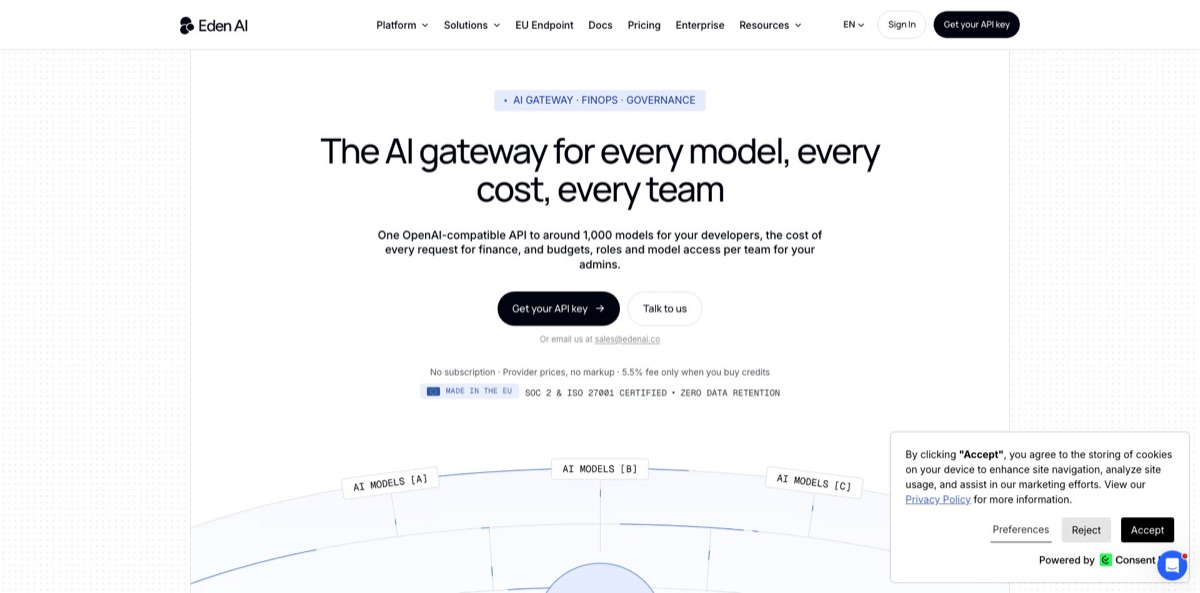
Eden AI is a hosted AI gateway run by a French company from the Lyon area: one OpenAI-compatible API key that reaches around 1,000 models from more than 80 providers, by the company’s own count. Besides chat LLMs from OpenAI, Anthropic, Google or Mistral, it exposes expert models for OCR, invoice parsing, speech, translation and image analysis through a second endpoint, so one integration covers both. The problem it removes is vendor sprawl: separate contracts, keys, SDKs and invoices for every provider, and no clear view of who spent what. Every response carries its cost in USD, and routing can pick the cheapest healthy provider or fail over on its own. The weak spot is price, since the 5.5% fee matches OpenRouter’s. Pick it if you juggle several providers or need European data handling.
How to start using Eden AI?
Sign-up is self-serve. Click Get your API key on edenai.co, register at app.edenai.run, and you land in the dashboard with no subscription to choose. On the API Keys page you can create a regular key or a Sandbox key; sandbox keys return simulated responses with the real response structure and cost nothing, so you can wire up your code before paying. When you want real calls, open the billing section, pick an amount of credits, choose USD or EUR and pay by card or PayPal, or by bank transfer on request. The 5.5% platform fee is added at that checkout, not per request.
Your first real scenario is usually a chat call from code you already have. Point the OpenAI SDK at the base URL https://api.edenai.run/v3, swap in your Eden AI key and pass a model as provider/model, for example anthropic/claude-sonnet-latest or mistral/mistral-large-latest. The answer comes back in the familiar OpenAI shape with two extra fields: provider, which names who served the request, and cost, in USD. For OCR, speech or translation, you send a POST to /v3/universal-ai with a model string such as ocr/financial_parser/google and an input object instead.
The settings that shape cost and reliability live partly in the request and partly in the dashboard. In the request you can drop the provider prefix and add a routing object that sorts providers by cost, speed, latency or exact instruction-following, plus a fallbacks list for when a model fails. In the dashboard, create separate keys for development, staging and production, each with its own budget and expiry. Response caching is on by default for identical requests, and log retention stays off unless you switch it on for debugging. Organizations on the Advanced plan also get roles and guardrails under Settings.
Before you go live, check three things. First, read the public model catalog at /v3/models, which needs no key, to confirm prices, capabilities and regions for the models you picked. Second, if your data must stay in Europe, switch the host to api.eu.edenai.run and confirm that non-EU models are refused with HTTP 451 rather than quietly rerouted. Third, turn on auto-refill with a threshold and a refill amount, because an empty balance makes every request fail with a 402 Payment Required error.
Who is it for?
Backend developers
You already ship features on the OpenAI SDK and want to try Claude, Gemini or Mistral without adding a client library per vendor. Eden AI keeps the same request shape, so switching is a change to one model string. Declared fallbacks mean a single provider outage no longer takes your feature down.
Engineering managers and FinOps leads
AI spend sits on several invoices and nobody can say which project caused last month’s jump. Per-key budgets that reset daily, weekly or monthly, request tags and usage endpoints give you chargeback data per key, member or product. You stop reconciling provider bills by hand.
European companies with strict procurement
Legal wants a DPA, data residency and certifications before any AI tool gets approved. Eden AI states SOC 2 and ISO 27001 certification, offers an EU endpoint that refuses non-EU models and keeps no prompts or outputs by default. That shortens the security questionnaire, although each underlying provider still needs its own review.
SaaS founders reselling AI features
You charge customers for AI features and need to stop one heavy user from eating your margin. A dedicated API key per customer or product, each with its own spending cap, turns that into configuration instead of custom metering code. The cost field on every response can feed your own invoicing.
No-code and automation builders
You work in Make, Zapier, n8n or Bubble and want OCR, speech-to-text or translation without coding against five different APIs. Eden AI ships modules and plugins for those platforms, and one credit balance covers all of them. Response caching can also save you from paying twice for repeated identical requests.
Developers using coding agents
You run Claude Code, Cline, Codex CLI or OpenCode and want to try other models or keep traffic in the EU. The docs include a setup guide for each, plus a hosted MCP server that adds expert models as tools. One key covers both the model and the tools.
Eden AI pricing
There is no subscription. You buy prepaid credits, and each call is deducted at the provider’s own published price with no markup; the only extra is a 5.5% platform fee charged when you purchase credits. Balances and per-request costs are always shown in USD, although you can pay in EUR at the ECB exchange rate. Under the terms of service, payments and prepaid credits are non-refundable, so top up in amounts you expect to use. The plans below come from the official pricing page and docs as of November 2026.
You pay provider prices plus the 5.5% fee on each credit purchase, with no API call cap. It includes access to around 1,000 models from 80+ providers, multiple API keys with individual budgets, free sandbox keys, cost and performance monitoring, auto-refill, unlimited seats and chat support with replies within 48 working hours. The default rate limit is 10 requests per second per account, raised on request.
Custom. Terms are quote-based and aimed at larger organizations, with higher rate limits, bulk discounts, private deployments, custom latency and cost optimization, dedicated support with an SLA and professional services. It also adds the team features: roles, guardrails, SSO, SCIM directory sync and audit logs, plus custom billing such as postpaid monthly invoices with 30-day terms and an optional monthly spend limit.
Eden AI key features
An OpenAI-compatible gateway accepts the OpenAI SDK with only the base URL and key changed, and an Anthropic-compatible messages endpoint exists too. Model ids follow the provider/model pattern, and the same surface covers chat, embeddings, images, audio and moderation. Streaming works on the LLM endpoint. You can move existing code over in minutes instead of rewriting it per provider.
Provider routing picks who serves a model when several providers sell it, ranking them by cost, speed, latency or exact instruction-following. Failing providers drop to the bottom of the list, declared fallbacks switch to another model, and the homepage says failed attempts are never billed. Whole chains can be saved as named routing policies.
Expert models sit behind a separate Universal AI endpoint that uses a feature/subfeature/provider model string
It covers OCR, invoice and ID parsing, table extraction, speech-to-text, text-to-speech, translation, image detection, moderation, video generation, web scraping and deep research. Long jobs run asynchronously, with webhooks, and results are kept for 7 days. A hosted MCP server hands 42 tools built on these features to any MCP client or agent.
Cost controls start with a USD cost field on every response
You can tag requests by team, client or product, give each API key a budget that resets daily, weekly or monthly, and pull usage through management endpoints. Identical requests are served from the response cache at no charge, and the Batch API takes up to 5,000 chat requests per JSONL file at half the standard token price for OpenAI and Anthropic models.
Governance tools on the Advanced plan include members with built-in or custom roles, and guardrails that allow or block providers and models, set per-member budgets and cap request rates. Guardrails attach to a role, a member, a single key or the whole organization. SSO through Okta, Azure AD and other identity providers, SCIM sync and audit logs round it out for compliance teams.
EU data residency runs through a separate host, api.eu.edenai.run, which routes only to providers and models cleared for European processing and refuses others with HTTP 451. By default Eden AI stores no request or response content, logs only metadata such as timestamps, token counts and costs, and does not train on customer data. The docs include a per-provider table of training, retention and zero-retention options, which helps when your DPO asks where data goes.
Integrations cover OpenAI SDKs for Python and TypeScript, LangChain, Haystack, Open WebUI and LibreChat, plus Make, Zapier, n8n and Bubble. Coding agents such as Claude Code, Cline, Codex CLI, Continue and OpenCode have their own setup guides. Bring-your-own-key lets you plug in existing provider contracts while keeping Eden AI routing and monitoring on top.
Eden AI Pros & Cons
Pros
The biggest win is consolidation. One key, one balance and one invoice replace separate accounts with OpenAI, Anthropic, Google, AWS and specialist vendors, and unlimited seats let the whole team in without per-user fees. Every response shows its exact cost, so budgeting stops being guesswork. Unlike most LLM routers, Eden AI also covers expert models such as OCR, invoice parsing, speech and translation through the same key. Sandbox keys, health-aware failover and free cached responses make it practical for production, and the EU endpoint gives European teams a hard regional boundary. Start with cost-based routing on a model that several providers serve to see whether the savings are real for your traffic.
Cons
The fee is not a differentiator: 5.5% on credit purchases matches OpenRouter, and Hacker News commenters questioned paying a European middleman to reach mostly US providers. The EU endpoint offers only models cleared for European processing, so some frontier models are off the table there. Team governance such as roles, guardrails, SSO and audit logs sits on the quote-based Advanced plan, not self-serve. The documentation is not fully consistent, quoting 300+, 500+ or around 1,000 models and different default rate limits on different pages. Independent reviews are thin and mostly date from 2023. Confirm your must-have models, regions and limits with support before you prepay a large balance.
Use Eden AI if you want…
- Call hundreds of LLMs through one OpenAI-compatible key.
- Route each request to the cheapest healthy provider.
- Fall back automatically when a model provider goes down.
- Keep AI requests inside the European Union.
- Track AI spend per team, product or customer.
- Mix OCR, speech and translation with chat models.
- Cap budgets per API key without custom billing code.
- Run coding agents like Claude Code on other models.
- Compare provider prices before committing to one vendor.
Eden AI alternatives
 OpenRouterRead review →
 LiteLLMRead review →
 CometAPIRead review →
 ReplicateRead review →
 Fireworks AIRead review →
Eden AI Reviews
Product Hunt reviewers, mostly from 2023, like reaching many AI services with one key and one bill instead of signing up with each provider, though one asked what it adds if a team already has OpenAI and AWS accounts.
A no-code builder on Product Hunt credits response caching and bring-your-own-key with keeping a Bubble app clear of timeouts and praises responsive support, while another reviewer pointed to small interface glitches such as truncated feature descriptions.
In an April 2026 Hacker News thread, one developer reported a week of testing without problems, but others argued that a 5.5% fee identical to OpenRouter leaves the European angle as the only real reason to switch.
The same thread criticised missing company details and unclear provider retention policies at the time; the terms now name Eden AI SAS near Lyon and the docs list per-provider data policies, but procurement teams should still read the DPA.
The single G2 review praises connecting to several models through one interface but says advanced features for specialised tasks are lacking, and a 2025 Trustpilot reviewer could not register because sign-up flagged their email as fraudulent.
FAQ
Is there a free plan for Eden AI?
There is no subscription fee, but real API calls are paid from prepaid credits. Sandbox keys are free and return simulated responses, so you can build and test an integration without spending anything.
Does Eden AI add a markup to model prices?
No. The model catalog shows each provider’s own price, and the only extra cost is a 5.5% platform fee applied when you buy credits.
Is Eden AI compatible with the OpenAI SDK?
Yes. Point the OpenAI SDK at https://api.edenai.run/v3 with your Eden AI key and keep your code; an Anthropic-compatible messages endpoint is available as well.
Where is my data processed, and is it stored?
Eden AI SAS is a French company, and its EU endpoint routes only to models cleared for European processing. By default it stores no prompts or outputs, does not train on your data and states SOC 2 and ISO 27001 certification; async job results are deleted after 7 days.
What are the rate limits?
Self-serve accounts start at 10 requests per second, shared across all keys, and the limit can be raised on request through the live chat. The Advanced plan offers higher limits tailored to your workload.
Can I use my own provider API keys?
Yes. Under Settings, Bring Your Own Keys, you can add keys for providers such as OpenAI, Google or Anthropic on plans that include the feature; those calls are billed by the provider while Eden AI still handles routing and monitoring.
Which payment methods and currencies are accepted?
You can pay by Visa, Mastercard, Amex, Apple Pay, Google Pay or PayPal, and by bank transfer on request. Charges can be in USD or EUR, while balances and costs stay in USD.
What happens when my credits run out?
Requests fail with a 402 Payment Required error until you top up. Turning on auto-refill with a threshold and refill amount prevents that interruption.
Similar tools
 Novita AIDeveloper cloud with one API for 200+ open-weight AI models, plus GPU instances, dedicated endpoints and isolated sandboxes for AI agents.
 You.comDeveloper platform of web search, content extraction, cited research and model inference APIs that feed AI agents and RAG apps real-time web
 QodoAI code review platform that runs specialized agents on every pull request, enforces team rules and checks changes against tickets and linked