

Edubrain
Education AIUpdated October 18, 2026
AI homework helper that solves questions from text, photos, PDFs or audio with step-by-step explanations, plus flashcard, notes and quiz tools.
We may earn a commission when you sign up through our links. It does not affect our reviews.
What is Edubrain?
Edubrain is a browser-based AI homework solver run by Pixella Rise Ltd, a company registered in Cyprus. You type a question, snap a worksheet, drop in a PDF or record audio, pick a subject from a list of 90+, and the model returns a worked answer with numbered steps and rendered formulas. Around that core sit a few dozen side tools: a math solver with calculators, flashcard and quiz makers, a lecture note taker, a PowerPoint generator, diagram builders, citation generators, plus an AI detector and humanizer. The problem it targets is simple: you are stuck at 11 p.m. and need the reasoning, not just the final number. The weak spots are depth in essay-style humanities answers, ad-heavy free use and a weekly subscription that renews automatically. Pick it if you want a free, no-account solver for STEM drills and exam review.
How to start using Edubrain?
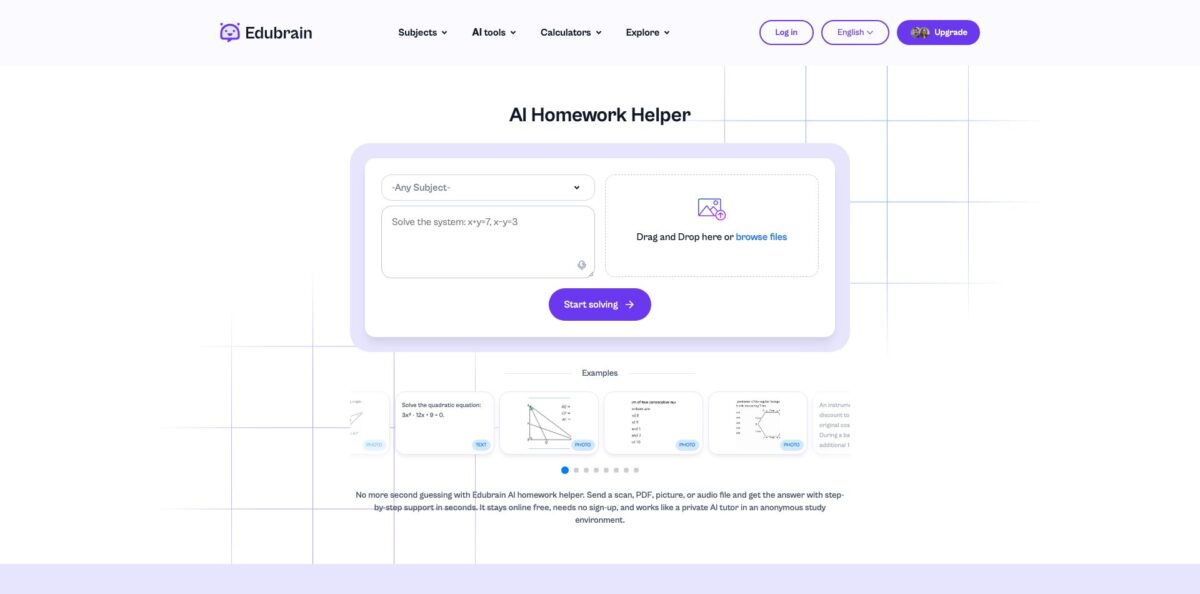
Open edubrain.ai in any browser. There is no app to install and no account is needed for the free tier, so the homework box on the front page is ready immediately. Choose a subject in the “Any Subject” dropdown, which runs from Accounting and Algebra to Python, Nursing and Trigonometry. Picking the right subject matters, because the helper tunes its explanation style to the field you select.
Next, give it a real assignment. Paste the text (up to 10,000 characters), attach one file (txt, pdf, doc, png, jpeg or jpg, up to 32 MB), or hit “Start recording” to dictate a question; audio uploads are capped at 25 MB. Before pressing “Start solving”, say how you want the answer: a quick final result, a full breakdown, or step-by-step explanations. A typical first run is a photo of a quadratic equation or a multiple-choice history question, both of which appear as examples on the homepage.
The answer screen is where the tool earns its keep. Each solution is split into steps, and math appears as formatted equations rather than plain text. You can ask a follow-up in the same thread, request a simpler version, or have it generate a similar practice problem. If one file per request feels tight, the interface pushes you toward paid “expert help” for bigger jobs, so plan to split long assignments into smaller chunks.
Finally, check the output before you rely on it. The pricing FAQ itself tells you to recheck facts on sensitive tasks and to follow your course policy. Download the result or create a share link for a classmate, and if you study with flashcards, push the same notes into the AI Flashcard Maker so you can test yourself instead of rereading.
Who is it for?
High school students
Algebra, chemistry and physics worksheets pile up, and a parent cannot always explain the method. Edubrain shows each step and lets you ask “why” on the line you did not follow. You finish the sheet and walk into the test knowing the procedure, not just the answer key.
STEM majors
Calculus, linear algebra and statistics problem sets punish one wrong sign. The math solver and dedicated calculators for derivatives, integrals and limits let you check intermediate values quickly. You find where your own working went off track instead of starting over.
International students
Worksheets and lectures arrive in a language you are still learning. The site itself runs in eight interface languages, and the lecture note taker is pitched at accented and multilingual lectures. You get a structured transcript and plain explanations to study from later.
Teachers
Building quizzes and flashcards for every chapter eats evenings. The quiz generator, flashcard maker and notes generator turn a topic or an uploaded page into draft material in minutes. You still edit the result, but the blank-page time disappears.
Adult learners
Returning to study after years away means formulas and citation formats feel foreign. Step-by-step answers plus APA, MLA and Chicago citation generators cover the two most common stumbling blocks. You stay on schedule without hiring a tutor.
Parents
Helping with homework you last saw decades ago is stressful. Enter the child’s question, read the guided steps together, and let the kid work toward the answer. The evening becomes a review session rather than an argument.
Edubrain pricing
Edubrain bills weekly, not monthly. The free tier is genuinely usable, the single subscription removes ads and adds a stronger reasoning mode, and human help is sold separately per task. The subscription renews automatically every calendar week until you cancel, and the subscription policy states that fees are non-refundable. Kept running for a full month, the weekly price works out to roughly $17.
Unlimited use of the homework helper and all AI tools with ads shown, file uploads, downloads of answers, presentations and flashcards, and share links. Some generators have caps; the presentation tool, for example, stops at 5 slides before asking you to subscribe.
Ad-free access to the AI detector, diagram generator, PowerPoint generator, answer generator, flashcard maker, notes generator and research assistant, an “advanced reasoning” mode, and discounted prices on expert reviews. Cancel anytime; the site says it emails you 2 days before each renewal.
Human-made presentations, homework help, STEM support, writing assistance and editing or proofreading, ordered through a chat.
Edubrain key features
AI Homework Helper: You submit text, a photo, a PDF or a voice recording, choose a subject and an answer style, and the model returns a numbered solution. It handles one file per request and up to 10,000 characters of text. You see the method behind the result, which is what you need for exam prep.
Math solver and calculators: A dedicated math mode works alongside 19 calculators, including quadratic formula, factoring, logarithm, derivative, integral, limit and fraction tools. Formulas render cleanly instead of as messy text.
AI Tutor with follow-ups: The tutor keeps context during a session, so a follow-up question builds on the earlier explanation. You can ask for a simpler version, a quiz, or a similar practice problem. That turns a one-off answer into a short revision session.
Lecture Note Taker: You record live or upload audio and video afterward (mp3, wav, m4a, mp4 and more), and the tool converts it into structured notes. Edubrain markets it for fast speakers and lectures in other languages. A missed class becomes a readable summary you can turn into flashcards.
Flashcard, quiz and notes generators: Type a topic or upload notes, textbook pages or slides, and the tools produce study cards, quiz questions or condensed notes. Flashcards can be saved as a PDF for offline review. This covers active recall without a separate app.
Diagram, presentation and citation tools: Generators for flowcharts, mind maps, pie charts, timelines and sequence diagrams sit beside a PowerPoint maker and citation generators for APA, MLA, Chicago, IEEE, AMA and more. Expect drafts rather than finished deliverables. They save setup time on projects and reports.
Writing suite: An AI detector, paraphraser, humanizer, summarizer and plagiarism checker round out the toolkit
They help you tighten your own drafts and check for overlap.
Edubrain Pros & Cons
Pros
The free tier is unusually generous: no account, no card, unlimited attempts on the homework helper and access to every AI tool, with ads as the trade-off. Input is flexible, so a blurry worksheet photo, a scanned PDF or a voice note all work without retyping. Answers come as clear numbered steps, and you can steer the depth from a quick result to a full breakdown, then keep asking follow-ups in the same thread. STEM coverage is the strongest part, backed by dedicated calculators for algebra and calculus. The extras, from flashcards to a lecture note taker, mean one site can cover a whole study week. Use it to check your own working line by line rather than to copy final answers.
Cons
Essay-style humanities answers tend to be shallow; one independent reviewer found them satisfactory but lacking critical depth, and weaker for complex coding and debugging. The free experience is ad-supported, and some generators stop early, such as the 5-slide limit on presentations. The “free” message is louder than the fine print, and at least one Trustpilot reviewer complained about exactly that. Billing is weekly with automatic renewal and non-refundable fees under the subscription policy, and cancellation goes through support by email. Each AI request accepts only one file, and larger jobs are steered toward paid expert help. If you subscribe, set a calendar reminder for the renewal date the day you pay.
Use Edubrain if you want…
- Solve math problems from a worksheet photo.
- Get step-by-step explanations for homework without an account.
- Turn lecture recordings into structured study notes.
- Generate flashcards and quizzes from your own notes.
- Check calculus steps with dedicated derivative and integral calculators.
- Build quick diagrams, timelines and mind maps for projects.
- Format citations in APA, MLA or Chicago style.
- Review old exam questions before a test.
Edubrain alternatives



Edubrain Reviews
Students on Trustpilot like that there is no forced sign-up or usage cap and that answers come with structured steps; one user rated it above Gauth for everyday homework.
Reviewers on Reviews.io say breaking chemistry, statistics and calculus tasks into steps made evening study less stressful, and some parents report their kids working more independently.
A Trustpilot reviewer gave one star because the site advertised itself as completely free when parts are paid, saying a paid model is fine but the messaging felt misleading.
An independent tech review found answers fast and accurate in math, physics and accounting, but shallow on humanities questions and weaker on complex programming.
Users who tried AI-Plus describe the roughly $4 weekly price as manageable on a student budget during exam season, mainly for the ad-free tools.
FAQ
Is Edubrain free?
Yes. The Free plan costs $0, needs no sign-up and gives unlimited use of the homework helper and AI tools with ads. Some generators, such as presentations, have caps on the free tier.
How much does Edubrain AI-Plus cost?
AI-Plus costs $3.99 per week and renews automatically each week. It removes ads, adds advanced reasoning and discounts expert help.
How do I cancel an Edubrain subscription?
According to the subscription policy, you cancel by sending a request to Edubrain support by email. Fees for the current week are non-refundable, though the pricing FAQ says wrong charges and clear errors are reviewed.
What file types and sizes does Edubrain accept?
The homework helper takes txt, pdf, doc, png, jpeg and jpg files up to 32 MB, one file per request, plus up to 10,000 characters of text. Audio uploads are limited to 25 MB.
Which subjects does Edubrain cover?
Edubrain lists 90+ subjects, from algebra, calculus and organic chemistry to history, psychology, Spanish, accounting and Python. It is strongest on math and science problems with a clear method.
Does Edubrain store my uploaded files?
The homepage says files are kept only during processing and removed after the task ends. The privacy policy also describes analytics and advertising cookies from third parties such as Google and Facebook.
Is using Edubrain considered cheating?
Edubrain positions itself as a study aid and tells you to follow your course policy. Using the steps to learn a method is different from submitting generated answers, so check what your school allows.
What languages is Edubrain available in?
The site interface is available in English, Spanish, German, Portuguese, French, Indonesian, Italian and Arabic. The lecture note taker is marketed as handling lectures in multiple languages.
Similar tools
 EducatoAI exam prep platform that builds a study plan around your test date, with practice questions, mock exams and a tutor that
 TutorGPTMulti-model AI study workspace with step-by-step homework solvers, chat with GPT, Claude and Gemini, plus slide, image and voice generators.
 UplupAI quiz and form builder that turns a prompt, PDF or URL into scored quizzes, personality tests and lead-capture funnels with CRM