

eesel AI
AI ChatUpdated October 18, 2026
AI support agent that learns from your help center and past tickets, then drafts or sends replies inside Zendesk, Freshdesk, Intercom and website chat.
We may earn a commission when you sign up through our links. It does not affect our reviews.
What is eesel AI?
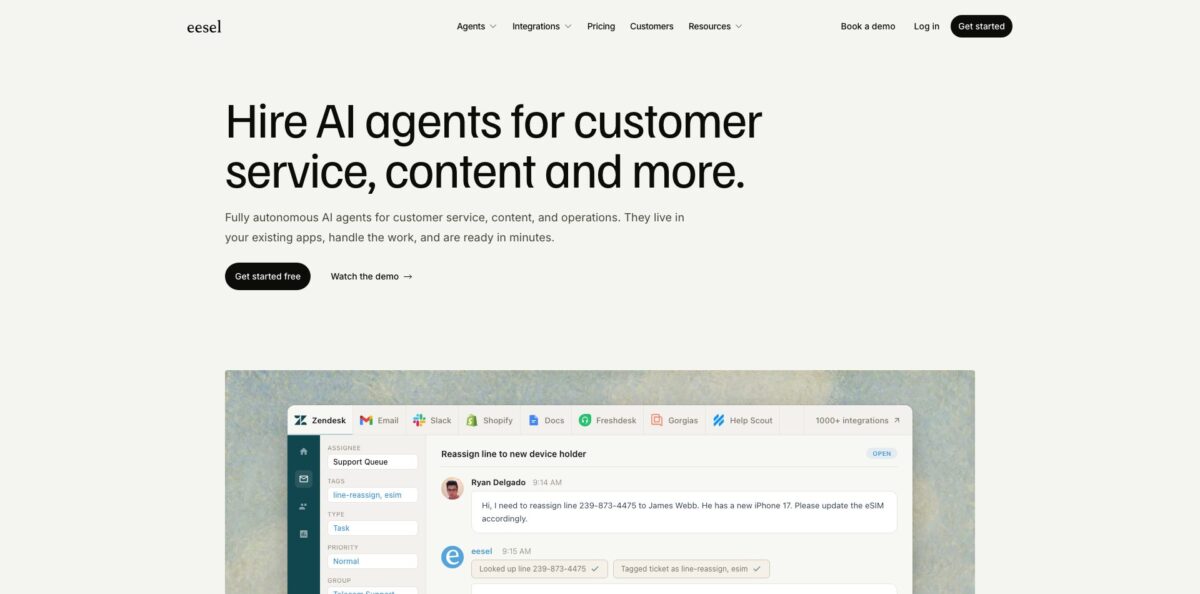
eesel AI is a support agent you plug into the helpdesk you already run instead of a new inbox you have to migrate to. It reads your help center, macros, past tickets and connected docs (Confluence, Notion, Google Drive, your website), stores them as searchable embeddings, and then drafts or sends replies inside Zendesk, Freshdesk, Intercom, Gorgias, Help Scout and other desks. The same agent can also answer in a website chat bubble, Slack or email. Setup happens by talking to the agent in a dashboard chat, which keeps the learning curve low for non-technical teams. The weak spot is cost at the entry level: paid plans start at $299 a month, so a shop with a few dozen tickets will find cheaper chatbots. It suits support teams handling hundreds or thousands of repetitive tickets who want automation without leaving their current desk.
How to start using eesel AI?
Sign up at dashboard.eesel.ai with no card. A new workspace gets a 7-day trial with 100 credits and every feature included. You land in a chat with your agent, and that chat is the main control panel: type “Connect my Zendesk” and it walks you through the connection. If you prefer clicking, the Integrations item in the left sidebar offers the same options.
Pick between Quick start and Full connection. Quick start only needs your helpdesk subdomain and reads your public help center, which is enough to test answer quality. Full connection sends you an approval link to sign in with your staff login, and adds past tickets, macros, triggers and actions. The first ticket import is a sample of up to 1,000 recent solved tickets, and you can untick sources you do not want the agent to learn from before approving.
Next, try the agent on a real ticket inside the dashboard chat. Ask for a draft on an open ticket and it shows the reply plus the help center article it used. If the tone or a step is wrong, say so in the chat; it rewrites the draft and saves the correction to its Instructions page as a plain-language rule you can edit later.
Connecting alone does not make the agent reply to anyone. You have to create an automation: a helpdesk trigger (for example, the customer’s first message) plus instructions describing which tickets to handle and what to do. Most teams start with the “Leave internal note” action so a human reviews every draft, then run the Simulation skill on past tickets to score accuracy before switching on “Send ticket reply”.
Start with internal notes on one narrow ticket category, check a week of drafts, and only then widen the automation.
Who is it for?
Zendesk and Freshdesk support leads
Your queue is full of tier-1 questions about orders, passwords and policies. eesel AI sits inside the desk as another agent, drafts or sends those replies, and tags and routes the rest. Your team keeps the same tool and workflow.
E-commerce operators on Shopify
Customers ask where their order is, whether a size is in stock, or how to return something. With Shopify or Magento connected, the agent looks up real orders and products and answers in chat or on tickets. Order-status tickets stop eating your mornings.
Teams frustrated with built-in helpdesk AI
Bundled bots are locked to one platform and charge per resolution. eesel AI runs one agent across several desks and channels, bills per ticket, and lets you rewrite its rules in plain language. You get more control over tone and escalation.
Multilingual support operations
The agent answers in the language the customer writes in, with 80+ languages supported. One German fintech lender runs over 100,000 tickets a month through it in German. You avoid hiring separate tier-1 staff per market.
IT and internal helpdesks
Employees ask the same questions in Slack or Microsoft Teams every week. Connect Confluence, Notion or Google Drive and the agent answers from your wiki in the thread. Your IT or HR team gets fewer repeat pings.
Ops managers who script setups
The eesel CLI and MCP server let a developer or an AI coding assistant connect integrations and manage automations from the terminal. You can version and repeat a setup instead of clicking through it.
eesel AI pricing
eesel AI sells monthly batches of credits instead of seats. A ticket the agent works on is 1 credit no matter how many replies it takes, and a chat in the bubble, Slack or email is also 1 credit. Seats, agents and integrations are unlimited on every plan, and tickets you tell the agent to ignore (spam, auto-replies) do not count.
A 7-day trial with 100 credits, every feature and integration, no card required. Agents pause when the credits or the 7 days run out.
Larger batches are 1,000 credits for $499, 2,000 for $849 and 5,000 for $1,749 a month, with steps in between. Includes every channel, scheduled agents, reports, skills, EU or US data residency and community support. Paying a year upfront gets you two months free.
Custom. Everything in Teammate plus a dedicated person for your setup, SSO and MFA, custom data residency, HIPAA with a signed BAA, a security review with DPA, and annual invoicing.
A founding-partner offer where eesel runs your whole support operation across email, chat, SMS, WhatsApp and phone, with no per-ticket fees.
Add-ons are available on any plan: priority support from $299/month and SSO with MFA from $199/month. If you run out of credits, extra ones cost $0.80 each up to a monthly cap you set (the cap starts at $200), and unused credits do not roll over.
eesel AI key features
Helpdesk-native agent
eesel AI connects to Zendesk, Freshdesk, Intercom, HubSpot, Gorgias, Help Scout, Front, Salesforce, Jira Service Management, Zoho Desk and Re:amaze. In Zendesk it can send replies, leave internal notes, hold drafts for approval, add tags, assign tickets and update fields. Your agents see its work inside the tool they already use.
Learning from past tickets
Beyond help center articles, the agent reads macros and solved tickets, so it answers the way your team actually answers. Sources pool together, so one reply can draw on Zendesk, Confluence and your website at once. Optional PII redaction is available for imported tickets.
Configuration by chat
You set rules, tone and escalation conditions by telling the agent in plain language, and corrections become saved instructions. Non-technical support leads can adjust behavior without a flow builder.
Simulation and gap analysis
The Simulation skill replays past tickets and scores the agent’s drafts against what your team sent, broken down by theme. Related skills surface recurring ticket themes and draft knowledge base articles for topics your docs miss. You find weak spots before customers do.
Website chat and team chat
A chat bubble installs with one script tag, an inline embed goes into a single page, and a public chat link needs no install at all. The same agent works in Zendesk Messenger, Freshchat, Slack, Microsoft Teams, Google Chat and email. Handover rules can open a helpdesk ticket when a human is needed.
E-commerce actions
With Shopify or Magento connected, the agent can check stock, recommend products and look up orders. Per-action approval settings decide whether it acts alone or asks a person first. That keeps refunds and cancellations under human control.
Developer access
The eesel CLI, an MCP server and connectors for Claude and ChatGPT let you run setup and automations from a terminal or an AI assistant. Webhooks and scheduled automations cover recurring reports.
eesel AI Pros & Cons
Pros
eesel AI works inside the helpdesk you already pay for, so there is no migration and your agents keep their usual views. It learns from past tickets and macros rather than only public articles, which tends to produce replies closer to your team’s real tone. Draft and internal-note modes plus the Simulation skill give you a supervised ramp before anything reaches customers. Per-ticket billing with unlimited seats and agents is easier to forecast than per-resolution pricing, and reviewers on G2 and the Shopify App Store repeatedly praise quick setup and a responsive vendor team. Use the first trial days to connect only one helpdesk and measure draft quality on a single category.
Cons
The $299 entry plan is steep for small stores with low volume, and unused credits expire each month. Users report that vendor support can be slow at times, with default support routed to the AI first and a human within a few days unless you buy the priority add-on. SOC 2 Type II is still in progress, which may stall enterprise security reviews. Native customer channels are limited to web chat, email and phone by arrangement, so WhatsApp or Instagram coverage depends on your helpdesk. An independent tester also noted that custom skills go live when saved. Test risky actions like cancellations on a staging store first.
Use eesel AI if you want…
- Automate tier-1 tickets inside your existing helpdesk.
- Draft on-brand replies trained on your past tickets.
- Answer customers in 80+ languages without extra staff.
- Run one AI agent across Zendesk, Slack and chat.
- Test answer accuracy on historical tickets before launch.
- Look up Shopify orders directly from support conversations.
- Find knowledge base gaps from recurring ticket themes.
- Pay per ticket instead of per seat or resolution.
eesel AI alternatives
 Intercom FinRead review →
 ForethoughtRead review →
 GorgiasRead review →
 ChatbaseRead review →
 QuickchatRead review →
eesel AI Reviews
A Shopify merchant says setup and workflow changes were easy because you just describe what you want in plain language, unlike earlier AI tools that needed developer skills, and adds that pricing feels affordable and non-binding.
A store with tens of thousands of historical Zendesk tickets and Shopify orders reports that the agent pulls information from that history efficiently and that the team was quick to help with setup and troubleshooting.
G2 reviewers rate the interface as easy and setup as fast, but some mention occasionally slow responses from vendor support and want more visibility into specific threads and knowledge gaps.
A Capterra reviewer likes that answers stay tied to company documentation rather than the open web, while noting that poorly written source documents lead to weaker answers.
An independent chatbot reviewer found building an agent by chatting very easy, including a custom integration, but flagged that saved skills go live immediately and that native channels beyond web chat and email are missing.
FAQ
Does eesel AI have a free plan?
There is a free trial rather than a permanent free plan. You get 100 credits for 7 days with every feature included and no card required, after which paid plans start at $299 a month.
Which helpdesks does eesel AI integrate with?
It connects to Zendesk, Freshdesk, Intercom, HubSpot, Gorgias, Help Scout, Front, Salesforce, Jira Service Management, Zoho Desk and Re:amaze. Knowledge sources include Confluence, Notion, Google Drive, uploaded files and your website.
Can I review replies before they reach customers?
Yes. You can have the agent leave internal notes or hold drafts for approval, and only switch on sending replies once you trust its accuracy. Low-confidence answers can be routed to drafts or escalated.
Is my data used to train AI models?
No. eesel says your data is used only for your own agent and is never used to train the underlying models from OpenAI, Anthropic or Google. Data is encrypted in transit and at rest, and GDPR and CCPA compliance are stated, while SOC 2 Type II is in progress.
What counts as a credit?
A ticket the agent works on is 1 credit regardless of length, and a chat conversation is 1 credit. Scheduled runs, generated images and blog posts also use credits, while most chats with your agent in the dashboard are free.
What languages does eesel AI support?
The agent supports 80+ languages and replies in the language the customer writes in. It can also read knowledge written in a different language from the customer’s question.
Does eesel AI have an API or CLI?
Yes. There is an eesel CLI, an MCP server for clients like Claude Code and Cursor, webhooks, and connectors that let you use your agent from Claude or ChatGPT.
How do I cancel?
Go to Workspace Settings, then Billing, in the dashboard and cancel through Stripe. There is no lock-in and no cancellation fee.
Similar tools
 Chat 4O AIAll-in-one AI workspace with GPT, Claude, Gemini and Grok chat plus image and video models like Veo, Kling and Nano Banana, paid
 LiveChatAIAI customer support agent trained on your website, docs and Q&As, with human live chat handoff, AI Actions, and WhatsApp, Slack and
 Kore.aiEnterprise agentic AI platform for building, governing and improving voice and chat AI agents for customer service, HR, IT and business processes.